What this review covers
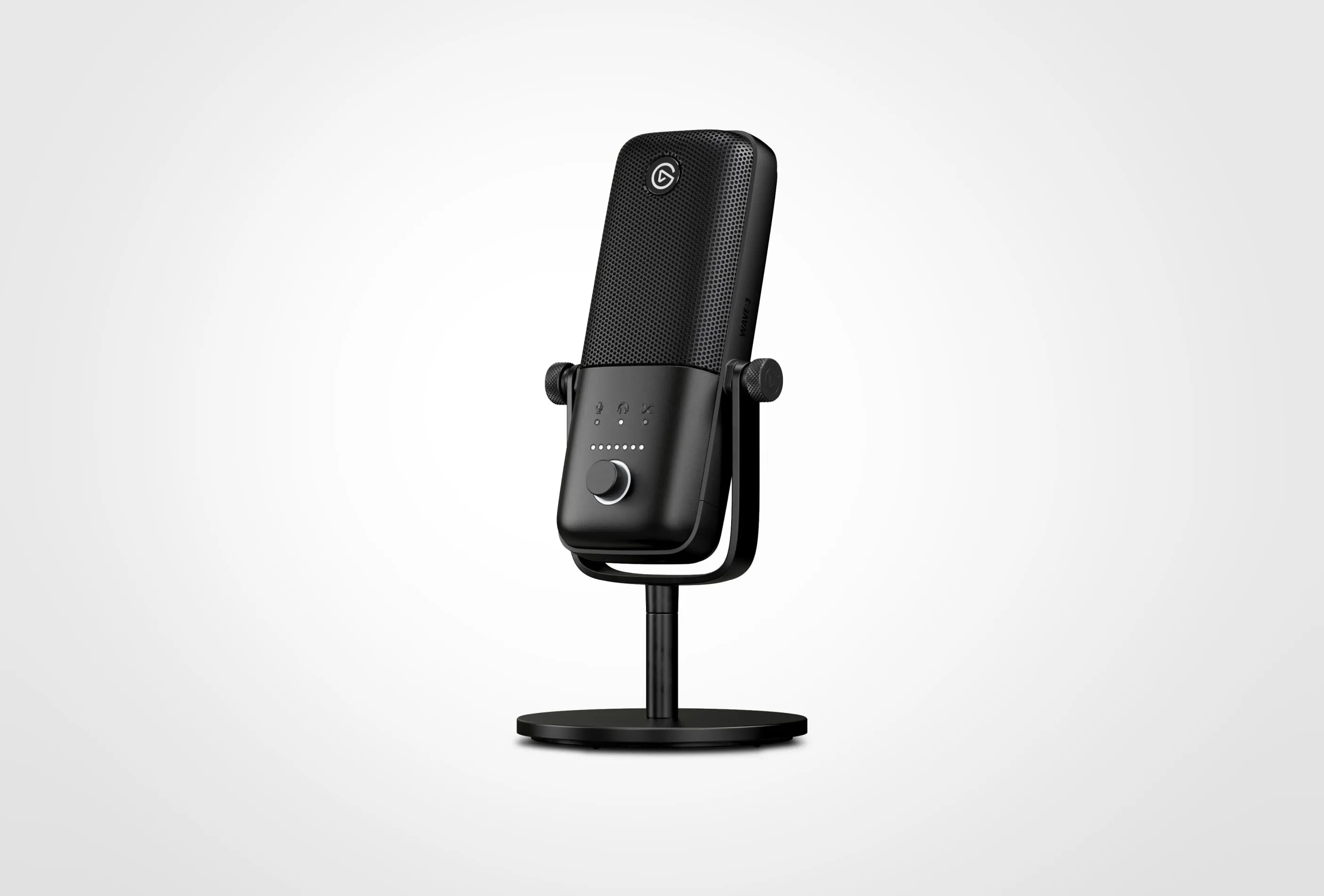
This review concerns the original black Elgato Wave:3 USB condenser microphone, SKU 10MAB9901. That identification is important because buyers may encounter later Wave:3 naming or current software references beside listings for the original hardware. Elgato’s catalogue connects the Wave:3 name and 10MAB9901 SKU, giving you a useful first check before comparing a listing’s accessories or description.
The buying decision is less about whether this is a capable USB microphone and more about whether its particular workflow matches your desk. The Wave:3 combines a front-facing speech capsule, local headphone monitoring, level protection and software audio routing. Those features suit a streamer or gamer who manages several computer sources, but they are less decisive for a simple call setup.
There is a second evidence boundary to keep in mind. Elgato’s current product material discusses Wave Link 3.0 and newer software features, while Tom’s Hardware reviewed the original microphone alongside an older Wave Link application. The independent review remains useful for its sound, handling and comparison observations, but its software description should not be treated as a current interface guide.
Hardware and specifications
Elgato specifies a 17 mm electret capsule and a cardioid polar pattern. Cardioid means the microphone is intended to prioritize sound arriving from in front of the capsule. That is a sensible arrangement for one speaker sitting at a desk, but it is not a multi-pattern design for changing group or room-recording layouts.
The manufacturer lists a frequency response of 70 Hz to 20,000 Hz. It also specifies 24-bit resolution with sample rates of 48 kHz or 96 kHz. These are capture specifications rather than a promise that a streaming service, recording application or final export will preserve every setting through its complete audio chain.
The connection is USB-C, and Elgato specifies a high-power headphone output for zero-latency monitoring. In practical terms, the Wave:3 is designed to connect directly to a computer while giving you a local headphone path. It is not an XLR microphone that requires a separate audio interface before the computer can receive its signal.
Elgato lists the microphone’s dimensions as 153 x 66 x 40 mm (6.0 x 2.6 x 1.6 in). The compact format should appeal to a desk where a large stand would obstruct the display, keyboard or writing area.
For weight, Elgato lists the microphone and U-mount at 280 g (9.88 oz), and the base at 305 g (10.76 oz). Tom’s Hardware separately lists the microphone at 0.6 lb (280 g), agreeing with the manufacturer’s microphone-only mass. The differing stand presentation is worth noticing when planning how much space and stability your desk arrangement requires.
The box includes the Wave:3, a USB-A to USB-C cable measuring 250 cm (98.4 in), a desktop stand, a boom-arm adapter and a quick-start guide. A boom arm is not listed as included. The supplied stand therefore supports a desk-first installation, while the adapter is relevant if you already own, or separately buy, a suitable arm.
Elgato says the included multi-adapter works with all mainstream boom arms. That broad statement does not establish the reach, clamp clearance or supported load of a particular arm. Check the arm’s own specifications against your desk thickness and preferred speaking position rather than treating the adapter statement as a complete fit assessment.
Placement and room fit
Cardioid pickup makes orientation part of setup. Place the front of the microphone toward the speaker and keep unwanted sources behind or to the sides where the desk allows. The pattern can help concentrate the intended speech direction, but the supplied evidence does not provide a room-rejection measurement or support treating the microphone as a substitute for a quiet recording space.
Distance matters for any desk microphone because the capsule receives both voice and surrounding sound. A consistent, relatively close speaking position can make the direct voice more prominent; a more distant position gives reflections, keyboard noise and computer sound more opportunity to enter. This is placement analysis based on the documented pickup pattern, not a claimed measurement of room performance.
Tom’s Hardware described the Wave:3’s high end as clear and rich and called its overall sound full-bodied for spoken streaming. The same review reported less low-end capture than the Blue Yeti X. That comparison gives the Wave:3 a recognizable tonal trade-off: speech intelligibility is a reported strength, while buyers seeking a stronger bass character should compare voices and processing expectations.
The fixed pattern also narrows the microphone’s role. It makes sense when one person faces the capsule, but it is less adaptable when two people share a microphone or when the recording position changes around the room. If you need several pickup directions, the Wave:3’s cardioid-only design should be treated as a purchase constraint rather than a minor specification.
Controls and monitoring
The headphone output is one of the more practical parts of the design. Elgato specifies zero-latency monitoring, and the front dial can adjust headphone volume. Direct monitoring avoids depending on an application’s monitoring path for timing, which is useful when you want to hear your voice while speaking without adding software-monitoring delay.
The front dial is multifunctional rather than a dedicated volume knob. Tom’s Hardware reports that pressing it cycles between gain, monitoring volume and the PC-microphone mix. That keeps the control panel compact, but it also means you should confirm which mode is selected before changing a level during a live session.
The top mute control is capacitive rather than mechanical. Tom’s Hardware reported that the control could be brushed accidentally. This matters when the microphone sits beneath a hand, monitor shelf or frequently adjusted accessory. It is a small handling weakness, but it directly affects confidence in a control you may need to operate quickly.
Elgato lists a multilayered noise shield and describes it as protection against plosive noise. Tom’s Hardware reported that its reviewer did not need to add a traditional pop shield while recording. That is an independent finding from one review setup, not a universal placement rule; speakers with strong plosives or an unusually close position may still prefer an external filter.
Clipguard and level management
Clipguard is the Wave:3’s distinctive level-management feature. Elgato says that when input levels peak, the microphone reroutes sound through a second signal path running at a lower volume. The manufacturer lists a maximum SPL of 120 dB, or 140 dB with Clipguard engaged.
Elgato also lists dynamic range of 95 dB, or 115 dB with Clipguard engaged. Those are manufacturer specifications for the microphone’s normal and Clipguard-enabled figures. They should not be interpreted as a reason to ignore gain staging, speaking distance or the acoustic conditions around the desk.
Tom’s Hardware reported aggressive limiting when its reviewer used an intentionally extreme close, loud condition. That supports a narrow practical conclusion: Clipguard can reduce the effect of sudden peaks, but strong intervention can change the sound. It is useful level protection, not a replacement for sensible placement or a deliberate input level.
Tom’s Hardware also reported that the Wave:3 can record at up to 24-bit / 96 kHz, matching Elgato’s current 24-bit specification with 48 kHz or 96 kHz sample rates. For ordinary live speech, the value of that higher capture setting depends on the rest of the recording chain. Routing, room sound and platform compression may matter more than selecting the highest available format.
Wave Link and routing
Wave Link is the other major part of the Wave:3 proposition. Elgato currently describes Wave Link 3.0 as providing advanced routing and audio control. Its current material also describes adding audio effects from Marketplace or third-party VST plugins directly to the Wave Link mixer.
Tom’s Hardware’s older review described Wave Link as an eight-track mixing application for sources including game audio, voice chat, music, alerts and multiple microphones. That passage is useful historical context for the original product’s intended workflow, but it should not be used as a definitive description of the current Wave Link 3.0 interface.
Elgato says Wave Link can be added as a master audio source in OBS Studio. It also documents Stream Deck integration for muting sources, adjusting levels and skipping tracks. These features have the most practical value when you already manage multiple audio sources and want software-controlled routing rather than a single microphone feed.
Routing introduces its own learning curve. A simple call setup may need only one input and headphone output, while a stream can involve voice, game audio, chat, music and alerts. The Wave:3’s value rises with that complexity, but a buyer who wants only straightforward speech should not confuse a long feature list with a requirement to use every available control.
Elgato’s current material also describes effects such as Voice Focus and a De-Esser, plus Wave Link 3.0 explanations covering advanced routing. Those are current ecosystem references, not evidence that every feature behaves identically to the software reviewed by Tom’s Hardware. Confirm the present application support and operating-system fit before planning a software-heavy setup.
Computer compatibility and setup
Elgato lists Windows 11 64-bit or newer as the Windows requirement. It lists macOS Sonoma 14.2 or newer for Mac. For both platforms, the manufacturer specifies a USB-A port, 4 GB of RAM and a built-in USB 2.0 port.
The supplied cable is USB-A to USB-C, with USB-A at the computer end and USB-C at the microphone end. A computer with USB-C ports only may therefore require a compatible adapter or another cable. The supplied material does not identify a particular adapter, so that accessory should be checked separately rather than assumed from the microphone’s USB-C connection.
A sensible installation sequence is to position the stand securely, connect the microphone, select it as the computer input, connect headphones to the rear output and set the monitoring mix. If you need separate computer sources, configure the desired Wave Link routing before opening the recording or streaming application. This is a practical plan derived from the documented connections and controls, not a report of a performed setup.
For a boom arm, use the included adapter and check the arm’s clamp fit, desk clearance and speaking reach. Elgato’s statement about mainstream boom-arm compatibility does not specify an individual arm’s dimensions or load rating. Your existing desk and arm are therefore part of the microphone decision, especially if the stand would occupy valuable keyboard space.
Alternatives and limitations
The Blue Yeti X is the clearest alternative in the supplied comparison. Tom’s Hardware reported that it captured more low end than the Wave:3 and described it as an all-rounder for home-studio work, podcasting and streaming. Those are the independent reviewer’s comparison findings; this review does not add unsupported current specifications, pricing or performance claims for that model.
The HyperX QuadCast is another category alternative named by Tom’s Hardware for buyers seeking broader home-recording potential. The supplied passages do not provide a current specification for that microphone, so the useful comparison is limited: consider a broader home-recording category if the fixed cardioid design does not match your planned arrangements.
Elgato’s Wave:1 is the closest same-family alternative in the evidence. Tom’s Hardware describes it as similar to the Wave:3 but with a lower maximum sample rate and more limited dial functions. The choice depends on whether the Wave:3’s higher recording option and fuller control arrangement matter to your workflow; no current Wave:1 price or additional specification is established here.
The Wave:3’s limitations are clear. It has one cardioid pickup pattern, Tom’s Hardware reported less low-end capture than the Blue Yeti X, and the capacitive top mute can be triggered by an accidental touch. It is a less natural fit for changing multi-speaker or home-studio arrangements than for one person speaking toward a desk microphone.
Its strengths point toward desk content creation. The body is compact, the box includes a desktop stand and boom-arm adapter, the front dial combines several controls, and Clipguard addresses sudden peaks. The current Wave Link ecosystem adds routing, effects and OBS integration, while the rear headphone output supports direct monitoring.
Verdict
Choose the original Elgato Wave:3 10MAB9901 when the main job is one-person desk speech, streaming, gaming chat or voiceover and you value direct monitoring plus software routing. Its strongest fit is a front-facing speaking position where cardioid pickup is useful and several computer sources are worth organizing.
Choose another category if the priority is several pickup patterns, stronger low-end character, broader home-studio flexibility or a microphone that can be handled frequently without concern about touching the mute surface. The Blue Yeti X is the evidence-backed comparison for more low-end and all-rounder use; the Wave:1 is the simpler same-family option when its reduced controls and lower maximum sample rate are acceptable.
Before buying, confirm that the listing identifies Wave:3 and 10MAB9901, that the computer meets Elgato’s current operating-system and port requirements, and that the planned position leaves enough room for the stand or arm. For the right desk workflow, this original Wave:3 is a focused USB speech microphone with substantial routing support. For a room-recording or multi-pattern brief, its fixed design is the deciding limitation.