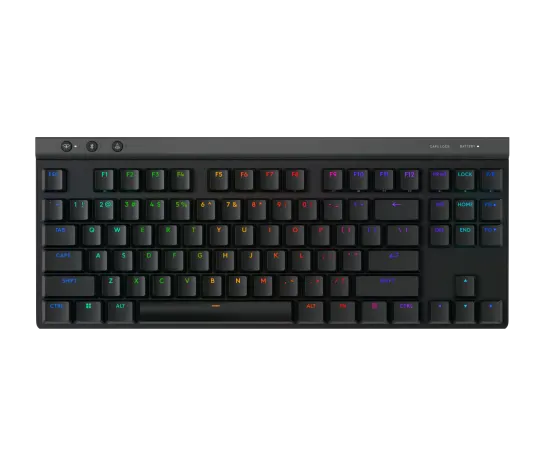
The Logitech G515 LIGHTSPEED TKL is easiest to understand as a low-profile keyboard for someone who wants one board to cover ordinary typing and gaming. This review concerns the exact Black, US English QWERTY, Tactile version, model 920-012423—not the separately sold Linear version. That distinction matters because the switch choice changes the feel, and the switches cannot be swapped later.
The exact model and buying decision
The central decision is whether you want a slim, restrained tenkeyless layout with wireless flexibility more than you want enthusiast-style adjustability or dedicated gaming controls. Logitech G describes the G515 as a tenkeyless design with tri-mode connectivity, GL mechanical switches, double-shot PBT keycaps, sound-dampening construction, and LIGHTSYNC RGB. Those are useful ingredients, but they do not make every feature available in every connection or application.
The model identifier matters when shopping because the manufacturer catalogue lists 920-012423 for the Black English US QWERTY configuration. The same catalogue lists other G515 colour and model variants, so a listing that merely says “G515” does not establish the layout or switch type. Confirm Black, US, Tactile, and 920-012423 before ordering.
Tactile is the meaningful choice here. Logitech lists the Tactile actuation force as 45 grams, while its specification line separately lists 43 grams for Linear. That numerical difference is less important than the tactile bump: it gives the keystroke a more pronounced point of resistance than the linear alternative. A buyer who prefers uninterrupted key travel should choose the other version instead.
The Tactile version makes more sense for mixed writing and gaming when you like feedback under your fingers and want some resistance against casual presses. It is not automatically the right choice for fast games. Tom’s Guide’s reviewer specifically found the tactile bump less comfortable for their gaming preference and noted that muscle memory made a tap-strafing scenario tricky. That is an individual finding, not a universal performance rule.
Low-profile fit and layout
The G515’s low profile is its clearest physical advantage. Logitech specifies a height of 22 millimeters, which helps explain why the board presents a flatter transition from desk to keys than a conventional tall mechanical keyboard. Tom’s Guide independently described the board as remarkably thin and found its low-profile keys suitable for both productivity and gaming.
The manufacturer lists the keyboard’s width as 368 millimeters and its depth as 150 millimeters. Those measurements describe the keyboard itself, not the extra clearance needed for a mouse, cable, or receiver placement. The tenkeyless format leaves out a dedicated number pad, so it suits a gaming desk or work area where horizontal mouse room matters more than spreadsheet entry.
Logitech lists the keyboard weight as 880 grams. That is substantial enough to avoid treating it like an ultra-light travel accessory, even though the independent review characterized the board as light for a mid-sized mechanical gaming keyboard. The contrast is useful: this is relatively portable for its category, but it still occupies a proper desk footprint.
A low profile is not the same thing as a compact layout. The G515 remains a tenkeyless board with the navigation and function areas associated with that format. If your priority is the smallest possible keyboard, a smaller compact category may free more space. If your priority is retaining dedicated navigation keys while removing the number pad, this layout is more conventional.
The included keycaps are low-profile double-shot PBT according to Logitech. Tom’s Guide’s reviewer praised their textured finish and subtle concave shape. That independent observation supports the idea that the key surfaces are intended to provide tactile orientation, but it does not establish how every user will find the sculpting or texture over long sessions.
Tactile typing and gaming feel
The manufacturer specifies a low-profile switch actuation point of 1.3 millimeters and total travel of 3.2 millimeters. Actuation is the point where a press registers; total travel is the full distance available to the key. These are switch specifications, not a promise of a particular game response, typing speed, or error rate.
The tactile mechanism is the reason to select this SKU rather than the Linear SKU. A bump can make the press feel more deliberate during writing, while it can also feel intrusive to someone who wants smooth repeated movement inputs. Tom’s Guide reported that its reviewer liked the Tactile version for typing because it provided resistance without feeling uncomfortably firm, while disliking that bump for some gaming actions.
That split makes the product a preference-led purchase. Choose Tactile if feedback and a more defined press matter during documents, messages, and general work. Choose Linear if your priority is a smoother keypress and you already know that tactile switches distract you during games. Logitech explicitly offers both switch choices, but the selected board does not let you change between them.
The switches are not hot-swappable, according to Tom’s Guide’s independent review. That is a material ownership limitation rather than a minor enthusiast detail. You cannot plan to buy the Tactile board and later convert it to Linear with replacement switches. The initial choice therefore deserves more attention than it would on a board designed for switch experimentation.
Tom’s Guide reported responsive gaming in its review, including its observation that the 1.3-millimeter actuation distance allowed quick directional adjustments in a tested game. It also reported a 1-millisecond response time in that review. Those are independent findings from that article, not measurements supplied by Logitech in the current technical specifications provided here, so they should not be treated as universal results across games, systems, or settings.
Connections and software
The G515 provides three connection modes: LIGHTSPEED wireless, Bluetooth, and wired data. Logitech says the mode can be selected with a button. This gives the board a practical route between a gaming computer, a second Bluetooth device, and a wired setup, although the usefulness of each mode depends on the device and application.
The included USB-A to USB-C detachable cable is 1.8 meters long. Logitech identifies it as a charging and data cable, so wired operation is not limited to battery charging. The box also includes a USB wireless receiver and a USB extender. The extender can help position the receiver more conveniently when the computer’s ports or case placement make a direct connection awkward.
For the manufacturer’s listed computer requirements, Logitech specifies a USB-A port and Windows 10 or later, or macOS 12 or later. Bluetooth compatibility is listed for Windows 10 or later, macOS 12 or later, Chrome OS, Android 4.3 or later, and iOS 10 or later. That broad list describes platform compatibility, not identical access to gaming controls or G HUB features on every platform.
Logitech requires internet access for its G HUB software. The manufacturer says G HUB and KEYCONTROL can support up to 15 functions per key, and that users can create profiles for different game types. This is substantial remapping flexibility, but “up to” is important: available controls can depend on software support, the active profile, and the application in use.
Tom’s Guide found G HUB easy to navigate and praised its per-program configurations, which can apply when a game or application launches. The reviewer also described three customizable layers: a base layer, an Fn layer, and a G SHIFT layer. That independent account makes the software more useful than a simple lighting utility, but software behaviour should still be checked against the operating system and application you actually use.
The manufacturer lists LIGHTSYNC RGB as a feature, and Tom’s Guide independently found a broad range of lighting combinations in G HUB. RGB customization is therefore a genuine part of the product’s appeal. It should not be confused with the expectation that every lighting effect or profile will behave identically outside Logitech’s software environment.
Battery and daily ownership
The G515 uses a rechargeable lithium-polymer battery. Logitech’s current technical specification lists battery life as up to 36 hours. “Up to” describes a ceiling under conditions that are not detailed in the supplied passage; it is not a fixed interval every owner should expect.
Tom’s Guide published a different battery figure in its review specification table. Because that conflicts with the current manufacturer technical specification supplied for this exact product family, the safer buying assumption is Logitech’s current “up to 36 hours” figure. Treat the independent table as a source discrepancy rather than combining the figures into a broader claim.
Battery planning is consequently part of the ownership trade-off. The detachable cable supports charging and wired data, so the board has a fallback when wireless use is inconvenient. If your desk routine keeps a cable nearby, the battery limit is easier to manage. If you expect long stretches away from a charging point, a keyboard with a substantially different power arrangement may fit better.
The manufacturer lists a two-year warranty. That is a support term, not evidence that every unit will remain cosmetically perfect or that a particular keycap issue will be covered in every circumstance. Keep the exact model information and purchase documentation if post-purchase support becomes necessary.
What is missing
The product does not solve every gaming-keyboard problem. Tom’s Guide specifically noted the absence of hardware features including a wrist rest and volume controls. If you routinely adjust audio from the keyboard or depend on built-in palm support, those omissions are more consequential than the slim design is attractive.
Tom’s Guide also reported that the G515 lacks gaming-specific features found on some similarly priced boards, including rapid trigger and adjustable polling rates. Those functions are relevant to buyers seeking configurable actuation behaviour or competitive-oriented tuning. Their absence does not make the G515 unusable for gaming; it narrows the reason to choose it over feature-heavy alternatives.
The board’s software customization can therefore be both a strength and a boundary. Remapping, profiles, layers, and lighting provide control through G HUB, while the physical hardware remains fixed in important ways. There is no hot-swappable switch path in the independent review, and the supplied evidence does not establish a dedicated volume wheel or adjustable actuation system.
Tom’s Guide reported minor quality-control concerns on its review unit, including uneven key lighting and printing issues on larger keycaps. The reviewer attributed those issues to improperly etched legends rather than the RGB lighting underneath. This is an independent unit-specific finding, so it is worth checking the key legends and illumination after delivery without assuming every unit has the same defect.
Alternatives and verdict
The most meaningful alternative is not one particular rival but the Linear version of the G515. It retains the product family’s low-profile concept while changing the switch feel. Pick it when the Tactile bump conflicts with your gaming habits or typing preference. Pick the Tactile model reviewed here when deliberate feedback is more valuable than an uninterrupted press.
A conventional mechanical TKL is the better category for someone who wants a taller key profile, a more familiar replacement ecosystem, or different switch choices. A smaller compact board is the better category when reclaiming more desk space matters and you can accept a different navigation layout. Neither comparison establishes specifications for a named alternative from the supplied evidence.
Tom’s Guide named the Keychron V1 as a lower-cost option for build quality, the SteelSeries Apex Pro Mini as a slightly more expensive option with rapid trigger, and the Cooler Master MK770 as a wireless alternative with dedicated volume controls. Those are source-supported reasons to investigate those categories, not a complete specification comparison or a current-price recommendation.
Buy the Black US Tactile G515, model 920-012423, if you want a slim tenkeyless board, three connection modes, configurable G HUB profiles, RGB, and a tactile low-profile switch—and you accept fixed switches, no dedicated volume control, and a battery figure specified as up to 36 hours. The fit is strongest for mixed desk work and gaming where tactile feedback is welcome.
Choose something else if your priority is rapid-trigger tuning, adjustable polling, a volume control, a wrist rest, hot-swappable switches, or a smoother linear feel. The G515 is not trying to be an enthusiast platform; its case, connections, and software make a focused hybrid package. Its value depends on whether those strengths matter more to you than the hardware features it leaves out.