The buying decision
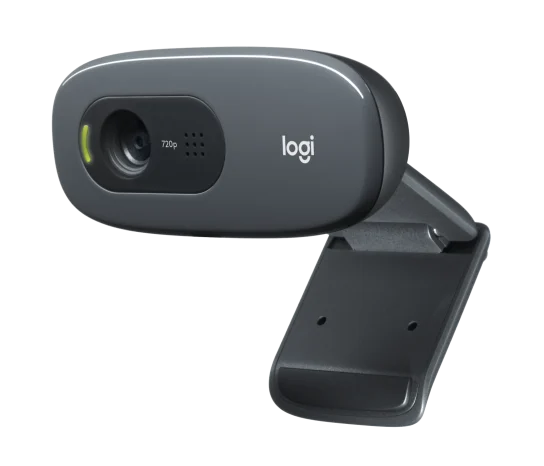
The Logitech C270 HD Webcam, Black, US model 960-000694, is aimed at a narrow but common problem: adding a straightforward camera to a desktop or laptop for ordinary video calls. It is not a flexible presentation camera or a high-detail streaming upgrade. Its appeal is the uncomplicated combination of 720p video, a built-in microphone, a universal clip and a USB-A connection.
That makes the important question less about whether the C270 has enough features and more about whether its fixed design matches the way you call. If you sit in one place, keep your face reasonably close to the screen and mainly need to be visible in a meeting, its specification is coherent. If you want a polished image, wider framing or easy control over composition, the compromises become central rather than incidental.
This review covers the exact Logitech 960-000694 model using the current manufacturer specification and an independent Tom’s Guide review. The manufacturer currently identifies the webcam’s diagonal field of view as 55 degrees. Tom’s Guide discusses an earlier 60-degree figure, so the current manufacturer number is the more useful one for buying this particular variant.
What the C270 actually provides
Logitech specifies a maximum resolution of 720p at 30 frames per second. That is suitable for a normal talking-head call, but it leaves less detail than the 1080p webcam category. Tom’s Guide’s review reaches the same practical conclusion from its independent evaluation: the camera is adequate for simple web calling, while its picture does not match a 1080p model.
The 720p limit matters most when the camera is placed farther away, when a call application crops the image, or when a viewer wants a particularly crisp professional-looking picture. It is less consequential when the camera is used in a conventional laptop position and the face occupies a sensible portion of the frame. That is why this model can be appropriate for routine calls without being a strong general-purpose video upgrade.
The lens uses fixed focus rather than autofocus, according to Logitech’s technical specification. Fixed focus removes one moving adjustment from the design, but it also means the camera is not continually refocusing as the subject moves. The buying implication is simple: place the C270 at a normal call distance and avoid expecting it to accommodate close document work or frequent changes in position.
The current manufacturer page lists a 55-degree diagonal field of view. That is a fairly centered framing choice for one adult at a desk rather than a camera intended to show a large group or a broad room. Tom’s Guide reports that an earlier version used 60 degrees, which is why older listings may disagree. For this US 960-000694 purchase, the current Logitech specification should take priority.
Logitech also lists automatic light correction. Tom’s Guide independently reports that RightLight 2 produced natural colors in a difficult mixture of household lights during its evaluation. That finding supports a reasonable expectation of assistance when illumination is imperfect, not an expectation that the camera will turn a dark or backlit room into a studio.
Color and detail remain modest. Tom’s Guide found that the C270 produced a relatively clear image from its plastic lens, but also found that it did not compare with a 1080p webcam and that colors could look muted or washed out. Those are meaningful limitations for anyone presenting products, artwork or a carefully controlled professional image.
Microphone and calling compatibility
The C270 has a built-in mono noise-reducing microphone. Logitech states that its microphone range reaches up to 1 meter (3 feet) in the technical specification, while its feature description states that the microphone can carry a voice from up to 1.5 meters (5 feet) away. Because those manufacturer passages differ, the safer buying interpretation is that microphone performance depends on distance and room conditions rather than treating either figure as a universal working range.
Tom’s Guide found the built-in microphone to be an improvement over a laptop microphone during its independent review, while also noting that it did not perform like the dual microphones on more expensive Logitech webcams. That makes the C270’s microphone useful for ordinary calls, but not a substitute for a dedicated microphone when voice quality is a major part of the job.
The manufacturer lists ChromeOS compatibility and specifies a USB-A port in the system requirements. It also says the webcam works with popular calling platforms, and specifically identifies Skype and Zoom in the product description. Buyers should therefore check the computer’s physical port before ordering: this model is not presented by Logitech as a USB-C webcam.
Tom’s Guide lists compatibility with Windows 8 or later, macOS 10.10 or later and Chrome OS in its review, but the supplied current manufacturer excerpts do not repeat that complete operating-system list. The useful confirmed point is the USB-A connection and ChromeOS support from Logitech; the computer should still meet the calling application’s own requirements.
The camera does not need a complicated workflow for basic calls. Tom’s Guide describes setup as instantaneous, and also notes that the webcam can operate without its companion software. That is helpful for a shared or occasional-use computer, where the value of a simple camera is partly avoiding a separate configuration exercise.
Placement and physical fit
Logitech says the universal mounting clip fits laptops, LCD displays or monitors. Its product description also says the clip can attach to a screen or laptop, fold and let the webcam sit on a shelf. This gives the C270 more placement flexibility than a camera that must remain on a monitor, although the shelf position still depends on finding a stable surface at a useful height.
The manufacturer lists the C270, including its fixed mounting clip, at 2.87 inches (72.91 millimeters) in one dimension. It lists 1.26 inches (31.91 millimeters) in another dimension and 2.62 inches (66.64 millimeters) in the remaining dimension. These dimensions describe a small webcam body, but they do not by themselves tell you whether a thick or unusually shaped display will hold the clip comfortably.
Logitech lists the weight as 2.65 ounces (75 grams). Tom’s Guide independently describes the camera as light and not bulky, and reports that its universal clip fit laptops and monitors of various sizes. That combination should suit a portable laptop setup or a small desk, though the clip remains a basic mounting solution rather than a separately adjustable stand.
The attached USB-A cable is listed by Logitech as 5 feet (1.5 meters). That length is practical for a nearby laptop or monitor, but desk layouts with a computer tower on the floor may need a different cable route or an extension. Because the cable is attached, replacing it is not the same as swapping a detachable lead.
The design does not provide pan, tilt or zoom controls, according to Tom’s Guide. The same review says the camera cannot rotate from landscape to portrait mode. It reports enough physical give to angle the camera slightly up or down, but that is not the same as a dedicated tilt mechanism. Frame the desk first, then treat the position as mostly fixed.
There is no tripod included and no privacy shutter, according to Tom’s Guide. The absence of a tripod matters if the intended setup is a shelf or camera stand that needs a standard mounting point. The absence of a shutter matters if the camera will remain connected on a shared desk and the owner wants a physical way to cover the lens.
Setup and fit checklist
For a conventional call, place the webcam above or near the display, keep the face centered in the 55-degree diagonal frame and avoid sitting so far away that the 720p image becomes a small crop. The fixed-focus design makes a stable, ordinary call position more sensible than a setup that expects frequent movement toward and away from the lens.
Check the computer for a USB-A port before choosing this model. Then confirm that the intended calling application recognizes the camera and microphone. Logitech identifies ChromeOS and popular calling platforms as compatible, while Tom’s Guide notes that its review unit worked with its calling setup and that basic use did not require the companion software.
Light placement deserves more attention than the feature list might suggest. Put the main light in front of the caller rather than relying on a bright window behind them. The automatic correction can help with changing conditions, but Tom’s Guide’s findings about muted or washed-out color show why the C270 should not be selected as a substitute for deliberate room lighting.
For audio, remain within a sensible speaking distance and avoid treating the microphone as a room-wide pickup. Logitech’s two published distance descriptions are not identical, and Tom’s Guide’s comparison with higher-priced dual-microphone webcams points to the same practical boundary: this is an integrated call microphone, not a room-audio system.
Ownership and maintenance
The C270’s ownership routine should be uncomplicated because its main adjustments are physical placement and the calling application’s own camera settings. Keep the lens clear, leave the clip supported by the display or shelf and disconnect the USB-A cable when the camera is not needed on a computer where privacy is a concern.
The lack of a privacy shutter means lens coverage has to be handled separately if that is important to the owner. A removable cover should not obstruct the microphone, clip or cable, and it should be removed before a call. This is an ownership consideration created by the hardware design, not a software setting.
Software may be optional for basic video calls, but Tom’s Guide reports that its review included CameraSettings controls for contrast, brightness, white balance, color intensity and anti-flicker. The same review says those controls worked on macOS 14.5 during its evaluation, while also noting differences in available download options. Treat those controls as a possible computer-dependent extra, not as the central reason to buy the webcam.
The manufacturer lists a 2-year limited hardware warranty. It also identifies user documentation in the box. Those provisions are useful ownership details, although they do not change the camera’s fixed-focus optics, 720p ceiling or physical placement limits.
Meaningful alternatives
The first alternative is the higher-resolution 1080p webcam category. Tom’s Guide explicitly says a 1080p model produces better quality than the C270 and suggests paying more for a 1080p webcam when a polished professional image is the goal. This is the right direction for a caller who needs more detail, rather than a reason to expect the C270 to perform outside its specification.
The Logitech C920 is a named alternative supported by the supplied independent review, which identifies it as a model to consider for 1080p at 30 frames per second. That makes it relevant when resolution is the main shortfall. The available evidence here does not establish its microphone, field of view, mounting hardware or software behavior, so those details should be checked separately instead of assumed from the C270 comparison.
A separate light is another alternative category for the problem of a dim or backlit room. The C270 already includes automatic light correction, but Tom’s Guide’s findings show that image quality and color still have limits. Better room lighting may improve the result without changing the webcam, while a higher-resolution camera addresses detail more directly. These solve different problems and should not be treated as interchangeable upgrades.
For audio-heavy work, a dedicated microphone is the relevant alternative category. The C270’s integrated mono microphone is intended to make ordinary calls possible, and Tom’s Guide found it better than a laptop microphone in its evaluation. A dedicated microphone makes more sense when voice clarity, distance or recording quality matters more than keeping the desk simple; the supplied evidence does not support a particular model comparison here.
Verdict
Choose the Logitech C270 960-000694 if the priority is a basic USB-A webcam for one adult, ordinary desktop calls, a fixed position and modest expectations about image detail. Its 720p/30fps output, fixed focus, universal clip, built-in microphone and automatic light correction form a sensible entry-level package when the computer and desk already fit those assumptions.
Skip it in favor of a higher-resolution category if the image must look polished, the call platform crops aggressively, or the camera needs to show more of the room. Also look elsewhere if you need pan, tilt, zoom, portrait rotation, a tripod mount or a physical privacy shutter. The C270 is most convincing when simplicity matters more than control; its limitations are the price of that narrow purpose, not details to overlook.