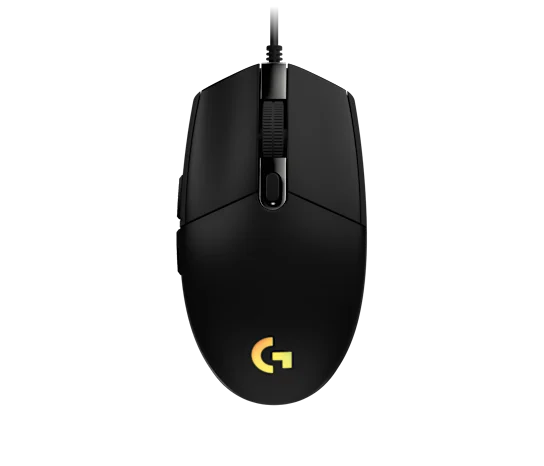
What this exact G203 is
This review covers the black US Logitech G203 LIGHTSYNC, model 910-005790. Logitech identifies that black version with SKU and MPN 910-005790. That detail matters because the G203 name also appears across other colors and part numbers. Check the identifier on a listing if the exact black variant, rather than the wider product family, is important to your purchase.
The central choice is straightforward: do you want a relatively light, compact wired mouse with lighting and configurable controls, or do you need wireless convenience, stronger ergonomic shaping or a much larger command layout? The G203 concentrates on the first option. It keeps the physical design uncomplicated and puts much of its customization in Logitech G HUB software.
Tom’s Guide describes the G203 as an inexpensive gaming mouse with a functional design. That is useful positioning from an independent review, but it is not a current price statement. Retail pricing, availability and bundles can change. The more durable buying questions are whether the shape suits your hand, whether the cable fits your desk and whether six buttons are enough.
Size and hand fit
Logitech lists the mouse as 116.6 millimeters long, 62.1 millimeters wide and 38.2 millimeters high. Those measurements help when comparing it with a familiar mouse or checking space beside a keyboard. They do not, on their own, establish comfort, because hand size, grip, sensitivity and available desk room all affect the fit.
The manufacturer lists the weight as 85 grams. That is light enough to make lifting and repositioning a central part of the design, particularly for someone who prefers broad, quick movements at lower sensitivity. Weight is not a complete comfort measure, however. A heavier, more sculpted mouse can suit a particular hand better than a lighter compact one.
Tom’s Guide describes the body as low-profile and semi-ambidextrous. “Semi” is the important qualification. The outside shape can look broadly symmetrical, but the controls are not mirrored. The independent review reports two thumb buttons on the left-hand side and no corresponding buttons on the right.
That arrangement makes the G203 primarily right-hand oriented. A left-handed user can still use the main buttons and scroll wheel, but the side controls do not become an equivalent opposite-side pair. If left-hand symmetry is a requirement, this is a design limitation rather than a setting that software can solve.
Grip preference is another meaningful filter. Tom’s Guide reports that its reviewer found the low-profile body less comfortable than an ergonomic design, while also finding it workable with claw and palm grips. That is an independent reviewer’s fit observation, not a universal comfort result, but it is relevant if you prefer a pronounced palm contour.
The practical description is therefore compact and low-profile rather than generously sculpted. It may suit someone who wants a smaller pointer and room for sweeping movements. A buyer with a larger hand or a strong preference for raised palm support should compare the shape in person where possible, rather than choosing from the dimensions alone.
Controls and tracking
Logitech specifies six programmable buttons. Tom’s Guide describes the arrangement as the two primary buttons, a clickable scroll wheel, a DPI button below them and two left-side thumb buttons. That gives everyday shortcuts and casual game commands some flexibility without turning the mouse into a thumb-operated keypad.
Six buttons are a useful middle ground for browsing, office shortcuts and many games. They are not a substitute for a mouse designed around numerous dedicated commands. Tom’s Guide specifically says the G203 may be light on buttons for hardcore MMO fans. That finding is consistent with the relatively simple physical layout.
The manufacturer lists a tracking-resolution range of 200 DPI to 8,000 DPI. A low setting can suit slower pointer movement and broad physical sweeps, while a higher setting can reduce the movement needed across a screen. The useful setting depends on the user’s preference, display arrangement and desk space rather than on the maximum figure alone.
Logitech also lists a USB report rate of 1000 hertz, equivalent to 1 millisecond. This is a device specification, not a prediction of a visible improvement on every computer or display. It does place the G203 among wired gaming mice with a published high report-rate setting.
The supplied manufacturer information calls the sensor gaming-grade and describes adjustable sensitivity, but it does not identify a sensor model or provide a laboratory tracking result. Read the 200 DPI to 8,000 DPI range as an adjustment specification, not as a complete verdict on accuracy or responsiveness.
Tom’s Guide reports that its reviewer evaluated the G203 with Doom Eternal, Age of Empires II: Definitive Edition, Shadow of the Tomb Raider and World of Warcraft. The reviewer found it suitable across those genres and separately noted the limited button count for demanding MMO use. Those are the independent review’s findings, not testing performed for this article.
The cable is part of the decision. Logitech lists a cable length of 2.1 meters, equivalent to 6.89 feet. That should accommodate many conventional desk layouts, but cable routing deserves attention if the computer sits far from the preferred mouse position or if a clear, cable-free surface is a priority.
LIGHTSYNC RGB
The G203 includes LIGHTSYNC RGB. Logitech says its lighting can use animations, game- and media-driven settings or custom choices from approximately 16.8 million colors. That offers substantially more visual choice than a fixed accent, but lighting should remain a secondary consideration if the shape or control layout does not fit.
Logitech describes several simpler approaches: choose one color, blend three colors or select an animation preset. It also says the mouse can synchronize with other Logitech G LIGHTSYNC equipment. That is most useful for someone already assembling a matching Logitech G desk; it does not change the mouse’s physical buttons or tracking range.
The manufacturer lists Screen Sampler as a mode that synchronizes the lighting with the screen. It also describes an audio visualizer that flashes colors in response to sound. These modes suit a decorative gaming setup, while a work area may call for a static color or less visual activity.
The lighting is therefore flexible, but it is not a reason to overlook practical fit. RGB effects are easy to appreciate in product images and desk setups. The more important questions are whether the mouse feels natural in the intended hand, whether two thumb buttons are enough and whether the cable reaches without creating a nuisance.
G HUB and customization
Logitech states that advanced features require Logitech G HUB software and says G HUB can program up to five presets. That creates a useful distinction between basic operation and deeper customization. The mouse can perform ordinary pointing and clicking without an elaborate profile plan, but buyers choosing it for remapping or lighting should expect to use the software.
Tom’s Guide reports that G HUB can customize profiles, change RGB lighting and reprogram buttons. Its reviewer found basic button reassignment straightforward, while custom lighting patterns were more difficult to create. The distinction matters: changing a button or selecting a preset should be less demanding than designing a detailed lighting sequence.
The independent review also reports that G HUB separates application profiles from desktop profiles in a way that can make creating and switching profiles cumbersome. Tom’s Guide nevertheless describes the software as generally stable and says it did not place a significant strain on system resources. Those are reviewer observations, not a current software benchmark.
Tom’s Guide further reports that G HUB can create macros and integrate Logitech devices with Discord and OBS. Those capabilities may appeal to a streaming or shortcut-heavy setup. They also show the trade-off clearly: the G203 remains physically simple while its broader feature set depends on a software workflow.
A sensible setup starts with one uncomplicated default profile. Add only shortcuts that solve a real problem, then create a separate application or game profile when the need is clear. Six programmable buttons offer useful room for customization, but layered macros and multiple lighting modes can make a small mouse feel more complicated than its hardware suggests.
Compatibility and setup
Logitech lists Windows, macOS and ChromeOS among the system requirements and specifies a USB port. That makes the G203 a candidate for a compatible computer with an available USB connection. The supplied manufacturer record does not list Linux or game-console compatibility, so those platforms should not be treated as confirmed by these sources.
Initial setup can remain simple. Connect the USB cable, route it so it does not pull across the intended movement area and check the side-button position before investing time in profiles. Someone who needs only pointing, clicking and scrolling can begin with the basic device rather than installing customization software immediately.
Install G HUB when button remapping, lighting profiles or other advanced functions are part of the reason for choosing the mouse. Logitech explicitly links advanced features to G HUB. The software is therefore optional for a basic pointer workflow but relevant to the advertised customization proposition.
The wired connection creates a deliberate compromise. It removes battery and charging decisions, but the cable remains part of the desk arrangement. Buyers who frequently change workstations or strongly prefer an unobstructed surface may value a wireless category more, while a fixed desk can make the wired approach easier to accept.
Limitations and alternatives
The G203 gives up several physical adjustments in favor of its compact design. Tom’s Guide specifically notes the absence of swappable buttons, tunable weights and adjustable scroll-wheel features. Those are hardware omissions; profiles and macros cannot reproduce the same physical adjustments.
The Razer Viper Mini and SteelSeries Rival 3 are relevant comparison points because Tom’s Guide discusses them alongside the G203. The review discusses their shared design trade-offs, but a current weight ranking would require verified specifications for every exact model. The supplied sources do not establish every current specification for those alternatives, so this is not a complete feature table.
The better alternative category depends on the missing feature. Choose a wireless mouse category if cable-free movement matters most. Consider a more ergonomic category if palm support is the priority. For MMO-heavy use, look toward a model category with more dedicated controls. For left-handed use, prioritize genuinely mirrored side-button layouts.
Ownership and verdict
The manufacturer lists a two-year limited hardware warranty. That is the warranty statement attached to this product record; regional terms and claim procedures should still be checked at purchase. The supplied sources do not provide a cleaning schedule, replacement-parts policy or long-term durability result, so those ownership questions remain unresolved.
Routine care should be conservative: avoid sharp cable bends, keep debris away from the buttons and wheel, and treat lighting configuration as separate from physical fit. These are practical handling suggestions, not evidence of a special maintenance system supplied with the mouse.
The G203 is most convincing for a right-handed desk user who wants a compact wired mouse, an 85-gram body, configurable RGB and a few remappable controls. Its 200 DPI to 8,000 DPI range, 1000-hertz report rate and 2.1-meter cable support that general brief, while the six-button layout keeps expectations realistic.
My conditional verdict is favorable for the narrow buyer problem. The black Logitech G203 LIGHTSYNC, model 910-005790, is a focused choice for affordable wired control and desk lighting when its right-hand-oriented shape fits. It is less suitable when comfort sculpting, left-handed symmetry, wireless convenience or extensive physical customization matters more than a simple light design.