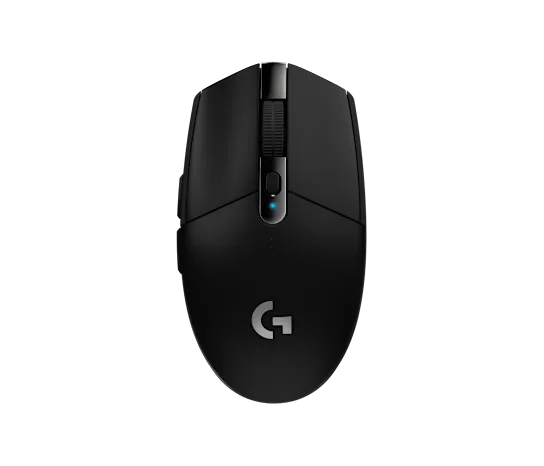
The Logitech G305 LIGHTSPEED Wireless Gaming Mouse, Black, US, model 910-005280, is a focused wireless mouse for someone who wants gaming-oriented control without a permanently attached cable. It combines Logitech’s HERO optical sensor, a LIGHTSPEED USB receiver and a replaceable AA battery in a compact shell.
That combination makes the G305 a more specific purchase than a general wireless office mouse. It can handle ordinary pointing, document work and gaming, but the important decision is not simply whether its sensor has a high maximum setting. Hand fit, receiver compatibility, handedness and battery preference will determine whether this model makes sense.
This review covers the exact black US variant, not the visually similar blue, mint, white or lilac versions. Logitech’s page supplies the manufacturer’s sensor, wireless and battery specifications. Tom’s Hardware supplies independent measurements and observations from its review. Those sources are kept separate: a manufacturer specification describes intended capability, while an independent review describes that reviewer’s evaluation rather than an experience reported here.
The buying decision in one sentence
Choose the G305 if you want a compact, right-handed, receiver-based wireless mouse with a replaceable AA battery, programmable controls and no RGB lighting. Choose another model if you require internal rechargeability, Bluetooth, a larger body or genuinely ambidextrous side controls.
The replaceable battery is the defining trade-off. Logitech claims up to 250 hours from one AA battery. That appeals to buyers who would rather keep a spare cell available than add another charging cable to a desk. It also means the mouse does not depend on an internal battery whose capacity may decline over time.
The opposing case is just as clear. The G305 cannot be charged over USB, and Tom’s Hardware identifies the lack of rechargeability as a drawback while noting that similarly priced wireless gaming mice may be rechargeable. Neither design is automatically superior. A user who already charges several devices may prefer adding the mouse to that routine. Someone who dislikes interrupting work or play to charge may prefer a removable cell.
Shape deserves attention before sensor specifications. Tom’s Hardware measured a relatively compact body and notes that its shorter height may be noticeable to people with larger hands or those who prefer mice with substantial palm humps. The G305 is a better candidate for someone whose existing comfortable mouse has similar proportions than for someone seeking a large ergonomic shell.
Sensor and wireless connection
The G305 uses Logitech’s HERO optical sensor. Logitech specifies operation from 200 to 12,000 DPI and says the sensor works without smoothing, filtering or acceleration across that range. Logitech’s technical table lists a maximum tracking speed of 400 IPS; this is the specification used here rather than the less precise over-400-IPS wording in promotional copy. Those are technical capability claims, not a promise that every player will benefit from the maximum setting.
Tom’s Hardware independently lists the sensor as Logitech Hero, with a maximum sensitivity of 12,000 CPI and a polling rate of 1,000 Hz. Its review describes tracking as responsive across CPI settings. That supports the mouse’s suitability for fast pointer movement, but it remains an independent reviewer’s finding rather than a universal result for every computer, game or surface.
The distinction between DPI and CPI is mostly terminology in this context. Logitech uses DPI in its specification, while Tom’s Hardware uses CPI in its table and discussion. Buyers should focus on the stated range and the controls for changing sensitivity rather than assume that the different labels describe different hardware.
Logitech describes LIGHTSPEED as a 2.4 GHz wireless system developed around latency, stability and connectivity, and specifies 1 ms wireless performance. The practical implication is that the mouse uses a dedicated USB receiver rather than Bluetooth. A desktop or laptop with an available USB Type-A port is the natural match.
A computer with only USB-C ports will need an adapter or hub that provides a compatible connection. The supplied evidence does not identify Bluetooth support, so the G305 should not be selected on the assumption that it can pair without its receiver. This is a small issue on a traditional desktop and a more important one on a thin laptop with a limited port selection.
The receiver’s position can affect convenience. Tom’s Hardware reports that the package includes a long USB cable that serves as an extender for the 2.4 GHz USB Type-A LIGHTSPEED dongle. That gives a desktop user another placement option when the computer is under a desk, behind a display or surrounded by other hardware.
A receiver extender is not the same as Bluetooth convenience, but it can make a receiver-based arrangement easier to organize. It may also help when a desktop’s rear ports place the receiver farther from the mouse area. The G305 remains a focused single-receiver mouse rather than a multi-device productivity peripheral.
Shape, measurements and hand fit
Tom’s Hardware measured the G305 at 4.59 by 2.45 by 1.50 inches, equivalent to 116.6 by 62.2 by 38.2 millimeters. It lists the weight as 3.49 ounces, or 99 grams. Those figures place the mouse in a compact category, with a body intended to be easy to move and transport rather than a large ergonomic shell built around extensive palm support.
That size is an advantage for some users and a warning for others. A smaller hand may find the proportions manageable, and a fingertip or claw grip may suit the shorter body. A larger hand or a buyer who prefers a pronounced palm hump may find the shape less accommodating. Tom’s Hardware specifically notes that the shorter height may be noticeable for larger hands or for people who like mice with big humps for palm grips.
The exterior may look broadly symmetrical, but the control layout is not. Tom’s Hardware identifies six programmable buttons: the left and right clicks, a CPI button below the scroll wheel, a clickable scroll wheel and two side buttons. The side controls are positioned for a right-handed thumb and are not swappable.
Left-handed buyers should therefore regard the G305 as a right-handed mouse, despite its less aggressively sculpted exterior. A shared desk where people alternate hands creates the same concern. The side-button arrangement is a functional limitation, not merely a matter of appearance.
The mouse has no RGB lighting. Tom’s Hardware lists the LED zones as none, while its description identifies an indicator below the scroll wheel. That indicator changes color as the user toggles through four CPI settings and flashes red when the battery is low. It is status feedback, not a full lighting system.
The absence of RGB may be a strength for a restrained desk or for a buyer who does not want lighting software for a cosmetic feature. It also keeps the product’s feature set focused. Buyers who expect illuminated logos, extensive lighting effects or a visually coordinated gaming setup should look elsewhere.
Work and gaming use
The G305’s sensor range is more than sufficient for most office pointing and document work. The dedicated CPI button can make the mouse adaptable between tasks, although sensitivity adjustment does not change the physical fit. If the body feels too small for your hand, changing CPI will not solve that problem.
Tom’s Hardware reports using a lower CPI setting for work such as signing electronic documents and a higher setting for gaming. That illustrates a useful role for the dedicated button, particularly for someone who wants one mouse at a shared desk. The button can also be left alone if you prefer a consistent pointer speed.
For gaming, the appeal is the combination of a receiver-based wireless link, a 1,000 Hz polling specification, the HERO sensor and a compact body. Tom’s Hardware describes the tracking as responsive and reliable across CPI settings and notes that the PTFE feet help the mouse move quickly. Its review also describes the left and right mechanical clicks as having a springy feel.
The independent review reports a claimed 10 million clicks. That figure should be understood as a product claim rather than a durability result for an individual mouse. It does not establish how a particular unit will age, nor does it replace ordinary care around dust, spills and worn feet.
The six-button layout can help in games that benefit from accessible side commands. It can also be excessive for someone who wants a minimal office mouse. The CPI button may be useful when moving between applications, while the side buttons can support browser or software shortcuts, but additional controls are valuable only when their placement suits your hand and habits.
Setup and software
Initial setup requires the AA battery and the LIGHTSPEED receiver. Connect the receiver to a USB Type-A port, place the mouse in the working area and use the supplied extender if the computer’s position makes direct receiver placement inconvenient. The wireless design removes the need to manage a permanent data cable, but the receiver remains an essential part of the system.
The G305 can be used without software for basic pointing and clicking. Tom’s Hardware says Logitech’s G Hub software is required to program the six buttons and configure the CPI settings associated with the dedicated button. G Hub can also provide a battery-life reading.
Software is therefore optional for basic use but important for customization. A buyer who wants programmable commands should be comfortable installing G Hub. A buyer who wants a simple pointing device can avoid most of that setup, accepting the default behavior instead.
Tom’s Hardware reports that the mouse stores one onboard memory profile. That is useful if you move the mouse between computers and want a saved configuration to travel with it. One profile is a modest amount of onboard storage, however. It should not be confused with a large library of per-game profiles or a full multi-device workflow.
Battery ownership and maintenance
The G305 uses one AA battery. Logitech claims up to 250 hours of operating life, while Tom’s Hardware reports that G Hub can show a battery reading and that the indicator flashes red when the battery is nearing depletion. These features provide useful warning and planning information, but the claimed maximum should not be treated as a fixed interval for every usage pattern.
The battery compartment also stores the wireless dongle, according to Tom’s Hardware. That is valuable for travel because the receiver is small and easy to separate from the mouse. Keeping it inside the mouse when packed reduces the chance of arriving at another desk without the component needed for wireless operation.
The removable battery makes routine maintenance simple: open the compartment, remove the depleted cell and install a replacement. It also creates a recurring consumable cost and disposal responsibility. Owners who prefer rechargeable AA cells may consider that route, but the supplied evidence does not establish runtime, compatibility or charging behavior for any particular rechargeable battery.
The G305 does not provide the internal rechargeable workflow some competitors offer. If you want to plug the mouse in overnight, continue using it while connected or avoid maintaining spare batteries, a rechargeable model is a better direction. If you value a readily replaceable power source and long claimed intervals, the G305’s battery design is more attractive.
Limitations to accept before buying
Handedness is the second limitation. The two side buttons favor right-handed use and cannot be swapped. Left-handed buyers should treat that as a functional problem, not as a minor design preference.
Finally, the G305 is not presented as a feature-rich office mouse. The supplied evidence does not identify tilt scrolling, multi-device switching, Bluetooth or more than one onboard memory profile. Buyers comparing it with a productivity mouse should judge the products by different priorities: low-latency receiver control and gaming-oriented customization here, versus device switching and office ergonomics elsewhere.
Alternatives and who should choose them
A rechargeable wireless gaming mouse is the closest alternative. Tom’s Hardware specifically identifies rechargeable rivals as a competitive advantage over the G305. Choose that category if avoiding replaceable cells matters more than having removable power. Check the alternative’s dimensions and button layout too, because rechargeability does not guarantee a better hand fit.
Tom’s Hardware compares the G305 with the Razer Mamba Wireless and Roccat Kain 200 Aimo, listing both competitors at 16,000 CPI. That is higher than the G305’s 12,000 CPI specification. The difference may matter to buyers who deliberately use very high sensitivity or prioritize maximum specifications, but it is not automatically decisive for ordinary gaming. Sensor resolution should be considered alongside shape, power and connectivity.
A larger ergonomic right-handed mouse is a better direction for a palm-grip buyer who wants more physical support. The G305’s compact measurements and independent fit observations point toward a different design goal. Such an alternative may be heavier or less portable, but those are acceptable trade-offs when comfort is the primary requirement.
A genuinely ambidextrous mouse is more suitable for left-handed use or a shared desk where users switch hands. The G305’s fixed side controls make it less flexible in that situation. Confirm that an alternative’s side buttons are accessible from the intended hand rather than judging only by its outer silhouette.
A productivity-focused Bluetooth mouse is more appropriate for multi-device work, USB-C-only laptops or users who want to avoid a receiver. That category usually emphasizes switching and office ergonomics rather than the G305’s gaming-oriented wireless connection. The G305 is the better fit only when the receiver, sensor behavior and replaceable battery are central to the decision.
Verdict
The Logitech G305 LIGHTSPEED is a sensible conditional buy for a right-handed user who wants a compact wireless gaming mouse, a replaceable AA battery and a capable HERO sensor. Logitech’s stated 1 ms LIGHTSPEED performance and up-to-250-hour battery claim are attractive specifications, while Tom’s Hardware’s independent review supports the broader case for responsive tracking and dependable wireless behavior during its evaluation.
Buy it when your computer can accommodate the USB Type-A receiver, your hand suits the compact body and you prefer replacing an AA cell to charging a mouse. It can also work as a general-purpose desk mouse if you appreciate a cable-free setup and do not need Bluetooth or extensive multi-device features.
Skip it when you have large hands, need left-handed side-button access, insist on internal rechargeability or regularly switch among USB-C-only computers. The G305 succeeds by keeping its priorities narrow. That focus is useful for the right buyer, but it makes hand size, handedness, receiver compatibility and battery preference more important than the sensor number alone.