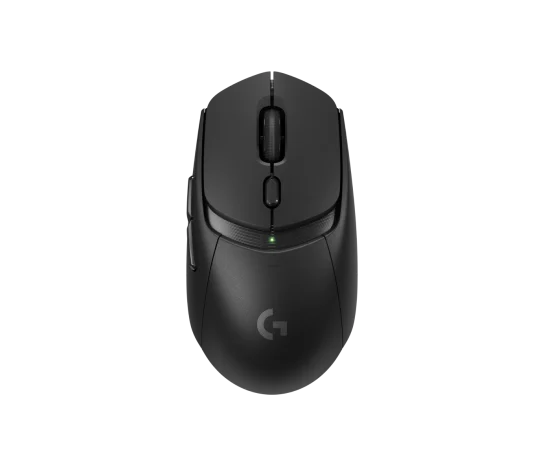
The Logitech G309 LIGHTSPEED Wireless Gaming Mouse, Black, US 910-007197 is a portable wireless mouse built around a specific compromise: you can use an ordinary AA battery, or remove that battery and use Logitech’s separate POWERPLAY charging system. That makes the G309 more flexible than a mouse that only works with a charging mat, but less straightforward than a conventional rechargeable model.
The buying decision
The important question is not whether the G309 has a capable sensor. It does. The decision is whether you already own POWERPLAY, intend to buy it for several compatible Logitech mice, or simply want a mouse that can move between a gaming desktop and another computer without a charging cable.
With an AA battery installed, Logitech lists the mouse at 86 g (3.03 oz). With POWERPLAY, the listed weight is 68 g (2.40 oz). That is a meaningful difference for a lightweight gaming mouse, but the lower figure is accessory-dependent: the mouse does not become a 68 g battery-powered travel mouse by itself.
The black US SKU reviewed here is model 910-007197. Logitech also lists a white version under a different SKU, so buyers should check the color and model number before ordering. This review focuses on the black variant rather than treating every G309 listing as interchangeable.
What comes in the box
Logitech’s listed contents include the G309 mouse, a LIGHTSPEED USB receiver, a USB cable extender, grip stickers, one AA battery, and user documentation. The extender matters when the computer is under a desk or the receiver would otherwise sit behind a metal chassis; it lets the receiver be placed closer to the mouse.
The mouse is wireless-only. It has no charging port and does not include a charging cable for replenishing an internal battery. The AA cell is the ordinary operating option, while POWERPLAY replaces the battery-based arrangement with wireless charging hardware sold separately.
The receiver is stored beneath the removable backplate, according to Tom’s Hardware’s inspection. That is useful for travel because the small USB-A part has a defined storage place rather than being left loose in a laptop bag. It also means the backplate is part of the portability routine: remove it to access the battery compartment or receiver storage.
Shape and size
The G309 has a symmetrical, ambidextrous shape, although that does not automatically make every grip or hand equally comfortable. Tom’s Hardware describes the body as slightly larger, with a mild hump. That description makes the mouse more relevant to buyers who prefer a moderate, straightforward shell than to shoppers seeking a deeply sculpted palm rest.
The manufacturer lists dimensions of 120 mm (4.72 in) long, 64 mm (2.52 in) wide, and 39 mm (1.54 in) high. Those dimensions are also reported in Tom’s Hardware’s specification table, so they are a useful cross-check rather than a single-page measurement.
The sides are relatively simple rather than heavily contoured. Tom’s Hardware found them somewhat slippery and reported that the included pre-cut grip tape improved surface traction. The practical choice is therefore clear: leave the shell bare if you prefer an uncomplicated surface, or apply the supplied stickers if lifting and repositioning the mouse feels insecure.
The included grip stickers are not a reason to assume the mouse will fit every hand. They address surface traction, not the basic shape, length, or button reach. Buyers should prioritize the G309’s 120 mm (4.72 in) length and symmetrical layout first, then treat the tape as an adjustment rather than a fit solution.
Weight and POWERPLAY
The G309’s unusual feature is its two weight states. Logitech specifies 86 g (3.03 oz) with one AA battery and 68 g (2.40 oz) with POWERPLAY. The independent review also identifies a magnetic dummy puck that can be exchanged for a POWERPLAY puck, which explains how the mouse can operate without a conventional battery.
POWERPLAY is not included with this mouse. Tom’s Hardware describes the charging mat as a separate purchase and says the G309 uses proprietary wireless charging technology. That creates a substantial ownership distinction: the 68 g (2.40 oz) configuration is not the low-cost default, but part of a broader Logitech accessory setup.
Without POWERPLAY, the G309 is a conventional AA-powered wireless mouse in practical terms. Tom’s Hardware characterizes that configuration as around 86 g (3.03 oz) with non-rechargeable battery power. That is still portable, but buyers comparing it with genuinely ultralight mice should compare operating weight, not the headline POWERPLAY figure.
With POWERPLAY, the mouse can remain on the charging mat during use, and Logitech says the battery can be omitted. Tom’s Hardware adds an important detail: the internal supercapacitor only holds enough energy for brief periods away from the mat, approximately five minutes according to its report. That makes the setup suitable for normal swipes and short lifts, not extended use away from the mat.
Wireless options
The G309 supports Logitech’s LIGHTSPEED wireless connection and Bluetooth. Logitech lists a computer with a USB-A port for the receiver connection, while Bluetooth requires a Bluetooth-enabled device. The two modes serve different jobs: LIGHTSPEED is the gaming-oriented desktop link, while Bluetooth is useful for a compatible laptop or secondary device.
Tom’s Hardware reports that the mouse can connect to one device over Bluetooth and one device over 2.4 GHz wireless at a time. Switching between them uses the button on the underside. This is convenient for moving between a gaming computer and a portable computer, but it is not the same as maintaining several simultaneously active Bluetooth device profiles.
The supplied USB cable extender is a small but relevant desk-fit accessory. A desktop tower tucked below a desk can place its rear USB port far from the mouse surface; moving the receiver closer can reduce that awkward arrangement. The receiver still requires USB-A, so a computer with only USB-C ports needs an appropriate adapter or hub.
Bluetooth is not a universal compatibility promise. Logitech lists Windows, ChromeOS, and Android among the supported platforms in its requirements, but configuration through Logitech G HUB also requires internet access. Buyers who want to use the mouse with a computer that cannot run G HUB should plan to configure supported functions elsewhere first.
Sensor and controls
The HERO 25K sensor has a manufacturer-listed tracking range of 100–25,600 DPI. Logitech also lists maximum acceleration above 40 G and maximum speed above 400 IPS, with those acceleration and speed figures tested on a Logitech G240 Gaming Mouse Pad. These are specifications, not a promise that every player needs those upper limits.
Tom’s Hardware reports a maximum polling rate of 1,000 Hz. That is a conventional gaming setting rather than an extreme high-polling design. For buyers choosing between ordinary desktop gaming and specialized competitive configurations, the G309 is aimed at the former without presenting a higher polling mode as its selling point.
The mouse has six programmable buttons, counting the left and right buttons, two thumb buttons, the DPI switch, and the scroll-wheel click. Logitech says the buttons can be customized through G HUB. Six controls are enough for common game and desktop shortcuts, but the layout is not designed to substitute for a multi-button MMO mouse.
Tom’s Hardware describes the primary buttons as crisp and clicky, with hybrid optical-mechanical switches. It also reports that the scroll wheel is notched, has no tilt function, and felt somewhat stiff during its evaluation. Those are independent observations, so they should be read as reviewer findings rather than manufacturer specifications.
The LIGHTFORCE switches combine optical detection with a mechanical feel, according to Logitech. Tom’s Hardware says G HUB offers an “optical only” setting that can lower latency and avoid some problems associated with mechanical switches. That setting is most relevant to a POWERPLAY owner, because removing the battery eliminates the reason to prioritize battery endurance over the lightest configuration.
Software and setup
G HUB is the central configuration tool. Tom’s Hardware reports that it can alter sensitivity presets and remap the six programmable buttons. It also describes five factory DPI steps of 400, 800, 1,200, 1,600, and 2,400 DPI, with the ability to replace those values with custom steps.
The software can assign a DPI Shift function, which temporarily changes sensitivity while a designated button is held. It can also assign commands, keys, actions, macros, and system options to programmable controls. Those options add flexibility, though six buttons leave less room for elaborate layers than a mouse designed around a larger control array.
Tom’s Hardware reports that G HUB supports software-specific profiles while the application runs in the background. That is worth noting for a desk that alternates between games and productivity applications. It also means the most convenient profile behavior depends on software being available, rather than being entirely independent of the computer environment.
The mouse includes onboard memory, according to Logitech’s specifications. That makes the product more practical for moving between machines, but the supplied passages do not establish which settings are retained or how many profiles can be stored. Buyers should not infer a particular onboard-profile workflow from the presence of onboard memory alone.
Battery expectations
Logitech lists more than 300 hours of continuous motion with LIGHTSPEED Wireless and more than 600 hours with Bluetooth, while noting that battery life varies with user and computing conditions. Tom’s Hardware independently describes approximately 300 hours over 2.4 GHz wireless and up to 600 hours over Bluetooth with one AA battery.
Those figures make the G309 attractive for travel. A spare AA battery is easier to pack than a dedicated charging cable, and Bluetooth can extend the quoted operating time when gaming-grade wireless performance is unnecessary. The trade-off is that the battery eventually needs replacement rather than recharging inside the mouse.
The POWERPLAY arrangement changes the maintenance routine rather than merely extending it. There is no rechargeable battery inside the G309 according to Tom’s Hardware; the separate mat supplies power while the mouse is on it, and the supercapacitor covers short departures from the charging surface. Buyers should therefore treat POWERPLAY as a desk system, not as a portable charging solution.
Ownership limitations
The first limitation is cost concentration. If you already own POWERPLAY, the G309 can make better use of that existing accessory. If you do not, buying the mouse for its 68 g (2.40 oz) operating weight means adding a separate charging mat to the decision. Tom’s Hardware specifically concludes that it would not buy POWERPLAY just for this mouse.
The second limitation is the basic control layout. Six programmable buttons suit ordinary gaming, productivity shortcuts, and a DPI Shift assignment, but Tom’s Hardware says the G309 does not offer enough buttons for MMORPGs and MOBAs. Buyers who need many bindings should choose a category built around more side controls rather than trying to stretch this layout.
The third limitation is the lack of a charging port. An AA battery solves the travel problem, but someone accustomed to plugging in a rechargeable mouse cannot top up the G309 with a USB cable. The supplied USB extender is for receiver placement, not charging.
The fourth limitation is aesthetic and tactile simplicity. Tom’s Hardware calls the design generic-looking, reports no RGB lighting, and notes that the wheel has a relatively stiff feel. Those details do not prevent ordinary gaming, but they matter if the desk setup calls for lighting, a more sculpted shell, or a free-spinning scroll mechanism.
Alternatives and verdict
The closest alternative decision is not another Logitech feature list; it is whether to choose a standard AA wireless mouse and skip the charging ecosystem. Tom’s Hardware compares the G309 with Razer’s Viper V3 Hyperspeed, reporting an 82 g (2.89 oz) weight and 280-hour AA battery life for that model. That comparison favors evaluating the complete ownership setup, not only the G309’s sensor.
For a buyer who already has POWERPLAY and wants a simple symmetrical mouse that can become lighter at the desk, the G309 is a logical fit. Its 68 g (2.40 oz) POWERPLAY configuration, LIGHTSPEED connection, Bluetooth fallback, and AA travel option address a real split-use routine.
For a buyer without POWERPLAY, the case is narrower. The G309 still offers a 100–25,600 DPI HERO 25K sensor range, six programmable buttons, Bluetooth, and long quoted AA endurance, but its special weight advantage disappears. In that situation, compare ordinary AA wireless mice on shape, operating weight, button layout, and total cost.
The Logitech G309 LIGHTSPEED is therefore best understood as a flexible mouse for an existing Logitech charging setup, with a respectable battery-powered fallback. Choose it when the AA option and POWERPLAY path both matter. Skip it when you want an included rechargeable system, many side buttons, a charging port, or the lightest possible mouse without buying another desk accessory.