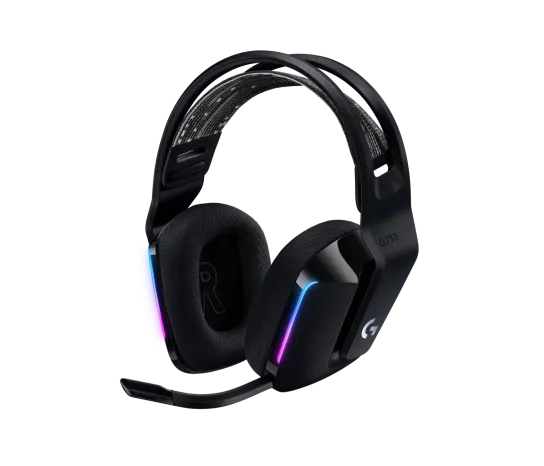
What this exact G733 is
The product here is the black Logitech G733 LIGHTSPEED Wireless Gaming Headset, US model 981-000863. That model distinction matters because Logitech lists other G733 colors under different stock-keeping numbers. This review focuses on the black 981-000863 variant, not a general discussion of every headset in the G series.
The buying decision is fairly specific: do you want a computer-oriented wireless headset that can also deliver console stereo audio, and are you willing to use a USB receiver plus Logitech’s software for the more advanced features? If yes, the G733 has a coherent use case. If you need Bluetooth, an analog cable, or a highly adjustable fit, the case is weaker.
Logitech describes the G733 as a wireless gaming headset designed for performance and comfort. Its supplied hardware includes a LIGHTSPEED wireless receiver with a USB-A connector, a USB-C-to-USB-A charging cable, and a detachable microphone. The receiver is therefore part of the normal connection plan rather than an optional accessory.
The manufacturer’s connection specification identifies LIGHTSPEED wireless through USB for the microphone connection and lists a USB 2.0 Type-A port as a requirement. Nothing in the supplied material identifies Bluetooth or an analog audio connection. I would therefore treat this as a receiver-based headset, not a general-purpose wireless headset for phones, tablets, or headphone jacks.
Compatibility and setup
For a Windows computer, Logitech lists Windows 10 or later. It also lists macOS X and, in its fuller compatibility entry, macOS X 10.12 or later. The practical setup question is simple: confirm that the computer has an available USB-A port, or plan a suitable adapter or hub without assuming that every USB-C accessory will provide identical behavior.
Logitech lists PlayStation 4 or later compatibility and separately names gaming consoles in the requirements. That supports a console use case, but it should not be expanded into universal console compatibility. The supplied evidence does not establish compatibility with every console, handheld, television, or mobile device.
On PlayStation 4, Logitech specifically says DTS Headphone:X 2.0, Blue VO!CE, and LIGHTSYNC RGB are unavailable. That creates an important split between connection and customization: the headset can be useful for supported console stereo operation, while several headline PC features remain unavailable on that platform.
On a computer, Logitech says advanced features require G HUB software and lists internet access as optional for that software. The software is available as a free download according to the manufacturer. In practice, this means the headset’s basic receiver connection and its configurable feature set should be considered separate parts of ownership.
G HUB is the route Logitech identifies for advanced features such as DTS Headphone:X 2.0, Blue VO!CE, and LIGHTSYNC RGB. The independent Tom’s Guide review also reported using G HUB for surround sound, equalization, and game-specific profiles. Those are software-dependent conveniences, not reasons to expect the same configuration controls from a console connection.
Fit and physical design
Logitech lists the headset at 7.64 inches (194 millimeters) in one dimension, 7.48 inches (190 millimeters) in another, and 3.27 inches (83 millimeters) in the third. Its listed weight is 9.81 ounces (278 grams). These figures help with desk and bag planning, but they do not predict whether the suspension strap will suit a particular head shape.
The headband uses a reversible soft strap that is attached to the headset. Logitech also describes the strap as a customization point and says additional straps and microphone covers are sold separately. The important distinction is that accessory personalization does not turn the G733 into a conventional headband with a broad range of incremental size adjustments.
Tom’s Guide found the elastic headband less precise than expected. Its reviewer described two strap positions on each side, followed by separate earcup adjustment, and reported that one position felt too tight while the other felt too loose. That is an independent fit finding rather than a manufacturer dimension.
The same review reported that the earcups could slide up and down and that the elastic band’s position on the head could affect the fit. It also found the plush earcups comfortable for long sessions, including with glasses. Those observations point to a headset that may be comfortable once adjusted but is less predictable during the adjustment process.
Tom’s Guide also reported that the earcups did not always form a complete seal and that they did not swivel. The seal issue matters for ordinary desk use because inconsistent contact can affect perceived bass and outside-noise isolation. The fixed orientation matters when storing the headset or packing it for travel.
The review’s description of a light, somewhat flimsy plastic chassis is more useful here than a generic durability prediction. It suggests prioritizing low carried weight and appearance over a particularly substantial physical feel. Logitech’s two-year limited hardware warranty provides a defined support period, but it does not change the construction impression reported by the independent reviewer.
Microphone and communication
The microphone is detachable, and Logitech specifies a cardioid, unidirectional pickup pattern. It lists a 0.24-inch (6-millimeter) microphone component and a microphone frequency response of 100 hertz to 10 kilohertz. Those are manufacturer specifications, not a promise that every voice, room, or software setting will sound identical.
Tom’s Guide reported that the microphone did not extend close enough to the reviewer’s mouth and called its design odd. That is the most consequential microphone caveat for ordinary desk conversations. A detachable boom is convenient when the headset is used only for listening, but detachment does not necessarily mean the remaining boom position will suit every speaker.
The independent review also reported that the microphone could produce decent sound with G HUB’s Blue audio options. Because those options are software-related, that finding belongs primarily to computer use. It should not be carried over to console operation, where Logitech says Blue VO!CE is unavailable on PlayStation 4.
For meetings, voice chat, and casual multiplayer communication, the G733 therefore makes more sense when the microphone’s placement works for the wearer and the computer can run the desired processing. If close microphone positioning is the central requirement, the supplied evidence gives a reason to consider a different headset category rather than relying on software correction.
Audio and battery
The headset uses 40-millimeter PRO-G drivers, according to Logitech’s specifications. Logitech lists headphone frequency response from 20 hertz to 20 kilohertz, passive impedance of 39 ohms, active impedance of 5 kilohms, and sensitivity of 87.5 decibels sound pressure level per milliwatt.
Those figures describe the hardware but do not establish a listening preference. Logitech markets the drivers as designed for precise, full-range sound and reduced distortion. That is a manufacturer description, while the more useful independent assessment is Tom’s Guide’s conclusion that the headset delivered decent game audio and generally good sound for gaming and music.
Tom’s Guide reported stereo, surround, and equalization options, with the caveat that its reviewer found the default soundscape somewhat flat. The reviewer also said the headset did not excel with a particular music genre. This makes the G733 a reasonable configurable gaming listen on the supplied evidence, not an obvious choice for someone prioritizing a distinctive music presentation.
DTS Headphone:X 2.0 is an advanced feature that Logitech ties to G HUB, and Logitech separately excludes it from PlayStation 4 operation. Treat surround as a computer feature requiring the right software path. A console buyer should not select this model on the assumption that every advertised audio mode will be available after plugging in the receiver.
Logitech states that the G733 has more than 29 hours of battery life. Its battery-life condition is important: the manufacturer says the figure is based on headset volume set to 50 percent with lighting turned off. That is a stated operating condition, not a universal runtime for every volume and lighting setting.
The battery is rechargeable. The included charging cable is USB-C to USB-A, so charging is part of the desk setup even though audio uses the wireless receiver. If lighting is a priority, expect a trade-off with the manufacturer’s stated battery condition rather than treating the 29-hour figure as independent of illumination.
Lighting and daily ownership
LIGHTSYNC RGB is central to the G733’s visual identity. Logitech says G HUB can customize the headset’s lighting effects, including colors, audio visualization, presets, and custom animations. That is a meaningful feature for a visible streaming or gaming setup, but it has little value if the headset is normally hidden under hair, used in dim rooms, or chosen strictly for communication.
Tom’s Guide found the front-facing lighting distracting, particularly because the reviewer reported reflections in glasses and glossy desk surfaces. The review also reported no easy way to turn the lights off when the headset was connected to a console without G HUB. This is a practical ownership limitation, not merely a disagreement about aesthetics.
Maintenance is relatively straightforward from the supplied information: recharge the headset, keep the receiver available, and remove the microphone when it is not needed. Logitech identifies the microphone as detachable and the battery as rechargeable. The evidence does not establish replacement-battery procedures, ear-pad replacement instructions, water resistance, or a cleaning method, so those should be checked before purchase if they are important requirements.
The receiver requirement also affects shared desks and laptops. A USB-A receiver is easy to account for on a conventional desktop, but it occupies a port and may need planning on a modern USB-C-only computer. A hub can solve the port problem, but the supplied sources do not establish hub compatibility or wireless performance through a particular adapter.
Alternatives and fit checklist
The closest alternative decision is not simply “which headset sounds better?” It is whether to trade the G733’s receiver-based wireless design and lighting for a different fit, microphone arrangement, or software relationship. The supplied independent review specifically compared the G733 unfavorably with Logitech’s G Pro X Wireless on fit and sound, and it described the G935 as having a more favorable microphone arrangement.
Tom’s Guide also named the SteelSeries Arctis 7 as an example of a headset with a more precise elastic-band fit. That does not establish current specifications for the Arctis 7, so the useful comparison is categorical: consider an alternative with a more adjustable suspension system if fit precision matters more than the G733’s design.
Choose the G733 when your computer has a practical USB-A connection, receiver-based wireless is acceptable, the detachable microphone is useful, and G HUB customization matters. It is also a reasonable candidate when a light listed weight and customizable appearance matter more than a rugged-feeling chassis or compact storage.
Be cautious when the headset must work across phones, tablets, and analog sources, because the supplied records identify USB receiver operation and do not document Bluetooth or analog connectivity. Be equally cautious if you need front-facing lighting disabled from a console, a microphone that naturally reaches close to the mouth, or a fit that requires very fine adjustment.
Verdict
The Logitech G733 LIGHTSPEED Wireless Gaming Headset is a conditional buy for an ordinary computer desk. Its strongest case is a Windows or Mac setup that can use the USB-A receiver and G HUB, where rechargeable wireless operation, a detachable microphone, configurable audio, and RGB customization all have a place.
Its weaker case is a mixed-device headset role. PlayStation compatibility does not preserve every software feature, the independent fit findings are notably cautious, and the supplied evidence does not support Bluetooth or analog use. Buy the exact black 981-000863 variant when those limitations fit your routine; otherwise, prioritize a more adjustable headset or a connection design that matches all of your devices.