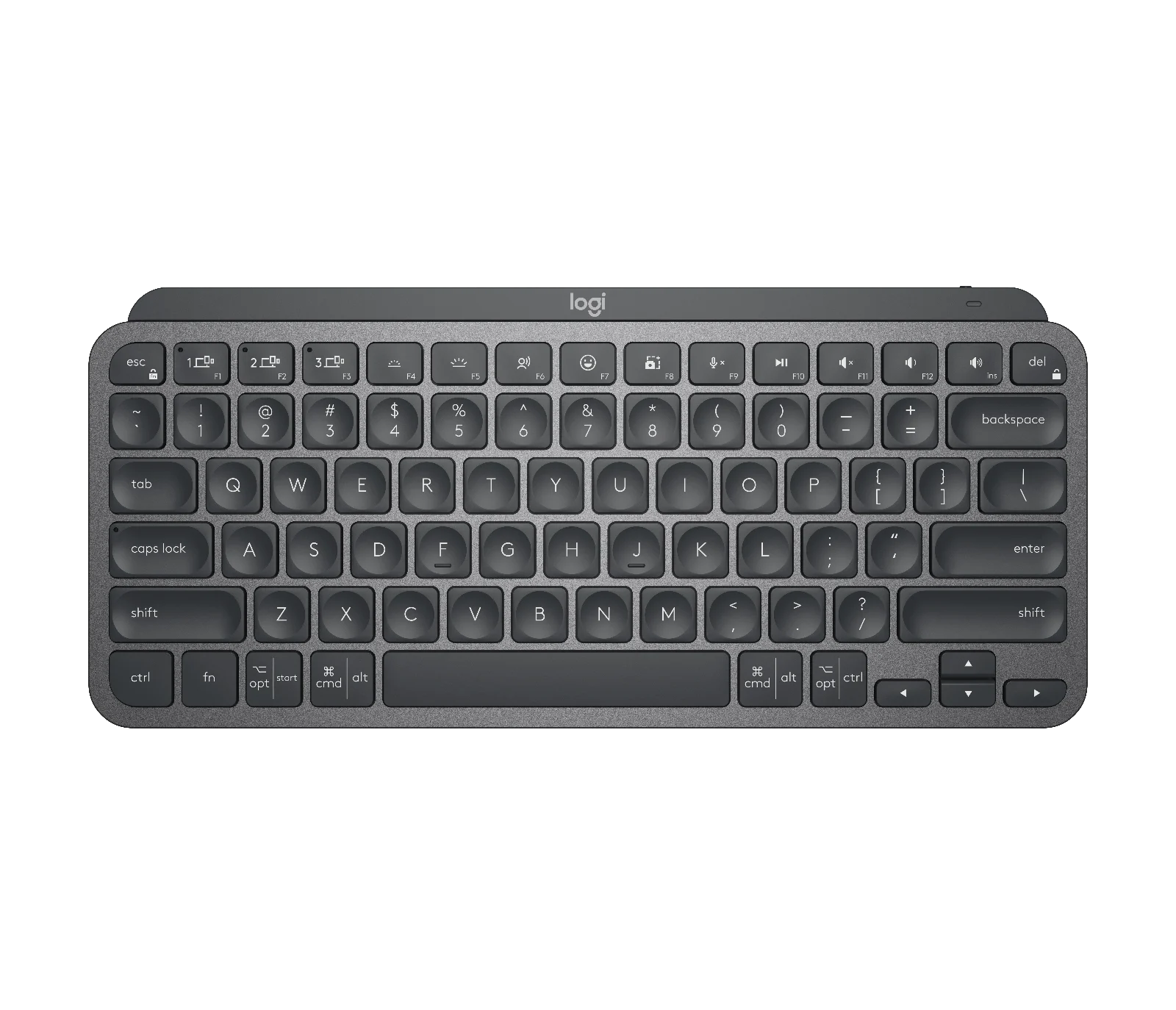
The Logitech MX Keys Mini Minimalist Wireless Illuminated Keyboard in Graphite with a US layout is a compact productivity keyboard for people who want more desk space without giving up a familiar main typing area. It is also aimed at users who move between computers and want one rechargeable keyboard instead of several wired or basic wireless models.
This review covers the exact Graphite English-US version, identified by Logitech as model 920-010388. It is not the full-size MX Keys model and not the mechanical MX Mechanical Mini. Logitech describes the MX Keys Mini as a minimalist keyboard with smart illumination, programmable keys and a space-saving form factor. Tom’s Guide’s independent review adds useful context: it found the board portable and particularly strong for typing, but criticized the price, limited lighting control and placement of its device-switching buttons.
The buying decision is therefore narrower than “is this a good keyboard?” The MX Keys Mini makes sense when compactness, low-profile typing and multi-device Bluetooth matter every day. It is less convincing if you need a number pad, an included wireless receiver, RGB lighting, hot-swappable switches or unrestricted access to the standard macOS function row.
What the compact layout changes
Tom’s Guide identifies the MX Keys Mini as a 75% keyboard. That layout retains the main typing keys while reducing the surrounding footprint and omitting a dedicated number pad. The smaller format can leave more room for a mouse and can make a shared or crowded desk easier to arrange. It also makes the keyboard more plausible for travel than a full-size office board.
The missing number pad is the central fit question. Writers, browser users, programmers and general office users may appreciate moving the mouse closer. Spreadsheet-heavy work, accounting and frequent numeric entry point in the opposite direction. Logitech says a full-size version with an integrated numpad is also available, so the Mini should be selected because the reduced layout suits the work, not simply because smaller sounds preferable.
Logitech specifies a width of 11.65 inches, height of 5.19 inches and depth of 0.83 inches for the MX Keys Mini. Tom’s Guide lists a slightly different 11.6 by 5.19 by 0.86 inches in its review. Use the manufacturer’s current dimensions when planning a tight keyboard tray or sleeve, and allow clearance rather than treating rounded reviewer figures as a precision fit guarantee.
Logitech says the smaller form factor aligns the shoulders and allows the mouse to sit closer. That is the manufacturer’s ergonomic rationale, not an assured outcome. Desk height, chair position, mouse size and individual preference still determine whether the arrangement feels comfortable. The practical benefit is easier positioning, not a promise that the keyboard will correct a workstation.
Typing feel and physical design
The low-profile key design is the strongest reason to choose this product. Logitech says the keys have spherical dishes shaped for fingertips and that increased key stability is intended to reduce noise. This describes the manufacturer’s design objective; it does not mean every typist will prefer the feel.
Tom’s Guide was much more positive in its independent assessment. Its reviewer called the keyboard exceptionally good for typing and recorded a result of 93 words per minute with 90.78% accuracy in that publication’s comparison table. Those numbers belong to the reviewer’s test conditions and are not a prediction for a typical buyer. They do support a narrower conclusion: people who like shallow, stable, laptop-style keys may find the MX Keys Mini easy to type on.
The same design will not satisfy everyone. A mechanical keyboard can provide deeper travel, more pronounced switch feedback and the option to change switches or keycaps. Tom’s Guide describes the MX Keys Mini’s keycaps as non-removable and identifies that as a customization limitation. Buyers should choose this board for its consistent, restrained typing design rather than expecting a platform for hardware experimentation.
The compact layout also changes how navigation and shortcuts are reached. That may be barely noticeable for writing and email, but more significant for users who depend on a number pad, dedicated function-row controls or a full-size navigation cluster. List the tasks you perform repeatedly before buying. If several depend on omitted keys, the small footprint may create more interruptions than it removes.
Backlighting and top-row controls
The MX Keys Mini uses a white LED backlight rather than RGB lighting. Logitech says the keys illuminate when hands approach and automatically brighten or fade according to the surrounding environment. Logitech also says Logi Options+ provides additional backlighting customization.
That approach suits a subdued office or evening workstation. It is not the right feature set for someone who wants colored effects, per-key RGB control or extensive hardware lighting controls. Tom’s Guide independently described the backlighting as restrictive and found that the keyboard makes many illumination decisions automatically. Treat the lighting as a visibility aid, not as a major personalization system.
The top row adds emoji, dictation and microphone mute or unmute functions. Logitech says its smarter Fn keys can send emojis, mute and unmute a microphone, and activate talk-to-text. These controls may be convenient for calls and written communication, but their behavior depends on the operating system and application receiving the shortcut. They should not be assumed to work identically in every meeting program.
The three device buttons create the more important top-row complication. Tom’s Guide reports that they sit over function buttons 1 through 3 and cannot be remapped. On macOS, its reviewer found that this displaced familiar functions including screen brightness controls and App Exposé. Logi Options+ can move some functions elsewhere, but that is a reassignment rather than a restoration of the original arrangement.
This matters most on a Mac-first workflow. If F1 through F3 are part of your muscle memory, check whether losing their standard behavior is acceptable. If an employer-managed computer does not permit Logi Options+, the available workaround may not be available at all. Windows users may be less affected, but they should still inspect the top-row arrangement before assuming every familiar shortcut is preserved.
Bluetooth and device switching
Tom’s Guide lists macOS, Windows and Linux among the supported operating systems and describes three-device Bluetooth pairing. Its Bluetooth-only description is incomplete against Logitech’s current specifications: the manufacturer also lists compatibility with a separately sold Logi Bolt USB receiver. That receiver is not included, and Logitech says other Logitech receiver types cannot be used in its place.
Three-device pairing is the keyboard’s most practical advantage over a basic compact board. A user could assign channels to a work computer, personal computer and tablet, then switch rather than repeatedly pair or move a cable. Tom’s Guide says initial connection is straightforward, channel switching is easy and a connection light provides confirmation.
Plan the connection before buying. A Bluetooth-capable computer can connect directly. If you need a receiver-based setup, include the separate compatible Logi Bolt receiver and an appropriate USB port in the total purchase. An old Logitech receiver should not be assumed compatible merely because it shares the brand.
Mac and Windows compatibility
Tom’s Guide says the standard board has dual-labelled macOS and Windows keycaps and can automatically switch between macOS and Windows key assignments. That makes the Graphite US version more flexible for a shared desk than a keyboard marked for one platform alone. It also means the keycaps carry more information than a dedicated Mac or Windows board.
Dual labels are useful when one keyboard serves two systems, but they are not a substitute for checking the actual shortcuts. The same independent review notes that the arrangement is not perfect and specifically discusses difficulties around some platform controls. The relevant question is not whether the keyboard supports both operating systems in general; it is whether the shortcuts used most often in your own applications remain convenient.
Software and setup
Logitech’s Logi Options+ software is an important part of the MX Keys Mini’s feature set. Logitech says the application can change Fn key functions, customize backlighting, assign app-specific profiles and create Smart Actions shortcuts. Logitech also says the keyboard can follow compatible Flow-enabled MX mice, including the MX Anywhere 3S and MX Master 3S, across devices and operating systems in Logi Options+.
Tom’s Guide says the software can customize most keys, show battery levels, assign Smart Actions and adjust lighting. That gives the fixed hardware more flexibility than its keycaps suggest, especially for people who use the same applications every day. A writing application, communications program and creative tool could each receive different shortcuts if the computer permits the software to be installed.
Software dependence is a limitation for managed offices, shared computers and users who prefer not to install peripheral utilities. The keyboard remains useful as a basic Bluetooth input device, but some of its value comes from profiles, remapping and battery information. If those features are unavailable, the product’s advantage over a simpler compact keyboard becomes smaller.
Battery, charging and maintenance
Tom’s Guide lists a 1,500 mAh battery and reports Logitech’s estimate of up to 10 days with backlighting and up to five months with backlighting off. These are manufacturer estimates reproduced by an independent source, not runtime results established in this review.
Actual intervals will depend on lighting use, wake behavior, usage hours and charging habits. The practical choice is straightforward: keep illumination active when visibility matters, or disable it when longer periods between charges matter more. Neither estimate should be treated as a fixed schedule for every desk.
Keep a charging cable accessible if the keyboard moves between a desk and a bag. Turn the board off before packing it and check its charge before a trip. The supplied sources establish that the battery is rechargeable, but they do not provide a replacement-battery procedure, charging-connector specification or warranty duration. Those details should be confirmed from current support information if serviceability or office deployment matters.
Maintenance is uncomplicated but constrained by the design. Tom’s Guide says the low-profile, non-removable keycaps do not snag easily during carrying, but also connects them with reduced customization and flexibility. They provide less opportunity for individual key replacement than a removable-keycap board. Keep food and loose debris away from the shallow gaps, use a gentle dry cleaning method suitable for electronics and avoid applying household liquid directly to the keyboard.
Portability and desk fit
The thin body and compact footprint suit hot desks, small home offices and people who regularly carry a keyboard. Tom’s Guide describes the board as lightweight and portable, with low-profile keycaps that do not snag easily in a bag. The independent listing of 17.8 ounces supports that portable positioning, although the keyboard still needs a stable work surface and a host with Bluetooth Low Energy or a compatible Logi Bolt receiver setup.
Portability does not mean it replaces every laptop setup. A separate keyboard is useful when the screen is raised, when a laptop is docked or when a shared desk needs a consistent typing surface. It is less useful if the computer must remain completely self-contained or if carrying a keyboard adds more equipment than the situation warrants.
Graphite is a restrained finish that should blend into an office or minimalist desk. Tom’s Guide called the styling mundane and corporate, while noting that the darker finishes looked sleek in its comparison. That is subjective, but it clarifies the product’s character: the MX Keys Mini emphasizes quiet utility rather than decorative lighting or mechanical-keyboard personality.
Alternatives and trade-offs
The most direct alternative is Logitech’s full-size MX Keys version with an integrated numpad. Choose that format for spreadsheets, accounting, frequent numerical entry or a preference for a conventional full-width layout. Choose the MX Keys Mini when mouse proximity, smaller desk occupancy and portability matter more than dedicated numeric keys.
The MX Mechanical Mini is the closer Logitech alternative for buyers who want a compact board with a mechanical typing experience. Its switch feel and hardware priorities differ, so it should not be treated as a direct substitute. The MX Keys Mini is the shallow, stable option; a mechanical model is more appropriate when physical feedback and switch choice are central to the purchase.
Tom’s Guide identifies the NuPhy Air75 V2 and Epomaker TH80 Pro as similarly sized or similarly priced alternatives and describes them as offering mechanical, hot-swappable customization. Those models deserve attention from buyers who want replaceable switches, a more distinctive appearance or broader hardware control. The MX Keys Mini remains more attractive to someone who values Logitech’s office-oriented software and simple three-device workflow.
Who should buy it
Buy the Graphite US-layout MX Keys Mini if you type frequently, work at a compact desk, switch among as many as three Bluetooth devices and prefer quiet low-profile keys to mechanical switches. It is a sensible fit for a mixed Mac-and-Windows setup when dual labels and easy channel switching are valuable, provided the displaced Mac function-row controls do not interrupt your routine.
Choose another keyboard if you need a number pad, an included wireless USB receiver, RGB effects, hot-swappable switches or extensive physical customization. Mac users should also look elsewhere if F1–F3 controls are essential and installing Logi Options+ is impossible or undesirable. The keyboard’s compactness is an advantage only when the omitted controls are genuinely unimportant.
Verdict
The Logitech MX Keys Mini is a focused productivity keyboard, not a universal upgrade. Its case rests on a compact 75% layout, low-profile typing, white proximity-based illumination, rechargeable power and three-device Bluetooth. Logitech’s specifications explain the feature set, while Tom’s Guide’s independent findings support the keyboard’s typing and portability strengths and identify its restrictive lighting and awkward device-button placement.
The conditional verdict is clear: buy this exact Graphite US-layout model when desk space, portable typing and multi-device switching are daily requirements, and when Logitech’s software approach fits your computers. Skip it for number-heavy work, mechanical customization, receiver-based connectivity or a Mac workflow that depends heavily on the displaced F1–F3 commands. If the layout matches your work, the MX Keys Mini removes clutter without removing the main typing area. If it does not, its small size will feel like a list of omissions rather than a benefit.