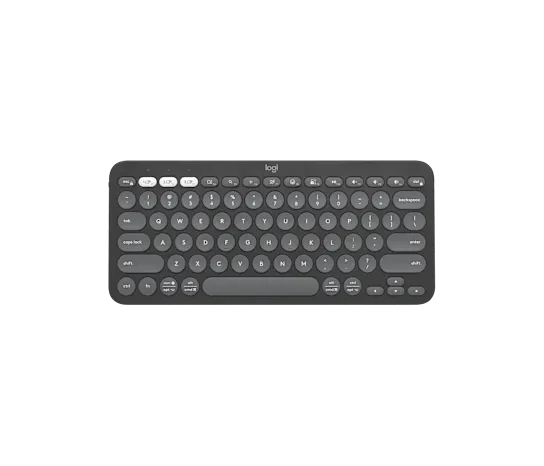
What this exact keyboard is for
The Logitech Pebble Keys 2 K380s in Tonal Graphite with a US English QWERTY layout is a compact Bluetooth keyboard for people moving between a computer, tablet and phone. Its appeal is not a full desktop feature set. It is the small, uncomplicated board you choose when saving desk space, carrying a keyboard between locations or switching hosts matters more than a number pad, backlighting or extensive remapping.
The central buying decision is therefore about priorities. Logitech supplies three Easy-Switch channels, shortcut keys and a slim laptop-like layout, while the independent review from Tom’s Guide identifies the circular keycaps as the main adjustment. If you already like rounded key surfaces, this design may feel distinctive and portable. If you want the most immediately familiar typing geometry, the shape deserves more attention than the color or thin profile.
This is the Tonal Graphite US variant, not a general description of every K380s package. Logitech’s catalogue identifies this version as “Tonal Graphite - English US (QWERTY)” and lists model number 920-011775. That distinction matters when ordering because other colors and layouts appear in the same product family. The keyboard is intended to be identified by its exact variant rather than by the K380s name alone.
Size, layout and portability
Logitech lists the keyboard at 10.98 inches (279 millimeters) wide, 4.88 inches (124 millimeters) deep and 0.63 inches (16 millimeters) thick. Those dimensions explain the space-saving appeal: it is easier to place beside a laptop or slide into a bag than a conventional full-size board. Tom’s Guide independently describes the design as compact and portable, consistent with Logitech’s measurements.
The listed weight is 14.64 ounces (415 grams). That is light enough to make portability a realistic part of the purchase, rather than merely a marketing description, while still giving the keyboard more presence than an ultra-minimal travel accessory. Tom’s Guide describes the board as light enough to forget in a bag and reports that its underside supports kept it from moving during typing.
The compact layout omits a dedicated standard numeric keypad, according to Logitech’s support material. That is a useful trade for a narrow desk but a real inconvenience for spreadsheet entry, accounting work or repeated numeric input. The keyboard’s small footprint saves space by removing hardware, not by making a full-size number pad disappear into a clever shortcut layer.
The keycaps are round and low profile. Logitech describes a quiet, laptop-like typing feel, while Tom’s Guide found the surface pleasant to touch but reported that the circular shape took time to adjust to. That independent finding is more useful than treating the design as universally comfortable: key shape, finger size and typing habits will determine whether the styling feels natural or causes extra corrections.
Connectivity and switching
The K380s uses Bluetooth Low Energy and can pair with up to three devices. The three Easy-Switch buttons provide the intended workflow: assign a host to a channel, then press the corresponding button when changing from one device to another. This suits a desk shared by a computer and tablet, or a portable setup where a phone occasionally becomes the typing target.
Tom’s Guide describes switching among three devices through the first three function keys and found the process straightforward during its review. That is an independent usability finding rather than a promise that every pairing situation will be effortless. The practical advantage is that the switching controls are built into the keyboard, so changing hosts does not require reopening a system menu each time.
Logitech lists a wireless range of 32.8 feet (10 meters), while noting that environmental and computing conditions can affect it. Treat that as a manufacturer operating specification, not a reason to expect the same distance through walls, crowded wireless environments or furniture. At an ordinary desk, the important point is that this is a wireless keyboard without a cable occupying the work surface.
A Logi Bolt USB receiver can be used with the keyboard, but Logitech says the receiver is not included. The keyboard therefore arrives as a Bluetooth-first product. Buying a separate Bolt receiver may make sense for a desktop that has unreliable Bluetooth or for someone who prefers a receiver-based Logitech setup, but the extra accessory should be included in the purchasing plan.
The K380s does not support older Logitech Unifying receivers, according to Logitech’s support information. Existing Unifying equipment should not be assumed to carry over simply because it is also Logitech-branded. Bluetooth works natively, and Bolt is the relevant receiver system, not Unifying.
Operating systems and shortcuts
Logitech lists support for Windows 10, Windows 11 or later, macOS 11 or later, iPadOS 14 or later, iOS 14 or later, Android 9.0 or later, ChromeOS and Linux. Basic functions work without the optional customization application. That broad host support makes the K380s a flexible companion for mixed-device households, although the exact shortcut behavior can vary by operating system.
The keyboard includes shortcuts for showing the desktop, searching, going back, voice dictation, opening an emoji menu and taking a screen capture. Logitech also identifies a battery LED and three Easy-Switch Bluetooth channels. These controls make the board more useful for everyday device interaction than a stripped-down travel keyboard, especially when the keyboard is used away from a conventional desktop operating system.
Logi Options+ supports customization on Windows and macOS, and Logitech says the function shortcuts can be customized through the application. Internet access is required to download the optional software. This creates a sensible division: the keyboard remains usable without software, while owners who want altered shortcuts need a compatible computer, an internet connection for installation and a willingness to configure the board there.
Tom’s Guide found the companion application easy to use and reported that function keys can be configured on a per-application basis. The same review also found the available actions less deep than the options on some productivity-focused boards. In practical terms, the software is useful for changing common actions, but this is not the right purchase if elaborate firmware-level customization is the primary requirement.
macOS users should examine the shortcut trade carefully. Tom’s Guide reports that the Bluetooth controls occupy the first three function positions, limiting their use for native macOS commands such as brightness or App Exposé. Options+ can rebind keys, but that does not fully restore the convenience of dedicated system controls. The keyboard supports macOS; it does not reproduce every MacBook shortcut arrangement without compromise.
Typing character and battery choice
Logitech describes the keys as scooped, low-profile and quiet, with a laptop-like feel. Tom’s Guide’s independent review found a soft press and quieter operation than low-profile mechanical keyboards, while noting that the board was not completely silent. This points to a good shared-desk role: reduced clicking is a benefit, but people seeking near-silent operation should keep expectations realistic.
The circular keycaps are the main limitation. Tom’s Guide reported that the shape took time to adjust to and separately reported below-average speed and accuracy after a week of extensive use. Those are the reviewer’s findings, not a universal performance result, but they identify a meaningful risk for fast typists and people with larger fingers.
The manufacturer specifies two AAA alkaline batteries, and the included batteries are pre-installed. Logitech lists battery life of up to 36 months while noting that usage and computing conditions can change the result. Disposable batteries avoid charging cables and battery-recharge planning, but buyers who prefer USB-C charging or rechargeable internal power should look elsewhere.
There is no integrated key backlighting. That omission helps explain why this is better suited to a daylight desk, travel bag or familiar workspace than to dark-room typing. It also means the K380s should not be selected by someone who relies on illuminated legends to find keys. The lack of lighting is a functional limitation, not merely a cosmetic difference.
Setup, ownership and maintenance
Initial setup is a Bluetooth pairing task: switch on the keyboard, select an Easy-Switch channel and pair it from the host device. The on/off switch is a simple control, and the pre-installed batteries reduce the number of steps before first use. Because the board can pair with three hosts, label or remember the channel assignments if the keyboard will move between personal and work devices.
The included box contents are modest: the Pebble Keys 2 K380s keyboard, two pre-installed AAA alkaline batteries, user documentation and an Important Info Document. Logitech does not list a Bolt receiver as included. That makes the package straightforward, but it also means the desktop computer should have compatible Bluetooth or the receiver cost and availability should be considered separately.
Battery replacement is the routine ownership task, and the manufacturer’s up-to-36-month figure means replacement should be infrequent under suitable conditions. Dust and debris around low-profile keys still warrant ordinary keyboard care; the supplied records do not establish a water-resistance rating or a special cleaning system.
Logitech says the keyboard contains more than 50% recycled plastic. That is a materials claim, not evidence that the product is repairable or that its batteries have no environmental cost. Owners who care about disposal should account for the two AAA batteries separately and follow applicable local recycling guidance rather than treating the recycled-plastic percentage as a complete sustainability assessment.
The manufacturer lists a one-year limited hardware warranty. Warranty coverage is different from durability evidence, and the independent review’s comments about a thin-feeling case should be considered alongside the portability benefit. A bag sleeve or protected compartment is sensible if the keyboard will travel regularly, especially because compact plastic construction is designed around low weight rather than ruggedized protection.
Alternatives and fit
The closest alternative category is a compact multi-device Bluetooth keyboard with more conventional key shapes. That type may be preferable if typing accuracy and immediate familiarity outrank the K380s’s rounded design. The independent review specifically favored boards with circular depressions in square keys for a larger fingertip landing area, so shoppers should compare the key geometry rather than choosing on dimensions alone.
The Keychron B1 Pro is a meaningful alternative category for buyers who want another compact wireless board and more customization. Tom’s Guide reports that it supports 2.4G wireless through an adapter, while describing its key shape as easier to adjust to. Those are independent review findings about the alternative; the more general decision is whether receiver connectivity and deeper customization matter more than the K380s’s simple three-device Bluetooth workflow.
Logitech’s MX Keys Mini is the more feature-oriented alternative within the same brand family. Tom’s Guide describes it as having a rechargeable battery and RGB backlighting, features the K380s does not provide. That makes it the more relevant direction for a buyer who wants illuminated, rechargeable desktop typing, while the K380s remains the more sensible category for someone prioritizing a simple, lightweight, battery-powered board.
A full-size keyboard is also a legitimate alternative, even if it is less portable. It can provide a dedicated number pad and a more expansive layout, which matters for data entry and desk-based work. The K380s earns its place when the desk is narrow or the keyboard must move between locations; it gives up layout space deliberately rather than attempting to replace every full-size function.
Verdict
Buy the Logitech Pebble Keys 2 K380s if you want a compact Tonal Graphite US keyboard that pairs with up to three devices, offers configurable shortcuts on supported desktop systems and avoids regular charging. Its strongest case is a mixed-device, space-conscious setup where simple switching and portability matter more than advanced customization or lighting.
Choose something else if you type quickly enough that round keycaps are likely to disrupt accuracy, need a number pad, want backlighting or prefer a rechargeable keyboard. The independent findings about adjustment and macOS shortcut compromises are too material to dismiss. For the right user, the K380s is a practical small keyboard; for a power typist, its compact design may solve the desk problem while creating a typing problem.