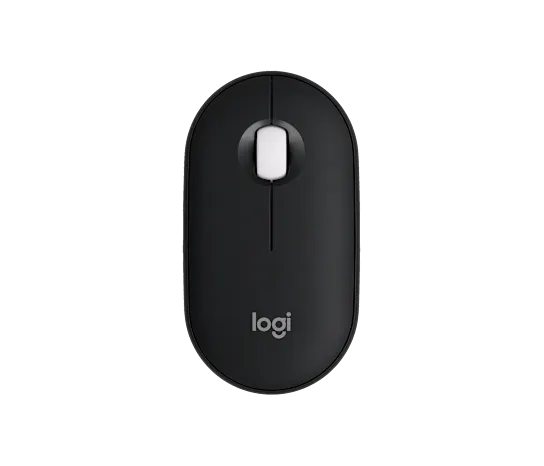
What this exact model is
The Logitech Pebble Mouse 2 M350s reviewed here is the black US variant with model number 910-007168. It is a slim Bluetooth mouse designed around portability rather than a large hand-resting shape or a broad shortcut layout. That makes the buying decision fairly clear: this is primarily a travel and light-productivity accessory, not an attempt to cover every mouse category.
Its appeal is the way several small conveniences work together. The mouse takes up little room, uses a replaceable AA battery instead of a charging cable, and can be paired with up to three devices. Logitech also gives it quieter clicking and a customizable middle button, although those additions do not change its fundamentally minimal design.
The useful question is not whether the M350s has enough features in the abstract. It is whether its compact shape, quiet operation, and Bluetooth switching matter more to you than palm support, thumb buttons, or a receiver included in the box. That tradeoff should guide the purchase more than the understated styling.
Size, shape, and portability
Logitech lists the mouse at 4.17 inches (106 millimeters) long. Its listed width is 2.31 inches (58.7 millimeters), and its height is 1.05 inches (26.62 millimeters). Those proportions put the M350s firmly in the slim, portable category. It is easier to allocate space for in a laptop bag or small work pouch than a taller, more contoured desk mouse.
The listed weight is 2.68 ounces (76 grams). That is relevant to someone who moves between desks, classrooms, meeting rooms, or temporary workspaces, because the mouse adds little to a bag compared with a larger office model. The same low-profile approach, however, leaves less physical room for a pronounced palm rest.
TechRadar’s independent review describes the shape as relatively flat, with a small incline toward the rear. That observation helps explain the difference between portability and long-session comfort. A low profile can disappear more easily into a travel setup, but it does not provide the raised, curved support some users expect from a primary desktop mouse.
TechRadar also reports that the compact size may become uncomfortable for people with larger hands during long periods. That is the most important fit warning in the available evidence. The manufacturer does not classify the mouse by hand size, so this should be treated as a practical caution rather than a universal fit rule.
For a smaller hand or someone who prefers a lighter fingertip-oriented grip, the proportions may make more sense than they would for someone who rests the whole palm on a mouse. That is an inference from the dimensions and the independent fit report, not a manufacturer fit claim. If flat mice already cause hand fatigue, the M350s is a poor candidate for replacing a main desk mouse.
Quiet everyday control
The mouse has three controls: left click, right click, and a scroll wheel that also provides middle click. There are no listed thumb buttons. This arrangement covers ordinary pointing, selecting, dragging, and scrolling, but it does not provide dedicated browser-back, browser-forward, or application shortcut buttons.
Logitech identifies Silent Touch Technology as reducing click noise by over 90 percent compared with the Logitech M185. That is a manufacturer comparison, not a claim that every sound disappears in every environment. TechRadar independently describes the buttons and scroll wheel as significantly quieter than a normal mouse button, supporting the practical value of the quieter design.
Reduced click noise is most relevant in shared spaces. A quiet mouse can be a more considerate choice for a library-like workspace, a shared office, a train, or a room where another person is concentrating. It is still a three-control mouse, though, so quieter operation should not be confused with a larger productivity command set.
The middle click is the control Logitech makes customizable through the Logi Options+ app. Logitech lists customization support on Windows and macOS, and TechRadar likewise reports that the middle click can be reprogrammed through the application on those platforms. This gives the mouse one adaptable control without adding physical buttons.
That distinction matters during setup. Basic mouse functions do not depend on changing the middle button into a shortcut, while personalization does depend on compatible software. Logitech says internet access is required to download the optional Logi Options+ app. The app is therefore useful for supported computers, but it is not necessary for the basic pointing functions.
Bluetooth and device switching
The M350s uses Bluetooth Low Energy technology and supports pairing with up to three devices. Logitech calls the switching feature Easy-Switch and describes changing between three devices with a press of the Easy-Switch button. The result is a better fit for a mixed-device workspace than a mouse intended to remain paired to only one computer.
The three-device arrangement could cover a work computer, a personal computer, and a tablet, provided each device is paired beforehand. Switching does not mean the mouse controls all three at once. It changes the active connection, so the benefit depends on whether those devices are nearby and whether moving between them is a regular part of your work.
TechRadar reports using the mouse with a Windows computer and an iPad, and describes switching between those devices as useful while traveling. That is an independent reviewer’s account of the feature in use, not a claim that every Bluetooth environment will behave identically. The manufacturer’s compatibility list remains the better reference for operating-system requirements.
Logitech lists Bluetooth Low Energy support for Windows 10 or later, macOS 11 or later, iPadOS 14 or later, Android 9.0 or later, ChromeOS, and Linux. The compatibility list is broad, but Logitech separately notes that Logi Options+ is not currently supported on some listed platforms. Basic functions can still work without that application where Logitech says the app is unsupported.
The black US variant does not include a Logi Bolt USB receiver. Logitech says the mouse is compatible with a Logi Bolt receiver, while its FAQ states that the receiver is not included. This is important for desktop buyers who expect to find a USB dongle in the package rather than pair the mouse directly through built-in Bluetooth.
The mouse also does not support Logitech’s older Unifying technology. Logitech’s FAQ says it supports native Bluetooth Low Energy or a Logi Bolt receiver instead. An existing Unifying dongle therefore should not be treated as a compatible shortcut. If your computer depends on a receiver, plan around a separately obtained Logi Bolt unit rather than assuming older Logitech hardware will work.
Tracking and battery
Logitech specifies high-precision optical tracking with a nominal resolution of 1,000 DPI. The manufacturer also lists an adjustable range from 400 DPI to 4,000 DPI in 100-DPI increments. That range lets users change cursor speed to suit a smaller screen, a larger monitor, or personal preference, but DPI alone does not determine whether a mouse suits gaming or extended desk work.
TechRadar lists the same 400-DPI to 4,000-DPI adjustable range and frames the mouse around portable productivity. That is a useful distinction when interpreting the specification. Adjustable sensitivity provides cursor-speed flexibility; it does not supply extra buttons, a more supportive shape, or a different connection method.
Power comes from one AA alkaline battery, and Logitech lists the battery as pre-installed. Logitech gives a battery-life estimate of up to 24 months, while noting that battery life may vary with user and computing conditions. TechRadar presents the two-year figure as Logitech’s claim and notes that its review period could not verify such a long duration.
A replaceable AA battery is convenient for travel because there is no charging cable to pack for the mouse. A spare cell can be carried separately and installed when needed. The tradeoff is that the M350s uses a replaceable battery rather than a rechargeable internal battery, so ownership involves keeping an appropriate AA cell available.
The top cover is magnetic and can be lifted from the rear crease to expose the AA battery slot. Logitech’s FAQ also identifies a receiver-storage pocket under the cover, although the compatible Logi Bolt receiver is not included. That arrangement supports the product’s travel focus by keeping battery access and optional receiver storage within the shell.
Setup and fit decisions
For a Bluetooth laptop or tablet, the practical sequence is to install the battery, switch on the mouse, choose an Easy-Switch channel, and complete pairing through the host device’s Bluetooth settings. The three-device capability becomes useful only after each intended computer or tablet has been assigned and paired to a channel.
Before choosing it, confirm that the host device supports Bluetooth Low Energy. Then decide whether switching among three devices is valuable enough to outweigh the need for a USB receiver. A Bluetooth-capable laptop is a natural match; a desktop without useful Bluetooth may require the separate Logi Bolt accessory.
Fit deserves equal attention. The dimensions explain the portability advantage, while TechRadar’s report about larger hands explains the potential cost. Someone who uses a mouse for short periods between travel tasks may accept the flat profile easily. Someone seeking a primary pointer for uninterrupted work should give more weight to hand support than to the small footprint.
The control layout creates another clear decision. Three controls are sufficient for ordinary navigation, document work, and scrolling. They are less suitable for a workflow that depends on several application shortcuts or thumb-operated browser commands. Logi Options+ can customize the middle button on Windows and macOS, but software cannot create physical side buttons that are not present.
The exact color and model number should also be checked before purchase. This review concerns the black US model 910-007168. Logitech lists other Pebble Mouse 2 colors and designs with different model numbers, so a listing for another finish should not automatically be assumed to have identical packaging or regional details.
Ownership and limitations
Ownership is relatively simple at the specification level. Replace the AA battery when necessary, keep the optical sensor and underside clear of debris, and store the magnetic cover securely after battery access. Logitech includes user documentation and an important information document, and lists a one-year limited hardware warranty for the product.
The first major limitation is ergonomics. TechRadar’s independent review says the compact shape may be unsuitable for larger hands, particularly during long periods. That finding matters more than the low weight if the mouse is intended to replace a larger, palm-supporting model at a permanent workstation.
The second limitation is the physical control count. Left click, right click, and middle click cover the basics, and the middle button can be customized on supported Windows and macOS systems. Still, the M350s cannot provide dedicated thumb controls or the broader command access found on mice designed for shortcut-heavy workflows.
The third limitation is receiver planning. Bluetooth is convenient on many laptops and tablets, but the Logi Bolt receiver is not included and the older Unifying receiver is unsupported. A buyer who already has reliable Bluetooth may see no problem. A receiver-dependent desktop user should account for the separate accessory before deciding that this is a complete out-of-box solution.
TechRadar also reported that the mouse’s feet produced a small amount of resistance compared with the reviewer’s usual mouse and some gaming mice. That is an independent comparative observation, not a standardized glide measurement. It reinforces the broader point that the M350s is designed around portable everyday control rather than a performance-focused gaming setup.
Alternatives and verdict
For sustained desk work, a larger ergonomic mouse is the more appropriate category when hand support is the priority. For extra controls or gaming-oriented use, a feature-focused compact mouse is the more appropriate category. Make those choices from documented controls and fit, rather than treating every compact design as an equivalent travel or gaming tool.
TechRadar also identifies Logitech’s Mobi Fold as an option for buyers seeking an even smaller travel footprint. The supplied passage supports its folding design and smaller folded footprint, but does not provide enough technical detail for a specification-by-specification comparison. That makes it an alternative category choice rather than a fully documented substitute in this review.
The Logitech Pebble Mouse 2 M350s is a sensible conditional choice for travel, light productivity, and quiet shared-space work. Its strongest evidence-backed advantages are the compact 4.17-inch (106-millimeter) length, 2.68-ounce (76-gram) weight, Bluetooth pairing for up to three devices, replaceable AA battery, and customizable middle click on supported Windows and macOS systems.
Choose this exact black US model when portability, quieter clicking, and multi-device Bluetooth control matter more than palm support, side buttons, or an included USB receiver. Skip it if you have larger hands, need a primary all-day desk mouse, rely on Logitech Unifying hardware, or want gaming-oriented controls. Its value is focused rather than universal: it keeps a small workspace supplied with a quiet pointer without adding much to the bag.