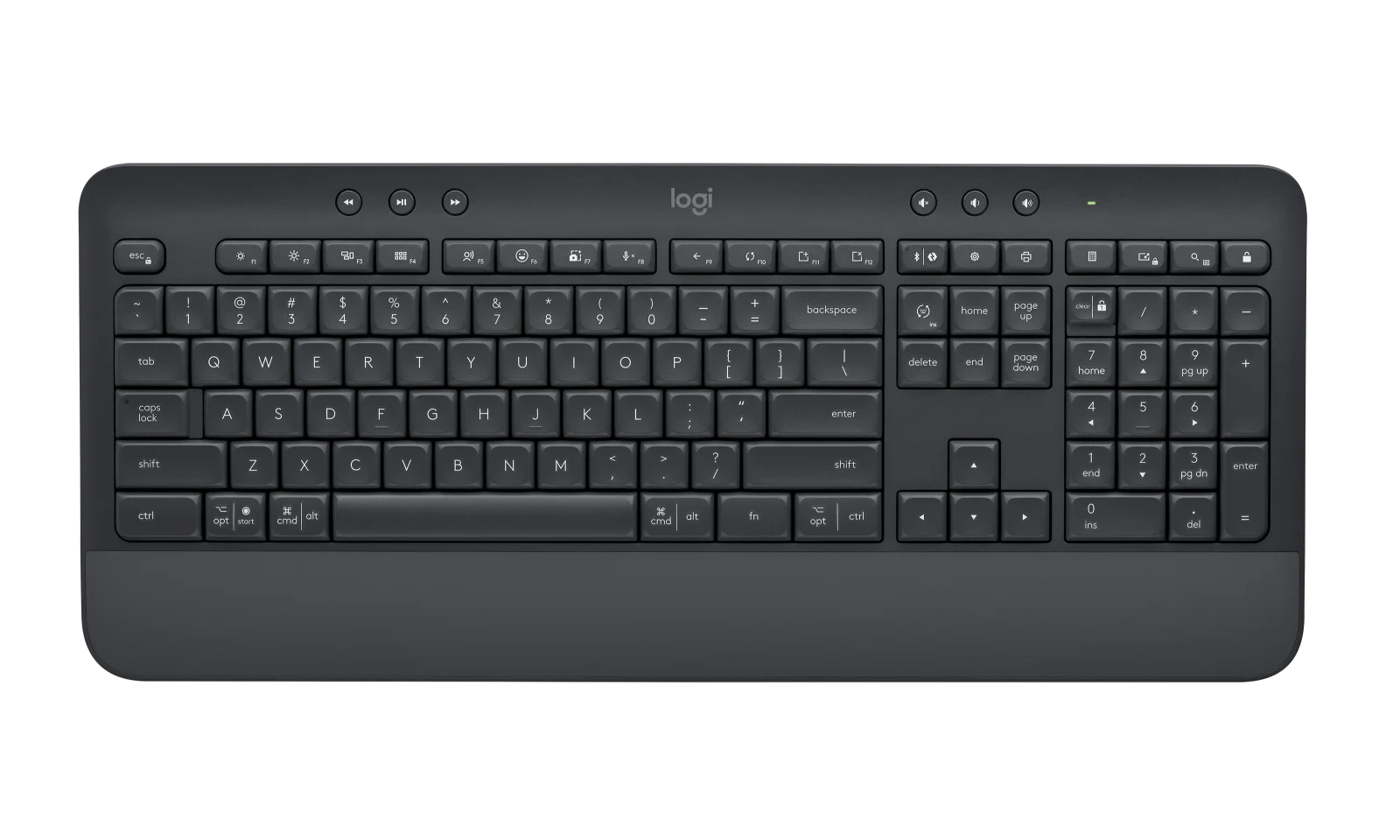
The Logitech Signature K650 Comfort Full-Size Wireless Keyboard with Palm Rest is a conventional office keyboard with a US layout, Graphite finish, numeric keypad and two wireless connection methods. The exact variant covered here is the Graphite English-US model with SKU 920-010908, rather than the visually similar Off-white version.
The K650’s appeal is easy to understand. It keeps the familiar full-size arrangement, adds shortcut keys for everyday work, avoids a charging cable and supports either Bluetooth Low Energy or Logitech’s Logi Bolt USB receiver. Its soft membrane typing feel will suit people who want a quiet office keyboard rather than a mechanical one.
The harder question is whether the integrated palm rest, absent backlight and single-device connection fit your desk. Those limitations are not minor details. The K650 can be a sensible keyboard for one primary computer, but it is a poor choice if you need substantial wrist support, illuminated keys or quick switching among several devices.
What this exact K650 provides
Logitech describes the Signature K650 as a wireless keyboard “equipped for everyday work and comfort.” Its core design is a full-size office layout with a number pad, navigation keys and a top row of productivity controls. That makes it suited to documents, email, spreadsheets, browser work and school assignments where a compact layout would sacrifice familiar keys or convenient number entry.
The keyboard includes an integrated palm rest and deep-cushioned keys. Those are manufacturer design descriptions, not a promise that the rest will suit every hand position. Independent reviews generally found the typing experience comfortable, but they were notably less enthusiastic about the palm rest. That distinction should shape the buying decision: the K650 is an office keyboard with a built-in ledge, not necessarily an ergonomic keyboard in the fuller sense.
Tom’s Guide describes the K650 as having sixteen dedicated shortcut keys. The controls cover functions such as screenshot capture, microphone muting, dictation, browser navigation and emoji access, although their behavior depends on the operating system. These shortcuts are most valuable when they correspond to actions you repeat throughout the day. A dedicated mute key can reduce the need to find a meeting application’s control, while browser and screenshot keys can reduce mouse movement.
The function row prioritizes media and productivity shortcuts by default. Logitech says the standard F1 through F12 behavior can be restored with Fn plus Esc. That arrangement is convenient for users who mainly browse, communicate and manage documents, but less convenient for software that relies heavily on ordinary function keys. The change is reversible, so the issue is preference rather than a permanent restriction.
The Graphite US layout also has dual-purpose keys for Windows and macOS conventions. Logitech provides shortcuts to force Windows, macOS or ChromeOS layout modes, which is useful when the keyboard is moved between platforms. Layout selection should not be confused with multi-device switching: the K650 is intended to be paired with one device at a time.
Typing feel and full-size fit
The K650 is not a mechanical keyboard. TechRadar identifies its switch as a plunger design and describes the keys as responsive but slightly squishy. Tom’s Guide characterizes them as smooth, bouncy and slightly concave. Together, those independent descriptions point to a familiar low-profile office feel: soft, quiet and forgiving, rather than clicky or sharply tactile.
That feel is a strength for ordinary desk work. Someone replacing a basic office keyboard should not need to learn an unusual layout or adapt to loud switches. The K650 is aimed at reports, messages, forms, spreadsheets and general productivity rather than enthusiasts selecting among mechanical switch types.
It is less suitable if the main reason for upgrading is a pronounced tactile bump, audible click or mechanical key response. TechRadar specifically notes that the keyboard is not mechanical. A mechanical alternative may be preferable for that reason, although it may also bring more noise, a different height and a less conventional layout.
The full-size format has a practical cost. TechRadar lists dimensions of 193.5 by 457.3 by 24 millimeters, or 7.62 by 18 by 0.94 inches. Tom’s Guide gives rounded dimensions of 7.6 by 18 by 0.9 inches. These are not competing designs; they are two presentations of a broad keyboard. TechRadar lists the weight as about 700 grams, while Tom’s Guide gives 1.5 pounds.
Measure the intended desk area before buying. The keyboard needs room not only for the main key field and number pad but also for its attached palm-rest extension. A monitor stand, notebook and mouse can make that extra width and depth more noticeable on a small desk. If the number pad is essential, the footprint is a reasonable trade. If it is rarely used, a compact keyboard may leave more useful room for the mouse.
The integrated palm-rest limitation
The palm rest is the most important qualification to Logitech’s comfort message. Logitech describes it as an integrated soft-touch palm rest intended to support long periods at a desk. TechRadar, however, says the palm rest does not work as intended, and Tom’s Guide calls it mediocre.
TechRadar’s independent evaluation found that the rest supported only the edge of the palm and was angled downward. The reviewer reported that the wrists did not comfortably reach it, and that moving the keyboard farther from the desk edge changed the angle of the hands rather than solving the problem. This is a specific design limitation, not a reason to dismiss every aspect of the K650.
The sensible interpretation is that the palm rest is part of the keyboard frame, not a substitute for an ergonomic keyboard or a separate support arrangement. It may be unobtrusive for someone who keeps the wrists lifted and rests the forearms on the desk. It may also feel useful as a smooth transition below the keys. But a buyer choosing the K650 primarily for meaningful wrist support should compare ergonomic designs instead.
The rest cannot be removed. Logitech says it is a permanent extension of the keyboard frame. That matters when planning a small desk, transporting the keyboard or deciding whether an external support can be positioned exactly where needed. The fixed construction also means there is no way to convert the K650 into a shorter board after purchase.
Wireless connections and operating systems
The K650 connects through Bluetooth Low Energy or the included Logi Bolt USB receiver. TechRadar identifies the Bluetooth connection as Bluetooth 5.1 and the receiver connection as 2.4GHz wireless. Logitech gives the wireless connection a range of up to 33 feet, or 10 meters; TechRadar also lists a 10-meter range.
Bluetooth is the cleaner option for a compatible laptop or tablet when USB ports are scarce. The Logi Bolt receiver is useful for a desktop or laptop with an available USB-A port. The supplied evidence identifies it as a USB receiver but does not establish that it is USB-C. A computer with only USB-C ports may therefore need a hub or adapter, depending on the ports and accessories already available.
Logitech lists Windows, macOS, Linux, iPadOS, iOS and Android compatibility and says the keyboard is Works With Chromebook certified. TechRadar gives version details for Windows 10 or later, macOS 10.15 or later, iPadOS 14 or later, iOS 14 or later and Android 8.0 or later. Those listings establish broad platform compatibility, not identical shortcut behavior everywhere.
Tom’s Guide found that only ten of the sixteen keyboard shortcuts worked on Apple devices during its review. This does not prevent basic typing on a Mac or iPad, but it changes the value proposition for Apple users who are buying specifically for the shortcut row. Windows and ChromeOS buyers may get a more complete match for the advertised productivity controls.
The K650 is intended to connect to one device at a time. Tom’s Guide lists a single connection channel, and Logitech says it is intended to be paired with one device at a time even though it supports the two connection methods. That is fine for a keyboard that stays with one desktop or laptop. It becomes inconvenient at a desk shared by a work computer, personal computer and tablet.
Setup is therefore straightforward but should be planned. Decide whether Bluetooth or Logi Bolt best suits the computer, check available ports, pair the keyboard and select the appropriate operating-system layout if necessary. The stated 10-meter range is a specification, not a guarantee that every room, obstruction or wireless environment will behave identically.
Logi Options+ adds software-based customization. Tom’s Guide says it supports updates, explains built-in shortcuts and allows key customization for different applications. Some of the additional actions require an account, according to that review. The K650 remains a normal keyboard without extensive software configuration, but buyers who expect deep remapping should include the software step in their setup plan.
Batteries, cleaning and lighting
The K650 is not rechargeable. Logitech’s technical specification panel and its separate support specification identify two AA batteries with an advertised life of up to 36 months. These are replacement batteries rather than an internal cell charged over USB. The stated interval is a manufacturer estimate that depends on use.
Logitech’s sales-page FAQ contains an inconsistent AAA reference. Its direct technical specifications, the separate K650 support sheet and both independent reviews identify AA instead. Use the AA requirement in the dedicated support specifications, and check the markings in the battery compartment when installing replacements. The conflicting FAQ wording should not be used to select a different battery size.
The non-rechargeable design suits a stationary desk where avoiding charging cables matters more than topping up an internal cell. There is no battery cable to keep attached, and the stated replacement interval is long. The trade-off is that a depleted keyboard cannot be restored through USB charging. Users who prefer rechargeable peripherals may reasonably favor another model.
Logitech describes the K650 as spill-resistant and easy to clean. Tom’s Guide reports resistance to accidental spills of up to two fluid ounces. That should not be read as waterproofing. A spill rating is a limited design claim, not permission to expose the keyboard repeatedly to liquid. Keep drinks away when practical, disconnect the keyboard if a spill occurs and follow the manufacturer’s cleaning guidance.
There is no backlighting. TechRadar lists RGB or backlighting as unavailable, and Tom’s Guide identifies the lack of a backlight as a significant weakness. This matters most in a dim room, bedroom or late-night study area. In a bright office, the omission may be irrelevant. Buyers who regularly type without a desk lamp should choose a backlit alternative rather than hoping the printed legends will be sufficient.
Who should buy the K650
The K650 suits a one-computer desk where a number pad, familiar navigation keys and dedicated productivity controls matter. It is particularly sensible for documents, spreadsheets, email, browser-heavy work and schoolwork. Bluetooth and Logi Bolt provide flexibility at setup, while the manufacturer-rated battery interval minimizes routine maintenance.
It also suits buyers who prefer soft, quiet office keys. Independent reviewers found the typing experience comfortable and responsive, but those were their evaluations rather than a universal result. The best match is someone who wants a conventional keyboard and does not regard mechanical feedback as essential.
Do not select it mainly for the palm rest. Its fixed, downward-angled design received the clearest criticism from independent reviewers. Do not select it for dark-room typing because it has no backlight. Do not select it for fast switching among several computers because it has one connection channel.
Alternatives that change the decision
The Logitech MX Keys S is the more relevant alternative when illumination and multi-device switching matter. Tom’s Guide says the MX Keys S has an automatic white light and can connect to three devices at once. That directly addresses two K650 limitations for a desk shared by a work computer, personal computer and tablet. The supplied evidence does not establish current pricing or availability, so those details need separate checking.
The Logitech Ergo K860 is the more relevant comparison when ergonomic positioning is the priority. Tom’s Guide describes the K650 as similar to a non-ergonomic version of the Ergo K860, with a smaller palm rest and more shortcuts. The distinction is important: choosing the K650 because it has a palm rest is not the same as choosing a keyboard designed around ergonomic positioning.
The Logitech MX Keys Mini is a better direction when desk space matters more than a numeric keypad. Tom’s Guide identifies it as a smaller alternative. Its compact arrangement changes number entry and navigation, so it is not an equal substitute for spreadsheet-heavy work. It is instead a different priority: a smaller footprint for a desk that can give up full-size keys.
A mechanical keyboard is the correct category for buyers who care about switch feel, click or pronounced tactility. TechRadar says the K650 is not mechanical, and its keys have a somewhat squishy feel. Mechanical alternatives vary widely in noise, height, layout and wireless behavior, so the important comparison is the desired typing experience rather than price alone.
Verdict
The Graphite US-layout Logitech Signature K650 is a practical full-size wireless keyboard with a clear one-desk use case. It offers a numeric keypad, a conventional soft typing feel, dedicated productivity controls, Bluetooth Low Energy, an included Logi Bolt receiver and broad operating-system compatibility. Logitech also describes it as spill-resistant and rates its two-battery design for up to 36 months of use.
Its weaknesses are equally clear. The palm rest is fixed and received limited-support criticism from independent reviewers. There is no backlight, the keyboard is not rechargeable and the single connection channel is inconvenient for multi-device desks. The full-size footprint also needs real desk space, while Apple users should not assume every shortcut will work identically.