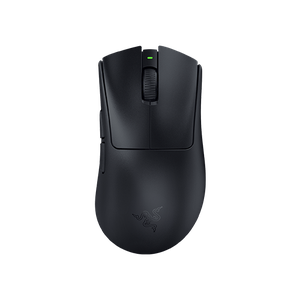
The Razer DeathAdder V3 HyperSpeed is a focused wireless mouse for people who want low weight without giving up an ergonomic shell. This exact variant is the black US model, with a right-handed shape, a 2.4 GHz USB receiver and a USB-C-to-A cable. Its main buying question is not whether the sensor has a large headline number. It is whether the narrower DeathAdder shape suits your hand and whether wireless convenience matters more than Bluetooth or extensive tuning options.
The product sits between a conventional symmetrical gaming mouse and a large palm-support design. Razer says the shape was refined with professional players, reducing the length and width compared with the DeathAdder V3 Pro while retaining a high peak for support. That makes this HyperSpeed version a smaller interpretation of the DeathAdder family rather than an identical replacement for the Pro.
Exact model and physical fit
Razer specifies a weight of 55 grams. The manufacturer lists the mouse at 122.2 millimeters long, 64.8 millimeters wide and 41.3 millimeters high. Those measurements point to a relatively compact ergonomic shell, especially across its width. TechRadar independently described it as relatively small across the width while retaining the length associated with a typical full-size pointer.
The form factor is right-handed and asymmetrical. Left-handed buyers can therefore eliminate this model before considering sensor performance or software. The sloped shape may give the hand a more natural resting position, but an ergonomic contour is not universally comfortable. TechRadar’s reviewer found the mouse more comfortable than other ergonomic gaming mice they had tried, while also warning that the shape would not suit everyone.
Razer’s own comparison describes the HyperSpeed as reduced in length and narrower in width than the DeathAdder V3 Pro, while retaining a high peak for support. That distinction is useful when choosing between the two models. Someone who likes the DeathAdder idea but finds larger mice intrusive may prefer the HyperSpeed; someone who needs more room for a broad palm should not assume the family resemblance solves the fit issue.
The shell uses a smooth-touch finish. Razer presents that finish as a handling improvement, and TechRadar reported that it provided enough grip for its reviewer without grip tape. No grip tape is included, according to that independent review. Buyers who prefer textured side panels, or who already know that smooth coatings become slippery for them, should treat the surface as a personal preference rather than a universal comfort feature.
The 55-gram weight is the clearest physical advantage. A light shell can make repeated repositioning feel less demanding, particularly for users who make broad swipes. That does not make low weight automatically preferable: some users like additional mass as an anchor for slower movements. The useful distinction is whether the mouse’s lightness complements your control style, not whether 55 grams is inherently better.
Sensor, feet and controls
The mouse uses Razer’s Focus X 26K Optical Sensor. Razer specifies a maximum resolution of 26,000 DPI and reports 99.6 percent resolution accuracy. DPI is a sensitivity range, not an instruction to use the highest setting. Most buyers should choose a setting that matches their display, game sensitivity and available desk space rather than treating the maximum as a performance target.
Razer also lists Smart Tracking, which automatically calibrates to maintain a consistent lift-off distance on surfaces. That feature addresses a recurring setup variable when a player lifts and replaces the mouse. It does not eliminate the need for a suitable surface, and the supplied material does not establish that every desk material will behave identically.
The underside has PTFE feet. Razer’s parts listing describes three larger pieces, while TechRadar described two large skates covering a substantial surface area. Those descriptions may be counting the feet differently, so the manufacturer’s parts listing is the safer reference for what is supplied. TechRadar’s independent finding is more useful for surface choice: the skates produced very smooth glides on mouse pads.
The same independent review reported that the feet were not thick enough for hard surfaces. That is a specific limitation, not a claim that the feet are poor everywhere. A desk-mat user is closer to the reviewed use case than someone who wants to move directly across wood, glass or bare laminate. If a pad is not part of your desk, the mouse’s low friction should not be assumed from the PTFE material alone.
There are six buttons, and Razer uses Optical Mouse Switches Gen-3. The manufacturer specifies a 90-million-click lifecycle, 0.2 millisecond actuation and no debounce delay. These are design specifications from Razer, not a prediction of how quickly an individual person will click or how long a particular unit will remain trouble-free.
TechRadar independently found the main buttons light enough for rapid clicks while stable enough to resist accidental presses. The reviewer also found the side buttons easy to reach and actuate. The scroll wheel was described as easy and secure to operate, but the middle click felt awkward and produced inconsistent actuation in that review. That complaint matters most if you frequently use middle click for browser tabs, camera controls or game actions.
Wireless connection and battery
Wireless operation uses Razer HyperSpeed through the included USB dongle. TechRadar reported consistent connectivity and no lag during its independent evaluation. That finding describes one reviewer’s assessment rather than a universal result for every desk, computer or radio environment, but it supports the mouse’s central purpose as a responsive wireless pointer.
The standard connection is 2.4 GHz wireless rather than Bluetooth. TechRadar specifically lists the absence of Bluetooth as a drawback. This matters if the mouse must move between a gaming desktop, a laptop and a tablet without carrying a receiver. It matters less if the receiver can remain connected to one computer and portability is not a priority.
The included cable is USB-C to USB-A. It provides a wired connection and a charging path, but it is not a second wireless protocol. TechRadar described the cable as well made but not braided, and reported that it was not long enough to be practical for wired play. The reviewer also found that cable drag could affect wired use, even if the effect was not as severe as with some other non-braided cables.
Razer specifies up to 100 hours of battery life. The word “up to” is important because battery duration depends on settings and use. TechRadar evaluated the claimed endurance in its own review and reported only a small battery decrease after several days. That independent observation supports the claim as plausible in its review conditions, but it should not be read as a fixed runtime for every configuration.
The mouse can be upgraded to wireless polling rates up to 8,000 Hz with the separately sold HyperPolling Wireless Dongle. Razer identifies that accessory as an additional purchase, so the standard package should not be treated as an 8,000 Hz setup. For most buyers, the more consequential decision is whether the normal wireless connection, battery routine and receiver arrangement fit the desk.
Razer also says the standard dongle supplied with the mouse supports multiple devices. The manufacturer describes this as a way to connect the mouse and keyboard to one dongle, provided the relevant HyperSpeed peripherals support the feature. That can free a USB port, but it does not turn the mouse into a Bluetooth device or remove the need for compatible Razer hardware.
Setup and software
Initial setup consists of connecting the receiver and configuring the mouse through Razer Synapse if you want custom controls. The supplied records establish the receiver and cable, but do not establish that a receiver extension accessory is included. A desktop computer with a crowded rear panel may therefore require some forethought about where the dongle will sit.
The bottom button has two default functions. Razer says pressing and holding it for 2 seconds turns power on or off, while pressing and releasing it changes DPI. The factory DPI stages are 400, 800, 1,600, 3,200 and 6,400 DPI. Those stages offer a practical starting sequence before creating a more tailored configuration in Synapse.
The bottom button is programmable in Synapse. Razer also says the mouse stores one onboard profile based on the last Synapse profile used, including custom DPI settings and button configurations. One onboard profile is useful when moving between computers, but it is not a large library of independent profiles stored inside the mouse. Buyers with separate work, creative and gaming layouts should expect some software management.
HyperShift adds another control layer. Razer describes it as a way to activate a second set of custom key bindings and a DPI stage when a selected button acts as a modifier. TechRadar reported that nearly every button can be rebound, but that the left click is not directly rebindable unless HyperShift is activated. That distinction matters for unusual layouts and accessibility-focused remapping.
Dynamic Sensitivity provides more control than simply selecting a DPI stage. Razer describes deeper control of DPI output and mouse input, while TechRadar explained that Synapse can customize a cursor-acceleration curve based on flick speed. The feature may suit someone who wants different behavior for slow positioning and fast swipes, but it also introduces another setting to troubleshoot when movement feels inconsistent.
TechRadar also reported an angle-rotation setting that can align mouse output with the natural angle of a user’s grip. This is an independent software finding, not a physical specification. It may help when horizontal movements routinely drift because of how the mouse is held, although it should be approached as calibration rather than a substitute for choosing a comfortable grip.
Synapse is capable, but it is not a complete competitive-tuning suite. TechRadar reported that the mouse lacks advanced options including a slam-click filter, lift-off-distance adjustments and angle snapping. Those omissions are more significant for buyers who tune every sensor behavior than for users who need ordinary DPI selection, button assignments and wireless play.
Razer’s support guidance recommends disabling Windows Enhance pointer precision when optimizing accuracy and says Synapse can provide additional performance adjustments. That advice concerns the operating system and software environment, not a measured improvement that applies equally to every desk. It is a reasonable troubleshooting step if pointer movement does not match the chosen sensitivity.
Ownership and alternatives
Ownership is relatively straightforward at the feature level: keep the sensor and feet clear of debris, charge through the USB-C cable when needed, and maintain consistent Synapse settings between computers. The supplied records do not establish an ingress rating, a removable battery or a special cleaning schedule, so those features should not be assumed. Razer does direct buyers to a replacement-parts page, which provides a route for checking supported components.
Razer states that the product comes with up to 2 years of warranty and technical support. Coverage can depend on the purchase location and applicable terms. Razer also states that direct RazerStore purchases receive 14-day risk-free returns. That return policy is specific to direct purchases and should not be treated as the rule for every retailer selling this model.
The DeathAdder V3 Pro is the closest named alternative because it keeps the right-handed ergonomic family resemblance. Razer’s comparison lists the Pro at 63 grams, with dimensions of 128.0 millimeters long, 68.0 millimeters wide and 44.0 millimeters high. It also lists a Focus Pro 30K sensor with a maximum resolution of 30,000 DPI. The Pro is the larger, more substantial option; the HyperSpeed is the lighter, narrower one.
TechRadar additionally described the V3 Pro as slightly heavier and more expensive, with upgraded sensor capability and faster IPS speeds and acceleration. Those differences make the Pro relevant when a larger shell and additional sensor headroom matter more than minimizing weight. If the HyperSpeed already sounds narrow, changing to the Pro may address fit more directly than compensating through software.
The Asus TUF Gaming M4 Air is the alternative for buyers who prioritize low weight but do not need wireless operation. TechRadar lists it at 50 grams and describes it as wired-only. The comparison is therefore not simply about which mouse has the smaller number. It is about choosing cable-free movement with the Razer or accepting a cable in exchange for a lighter wired design.
Final buying decision
Buy the Razer DeathAdder V3 HyperSpeed if you want a 55-gram wireless mouse, use your right hand, prefer a sloped ergonomic shape and are comfortable connecting through a 2.4 GHz receiver. Its strongest case is the combination of low weight, smooth pad gliding, configurable controls and a sensor range that already exceeds what many users need.
Choose another model if you need Bluetooth, use your left hand, work directly on a hard desk surface or expect extensive lift-off and click-filter controls. The missing advanced adjustments are not fatal for ordinary gaming, but they narrow the audience for competitive users who tune every behavior. The middle-click issue reported by TechRadar also deserves attention if that input is central to your workflow.
My conditional verdict is that this exact black US model makes the most sense when fit is checked before speed is considered. Its wireless design is compelling, but the reduced width and right-handed shell decide comfort. If those suit your grip and a mouse pad is already part of your desk, the DeathAdder V3 HyperSpeed is a focused, capable choice. If not, the larger DeathAdder V3 Pro or wired Asus TUF Gaming M4 Air offers a clearer answer to a different priority.