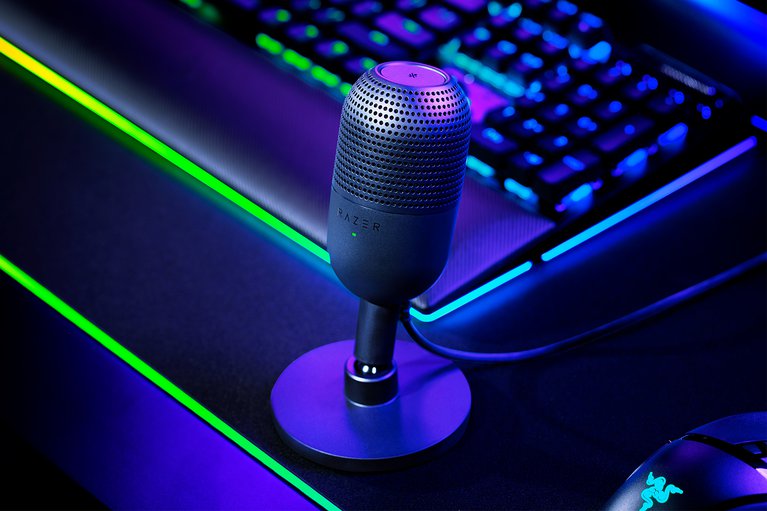
The Razer Seiren V3 Mini USB Microphone in Black is designed for a straightforward desktop problem: making spoken audio clearer than a typical webcam or headset microphone without adding a large audio interface. This review covers the US Black model RZ19-05050100-R3U1, not the original Seiren Mini, Seiren V3 Chroma or Seiren V3 Pro.
That distinction matters because the V3 Mini adds a multifunction control and a different cable arrangement while retaining the compact desktop format. The practical buying question is not whether it has an impressive feature list. It is whether its directional pickup, placement requirements and software controls suit the way you speak at your desk.
What this exact model is
Razer describes the product as an ultra-compact USB microphone with a 14 mm condenser microphone, a supercardioid pickup pattern and a tap-to-mute sensor with an LED indicator. The selected finish for this listing is Black, and the selected model is Razer Seiren V3 Mini.
Those details place it firmly in the single-speaker desktop category. It connects directly to a computer and is intended for calls, streaming and voice recording rather than a multi-microphone recording system. The 14 mm specification identifies the microphone hardware, but it does not by itself predict how warm, bright or natural a particular voice will sound.
Supercardioid pickup makes aiming important. The microphone is intended to favor sound from a defined direction rather than accept a shared conversation equally from around the desk. That can help a solo speaker keep the intended voice prominent, but it also makes positioning more consequential.
A directional pattern is therefore a fit decision, not automatically an advantage. It suits one person who can remain in front of the microphone. It is less convenient for two people sharing a desk or for a speaker who frequently turns away while talking.
Controls for ordinary calls
The most useful physical update over the original Seiren Mini is the multifunction tap-to-mute control. Laptop Mag reports that one tap can mute the microphone and that the control can also be assigned to microphone or playback volume.
That is more flexible than a mute-only switch. A person can keep the microphone on the desk and quickly change its state without finding the meeting application. The extra behavior also means it is worth learning the assigned gestures before an important call, particularly if the button uses different tap counts for different actions.
The manufacturer lists a tap-to-mute sensor with an LED indicator. Laptop Mag further reports that the front light glows red when the microphone is muted and green when it is not. That provides a visible state check when the microphone sits below a monitor or beside other equipment.
Razer Synapse adds customization for the control. Laptop Mag says users can assign it to microphone or playback volume and change the number of taps used for different functions. This is useful if you want the button to do more than mute, though it makes the preferred arrangement less self-explanatory than a dedicated mute button.
Stand and placement
The included stand is basic. Laptop Mag describes it as bare bones and says it includes a built-in shock absorber. That makes it a ready-to-place desktop support rather than evidence of a heavily adjustable mounting system.
The shock absorber is relevant to a normal desk where the microphone shares a surface with a keyboard. Laptop Mag reports that it helped minimize noise from typing and accidental desk bumps. It should be understood as help with mechanical vibration, not as a way to remove every keyboard, fan or room sound.
Placement still matters despite the small size. Laptop Mag’s reviewer found that the microphone sounded best when closer to the speaker and tilted slightly backward. That supports a practical setup sequence: bring the microphone closer before increasing software gain, aim it at the speaker, and adjust its angle rather than leaving it distant and flat.
The supplied stand is not the only mounting option. Laptop Mag reports compatibility with third-party microphone arms. An arm may make it easier to keep the microphone near the speaker or clear space around the keyboard, but the supplied evidence does not establish a universal connector standard or identify a particular arm.
Check the arm’s connector before purchasing one. Compatibility with third-party arms is useful, but it should not be treated as proof that every arm will fit without an adapter.
Voice pickup and sound expectations
Laptop Mag describes the recorded audio as clean and clear and says the supercardioid pattern helped isolate the reviewer’s voice from background noise. That is an independent review finding rather than a promise for every room. Fans, reflective walls, keyboards and speaking distance can still affect the result.
The same review says the microphone sounded good out of the box and worked with background-noise-cancellation tools. Software processing can help in a noisy environment, but aggressive processing can also change speech. Correct placement should come before adding more filters or gain.
Laptop Mag considers the V3 Mini suitable for streaming and YouTube recording. That assessment fits a solo speaker who wants a direct USB connection and directional pickup. It does not establish that the microphone replaces a complete studio chain, includes an XLR output or supports a multi-input recording workflow.
The review also compares the V3 Mini with the HyperX SoloCast. Laptop Mag says the SoloCast uses a basic cardioid pickup pattern, while the Seiren V3 Mini uses supercardioid pickup. The same source says the SoloCast’s tap-to-mute button is for muting, while the Razer’s control can handle additional functions.
That comparison is useful because the microphones represent different priorities. A buyer who wants a simpler cardioid arrangement may prefer the broader category. A buyer who wants more deliberate aiming and configurable button behavior has a clearer reason to choose the Razer.
USB connection and software
Laptop Mag says the box includes the microphone, its stand and a detachable USB Type-A to Type-C cable. The detachable arrangement is practical if the cable needs to be stored separately or replaced. The Type-A end also matters for computers that still provide conventional USB-A ports.
The connection is a meaningful change from the original Seiren Mini. Laptop Mag reports that the earlier model used micro-USB with a proprietary header, while the V3 Mini uses USB-C with a standard narrow rectangular cable header. That should make cable replacement or swapping less awkward than with the earlier design.
Laptop Mag reports that the Seiren V3 Mini worked with Discord and OBS without additional software during its review. That supports a relatively simple setup for common calls and streaming scenes. Application permissions and operating-system input selection can still require attention on an individual computer.
Razer Synapse exposes additional settings. Laptop Mag reports that the sampling rate is 48 kHz by default and can be changed as high as 96 kHz. Those options may matter in a particular recording workflow, but selecting the higher setting alone does not establish better ordinary speech quality.
Laptop Mag also reports a microphone-volume slider in Synapse. That gives users an alternative to assigning volume changes to the multifunction button. You can keep the button focused on muting or use it for volume and make more deliberate adjustments in software.
The microphone is compatible with Razer’s digital stream mixer in Synapse, according to Laptop Mag. The reviewer describes that mixer as a way to control basic audio input and output settings inside Synapse. It may reduce the need for a separate physical mixer in a beginner setup, while tying those advanced controls to Razer’s software environment.
The monitoring question
Monitoring deserves separate attention because the supplied manufacturer excerpt lists the condenser microphone, supercardioid pattern and tap-to-mute indicator but does not document a headphone output or direct zero-latency monitoring feature.
That omission does not establish that every software monitoring method is unavailable. It does mean buyers should not assume the V3 Mini includes the dedicated headphone-monitoring controls found on some larger USB microphones. If hearing your own voice while speaking is essential, confirm how your computer and chosen application handle software monitoring before purchase.
This concern is smaller for calls, occasional voiceovers and streams where audio feedback is handled elsewhere. It matters more for singing, instruments, close timing or any workflow where hearing the input directly is part of the process.
Setup and fit
For ordinary desktop speech, place the microphone near the speaker instead of at the far edge of the desk. Aim the front toward the speaker and keep the loudest unwanted source away from that pickup direction. The slight backward tilt reported by Laptop Mag is a sensible starting position.
Use the included stand when its basic desktop support is sufficient. Consider a compatible microphone arm when the keyboard is close, the desk is crowded or the speaker needs the microphone consistently near the mouth. An arm is primarily a positioning change, not an automatic improvement to the microphone’s sound.
Before a call, check which application has selected the Razer microphone and look at the LED state. If Synapse is installed, decide whether the tap control handles mute, microphone volume or playback volume. A quick practice check is sensible because a multifunction control is more capable than a single-purpose switch but less obvious at first.
The strongest fit is a solo desktop speaker who wants a compact USB condenser microphone, directional pickup and a physical mute control. It also suits a beginner creator who wants reported Discord and OBS compatibility, with optional Synapse controls and a digital stream mixer.
The weaker fit is a shared-table conversation, a speaker who moves substantially while talking, or a recording setup built around direct headphone monitoring. The basic included stand may also be a poor match for anyone who needs a more elaborate mounting arrangement.
Ownership and alternatives
Basic care should be uncomplicated: keep dust away from the microphone opening, avoid pulling the cable by its connector and protect the detachable cable during transport. The supplied evidence does not specify a removable grille, replacement capsule or service parts, so do not assume those components are user-replaceable.
The original Seiren Mini is the model most likely to cause confusion. Laptop Mag identifies its micro-USB connection and proprietary cable header, while the V3 Mini uses USB-C and adds the multifunction tap-to-mute control. The newer connection and control layout are the important distinctions when comparing two similarly compact microphones.
The Seiren V3 Chroma is another Razer comparison named by Laptop Mag. In that reviewer’s side-by-side test, the Chroma produced a somewhat smoother and warmer voice, while both microphones delivered clean, clear audio. That is an independent tonal comparison, not evidence that every feature of the Chroma is included in the V3 Mini.
The HyperX SoloCast is the closest alternative supported by the supplied evidence. Its basic cardioid pattern may appeal to a buyer who wants a less narrowly aimed pickup arrangement, while its mute control is simpler. Choose between these models by deciding whether directional placement and multifunction control matter more than a basic cardioid approach.
Verdict
Choose the Black Razer Seiren V3 Mini when the priority is single-speaker desktop speech from a compact USB microphone, especially if a visible mute state, configurable tap control and a detachable USB-C cable are useful. Its supercardioid pattern rewards deliberate placement, and the built-in shock absorber addresses some everyday desk vibration.
Investigate other microphone types first if direct headphone monitoring is central, several people need to speak around one microphone, or the basic included stand conflicts with the desk. The V3 Mini’s strength is simplifying ordinary speech capture, not replacing a complete monitoring and recording system.
The conditional verdict is straightforward: for calls, entry-level streaming and focused desktop voice work, the V3 Mini combines compact hardware with practical controls. Choose something else when the actual requirement is shared-room pickup, studio routing or documented direct monitoring rather than simple USB speech capture.