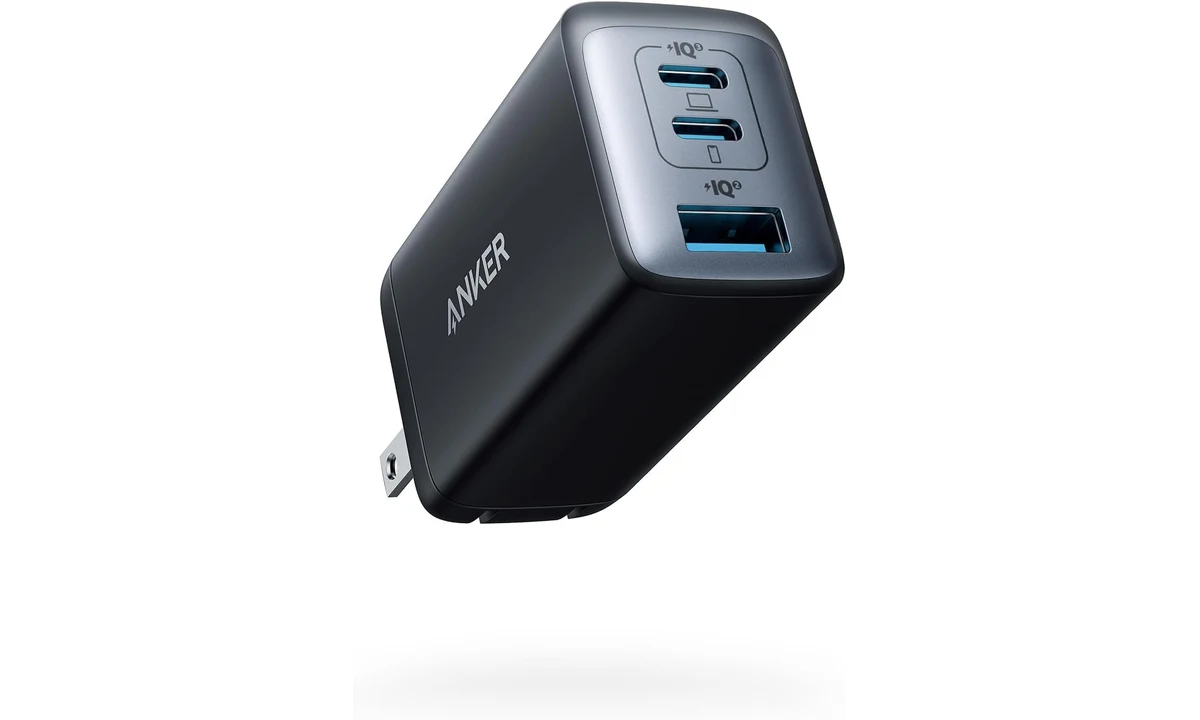
The Anker 735 Nano II can replace several small charging blocks, but only if its port-sharing arrangement suits your devices. Its headline output belongs to a compatible device connected under the right conditions. It is not available independently from every socket. The sensible buying question is what your laptop, phone and accessories receive when they are all connected in the combination you actually intend to use.
This review covers the Nano II A2667, including the black US retail variant identified as A2667111. Anker also uses the 735 name on other hardware, so the model identifier matters more than the large number in a listing title. The analysis draws on Anker’s specifications and manual, with Gadget Explained’s original review as additional context. We have not performed our own electrical or charging-time tests.
Identify the exact charger before comparing it
The reviewed charger has two USB-C sockets and one USB-A socket. The selected US version has folding mains prongs. That makes it a different physical package from the UK version examined in the independent review. Measurements that include another country’s plug should not be transferred to this model, and a photograph of one regional version does not establish what another seller will supply.
Look for A2667 or the corresponding full retail identifier, rather than accepting any listing headed Anker 735. A different generation can have different power allocation, dimensions or supported behavior despite a similar name. If a retailer switches the selected variation when you choose a colour or plug, repeat the model check. The cost of an incorrect comparison is a charger that fails the specific job you bought it for.
Also separate the charger from similarly branded hubs. This is a mains power supply, not a data hub, video adapter or portable battery. Plugging a display cable into a charging socket will not turn it into a desktop dock. It needs a mains outlet and provides power through the supported charging arrangements; it does not store energy for later use away from an outlet.
Read the port table before the headline
Anker specifies up to 65W from a single USB-C connection, while a single USB-A connection can provide up to 22.5W under a supported protocol. Those are maximum capabilities, not the power every attached device will draw. A device requests power according to its own charging design, battery state and other limits. A lower draw is not automatically evidence that the charger is faulty.
With both USB-C sockets occupied, the documented allocation is up to 45W and 20W. Pairing USB-C1 with USB-A produces up to 40W and 22.5W. Pairing USB-C2 with USB-A produces up to 12W and 12W. With all three ports occupied, the allocation is up to 40W, 12W and 12W. The particular sockets you select therefore change the outcome materially.
For a laptop and phone, the first task is to identify the laptop’s supported USB-C input and expected power requirement. A machine that works comfortably from the charger alone may have less power available when the phone is added. Under a demanding workload, that difference can matter more than whether the charger fits neatly in a bag. A manufacturer’s recommended adapter remains a useful reference point.
Do not sum the single-port ratings and expect that total concurrently. Nor should you assume that moving a cable between otherwise similar USB-C sockets leaves the arrangement unchanged. The allocation table is the practical specification here. If your routine requires substantial laptop power alongside several fast-charging accessories, choose a charger whose documented simultaneous outputs meet that routine rather than hoping unused capacity will be assigned differently.
What the sharing limits mean in daily use
A light laptop workload and overnight accessory charging are different jobs from running a workstation while restoring several empty batteries. For the former, sharing may be an acceptable tradeoff for carrying one block. For the latter, a larger multiport supply or the laptop’s original adapter may be more appropriate. This is about headroom under your workload, not a universal judgement that a smaller charger is underpowered.
Think in terms of your busiest charging moment. Perhaps you arrive at a hotel with a nearly empty laptop, phone and headphones, then need to work immediately. That moment exercises the shared-output limits more than charging one device at a time at home. Write down which device would use each socket before buying. It is easier to evaluate the table against a real arrangement than a vague promise of charging everything.
Adding or removing a device can require the charging arrangement to renegotiate. We do not assign a measured interruption time to this model. If uninterrupted power to a sensitive accessory is important, confirm that accessory’s requirements and use an appropriate dedicated supply. A convenient travel charger should not be assumed to provide the same continuity as a purpose-designed power system.
There is no requirement to fill every socket just because it exists. A practical approach may be to charge the laptop alone while working and add smaller devices later. That reduces the simultaneous demand, though it also means accepting a charging schedule. If you want to plug everything in once and forget about allocation, pay particular attention to a competing charger’s concurrent-output documentation.
Cable quality and protocol compatibility
A USB-C connector describes the physical connection, not every electrical capability. To use the highest supported power available here, the device and cable both need to support the relevant arrangement. In particular, do not assume an unmarked cable intended for modest phone charging is suitable for every laptop requirement. Select a properly specified cable rather than trying to infer its rating from thickness or colour.
Cable length is a practical choice too. A short lead keeps a desk tidy but may leave a phone hanging awkwardly from a wall outlet. A long lead can reach a hotel desk while making the travel bundle less compact. The charger is only one component of the kit: include the appropriate cables in your size and cost comparison, because they are separate purchasing considerations.
Phones use different fast-charging protocols, and support is not implied by a shared connector. A handset advertising a high charging figure with its own adapter may negotiate a lower level here. Check the phone maker’s requirements when speed is a major reason for purchase. Avoid treating a retailer’s list of compatible phone names as a promise that every model reaches its maximum advertised charging rate.
If a device does not charge as expected, simplify the arrangement before drawing conclusions. Try the appropriate single port and a known suitable cable, then add other devices. That separates a shared-power limitation from a cable or protocol issue. It is a more useful diagnostic sequence than repeatedly swapping sockets with every device still attached and no clear baseline.
Mains use and travel expectations
Anker lists an input range of 100–240V at 50–60Hz. That addresses the charger’s specified mains input, not the mechanical fit of its US plug in every country. International travel may require an appropriate plug adapter. A plug adapter does not add new USB charging protocols or change the connected device’s capabilities, and it does not turn the charger into a supply for unrelated mains appliances.
The folding US prongs reduce exposed projections in a bag, but the charger still needs a usable outlet. Recessed sockets, crowded power strips and neighboring plugs can affect practical fit. Consider where it will sit once the cables are attached. A compact block with several cables extending outward may occupy more working space than its product photograph suggests.
Follow the manufacturer’s indoor-use and handling instructions, and do not cover the charger with bedding or pack it away while it is still connected and in use. This review does not provide measured surface temperatures or electrical safety certification beyond the supplied documentation. If a unit is damaged or behaves abnormally, discontinue use and follow the maker’s support guidance rather than treating that behavior as an expected consequence of fast charging.
For a permanent desk, a separate power strip or a different charger format may give better cable routing. For travel, reducing several blocks to one can be worthwhile even if you occasionally charge devices in sequence. Evaluate the complete setup where it will be used; portability is less helpful if the only reachable outlet leaves your laptop cable stretched across a walkway.
How it compares with other ways to charge
The laptop’s original adapter is the first alternative to consider. If it supplies the machine reliably under demanding work, keeping it may be more valuable than reducing luggage. You could use the Nano II for smaller devices separately. That arrangement carries more hardware, but it avoids allocating the laptop’s supply around a phone connected at the same time.
A single-port USB-C charger is a reasonable alternative if you normally charge only one device and already have an accessory solution. Multiple sockets add flexibility, but flexibility is not the same as need. Conversely, a documented higher-output multiport charger is worth examining if your busiest routine exceeds the Nano II’s shared allocations. Compare the multi-device tables rather than ranking products solely by their largest printed wattage.
Anker’s data hubs already covered on TopDataLLC solve a different problem. A hub may accept pass-through power from a charger while reserving some of that input for its own operation. That creates another dependency in the chain. Check the hub and computer requirements together; a charger’s single-port maximum should not be repeated as the exact power assured to reach a laptop through any intervening hub.
A power bank is the alternative when no outlet is available, but its capacity and output limitations require a separate assessment. The Nano II is preferable only when mains power is accessible and its allocation suits the connected devices. It cannot provide emergency battery reserve merely because it looks like a compact battery pack in a photograph.
Consider how often the kit changes
A shared charger is easier to manage when the same devices use it regularly. If family members repeatedly exchange cables and move plugs between sockets, the documented arrangement may not remain the one you planned. Keep the laptop’s preferred socket obvious and explain the sharing limits to other users. For a guest room or communal desk, separate dedicated chargers can sometimes be less confusing than a compact multiport block. The smaller physical kit is useful only when people understand how to connect the equipment that depends on it.
A buying decision based on the whole kit
Before ordering, confirm the model, regional plug, socket arrangement and suitable cables. Then compare the documented shared outputs with the devices you expect to charge together. This small amount of planning is more informative than an unverified charging-time claim or an attractive picture of several devices connected. Retail prices, bundles and sellers vary, so check what is actually included rather than assuming cables or adapters accompany the block.
Our verdict is positive for a compatible laptop-and-accessory routine that fits the port table. The Anker 735 Nano II A2667 offers useful consolidation in a portable US-plug package. It is a weaker choice when maximum laptop power and several demanding accessories must run together. Buy it for the combination it can documentably support, and the power-sharing limits become a clear selection criterion rather than an unpleasant discovery after purchase.