The buying decision
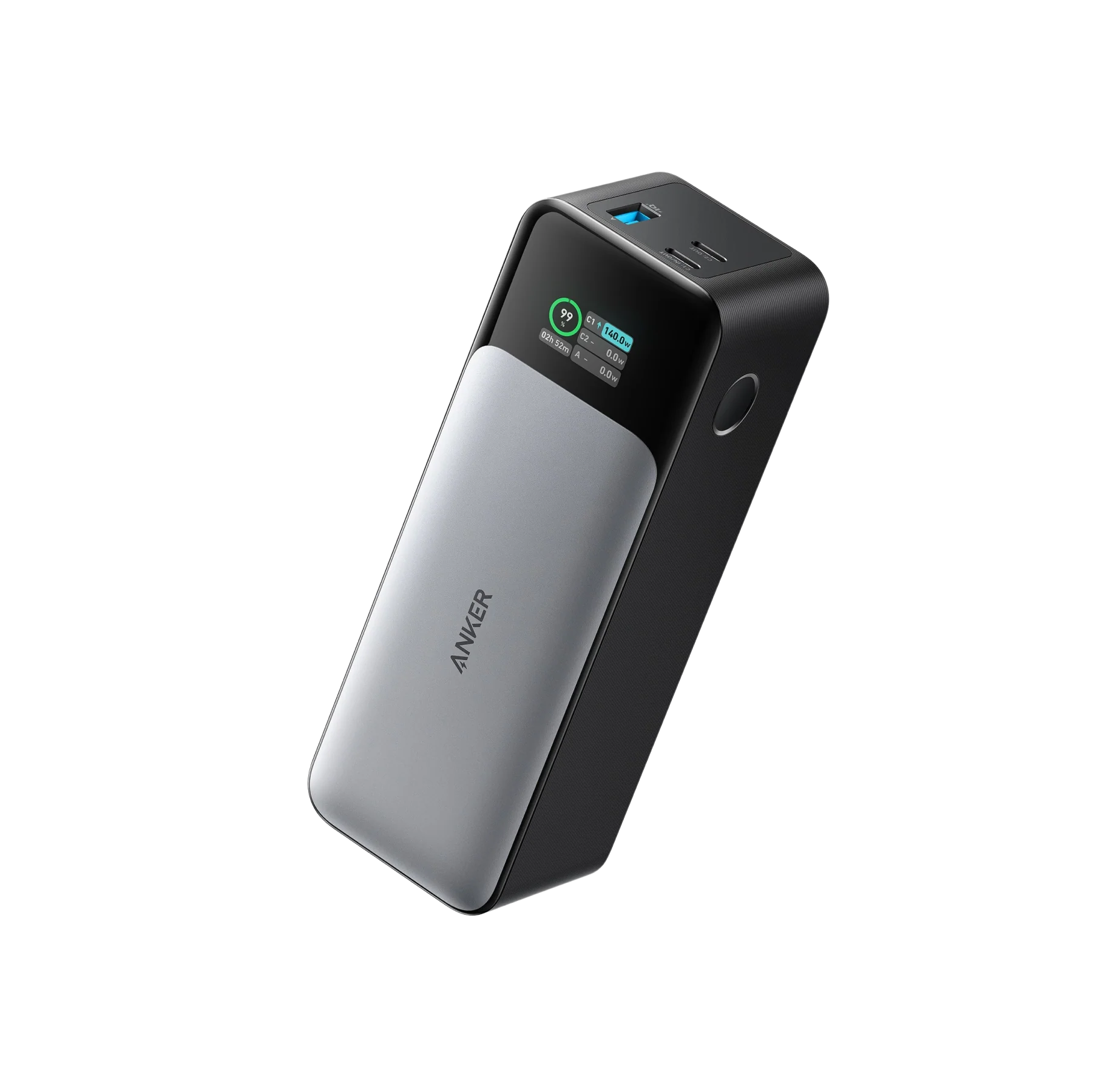
The Anker 737 Power Bank, also called the PowerCore 24K, is a laptop-oriented battery for people who need more than emergency phone power. The exact product covered here is the black US A1289 variant. Its appeal is straightforward: high USB-C output, a large rated capacity, three charging ports and a screen that reports what the bank is doing.
The important qualification is that 140W is a maximum capability, not a universal charging result. The laptop, cable and charging protocol still have to support the requested power. A computer that accepts less will negotiate a lower rate, while a cable without the necessary rating can become the limiting part of the setup.
That makes this a specialized purchase rather than an automatic upgrade for every traveler. It is a sensible category for someone carrying a USB-C laptop into meetings, flights or places with unreliable outlet access. For occasional phone charging, the bank’s size and weight are harder to justify.
Capacity and ports
Anker lists the battery at 24,000 mAh. TechRadar identifies that rating as 86.4 Wh, a more useful comparison when weighing laptop power banks against one another. The watt-hour number is the bank’s rated stored energy, not the exact energy a laptop will receive after conversion and charging losses.
The bank has two USB-C ports and one USB-A port. The main USB-C port is the high-output connection, while TechRadar identifies the second USB-C port as offering up to 100W. The USB-A port is rated by TechRadar at up to 18W, giving the bank a practical route for older cables and smaller accessories.
Anker specifies 140W as the total output maximum. That figure should not be read as 140W independently available from every port at the same time. When several devices are connected, the useful question is how the bank allocates output among them and what each device requests.
For a laptop plus phone arrangement, the second USB-C port and USB-A port are useful additions. They do not make every connected device a high-power load, and adding a second device can change the power available to the laptop. Buyers who need the laptop to charge as quickly as possible should treat single-device operation as the simpler arrangement.
What 140W requires
Anker says reaching 140W requires a cable that supports PD 3.1. The connector shape alone does not prove that a USB-C cable can carry that level of power. A suitable lower-rated cable may still charge a compatible laptop, but it should not be assumed to unlock the bank’s maximum output.
The computer also needs PD 3.1 input for the 140W result. Anker gives the 2021 MacBook Pro 16 as an example, but that example does not establish the same capability for every MacBook, Windows laptop or gaming notebook. Check the laptop maker’s charging specification before treating the headline figure as relevant.
Anker recommends a USB-C to MagSafe cable for best results. That recommendation matters when the laptop’s preferred charging route is MagSafe. The power bank therefore does not remove the need to pack the correct laptop cable, and a cable intended for another charging path may not produce the expected setup.
The practical buying checklist is short: identify the laptop’s charging connector, confirm that its USB-C port accepts power, check its maximum input rate, and match the cable to that rate. A USB-C port used only for data or display does not become a charging port because the power bank can supply more power.
Usable energy and independent findings
The rated 86.4 Wh capacity will not all arrive at the laptop. TechRadar’s independent measurements found 85% of rated capacity available at 140W and 89% available at 100W. Those figures describe the review’s measurement conditions, but they give a more realistic basis for planning than treating the nominal capacity as delivered energy.
The same review measured 87% efficiency at 20W for phone charging. At a 10W condition, it measured 81.5% from USB-A and 86% from USB-C. In that comparison, USB-C was the more efficient connection, while USB-A retained its value for compatible older accessories.
TechRadar reported stable voltages while the bank sustained 140W output and also reported warmth under sustained high-wattage loads. Those are independent findings rather than manufacturer specifications. They support leaving sensible space around a heavily loaded bank instead of burying it beneath clothing or other equipment.
The difference between rated and usable energy also affects laptop expectations. Battery size, laptop workload and the negotiated charging rate will all influence how long the bank extends runtime. The 737 is better understood as additional working time than as a promise of a fixed number of laptop charges.
Size, weight and travel
The manufacturer specifies dimensions of 6.13 × 2.15 × 1.95 inches, equivalent to 155.7 × 54.6 × 49.5 millimeters. It specifies a weight of 22.22 ounces, equivalent to 630 grams. Those figures place the bank firmly in the substantial laptop-power category rather than the pocketable phone-battery category.
TechRadar describes a compact rectangular body that can fit drink-bottle holders and most bags, while warning that it may be a tight fit in slim laptop bags. The practical distinction is available volume versus the shape of the compartment: a backpack may have room while a narrow computer sleeve may not.
TechRadar identifies the 24,000 mAh battery as 86.4 Wh and describes it as flight-safe. Airline rules and screening procedures can vary, so that description should be treated as useful product context rather than a substitute for checking the current rules for a particular trip.
At 630 grams, the bank adds noticeable mass before the laptop charger, cable and other travel items are counted. It suits a backpack, work tote or travel kit where extra laptop runtime matters more than minimizing every gram. It is a poor fit for a slim loadout built around a phone and compact accessories.
The display
The built-in display is one of the 737’s more practical features. TechRadar reports that it shows remaining capacity, battery health and power output from each port. That information can help distinguish a charging problem from a laptop that is simply requesting less power.
The display is especially useful when the setup falls back from its expected rate. The cause may be the laptop’s input limit, the cable, the selected port or another connected device. The screen cannot remove those constraints, but it can make the situation easier to diagnose than relying only on a laptop battery icon.
There is a storage cost to leaving the display active. Anker says that when the settings selection screen remains on, both the screen and the MCU are working. The manufacturer reports overall power consumption of 0.36W and says this uses 15% of the battery in about 24 hours.
Anker recommends turning off the display when it is not in use. That makes the screen better viewed as a monitoring and troubleshooting feature than as something to leave illuminated in a drawer or overnight travel kit.
A new owner may also notice nonzero counters immediately. Anker says the display can show factory production and testing data when the charger is received. The company says battery cycle should be 0 and battery health should be 100%, while screen usage, total input and total output should not be 0 because those records include factory activity.
Setup and small-device compatibility
The power button and display add a small management step for low-draw accessories. TechRadar reports that low-current charging mode activates with a double press of the power button. That mode is intended for smaller devices that might otherwise stop drawing power or fail to keep the bank awake.
USB-A behavior can also look unusual after an accessory is removed. Anker says the port may continue outputting a small current for about 2 minutes after unplugging. The manufacturer also says 0.1W output from USB-A is normal in low-current mode, so a small reading is not by itself evidence of a defective connection.
For a laptop setup, begin with the main USB-C port and the cable recommended for the computer’s charging route. Add a phone or accessory only after confirming that the laptop is receiving the intended rate. This sequence makes port sharing easier to diagnose.
The second USB-C port is useful for a lower-priority device, but its stated ceiling should not be confused with the main port’s 140W capability. USB-A is the compatibility option for suitable legacy cables, not the route to laptop-class output.
Recharging and operating limits
The bank supports fast self-recharging through its USB-C input. TechRadar reported a full recharge in under an hour at 140W and approximately 1.5 hours at 100W. Those are independent review measurements, not universal times for every wall charger, cable or electrical outlet.
The review also reports pass-through charging up to 90W. However, it says the bank does not allow self-charging at the same time and lacks a UPS mode. That distinction matters at a desk: this is a temporary battery source, not an automatic uninterruptible power device.
The absence of UPS mode narrows the sensible use case. The 737 can suit travel, meetings or locations without convenient outlets, but it should not be selected to maintain a desktop computer or network setup through an outage. Automatic switchover calls for a purpose-built UPS.
TechRadar distinguishes an earlier Gen 1 unit from a newer Gen 2 version regarding 12V output. Its review says the Gen 1 model did not support 12V output from USB-C, while the latest Gen 2 version was upgraded with 12V/3A PD-spec output. The supplied product information does not clearly identify which generation this A1289 listing represents, so buyers who need 12V should verify the exact retail revision.
Alternatives and ownership
The ZMI No.20 is a meaningful alternative for buyers who prioritize capacity but do not need the Anker’s 140W ceiling. TechRadar lists it at 25,000 mAh, equivalent to 90 Wh, and up to 100W. That makes it a category comparison for a laptop user whose computer does not require the higher output.
The Iniu B6 belongs to a different category. TechRadar lists it at 10,000 mAh, equivalent to 37 Wh, with 20W fast charging and describes it as easier to carry. It is the more relevant option for phone-first travel, while the Anker is aimed at carrying more hardware for laptop-class charging.
Ownership is mainly about cables, storage and interpreting the display. Keep the high-power USB-C cable with the bank, switch off the display during idle storage, and do not interpret factory-populated counters as evidence of prior consumer ownership. Anker identifies ActiveShield 2.0 and battery-health monitoring, while TechRadar reports 21700 cells and monitoring in its review.
Check the complete charging setup
Before choosing this bank, list the devices you actually carry and the charging cables that stay with them. A laptop-focused kit needs a cable and computer that support the intended charging profile, while a phone-focused kit may gain little from the bank’s size. Keep the high-power cable with the power bank so a compatible setup is available when needed. If that extra packing step is inconvenient, compare a smaller bank and your normal wall charger before making the larger unit part of everyday travel.
Verdict
Buy the Anker 737 when a USB-C laptop is central to the trip, the bag can accommodate a 630-gram battery, and the computer and PD 3.1 cable can make meaningful use of the 140W ceiling. The display adds diagnostic value, while the extra ports support a mixed-device travel kit.
Choose a smaller power bank when the job is mainly phone charging. Consider the ZMI category if 100W is sufficient and capacity matters more than the Anker’s display and higher output ceiling. Choose a UPS when automatic uninterrupted power is the requirement. The 737 makes sense when its laptop role is specific; it is excessive when that role is absent.