Elgato Prompter: the buying decision
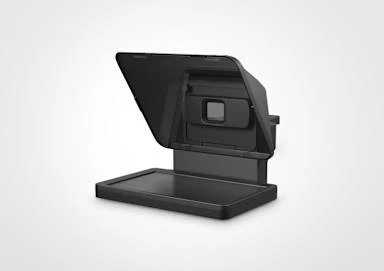
The Elgato Prompter is a desktop teleprompter with its own display, but its real appeal is broader than script scrolling. It can place text, windows, apps, video-call content or chat directly behind the beamsplitter glass, keeping the camera near your reading position. The exact product covered here is the black US model, SKU 10WAD9901, rather than the larger Prompter XL.
That distinction matters. This is a compact creator tool for a desk, streaming station or small production setup, not a studio teleprompter designed for long camera-to-presenter distances. Elgato lists a recommended reading range of up to 1.8 m / 6 ft, while its larger sibling reaches up to 4.6 m / 15 ft. Your room, font size and presentation style therefore matter more than the headline feature.
The central question is whether a dedicated, aligned display is worth accepting a computer connection and a relatively small screen. If you already record at a desk and want natural eye contact, the answer can be yes. If you need a self-contained, battery-powered unit for mobile filming, this model is the wrong shape of solution.
What the built-in display changes
Elgato specifies a 9-inch display with a 1024 x 600 pixel resolution and a 60 Hz refresh rate. The display is integrated into the Prompter rather than being a tablet that must be positioned behind the glass. That fixed relationship removes one recurring tablet-prompter chore: centering an independent screen every time the camera or support changes.
The screen is not merely a script panel. Elgato describes it as an extra display, and its software can place apps or windows there. In practical terms, that makes the Prompter relevant to video calls, demonstrations and streaming layouts, not just memorized presentations. You can keep a reference, presentation or viewer conversation near the lens instead of looking toward a separate monitor.
The beamsplitter glass reflects the display toward the presenter while remaining transparent to the camera. Elgato says the audience sees the presenter rather than the screen content. The manufacturer also notes that bright setups can produce minor glare, which can be reduced by lowering display brightness or changing the lighting.
That optical arrangement is the reason this design can support eye contact without requiring a tablet. It does not make every script equally comfortable, though. A 9-inch panel has less room for text than a tablet, and independent Tom's Guide reviewer Paul Antill identified the small screen as the main decision point for buyers who want to read from farther away or keep more text visible at once.
Camera and lens compatibility
The included hardware is unusually flexible for a compact desktop unit. Elgato says the package includes DSLR/mirrorless, Facecam 4K and universal backplates, plus a universal bracket. The manufacturer describes support across webcams, smartphones, action cameras, point-and-shoot cameras, DSLRs and mirrorless bodies, although support still varies by camera model.
For lenses, the included step-up rings cover 49 mm, 52 mm, 55 mm, 58 mm, 62 mm, 67 mm, 72 mm, 77 mm and 82 mm sizes. Those rings are a direct lens-front mounting route, but they do not mean every camera-and-lens combination will fit. The manufacturer lists a maximum camera-plus-lens length of 11 cm / 4.3 in.
Elgato lists maximum lens clearance of 85 mm without a backplate and a maximum lens diameter of 160 mm without a backplate. Those are useful screening numbers, but they are not a substitute for the model-specific compatibility checker. A long body, unusual lens shape, protruding controls or a wide hood can create a practical mismatch before the nominal diameter is exceeded.
The universal backplate imposes a field-of-view limit, so check the manufacturer’s compatibility information for your camera and lens together. Physical lens clearance and camera-bracket fit are separate checks; a camera that sits on the bracket is not automatically a good optical match. A phone can also serve as the camera, but Elgato says a separate 1/4-inch smartphone mount is required and is not included.
Tom's Guide's independent review gives a useful example rather than a universal promise: its reviewer used the largest included ring with a Sigma 24-70 lens and a Sony a7siii. The same account notes that a standard lens cap may not fit while the ring remains attached. That is a small ownership detail, but it illustrates why a ring can simplify mounting while complicating storage.
Mounting, size and desk fit
The Prompter has two 1/4-inch mounting threads. Elgato lists compatible support types including a Multi Mount, tripods, desk stands and microphone arms, while advising buyers to check the mount's weight limit before attaching equipment. The camera, lens and accessories add to the load, so the Prompter's own weight is not the whole support calculation.
The unit weighs 690 g / 1.52 lb without accessories. Its dimensions with the camera bracket are 282 x 224 x 219 mm / 11.1 x 8.9 x 8.6 in, listed as depth by width by height in the comparison specification and as width, height and depth in the technical summary. Either way, reserve more than a narrow webcam footprint because the glass hood and camera position project forward.
Elgato rates the camera-bracket maximum load at 3 kg / 6.6 lb. That figure describes the bracket's stated load capacity, not a recommendation to put any camera and lens of that mass on a lightweight desk arm. A stable support is part of the purchase decision, particularly when the camera is mounted directly to the Prompter.
The two cold-shoe mounts accept accessories such as a shotgun microphone or light. They can reduce the need for separate accessory supports, but they also add weight and cable clutter around the camera. Plan the complete arrangement—camera, microphone, light, arm and USB cable—rather than judging the bare teleprompter alone.
Travel is a weaker part of the design. Elgato says the display can be detached for travel and cleaning, and the independent review says removing the display requires two screws. Tom's Guide also criticized the lack of a folding mechanism and described the unit as harder to pack protectively than a folding design. That makes it portable in a limited sense, not an especially compact travel accessory.
Computer and software requirements
Prompter is not a standalone script player. Elgato says it connects directly to a computer with one USB cable, and that cable carries both power and data. The manufacturer lists Windows, macOS and Android support, but the desktop operating requirements differ from the mobile path and should be checked before purchase.
For Windows, Elgato lists Windows 11 or newer, an Intel or AMD CPU and a USB 3.0 Type-A connection. For macOS, it lists macOS 13.3 Ventura or newer, an Intel or Apple CPU and a USB 3.0 Type-A connection. The included cable is USB-C to USB-A 3.0 and measures 200 cm / 78.7 in.
Elgato says the Camera Hub app is available as a free download for PC and Mac. Its software includes a script manager, display mode for dragging windows or apps onto the Prompter, and support for Stream Deck control through an Elgato plugin. The included display therefore depends on a software setup rather than behaving like a normal independent monitor in every context.
The Android route has its own caveat: Elgato lists Android 11 or newer and says a USB-C-to-C cable is required, with that cable not included. Do not assume the included USB-C-to-A cable covers every supported device. Connection type, operating system and available ports should be part of the pre-purchase checklist.
The Voice Sync feature is also hardware-dependent. Elgato says smart voice tracking requires an NVIDIA RTX 2060 GPU or newer on Windows, or an Apple M1 CPU or newer on macOS. That requirement applies to Voice Sync, not to the basic idea of displaying a script, so buyers without that hardware should not treat the feature as part of the baseline experience.
Reading and control workflow
The software offers more than a plain scrolling page. Elgato describes controls for writing, editing and organizing scripts, along with options for how a script looks and scrolls. It also lists Voice Sync, which can adjust scrolling as you speak, and Twitch chat integration for reading and responding while facing the camera.
Stream Deck support is optional rather than something to assume is in the box. Tom's Guide reported using a Stream Deck Mini to pause and resume, start automatic playback, move backward or forward and change font size. That can make the workflow more hands-off, but it adds another device and another purchase if you do not already own compatible control hardware.
The display mode is particularly useful for presenters who need visual context. A script can sit in front of the lens while a call, presentation or other window occupies the same viewing area. This is a different proposition from a tablet teleprompter app, where the tablet usually contributes the screen and the computer remains separate.
There is a trade-off in that flexibility. A larger external monitor or tablet can show more material at once, while the Prompter keeps the viewing position closer to the camera. If you rely on long pauses, gestures or reading several lines ahead, the smaller panel may force larger text and shorter visible passages. Tom's Guide specifically connected its small-screen concern with maintaining a natural delivery.
Ownership and limitations
The most important limitation is the reading distance. Elgato's stated maximum is up to 1.8 m / 6 ft, depending on text and font size. That suits a typical desk or close camera position, but not a presenter standing well back from a camera. For longer rooms, the manufacturer's Prompter XL comparison points to the larger model's longer range rather than solving that need with the original unit.
The second limitation is the host computer. Tom's Guide described the Prompter as dependent on a PC or Mac, and its reviewer wanted a future version with wireless communication, direct script storage or a built-in battery. Those are not missing specifications to overlook; they define why this product is best placed in a static recording station.
Maintenance is straightforward but still deserves planning. Elgato says the glass is detachable for cleaning, and the package includes a cleaning cloth. The glass surface should be kept clear because fingerprints, dust and reflections sit directly in the optical path. Bright lighting may require display or light adjustment, according to the manufacturer's support guidance.
Software reliability is not perfectly abstract. Tom's Guide reported occasional issues involving looping script sections and speed changes during its review period, followed by a period without seeing those problems again. That is an independent observation, not a claim that every installation will behave the same way. It is a reason to keep a simple fallback script or control method for important recordings.
Elgato Prompter alternatives
The most obvious alternative is a tablet-based teleprompter. That route can make sense if you already own a suitably sized tablet, want a removable screen for other tasks or need a more portable kit. Its trade-off is the extra alignment, app and control workflow that the integrated display is designed to avoid. The better choice depends on whether convenience or screen flexibility matters more.
A conventional tablet-free teleprompter with an external monitor may suit a larger production setup. It can provide a bigger viewing surface, but it generally asks you to manage the monitor, mounting arrangement and optical alignment separately. The original Prompter instead concentrates those pieces into a compact unit, accepting the 9-inch reading area and computer dependence.
Elgato's own Prompter XL is the more relevant alternative when the camera is larger, the lens is longer or the presenter stands farther back. The manufacturer's comparison lists a 15.6-inch display, 1920 x 1080 resolution, a 4.6 m / 15 ft recommended range and a 22 cm / 8.7 in maximum camera-plus-lens length for that model. Those specifications describe a different class of setup, not a reason to buy the larger unit automatically.
Verdict
Choose the Elgato Prompter if your recording position is within 1.8 m / 6 ft, your camera and lens pass the compatibility checks, and a Windows, Mac or supported Android device will remain connected. Its strongest case is a repeatable desk workflow where aligned eye contact, a built-in display and access to apps or chat are worth more than a large reading surface.
Choose a tablet-based setup if you value a screen you can remove, repurpose or take between locations, especially when you already own the tablet. Choose Prompter XL or a larger conventional setup if your presentation distance, camera package or visible script length exceeds what this compact model can comfortably handle.
My conditional verdict is favorable for individual creators, streamers, remote presenters and small teams building a permanent or semi-permanent camera station. It is less convincing for run-and-gun filming, long-distance presentation or anyone unwilling to keep a computer attached. The product solves alignment and workflow friction well, but it does so by making compactness, software and reading distance part of the bargain.