Razer Naga V2 Pro: the real buying decision
The Razer Naga V2 Pro is for buyers who want the mouse’s controls to change with the game. Its main distinction is not simply a high button count. It combines interchangeable side plates, a configurable scroll wheel and wireless connectivity in one right-handed design.
That flexibility creates a specific trade-off. The mouse is heavy, its most distinctive wheel controls depend on software, and wireless charging requires extra hardware. The important question is whether you will use more than one physical control layout, not whether the specification list looks impressive.
This review covers the black Razer Naga V2 Pro. Razer’s original V2 announcement establishes its modular design and model-specific features; Tom’s Hardware supplies an independent assessment of the controls, shape and practical limitations. Keep this model distinct from the later Naga V3 Pro when comparing listings and accessories.
Three side plates, three different jobs
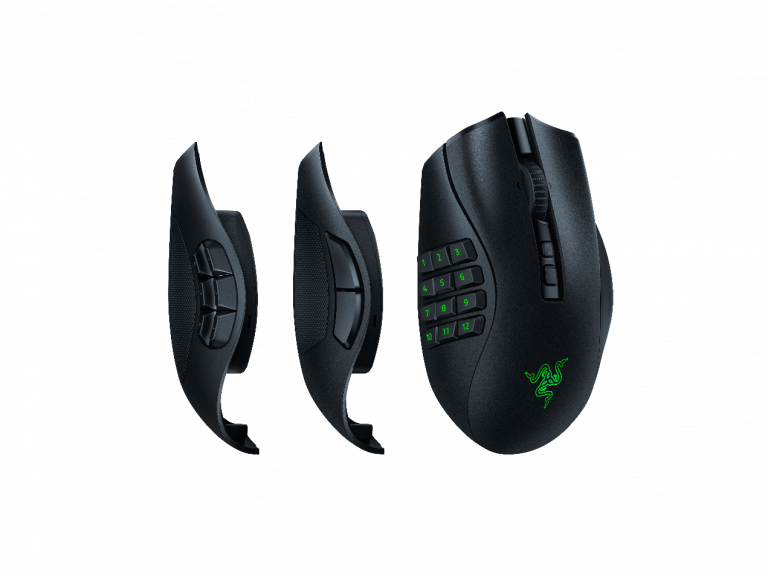
The Naga V2 Pro includes magnetic side plates with 12, 6 and 2 buttons. Changing the arrangement is a physical reconfiguration: remove one panel and attach another. That makes the mouse unusually adaptable if you genuinely move between games with different control needs.
The 12-button plate is the obvious MMO configuration. It puts a large group of abilities, items or shortcuts beneath the thumb, allowing the other hand to remain focused on movement and ordinary keyboard commands. It is also the layout most likely to require a careful fit check because a full keypad can feel crowded.
The 6-button plate is a middle option for games that benefit from extra commands without needing a complete MMO grid. The 2-button plate is the least specialized, giving you a simpler side-button arrangement for other games or general computer work.
Tom’s Hardware reports that the numbered 12-button plate has RGB lighting, while the 6-button and 2-button plates use textured panels instead. The panels therefore differ in more than button count: their appearance and surface feel also change.
The installed side plate determines the thumb inputs you can reach. Focus on the physical arrangement you need, rather than treating a headline programmable-control total as the number of convenient shortcuts available to your thumb. The simpler panel can be a better choice when accidental commands are more disruptive than using a keyboard shortcut.
The magnetic attachment is a practical strength because swapping layouts does not require tools. It also makes the modular concept more useful for a desk shared between MMO play, other genres and everyday work. If the 12-button panel would stay installed all the time, much of the Pro model’s extra complexity becomes harder to justify.
The scroll wheel is powerful, but not simple
The Naga V2 Pro’s second major differentiator is its HyperScroll Pro wheel. Tom’s Hardware describes six modes, including a custom mode, with adjustments for scroll tension and the number of scroll steps. That is a wider range of behavior than a basic tactile-or-free-spin switch.
The custom mode allows scroll tension from 0 to 100 and scroll steps from 0 to 96. These are software settings, not measurements of physical wheel travel. They could be useful for tailoring weapon selection, inventories, menus or ordinary documents to different scrolling preferences.
Flexibility is not automatically an advantage. Tom’s Hardware’s reviewer found the preset modes other than smooth scrolling too stiff and spent most of the review using smooth scrolling or a custom tactile setting. That is an independent finding, not a universal result, but it suggests that many owners may settle on two preferred behaviors.
The wheel modes are software-reliant. That matters if you regularly move between computers or prefer controls that behave consistently without configuration. Tom’s Hardware contrasts the V2 Pro’s approach with hardware-based tactile and free-spinning wheels on some Logitech mice. Compare the settings you would actually maintain, rather than choosing the most configurable wheel by default.
Shape, dimensions and weight
Razer lists an approximate length of 4.7 inches (119.5 millimeters), width of 2.97 inches (75.5 millimeters) and height of 1.72 inches (43.5 millimeters). These manufacturer dimensions provide the consistent reference for the model; the more useful fit question is whether your hand can support the shape while reaching the side controls.
The footprint only partly describes the fit. The review describes a right-handed, gently sloped body with a rearward hump and a ridge for resting the ring finger. It is a substantial, palm-friendly shape rather than an ambidextrous design for switching between hands.
The mouse weighs 4.72 ounces, equivalent to 134 grams, excluding the cable. Weight is central to the purchase decision because the modular system adds capability without aiming at the lightweight competitive-shooter category.
Tom’s Hardware describes the Naga V2 Pro as heavy even for an MMO or MOBA mouse. The reviewer found the mass comfortable with a palm grip but too heavy in single-player and competitive first-person shooters. That makes weight a practical limitation for fast aim corrections, not merely a specification-card detail.
The same review compares the Naga V2 Pro with the Redragon M913 Impact Elite, Corsair Scimitar RGB Elite and Razer Naga Pro, finding the V2 Pro heavier than each cited model. This supports calling it weighty within that comparison, but it does not establish which shape will suit a particular hand.
The side-button layout deserves more attention than the headline count. A thumb that naturally reaches the intended columns can make the keypad efficient; a different hand position can make some buttons awkward. Consider which commands need frequent, confident access and which could stay on the keyboard. Additional buttons are useful only when reaching them does not disrupt the grip.
Sensor, switches and connections
The V2 Pro uses Razer’s Focus Pro 30K optical sensor. Tom’s Hardware lists maximum sensitivity of 30,000 DPI, maximum speed of 750 IPS and maximum acceleration of 70G. These are ceiling specifications rather than settings most users need to approach.
Tom’s Hardware reports accurate and precise sensor performance during its sessions across an MMO, a MOBA, a single-player FPS and a competitive online FPS. The reviewer also found no noticeable click latency and described the buttons as providing tactile feedback. Those are independent findings, separate from the sensor’s maximum figures.
The mouse uses Razer’s third-generation optical switches, rated for 90 million clicks. That is a durability rating, not a prediction of how long an individual unit will last. It does show that the switch design is intended for sustained button use.
Connectivity includes 2.4GHz wireless, Bluetooth and wired USB-C. Tom’s Hardware reports that the package includes a 2.4GHz USB-A dongle and a 6-foot, equivalent to 1.8-meter, USB-C-to-USB-A Speedflex cable. Those options cover a fixed gaming desk, a secondary computer and a wired fallback.
The 2.4GHz dongle can be stored in a slot beneath the side plates when it is not in use. That is useful when switching to Bluetooth or transporting the mouse, although it does not remove the need for a compatible USB connection when you want the receiver.
Battery and charging
Razer’s stated V2 Pro battery figures, as reported by Tom’s Hardware, are up to 150 hours over a 2.4GHz wireless connection and up to 300 hours over Bluetooth. These are connection-specific maximums, not one runtime that applies to every setup.
Tom’s Hardware observed faster battery use with RGB lighting enabled at maximum brightness, then much smaller battery loss after turning the lighting off. That independent observation gives the headline figures useful context: buyers who want longer intervals between charges should consider reducing or disabling lighting.
The V2 Pro supports optional wireless charging through a separately purchased Razer Wireless Charging Puck. Tom’s Hardware reports that the puck works with Qi-certified wireless charging devices. Plan for the mouse and any charging accessory separately; the ability to add wireless charging does not mean a compatible charging setup comes with the mouse.
The mouse can also connect through the Razer Mouse Dock Pro for wireless charging, but it cannot use that dock’s integrated 4K HyperPolling transceiver. The V2 Pro has a maximum polling rate of 1,000Hz, so the dock adds charging convenience rather than the dock’s complete high-polling feature set.
This distinction matters if you are considering a charging ecosystem rather than just a mouse. The V2 Pro is not the right purchase if access to higher polling through the dock is part of the plan. Its charging compatibility is useful, but narrower than the accessory name might suggest.
Software and setup
Razer Synapse 3 handles configuration. Tom’s Hardware reports that the software shows the mouse and separate views for all three side plates, and that a plate does not need to be attached to program its buttons. You can prepare layouts before physically changing the panel.
The review also reports two layers of programmability through HyperShift. The mouse stores up to five onboard profiles, and the bottom profile button can be reprogrammed. That provides room for separate game or work arrangements, but it also creates an organization task: profile names, layers and bindings need to remain understandable.
The software dependency extends beyond button mapping because the Naga V2 Pro’s wheel modes rely on software. If you want a mouse that behaves predictably on an unconfigured computer, a simpler wheel and fewer profiles may be a better fit.
The mouse ships with five standard DPI stages from 400 to 6,400 DPI. Those stages can be changed, removed or assigned different vertical and horizontal settings. The range offers plenty of room for sensitivity preferences, although its value depends on whether you regularly switch between stages.
Alternatives and ownership trade-offs
The most direct alternative for comparison is the Razer Naga V2 HyperSpeed. Tom’s Hardware describes it as having the V2 Pro’s form factor and sensor, but a fixed 12-button setup and a regular two-mode HyperScroll wheel. It is the more focused choice for an MMO player who wants a keypad without interchangeable plates or detailed wheel tuning.
The V2 HyperSpeed uses one AA battery and is specified for up to 250 hours over 2.4GHz wireless and up to 400 hours over Bluetooth. Those are maximum figures for that model, not a direct prediction of daily use. The trade-off is a fixed layout and battery replacement instead of the V2 Pro’s modularity.
For speed-focused first-person shooters, Tom’s Hardware points to the DeathAdder V3 Pro as an ultralight alternative. That is a different buying priority: low moving mass and rapid corrections take precedence over interchangeable side plates. If those shooters dominate your play, investigate a lighter mouse before paying for a modular system you would rarely change.
The Corsair Scimitar RGB Elite and Redragon M913 Impact Elite appear in the independent review’s weight comparison. Logitech’s G502 X Plus and MX Master 3S appear in its discussion of hardware-based scroll behavior. These comparisons identify different priorities to investigate, rather than a single ranking: a fixed keypad, a lighter body or simpler scrolling may be the better fit when modularity is secondary.
Verdict
Choose the Razer Naga V2 Pro if you are right-handed, want a serious MMO keypad, expect to use at least two side-plate layouts and value detailed wheel customization. Its strongest case is control density with an escape route: one mouse can move from a 12-button MMO arrangement to a less crowded setup without replacing the pointer.
Choose something else if you will leave the 12-button plate installed permanently, prefer a light mouse for shooters or dislike managing profiles and software-specific controls. The V2 HyperSpeed is the clearer fixed-keypad option, while an ultralight FPS-oriented mouse makes more sense when fast movement is the priority.
The conditional verdict is favorable but narrow. The Naga V2 Pro is a modular control system rather than a universal upgrade. Its weight, optional charging hardware, software reliance and setup overhead make sense when interchangeable layouts solve a real problem; otherwise, a simpler MMO mouse can deliver the controls you need with less complexity.