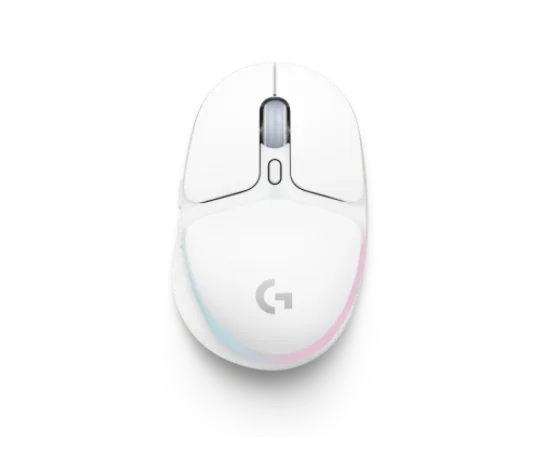
The Logitech G705 LIGHTSPEED wireless mouse in White Mist, US model 910-006365, is aimed at a specific buyer: someone who needs a shorter gaming mouse but still wants dedicated wireless, lighting and programmable controls. Logitech describes the design as intentionally inclusive of smaller hands. That makes physical fit the first question, ahead of its attractive Aurora Collection styling.
The buying decision is not simply whether the G705 is small. It is whether its shorter body helps your fingers reach the controls without making the mouse feel too cramped, and whether you accept its 3-ounce (85-gram) weight and lighting-related charging routine. A buyer wanting the lowest possible mass or a large bank of side buttons is looking at a different category.
This review covers the Logitech G705 LIGHTSPEED wireless mouse, White Mist, US SKU and MPN 910-006365. Logitech’s catalogue identifies the variant as G705 - White. The model designation matters because the physical description, included accessories and compatibility discussion here apply to this specific US White Mist version.
What the G705 is
Tom’s Hardware describes the G705 as a small, contoured dual-wireless gaming mouse with six programmable buttons. Its control layout consists of left and right click, a scroll wheel, a DPI switch and two thumb buttons. That is a conventional gaming arrangement with extra shortcut capacity, rather than the dense side-button layout associated with MMO-focused mice.
The mouse supports Logitech’s LIGHTSPEED wireless connection through a USB port. Logitech also lists Bluetooth-enabled devices as compatible, while the independent review identifies Bluetooth and wired USB-C connectivity. Those three connection paths serve different routines: a receiver for the primary gaming setup, Bluetooth for compatible devices and a cable when charging or using a wired connection is preferable.
The package includes a LIGHTSPEED wireless receiver, an extender, a data and charging cable and user documentation. Tom’s Hardware describes the supplied cable as USB-C to USB-A and the adapter as USB-C to USB-A. The extender is useful when the computer’s USB port is poorly positioned or the receiver needs to sit closer to the mouse.
Logitech says the G705 can connect to the G715 Wireless Gaming Keyboard receiver simultaneously with one USB receiver. That is a useful ecosystem feature for someone who owns that compatible keyboard. It should not be treated as a general multi-device advantage, because the source specifically describes the G715 receiver relationship.
Size and hand fit
Logitech lists the G705 at 4.17 inches (105.8 millimeters) long, 2.68 inches (68.1 millimeters) wide and 1.55 inches (39.4 millimeters) tall. The shorter length is the central fit proposition. The width is not especially narrow, so “compact” here should not be read as meaning small in every direction.
Logitech lists a weight of 3 ounces (85 grams), and Tom’s Hardware gives the same figure in its specification table. Use that manufacturer weight when comparing the G705 with other mice. A compact shape does not automatically mean the lightest possible construction: decide whether the smaller body and thumb support are more useful to your grip than a lower weight on a larger mouse.
Tom’s Hardware reports that the shorter length might work for smaller hands and separately says the mouse felt too small for the reviewer’s larger hand. That is an independent fit observation, not a universal hand-size cutoff. Finger length, grip style and the position of your palm can change whether the same shell feels supportive or restrictive.
Logitech describes the G705 as contoured and identifies a sculpted thumb rest. Tom’s Hardware says the ridge supporting the side buttons makes palm, claw and fingertip grips possible, while describing palm grip as the likely strongest match. The shape therefore offers some grip flexibility, but the dimensions remain more important than the marketing language.
The G705 is compact mainly where reach matters. Its 4.17-inch (105.8-millimeter) length can help a shorter hand avoid stretching toward the front buttons. Its 2.68-inch (68.1-millimeter) width still matters to anyone who prefers a narrow body, and its 3-ounce (85-gram) weight rules it out for shoppers whose priority is minimum mass.
Controls and tracking
The manufacturer lists six programmable buttons and identifies two thumb buttons and a top-mounted DPI-shift button. Tom’s Hardware describes the same physical layout. This gives the G705 enough inputs for common gaming actions and application shortcuts, but not the immediate command density of a mouse built around a large side cluster.
Logitech specifies a tracking range of 100–8,200 DPI. That range accommodates both slower and faster pointer settings, but the upper limit is not a quality ranking by itself. Desk space, display resolution and the steadiness of your grip usually matter more than selecting the largest number available.
Tom’s Hardware identifies the sensor as Logitech Lightsync rather than the Hero 25K sensor used in some other Logitech gaming mice. The same review reports a 1,000 Hz wireless polling rate. Those details position the G705 as a gaming-oriented mouse with a defined sensor platform, not as a specification exercise where the highest number automatically decides the purchase.
Tom’s Hardware describes the buttons as tactile and clicky. The review calls the scroll wheel notched and slightly stiffer than the reviewer preferred. These are useful independent observations about control feel, but switch preference is personal. A buyer who likes pronounced feedback may value the description more than someone who prefers a softer, quieter action.
The DPI switch gives you a quick physical way to change sensitivity, and Logitech says all six buttons are programmable. Tom’s Hardware reports that G HUB can assign commands, macros, audio samples and voice effects. That software flexibility helps with shortcuts, but it does not add more physical buttons for games that require many simultaneous commands.
Software and lighting
G HUB is the route to deeper customization. Logitech says the software can program buttons and customize RGB lighting. Tom’s Hardware reports that it includes device settings, sensitivity, assignments and LIGHTSYNC sections, with access to firmware information, DPI presets, polling-rate adjustment and lighting effects.
The G705 has LIGHTSYNC RGB with three lighting zones. Logitech says four Play Mood animations are preloaded and that G HUB can provide additional customization. Tom’s Hardware describes a diffused light strip around the rear curve, with a pastel pink-blue Aurora Collection treatment active out of the box.
That lighting is central to the product’s identity. Tom’s Hardware describes an all-white body with lavender accent buttons and a lavender scroll wheel. Buyers building a coordinated gaming desk may see those details as a reason to choose the G705. Buyers who prefer understated hardware may regard them as visual decoration that does not improve control.
Logitech lists PC and Mac compatibility. Its system requirements state that an internet connection is needed to download the software on Windows and macOS. Bluetooth support is listed for Bluetooth-enabled devices, so the hardware’s connection options are broader than the operating systems named for the software download.
Battery and charging
Logitech rates the G705 for 40 hours with RGB lighting activated. The manufacturer says battery life may vary with battery discharge characteristics, the user and computing conditions. Treat that number as a planning reference rather than a fixed interval that every owner will experience between charges.
Tom’s Hardware independently reports approximately 40 hours with lighting on and 145 hours with lighting off. That creates the key ownership choice. Keeping the Aurora lighting active preserves one of the mouse’s defining features, while turning it off substantially extends the independent review’s reported runtime.
The G705 is USB-C rechargeable and uses a lithium-ion battery, according to Logitech. The included data and charging cable means replenishing the mouse does not require a separate proprietary cable. A buyer who dislikes interrupting wireless use should decide whether the lighting is important enough to accept a shorter interval between charges.
Tom’s Hardware reports that the G705 has no built-in dongle storage. That omission is easy to overlook on a permanent desk but matters when the mouse moves between a home setup and a laptop bag. The supplied extender helps position the receiver; it does not provide a compartment inside the mouse for carrying it.
Limitations and alternatives
The first limitation is fit uncertainty. Tom’s Hardware found the G705 too small for the reviewer’s larger hand and concluded that its compactness mainly benefits users with shorter hands or fingers. The listed dimensions support that caution: the mouse is shorter, but it is not especially narrow or light.
The second limitation is control density. Tom’s Hardware says the G705 is not the strongest choice for MMOs or MOBAs because it has only six programmable buttons. The review also reports G-Shift support, which adds a software layer. That can expand assignments, but it does not create extra physical controls or eliminate the need to remember alternate commands.
A lighter gaming mouse is the relevant alternative if mass matters more than short reach and Aurora styling. Tom’s Hardware lists the Razer DeathAdder V3 Pro at 5 inches (128 millimeters) long and 2.25 ounces (64 grams). That is a different priority: less mass and a longer body, rather than the G705’s shorter reach for smaller hands.
A small wireless gaming mouse in the broader category may suit buyers who want compactness without committing to the G705’s lighting design. Tom’s Hardware names the Razer Orochi V2 Wireless as another small wireless gaming mouse, but the supplied evidence does not establish that model’s dimensions, battery system or button layout. Verify those specifications in current documentation before making a direct comparison.
A mouse with more physical buttons is the better category for MMO-style command mapping. The G705’s six-button arrangement is more straightforward for ordinary gaming and desktop shortcuts, while the trade-off is fewer immediately accessible commands. Choose the desired control layout first, then compare fit and connection details among models in that category.
Setup and ownership
Initial setup can follow the intended use: connect the LIGHTSPEED receiver to a USB port, pair over Bluetooth with a compatible device or attach the USB-C cable. The package includes an extender for receiver placement. G HUB is not needed for basic pointer operation, but it is the route to deeper button, sensitivity and lighting changes.
A sensible setup begins with physical fit rather than visual customization. Check whether your fingers rest naturally on the primary buttons and whether the thumb buttons sit comfortably beneath the thumb. Then choose a manageable DPI setting and create application-specific assignments only after the basic grip feels stable.
Ownership involves a recurring choice between appearance and charging frequency. RGB lighting is one of the G705’s defining features, yet Logitech’s rating is 40 hours with lighting activated. If longer intervals between charges matter more than the Aurora effect, the independent review’s 145-hour lighting-off figure explains the relevant compromise.
Tom’s Hardware reports that G HUB can show remaining battery life and current firmware information. The review also says the software can manage DPI presets, assignments and lighting preferences. That gives Windows and macOS users a central place to monitor and adjust the mouse, provided they have the internet connection Logitech lists for downloading the software.
Logitech lists a two-year limited hardware warranty. That is useful ownership information, although warranty terms can depend on the purchase region and the nature of the fault. The supplied evidence supports the existence of the limited warranty, not a broader promise about service outcomes or battery longevity.
Verdict
Choose the Logitech G705 when a shorter 4.17-inch (105.8-millimeter) body is likely to improve your reach, and when LIGHTSPEED, Bluetooth, wired USB-C use, six programmable buttons and three-zone RGB match your priorities. The White Mist styling is a meaningful reason to select this model, especially for someone coordinating other Aurora Collection hardware.
Pass when your hand is medium or large, when 3 ounces (85 grams) is more weight than you want, or when your games need a large bank of physical commands. The 40-hour lighting-on rating also makes charging part of ownership. For the right smaller hand, the G705’s shape, connections and styling can justify those compromises; otherwise, shop the lighter, longer or more button-rich categories.