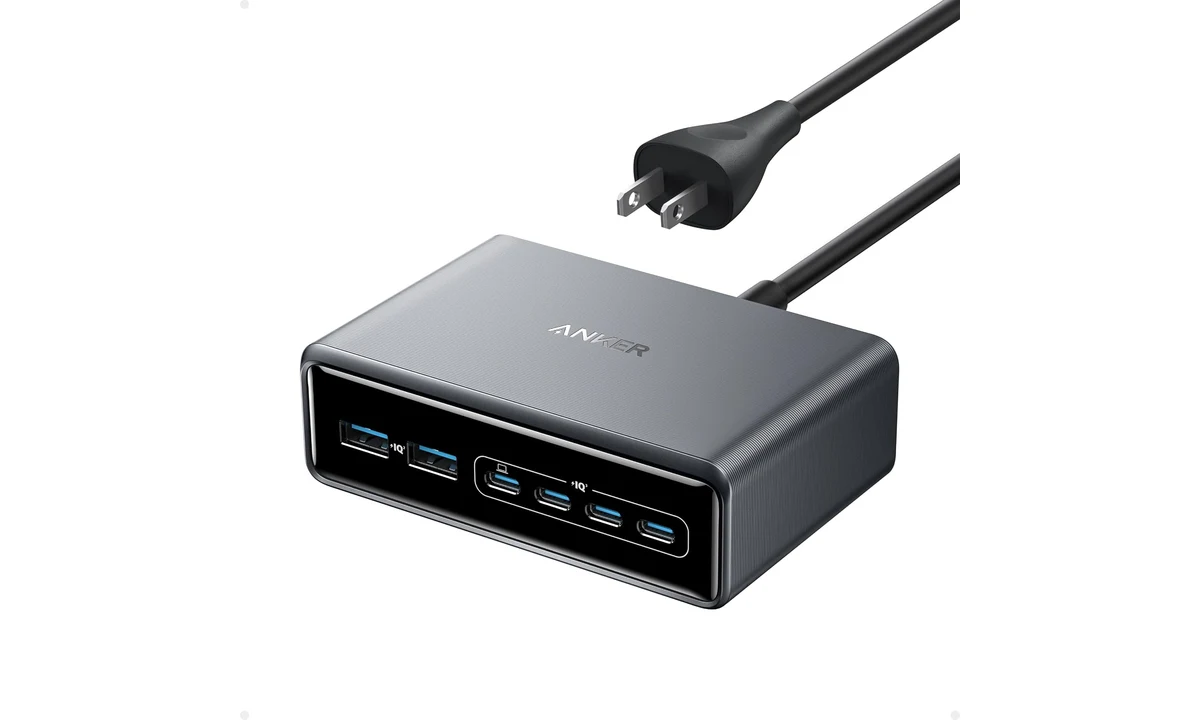
The Anker Prime A2683 is a desk charger for people who have accumulated several USB-powered devices and would like fewer separate wall adapters. Four USB-C ports and two USB-A ports give it a useful mix for laptops, phones and smaller accessories. Its appeal is consolidation. If you only charge one phone beside the bed, its size and shared power system solve a problem you probably do not have.
This review covers the US-cord A2683, the 200W six-port model without a screen. Before ordering, match A2683 explicitly; similarly named charging stations can have different output limits, displays and port layouts. Anker’s current specifications and quick-start guidance establish its output limits; TechRadar’s original multi-device review provides independent use context. We have not measured power delivery, efficiency or charging times. Our recommendation depends on the devices connected together, their supported charging methods and the cables used between them and the charger.
Count simultaneous devices, not the contents of a drawer
Start with the equipment that genuinely needs to charge at the same time. A laptop, work phone and tablet create a different requirement from a collection of rarely used accessories. Six sockets are valuable when several are occupied regularly. They offer less benefit when most devices already charge from a laptop dock or spend the working day fully charged on another stand.
List which items need USB-C and which still use USB-A. The A2683 provides four of the former and two of the latter. That can accommodate a mixed desk without replacing every existing accessory lead. A desk made entirely of modern USB-C devices may prefer a different port mix, especially if using an adapter would consume space and undermine the simplicity that attracted you to one charging station.
Then separate charging from data. A keyboard receiver, external drive or webcam cannot be made into a computer peripheral merely by plugging it into this charger. The A2683 supplies power; it is not a USB hub carrying those devices to your computer. A dock such as the CalDigit TS4 reviewed elsewhere on TopDataLLC serves a different role, even though both products can reduce the number of items around a laptop.
This distinction also applies to a phone. Connecting it here does not automatically provide file transfer, display output or a connection to desktop software. Decide whether a device needs power alone or an actual computer link. Sometimes the best arrangement is a charger for several mobile devices and a separate data connection where needed, rather than trying to replace every cable with one kind of box.
The total output belongs to the whole station
Anker rates the A2683 at up to 200W total output. Each USB-C port can deliver up to 100W within the supported sharing arrangements, while each USB-A port has its own lower limit. These figures describe different constraints. A station containing four USB-C sockets is not offering four separate 100W supplies operating at their maximum simultaneously. Adding the individual port maxima gives the wrong picture of what the product can do.
The manufacturer specifically describes two USB-C devices receiving up to 100W each under suitable conditions. That is the simplest way to understand why a multi-device workstation might want this model. It is also the point where the headline total has already been accounted for. Additional devices introduce another sharing arrangement; the presence of empty sockets does not mean more maximum output appears when you fill them.
Anker’s current table lists up to 199W for five- or six-port use. The practical difference is not a reason to obsess over a single watt. It is a reminder to read the applicable connection arrangement rather than treating the largest number on the box as a universal promise. Plan around what the exact collection of devices can receive together, not a sum of ideal single-port situations.
If you routinely connect and disconnect equipment, observe the actual behavior during an ordinary working session. A device changing its charging state is different from proof of a fault, but interruptions can matter for the equipment involved. This review does not claim seamless behavior with every load combination. Check the maker’s current allocation guidance and the device’s own charging indicators before relying on a particular shared setup.
A compatible socket is only the beginning
A USB-C device negotiates the power it accepts. The A2683 cannot force a phone or laptop to use its port’s maximum just because that number is available. Battery state, operating temperature and the device’s supported input all affect charging. A product advertised as fast charging may also depend on a specific protocol, cable or manufacturer arrangement that a general USB power source does not reproduce in full.
For the documented 100W output, Anker calls for an appropriate e-marked cable. A lead that works well for a small accessory is not automatically the right choice for the laptop drawing the most power. Keep the high-power leads identifiable. Otherwise, changing one anonymous cable can make a previously suitable setup behave differently without anything changing inside the charger or the computer.
Use the device maker’s charging requirements as the starting point. A laptop that expects more than a single port’s available output may need its original adapter for a demanding workload. Receiving power and maintaining the battery under every workload are different tests. The A2683 is useful when its supported output fits the computer, rather than when you hope that a large station-wide total overrides the limit of the individual connection.
There is also no universal time advantage to having a more powerful charger once a device is already receiving its supported input. Charging usually changes as the battery fills. We do not translate TechRadar’s phone result into a timetable for yours. The sensible comparison is whether your devices receive suitable power in the intended simultaneous arrangement, not whether a larger headline number must make every battery fill proportionately faster.
The missing screen is a real choice
The A2683 has no display for live output readings and no companion app for the controls offered by certain other Prime models. That makes it a comparatively straightforward object on the desk: connect the intended cables and let the supported charging system operate. It also means a person who enjoys watching individual port readings will need another method or a different charger.
TechRadar’s reviewer valued the combination of multiple outputs and a detachable power lead, while identifying the lack of a screen and app as the principal missing extras. That aligns with a practical buying split. Choose this model when output and port availability are the requirement. Compare the different 250W Prime if its documented monitoring and control features are actually what you want, rather than assuming every Prime station includes them.
Do not buy the A2683 expecting an application update to reveal hardware that is not present. Likewise, avoid treating a screen as proof that a charger is automatically a better fit. The ability to see a wattage number does not correct an unsuitable cable or give a device an unsupported charging mode. Monitoring is useful for understanding a setup, but it is a separate benefit from providing the required power.
For occasional diagnosis, the device’s own power information can help establish whether charging is happening as expected. If a particular issue remains unclear, use appropriate support guidance rather than repeatedly swapping every part at once. Start with one device, a suitable cable and a documented connection. Then add the other loads. That sequence can identify a mismatch much more effectively than judging only the total number of illuminated battery icons.
A desktop power lead changes where the charger can sit
The detachable AC lead lets the station sit on the working surface while the wall connection remains elsewhere. That is often more convenient than reaching under a desk to plug a small device into a crowded wall adapter. It is also an extra cord to route. The station reduces the count of separate adapters, but it does not remove the individual USB leads running to the equipment that needs power.
Anker lists dimensions of 112mm by 76mm by 35mm. Measure the position with connectors inserted and cables curving naturally away from the front. A compact box pushed tightly against another object can still create an awkward working arrangement. Leave the installation and ventilation appropriate to the maker’s instructions rather than hiding the station inside an improvised pile of equipment simply to make the desk look clearer.
The exterior is plastic with a metallic coating. Its appearance should not be read as evidence that the casing is a solid aluminum heat sink. That is a factual construction distinction, not an automatic quality verdict. If you are comparing hardware in person, assess stability, connector access and cable routing as well as the finish. Those daily interactions matter more than assuming that a metallic-looking photograph establishes a particular material.
Buy the correct regional cord package and follow the supplied connection instructions. Use an appropriate replacement lead only within the documented requirements if a replacement becomes necessary. This is mains-powered equipment, so a loose connection or damaged cord is a reason to stop and resolve the issue. A desktop charging station is not improved by an improvised arrangement that puts strain on the inlet or hides damage from view.
Charger, power bank or travel adapter
The A2683 needs a mains supply. It is not a battery for operating through a power cut or recharging devices away from an outlet. That sounds obvious, but charging-station and power-bank product families often share names and wattage figures. Choose stored energy when the problem is lack of access to power, and a desktop station when the problem is consolidating several connections at a fixed location.
For travel with one laptop and a phone, the Anker 735 Nano II already covered on TopDataLLC may be a more proportionate category. Its portability and smaller port count serve a different packing decision. Compare the exact devices and leads you would carry, including the AC cable here. A station that works well on a permanent desk can still be unnecessary bulk in a small travel bag.
A wireless charging pad or stand is another separate choice. It may be convenient for a compatible phone that is picked up frequently, while leaving the A2683 to supply other devices. This charger does not create wireless charging merely because a suitable phone is nearby. Judge the complete arrangement, including any powered stand or watch charging accessory that must still be provided independently.
Verdict for a mixed-device desk
Choose the A2683 when several USB devices need power together, the four-USB-C/two-USB-A mix fits them and a fixed desktop station would replace a real collection of adapters. Its documented output and detachable AC lead make a coherent proposition without a display. The important preparation is checking the shared arrangement and choosing appropriate cables for the highest-power devices.
Choose a smaller charger when only a few ports are needed, another model for live monitoring or a power bank for use away from mains electricity. Keep data and display needs separate from charging. The A2683 earns its space by making a recurring multi-device routine easier to manage, not by promising that every connected product receives the station’s full advertised power.