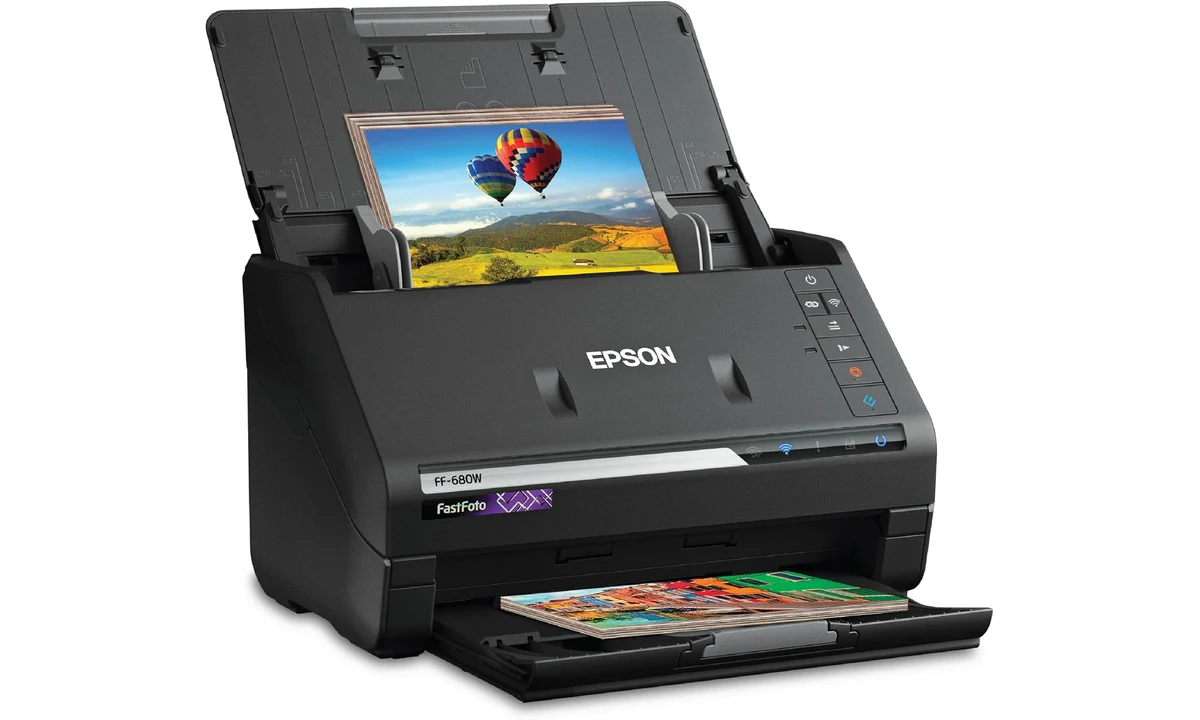
The Epson FastFoto FF-680W is worth considering when the obstacle to digitizing a photo collection is the number of suitable loose prints waiting in boxes. Its feeder can move through batches without requiring every photograph to be placed individually on a flatbed. That is a different buying proposition from scanning a handful of documents or occasionally copying one special picture. The collection and the work around scanning should justify the machine.
This review covers the US B11B237201. Epson’s product information and user guide establish its capabilities and media restrictions; Digital Camera World’s original evaluation supplies independent context about speed, software and imperfect automatic corrections. We have not scanned a collection with this unit ourselves. Our recommendation depends on the condition of the prints, the size of the project and your willingness to organize and check the resulting archive.
Count suitable prints before counting scanning speed
Begin by looking through the collection. Loose modern prints, photographs fixed into albums, fragile older material and film are different jobs. The FF-680W is a sheet-fed photo and document scanner, not a device that automatically digitizes every form of family history. A large box of suitable loose prints creates a strong case. A collection dominated by album pages or damaged material may call for a different approach.
Epson’s guide sets conditions for size, thickness and photo handling. Follow those conditions for the actual material rather than using the feeder as an experiment with an irreplaceable print. A carrier sheet is useful only within its documented role. It does not make every damaged, sticky, folded or delicate object appropriate to send through a moving paper path.
Sorting is therefore part of the purchase calculation. Remove unsuitable material from the feeder project and plan another route for it, such as an appropriate flatbed process or professional service. A machine that handles most of a collection quickly can still be valuable, provided the remainder is identified deliberately. The difficulty comes from assuming one acquisition method must be used for everything simply because it was expensive.
The FF-680W does not scan negatives or slides as film. Choose a film-specific workflow when that is where the originals are. A print made from a negative is a different source from the negative itself, and scanning it does not recover information absent from the print. Set the archive’s aims before comparing resolution labels, especially if you hope to make large future enlargements from modest original photographs.
The fast feeder is one stage of a longer project
Epson advertises scanning as fast as one photo per second at 300dpi under its stated conditions. That is a feed-stage claim, not an estimate for completing an entire family archive. Dusting, sorting, loading, naming, checking and preserving the files add work around the machine. The practical benefit is reducing repetitive placement, rather than making every other part of the project disappear.
Do a representative small batch before committing a long afternoon to production. Choose ordinary prints that meet the guide, including the kinds of sizes and backs you expect to encounter. Check the resulting orientation, cropping and file organization. A short rehearsal can reveal a naming or image-setting choice that is easy to correct before it has been repeated across a large collection.
Epson’s current page gives different feeder figures in its overview and detailed specifications, with media-dependent conditions. We do not convert them into one universal batch promise. Use the applicable guide for the material and loading arrangement. A consistent manageable batch is more useful than squeezing in extra prints simply to match the largest number seen in a comparison table.
Think about where finished prints will go as well. If unscanned and completed piles become mixed, it becomes difficult to know what the digital archive covers. A simple physical separation and a batch record can save more effort than another small increase in scanner speed. The machine earns its place when the project remains understandable to the person doing it and to anyone helping later.
Optical resolution and larger output files are different
The FF-680W’s optical resolution is 600dpi. Epson also offers 1200dpi output through interpolation, which increases the output sampling without turning the sensor into a native higher-resolution system. That distinction matters when evaluating promotional resolution numbers. A larger file is not automatically evidence that more original detail has been captured from the photograph.
Choose an output arrangement according to the intended use and the source material. A small sharing copy, a preserved archive master and a future print enlargement can be different needs. Epson’s software offers formats and modes for those roles. The useful decision is how you want to preserve and use the images, rather than selecting the biggest output value without considering storage or the actual detail present in the print.
An older photograph can contain grain, damage or softness that scanning does not remove. Automatic processing may make it more pleasant to view, but that is different from recovering a perfectly detailed original scene. If the project includes a few exceptionally important photographs, consider whether they deserve individual attention or another capture method even when the bulk of the collection suits the feeder.
Digital Camera World found the scanner capable of useful photo results, while identifying occasional artifacts. That supports making sample checks part of the routine. We do not treat one reviewer’s collection as evidence that every print will look equally good. Look at detail, edges and crop decisions on representative files, not just a contact sheet that makes every image too small to assess.
Keep the original scan when trying automatic corrections
FastFoto can apply enhancements such as colour restoration, red-eye reduction and other adjustments. These can make faded or awkward-looking prints easier to share. They are also editorial decisions about an image. A correction that helps one photograph can change another in an unwanted way, particularly when the original already has a distinctive colour cast or lighting style.
The independent review found those automatic corrections inconsistent. That is a reason to preserve the uncorrected scan and assess the enhanced version separately. A more vivid result can be attractive without being the best representation of the print. Keeping both, where the software supports the intended arrangement, lets you make that judgement later rather than committing every file permanently to one automatic interpretation.
Establish a clear naming distinction between the original capture and the sharing or corrected file. Otherwise, another person may overwrite or discard the version you intended to retain. The archive does not need an elaborate professional catalog to be useful. It does need enough consistency that you can tell which image is the source capture and which has been adjusted.
Avoid promising relatives a restoration outcome before checking the material. Some damage and fading require more work than an automatic setting provides, and some information may no longer exist in the print. The FF-680W is primarily an efficient capture tool. Its convenience is strongest when image improvement is treated as a reviewable second stage rather than a claim that every old photograph is restored by default.
The back of a photograph can be part of the record
The duplex arrangement can capture writing on photo backs during the scanning workflow. That is valuable for dates, names and places that might otherwise be separated from the picture. Before a large project, learn how the software detects and saves those backs. Confirm that a sample note remains associated with the correct photograph in the resulting folder structure.
Do not assume every automatic detection choice captures everything you care about. A faint pencil note, a nearly blank back and a strongly marked reverse present different cases. Check representative examples and use the documented settings. The benefit is reducing a separate handling step, but the archive still needs someone to verify that important context has not been omitted.
File naming should reflect what is known. A month or year supplied by a relative is different from a date inferred from clothing or an uncertain memory. Preserve uncertainty in an ordinary note rather than inventing precision in the file name. The scanner captures the photograph; it cannot establish when the scene actually happened or who appears in it.
This is also a good moment to ask for context while the physical collection is organized. A folder of well-scanned images becomes more useful when people can identify them. The FF-680W can accelerate capture, but the information supplied by the family or collection owner remains a separate source. Keeping that distinction makes the archive more credible and easier for another person to continue.
Software and placement need checking on the actual computer
The scanner supports USB and Wi-Fi, with FastFoto for the photo workflow and ScanSmart for document tasks. Check current drivers and application support for your computer rather than relying on the old operating-system list reproduced on a launch-era review. Hardware that connects successfully still needs suitable software for the workflow you want, especially after a major computer upgrade.
Wi-Fi can make placement more flexible, but it does not remove the need for power, accessible trays and a stable work area. The open feeding and output arrangement takes more space than the closed storage shape suggests. Put the scanner where prints can be handled without balancing them on other equipment. A small desktop object can require a surprisingly deliberate surrounding workspace during a large project.
If sharing or cloud features are enabled, understand the destination account and what is being uploaded. Family photographs may include information that the people involved do not expect to be shared broadly. A scanner’s cloud option is a transfer capability, not an automatic decision about audience or privacy. Keep a local capture process available when you want to review files before sending them elsewhere.
Documents are useful extra work, rather than the main justification
ScanSmart and the document-feeding capability can extend the scanner’s use beyond photographs. That helps a household with both paper administration and a substantial print collection. It does not mean the photo-focused purchase is automatically economical for someone who mainly scans receipts. The ES-50 guide already on TopDataLLC concerns a different, simpler document role with different handling expectations.
Consider a flatbed or another appropriate device when the job involves books, attached album material or objects unsuitable for a feeder. For a small one-off collection, compare the total cost and handling arrangements of a reputable scanning service. Include your own time for sorting and checking either route. Paying for fast hardware is easier to justify when there is enough recurring work to make its specific advantages useful.
Verdict for a substantial photo project
Choose the FF-680W when you have many suitable loose prints, current software support and a plan for checking, naming and preserving the files. Its feeder, back-side capture and approachable photo workflow address a real source of repetitive work. Keep uncorrected files where appropriate, inspect representative results and maintain independent copies of important material. A scanner is the start of a digital archive, not the entire preservation system.
Choose another method when film, fragile originals or a small occasional batch dominates the task. The FF-680W’s strongest case is a well-planned bulk-print project in which faster capture leaves more time for meaningful checking and context. It should help you complete the archive carefully, rather than encourage a hurried process whose missing images or lost notes only become apparent after the physical collection has been put away.