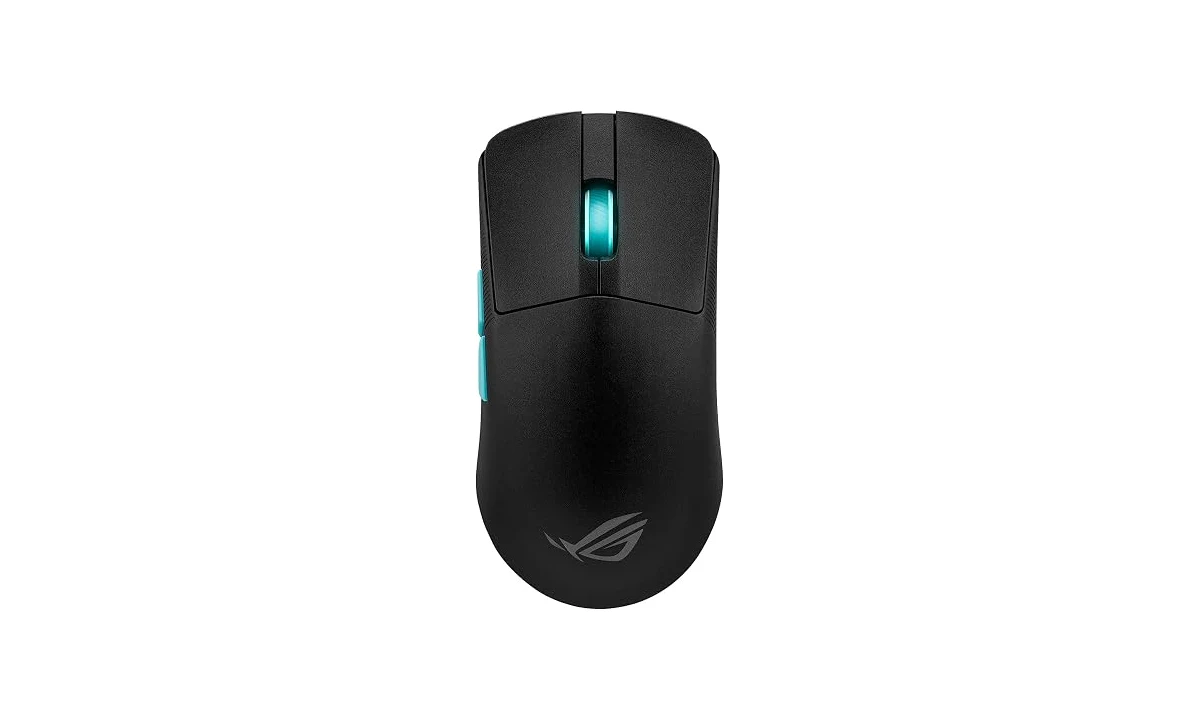
The ASUS ROG Harpe Ace Aim Lab Edition is a lightweight wireless mouse whose appeal is tied closely to its shape and its configuration tools. The selected version is black, with the distinctive light turquoise side buttons. It is not the smaller Harpe Ace Mini or another later member of the Harpe range. Similar branding should not be used to transfer specifications between those products.
Its strongest case is focused gaming where you want a light body, familiar main controls and the option to adjust the setup deliberately. The weakest case is buying it because the sensor number looks larger than another mouse's. Hand contact and dependable access to the controls matter more than a maximum sensitivity setting that you may never have a reason to use.
Shape comes before the software
ASUS lists the Harpe Ace Aim Lab Edition at 54 grams without its cable or wireless dongle. The body measures 127.5 millimeters long, 63.7 millimeters wide and 39.6 millimeters high. Those figures describe the manufacturer's nominal product, not a promise that every measurement of a sample will be identical or that the same dimensions feel alike in every hand.
The body is broadly symmetrical, while the thumb buttons sit on its left side. That makes it important to distinguish a symmetrical outline from a mirrored control arrangement. A right-handed grip can reach those side buttons naturally; a left-handed buyer should examine their position before assuming the mouse offers the same access to every control with either hand.
Tom's Hardware found the mouse impressively light but called attention to a pronounced hump near the middle and slippery sides, even with grip tape fitted. Those observations are more useful for choosing a mouse than a generic statement that it is comfortable. If a central hump tends to meet your palm awkwardly, the low weight will not move that contact point elsewhere.
Think about the grip you actually use when concentrating. A relaxed palm position, an upright claw grip and fingertip guidance expose different parts of the hand to the body. The Harpe Ace can be lifted and repositioned easily in principle because of its low mass, but whether it remains secure and comfortable during that movement is a separate fit question.
Controls without a crowded side panel
ASUS specifies five buttons, with the conventional main clicks, wheel click and a pair of thumb buttons. The manufacturer also identifies mechanical main switches rated for 70 million clicks. This is a focused control layout rather than a mouse intended to place an extensive collection of abilities or shortcuts beneath the thumb.
A restrained arrangement can be helpful when the keyboard already handles most commands and you want the mouse to remain predictable. It becomes a limitation when your applications require many separate mouse-accessible actions. Decide which commands genuinely need to live on the pointer before comparing button counts, and include wheel-click behavior in that plan rather than treating every control as equally convenient.
Tom's Hardware described the main clicks as tactile and consistent, but firmer than the reviewer's preference. That is not evidence of a fault; it is a warning that light overall weight and light button pressure are different properties. A buyer who prefers a very gentle click should consider the switch feel independently of how easily the body moves.
The endurance rating should be understood narrowly as a manufacturer specification. It does not predict a particular owner's replacement date or establish a warranty against every kind of wear. Body fit, wheel behavior, cable handling and the condition of the gliding surfaces can affect ownership even when the main switches continue operating normally.
Sensor figures in context
The mouse uses ASUS's ROG AimPoint sensor, with a maximum resolution of 36,000 DPI. That is a ceiling, not a target. A sensible starting point is a sensitivity that allows repeatable movement in the games and applications you use. Raising the setting because the hardware supports it does not by itself create more accurate hand control.
ASUS lists a USB report rate of 1,000Hz for this model. Do not confuse it with specifications advertised for other Harpe products or later receivers. If a higher reporting-rate configuration is essential to your purchase, verify that requirement against the exact model and accessories. The Aim Lab Edition should be assessed on its documented capabilities, not on the family name alone.
Tom's Hardware found the sensor performance responsive and accurate in its evaluation. That supports taking the hardware seriously, while leaving the personal fit questions open. The same review did not regard its physical design as universally preferable to established alternatives. Strong tracking capability and a shape that a reviewer notices continuously can coexist in the same product.
A practical evaluation should hold the rest of the setup steady. Use a familiar surface and an understandable sensitivity before changing calibration options. If you alter sensitivity, grip, surface and software settings simultaneously, you may struggle to identify which change helped or hurt. The Harpe Ace's adjustments are most useful when each one answers a specific problem.
Choose the connection for the task
The Harpe Ace Aim Lab Edition supports a wireless receiver connection, Bluetooth and wired USB use. ASUS includes the USB dongle, a dongle extender and its paracord cable. These options let the mouse serve a permanent gaming desk and another compatible computer without making battery operation the only possible way to use it.
For the intended gaming setup, start with the receiver or wired connection and follow ASUS's placement guidance. Bluetooth can be convenient when connecting without a receiver, but its presence should not be read as proof that every connection mode behaves identically in a fast game. Pick the connection for the task rather than choosing whichever one happens to pair first.
The receiver extender is useful to consider when a desktop's available ports sit behind a case or other equipment. Give the receiver a sensible position and keep the path around the mouse orderly. Adding a wireless mouse does not remove the need to think about the rest of the desk, especially when several wireless accessories and cables are already concentrated in the same area.
Wired use also gives you a way to evaluate the physical shape without worrying about charge state. Check that the cable has enough slack for your ordinary movement and does not catch on another accessory. A light mouse can feel very different when a cable repeatedly pulls it toward the back of the desk.
Battery claims have conditions
ASUS quotes up to 90 hours without lighting and 79 hours with its default breathing-light setting. These are manufacturer figures with conditions, not a measurement of every owner's working week. Your connection, lighting and use pattern matter. Treat the numbers as a guide to comparing configurations, rather than a reason to assume charging can be ignored indefinitely.
The useful ownership decision is whether you are comfortable keeping another rechargeable device ready for use. A receiver stored neatly and a short charging routine may be easy on a permanent desk. For someone who already struggles to keep accessories charged, a wired mouse or another power arrangement can be the more convenient choice, even when a wireless product is technically appealing.
Lighting is a preference with a practical consequence rather than an essential performance feature. If the longer stated endurance matters more to you than the wheel's appearance, disable the lighting and assess the mouse in that configuration. There is little value in comparing battery claims that assume different lighting settings while planning to use neither setting consistently.
Keep the receiver and cable together when transporting the mouse. The product includes receiver storage in its underside arrangement, as described by the independent review, but a storage place is useful only when it is used. A compact wireless accessory is less convenient when the receiver needed for the preferred connection has been left in another computer.
Armoury Crate and Aim Lab
ASUS identifies Armoury Crate as the configuration software and lists Windows support on its technical page. Check the current software requirements for your own computer before buying around customization. A retailer's broad compatibility description may concern basic pointer operation, while the manufacturer's configuration tools have a narrower set of supported systems.
The Aim Lab collaboration adds a Settings Optimizer intended to help users explore sensitivity and related settings. It should be understood as a calibration aid, not a promise of improved competitive results. The important question is whether its suggested changes are understandable and useful in your own play, rather than whether a collaboration logo makes the mouse inherently better than alternatives.
Tom's Hardware found extensive adjustment available but was critical of Armoury Crate's resource demands and software experience at the time of review. That observation is worth considering if you prefer minimal configuration software. It is not proof of a current problem on every system, so check the present software and decide how much configuration you want to maintain.
A controlled setup process can help prevent constant adjustment from becoming the hobby instead of the game. Establish a setting you understand, note why a change is being made, and return to ordinary play long enough to assess it. If the same setting continues to work well, there is no need to keep searching for another recommendation simply because an optimizer is available.
Grip tape, skates and the full package
ASUS lists grip tape and replacement mouse feet among the supplied accessories. The grip tape changes the contact surface and also changes the appearance of the black mouse. Inspect the look and placement before applying it. These are useful accessories for someone who wants to tune contact or maintain the gliding surfaces, but they are not substitutes for choosing a suitable underlying shape.
The independent review found the supplied tape's appearance polarizing and still noticed slippery sides. That makes it unwise to assume the tape automatically resolves every grip concern. Consider whether your normal lifting technique feels secure with the intended surface, and follow the manufacturer's fitting instructions rather than layering accessories until the mouse no longer resembles the shape you originally selected.
The similarly branded Hone Ace mouse mat is a separate item, not something to assume is included with the selected mouse. Its presence in marketing photographs or discussion of the Aim Lab collaboration does not establish the contents of a retailer package. Check the actual box list and decide whether your existing surface already supports the movements you want to make.
Alternatives and verdict
A more strongly contoured right-handed mouse is worth comparing when palm support matters more than a symmetrical silhouette. A simpler wired model is relevant when you want to avoid receivers, batteries and wireless configuration altogether. The useful comparison is between the physical and operational arrangements you would actually use, rather than between the largest sensitivity numbers in two advertisements.
An ultra-lightweight competitor is also worth considering if the Harpe Ace's middle hump or side grip feels wrong. Low mass is available through more than one body shape, so there is little reason to accept a poor fit merely to remain in this category. Original reviews can help identify these differences, but your hand placement remains a personal part of the decision.
Choose the black ROG Harpe Ace Aim Lab Edition if its shape suits your grip, its restrained controls cover your commands and you value having receiver, Bluetooth and wired options. Its sensor capability and included accessories give it a credible hardware foundation. Its specific appeal is a light, configurable mouse, not a universal shortcut to better play.
Choose something else if you dislike a pronounced central hump, prefer softer-feeling main clicks or do not want to maintain ASUS's configuration software. Check the exact Aim Lab Edition rather than a similarly named later model, and confirm the software support you need. The right purchase is the mouse that remains predictable during your normal use, with its specifications serving that experience.