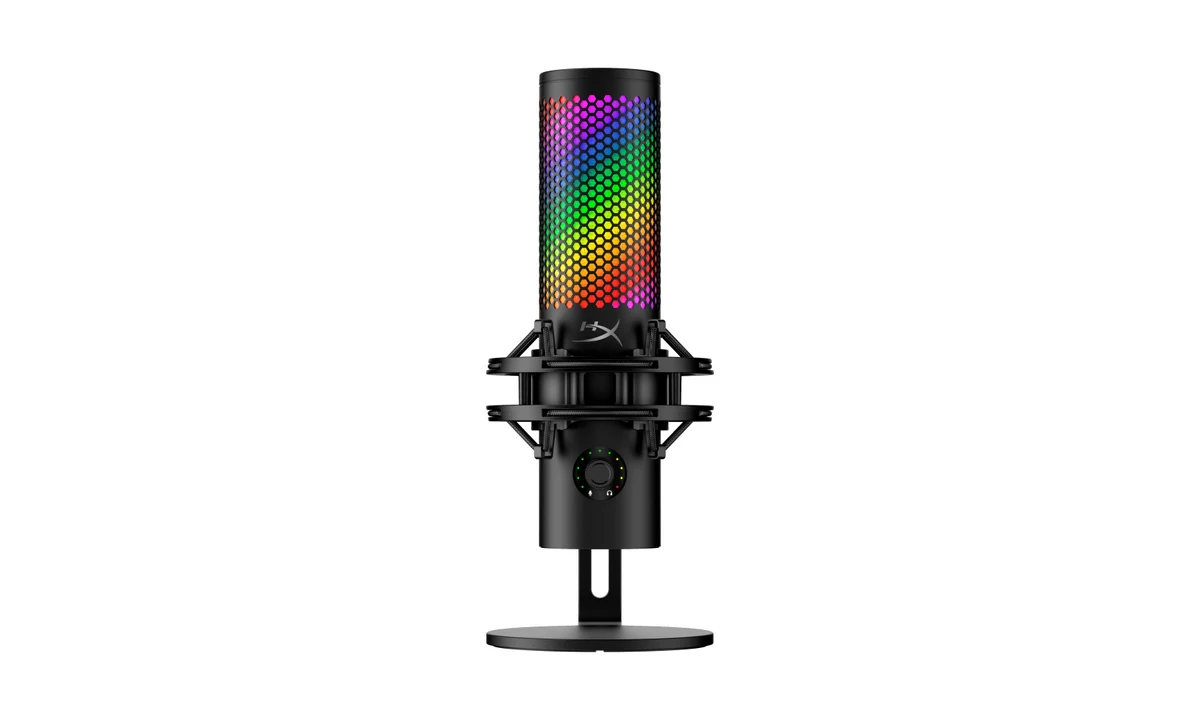
The HyperX QuadCast 2 S is a desktop USB microphone for someone who wants visible lighting, accessible physical controls and a complete stand arrangement in one purchase. Its headline recording resolution is impressive, but its more useful everyday features are easier to understand: tap-to-mute, selectable pickup patterns, headphone monitoring and a removable shock mount. Those are the features to evaluate before paying attention to a large format number.
The sensible buying question is whether this particular arrangement fits your room and working routine. A microphone that is easy to mute and position can be more useful for a stream than a specification you will never use. Equally, colorful lighting and a supplied stand do not remove the need to manage the distance between the microphone and your voice or the sounds around the desk.
Identify the right QuadCast
This review covers the black QuadCast 2 S, product number 9A273AA. It is distinct from the original QuadCast, the earlier QuadCast S and the non-S QuadCast 2. Similar names and cylindrical bodies make it easy to compare the wrong version. Confirm the exact model in the selected offer rather than relying on a photograph whose lighting is the most noticeable difference.
HyperX specifies recording capability at 32-bit and 192kHz, alongside four selectable pickup patterns and addressable RGB lighting. Those are capabilities of this model, not a requirement to record every session at its maximum format. Choose the settings needed by the application and project, and confirm that the rest of the recording path uses them as intended.
Tom's Hardware's original evaluation found the microphone sounded good for its gaming and streaming role, while regarding the maximum recording format as excessive for most of that audience. That is a useful way to frame the purchase. The number can be a capability without being the feature that makes a practical difference to a voice call, stream or ordinary spoken recording.
An owner of an earlier QuadCast should therefore compare a specific missing function before upgrading. If the existing microphone already produces a suitable result and is easy to operate, a larger format specification alone may not change the delivered recording. The stronger reasons to consider the newer model involve its controls, mounting arrangement or another clearly identified requirement.
Choose the pickup pattern for the session
The QuadCast 2 S offers cardioid, omnidirectional, bidirectional and stereo patterns. These are different pickup arrangements, not interchangeable labels for stronger noise removal. Start with the documented pattern suited to the placement of the people or sound you want to record, then evaluate the actual result in the intended room.
For a single person at a desk, the useful setup question is where the microphone's intended pickup area faces and what else sits around it. A keyboard, computer fan and reflective tabletop remain part of that environment. Changing the pattern should not be treated as a promise that unwanted sounds disappear while the desired voice remains untouched.
A bidirectional or omnidirectional arrangement may be useful for particular shared recordings, but one central microphone creates a different situation from separate microphones for each person. Consider relative distances and where the speakers sit. The availability of a pattern is a useful option; it does not make every seating arrangement equally easy to capture or adjust afterward.
Stereo is another option whose usefulness depends on the project rather than the fact that it exists. A spoken stream may have no need for it, while another kind of recording may use it deliberately. Do not buy the microphone on the assumption that selecting the most elaborate-sounding mode automatically improves the audience's experience.
Physical controls are the practical attraction
The top tap-to-mute sensor provides a direct way to manage whether the microphone is active. That can be especially helpful when the recording application is behind another window. Learn the microphone's indicators and check the intended mute behavior during setup. A control is most useful when its state is obvious without disrupting the session.
The multifunction knob adjusts microphone gain, headphone volume and monitor mix, and participates in pattern selection according to HyperX. These are different controls with different effects. Increasing the level in headphones is not the same as increasing the signal being recorded. Take time to understand which setting is active before making a quick adjustment during a live session.
Monitor mix is useful when you want to balance what you hear locally, but it should not be mistaken for a report of every processing step applied elsewhere. A recording application or communication platform may handle the signal separately. Listen to an actual test recording or call as well as using the headphone output, so you know what the audience receives.
Physical controls also reduce the need to keep a software settings window open for basic operation. That is appealing if your main screen is already occupied by a game, slides or editing tools. It does not remove configuration from the workflow entirely: the host must still use the intended input device, format and application settings.
Placement matters more than a lighting preset
The microphone comes with a desktop stand and a vibration-dampening shock mount. HyperX describes a redesigned detachable mount using spring-loaded pins. This makes the mounting arrangement a meaningful part of the product rather than an accessory to ignore when comparing two microphones. Check how the complete assembly fits beside your display, keyboard and camera.
A supplied stand is convenient because you can begin with the included arrangement, but the available desk position may not put the microphone where you want it. Before buying, think about the space between your face, screen and keyboard. If the microphone has to sit far away to avoid blocking something, an arm or a different placement may be the more useful investment.
Tom's Hardware found the microphone handled steady background sound better than inconsistent noises such as typing in its evaluation. That is an important limitation for a desk shared with a keyboard. The shock mount and a directional pattern can be useful features without making every keystroke inaudible. Judge the actual recording under normal working conditions rather than during a silent demonstration.
The review also suggested considering an external pop filter despite the internal filtering arrangement. Treat that as a prompt to evaluate your own speech and placement, not an instruction that every user must buy another accessory immediately. The appropriate setup is the one that handles your ordinary recording, with extra equipment added to address an identifiable problem.
USB, headphones and package details
The microphone connects through USB-C and provides a 3.5-millimeter headphone output. The current HyperX package list includes a three-meter USB-C-to-USB-C cable and a USB-C-to-USB-A adapter. The older independent review described a different cable arrangement, so check the actual current retailer contents instead of relying on an earlier unboxing alone.
Cable length can be convenient on a larger desk, but arrange the spare length deliberately. Avoid leaving it where it pulls against the microphone or interferes with movement around the workstation. The supplied stand and controls are easier to use when the cable path has been planned alongside the physical placement rather than added afterward.
Confirm that the intended computer and application support the microphone and the settings you need. HyperX lists PC and Mac compatibility, but that broad statement should not be used to assume every version of the configuration software is available on every host. Basic recording, onboard controls and the full customization application are separate aspects of compatibility.
For a managed computer, check whether additional software may be installed before choosing the device around a particular lighting or configuration feature. A useful microphone should fit the permitted setup. Discovering after purchase that an important application is blocked can matter more than differences in the recording format printed on competing product pages.
Lighting and NGENUITY
HyperX identifies NGENUITY as the customization application and advertises more than 100 addressable RGB LEDs in the QuadCast 2 S. Lighting is a substantial part of the design, especially when the microphone is visible in a camera frame. Decide whether that appearance helps the setup you are actually building rather than assuming more lighting is inherently more professional.
Tom's Hardware found the software's recording adjustments fairly restrained in the version it evaluated and regarded lighting customization as a major reason to use it. Current software can change, so check the present feature set if a particular processing option matters. Do not assume the microphone includes a complete production-effects suite merely because it has a configurable application.
If the microphone will appear on camera, assess its brightness and placement as part of the overall picture. The desired appearance may be subtle or deliberately colorful. Either can be appropriate, but the lighting should not distract from the content or become the only reason for choosing a microphone whose physical position does not suit the desk.
For an audio-only workflow, the same lighting capability may contribute little. Compare the complete cost and controls with simpler alternatives rather than treating an unused visual feature as an advantage. The QuadCast 2 S is particularly coherent when the user appreciates both its practical onboard operation and its appearance, not simply its largest specification.
Recording format and realistic expectations
A 32-bit recording label is not a promise that careless placement, excessive levels or every kind of distortion can be repaired later. The useful habit is still to check the signal under the loudest ordinary conditions you expect and confirm what the application actually records. A specification should support a deliberate recording process rather than replace it.
Likewise, the highest sample rate is not automatically the right setting for every task. Match the format to the project and the application's requirements. Tom's Hardware's conclusion that the maximum format is unnecessary for many streams is relevant here: a voice-focused purchase should be judged by the delivered voice and usable controls, not by a number divorced from the workflow.
Make a short test with the intended software, normal background activity and the microphone in its real position. Listen for whether words are clear, whether keyboard activity is distracting and whether quick mute and level adjustments are understandable. This kind of evaluation answers more of the buying question than a silent room and an attractive lighting pattern alone.
Alternatives and ownership
A simpler USB microphone is worth comparing when you need one pickup arrangement and rarely change controls. A separate microphone-and-interface system is a different route when specific recording equipment or a broader studio workflow is already planned. Compare the complete setup, including required accessories and available desk space, rather than assuming every more complicated arrangement is automatically an upgrade.
HyperX lists a two-year warranty for the product. Check the applicable terms and the exact retailer, and keep the product number with the purchase record. Also investigate the mounting arrangement you would use if the supplied desktop stand is unsuitable. An arm should be selected for the actual assembly and compatibility requirements, not merely because a mounting thread appears in a photograph.
Verdict
Choose the QuadCast 2 S if you want a supplied desk arrangement, accessible mute and level controls, several pickup patterns and lighting that belongs in the intended setup. Its documented capabilities and positive original evaluation support that use. Confirm the host, cable contents and physical placement before deciding that it is a complete answer for your desk.
Choose a simpler microphone if the lighting and extra patterns will remain unused, or reconsider the placement first if typing and distance are the real problems with your current audio. The QuadCast 2 S is a strong-looking, practical USB option for the right arrangement. Its most valuable features are the ones you will operate and hear, rather than the format numbers you may never need.