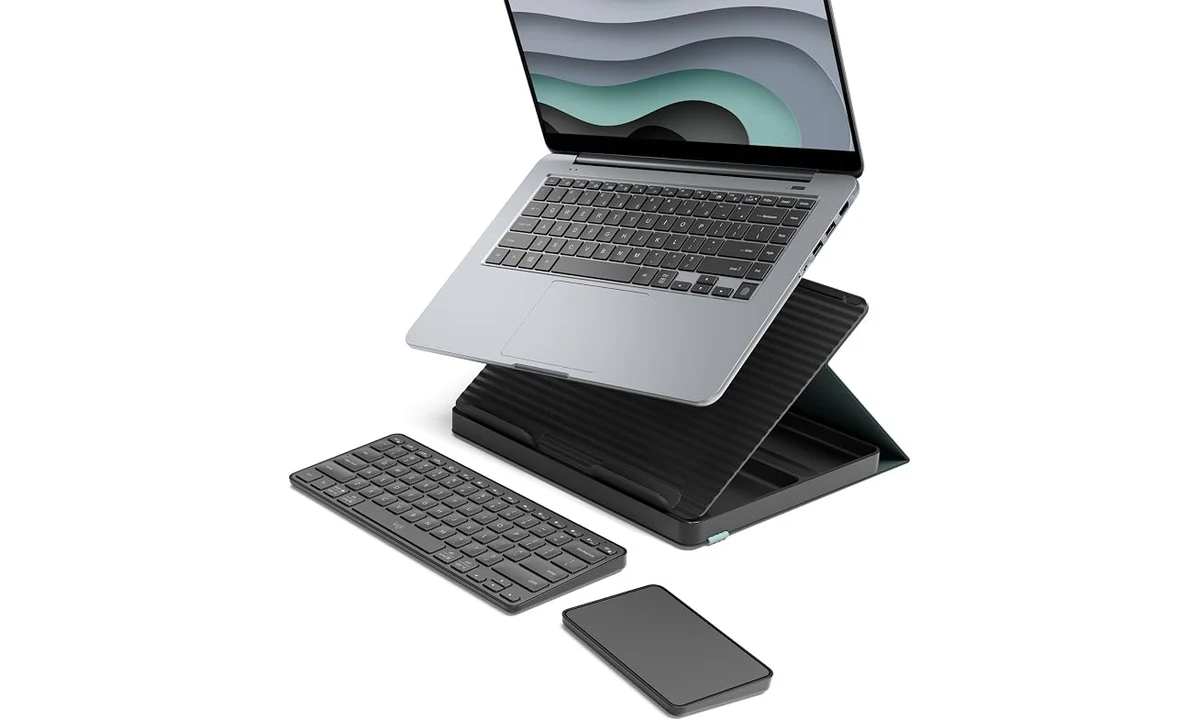
The Logitech Casa Pop-Up Desk is a portable workstation kit for people whose working surface has to become part of the home again when the job is finished. A book-like case holds a keyboard and touchpad, then opens into a laptop stand. It is not a desk with legs, and it does not turn every sofa or narrow shelf into a suitable working surface.
Its strongest case is repeated setup and pack-away at a dining table, spare room or shared work area. You are buying a coordinated arrangement that keeps its main parts together. If a permanent desk is available, separate accessories may offer more choice. If carrying as little weight as possible is the priority, the combined kit needs a closer look before ordering.
What this kit contains
The selected version is Classic Chic, the deep green and graphite combination labelled Green/Black on the Amazon US listing. Casa includes Casa Keys, Casa Touch and Casa Book, plus a USB-C charging cable and documentation. Product photographs may show a laptop to demonstrate the stand. The laptop is not included, and its suitability must be checked separately.
Casa Book is both the storage case and the support for the computer. The keyboard and touchpad come out for use, allowing the screen to sit higher than the typing surface. That separation is the useful idea behind the kit: you can arrange the controls independently of the laptop rather than choosing between comfortable typing placement and a more visible screen.
Logitech lists a packed weight of 1.2 kilograms. That deserves attention when comparing the Casa with a small folding stand already in your bag. The weight buys an integrated keyboard, touchpad and carrying structure, but it is still additional to the laptop, charger and other equipment. A coordinated kit is not necessarily the lightest possible portable setup.
The case also provides space for small items, according to Logitech. Treat that as convenient organization, not permission to overfill it. Keep loose objects from pressing against the controls, and make sure everything closes as intended. The point of the design is an orderly, repeatable pack-away routine; turning the case into a miscellaneous accessory box can work against that advantage.
Check the laptop fit carefully
Logitech says Casa Book supports most laptops with screens from 10 to 17 inches and a maximum supported weight of 7.5 kilograms. Those are boundaries, not a promise that every machine within the screen-size range fits. The manufacturer excludes tablet laptops and machines whose non-square edges exceed the documented 12-millimeter limit at the support area.
That qualification matters for rounded bases, unusual convertible designs and protective shells around a laptop. Screen size describes the display, while the stand actually meets the computer's lower edge and underside. Examine the contact points shown in Logitech's instructions and compare them with your own machine. Resolve an unusual fit before relying on the size range printed in a retailer title.
A raised screen is useful only if the whole arrangement has a stable place to sit. Allow room for the opened stand, keyboard and touchpad on the surface you intend to use. Check where cables will run and whether other people need the same table. The kit organizes a workstation; it does not create additional table area or remove the need for a sensible placement.
Avoid treating the arrangement as a medical solution. Logitech markets comfort benefits, but personal comfort depends on the chair, table, viewing distance and how the controls are positioned. Use the ability to move the keyboard and touchpad to find a workable setup. A product's name and appearance should not replace attention to how you actually sit and work.
Keyboard and touchpad compatibility
Casa Keys and Casa Touch connect through Bluetooth Low Energy. Logitech lists support for Windows, macOS, ChromeOS and iPadOS, with version requirements on its current product page. The software experience is not identical across those systems. In particular, Options+ customization is available on Windows and macOS, while the manufacturer says Options+ is not supported on ChromeOS or iPadOS.
Mac users should note the separate requirement to install Options+ for touchpad gestures. It is easy to assume that a wireless touchpad automatically behaves exactly like the one built into a laptop. Check the gestures you actually use, especially for switching workspaces or moving between applications. Basic connection and the complete customized gesture experience are different parts of compatibility.
For a company-managed computer, verify that Bluetooth accessories and the required software are allowed. If the system administrator restricts Options+, choose the kit on the basis of the functionality that remains available. Do not assume you can add the missing customization later without permission. This is particularly relevant when the Casa is intended to make moving between home and office effortless.
Logitech lists Easy-Switch channels on both controls. This can be helpful when several compatible devices share the kit, but it still requires a deliberate switching routine. Keep track of which computer each control is paired with. A keyboard connected to one device and a touchpad connected to another can look like an unreliable workstation when the real issue is simply the selected channel.
How the controls change everyday work
The keyboard's laptop-like format is aimed at a familiar typing experience rather than the feel of a large desktop mechanical board. Consider the applications you use before deciding that compactness is a benefit. Heavy spreadsheet entry, repeated navigation commands or a strong preference for a separate number pad can make a different keyboard more appropriate, even if it packs less elegantly.
Casa Touch gives you a separate pointing surface without adding a conventional mouse. That is appealing on a shared table, where a repeatable layout and a tidy pack-away may matter more than elaborate pointing-device features. It also means that the kit's value depends partly on whether you enjoy using a touchpad for the work you do most often.
For detailed selections, long document work or repeated dragging, compare a touchpad with your preferred mouse rather than assuming one input method is universally better. A person who already uses gestures fluently may appreciate the arrangement immediately. Someone who frequently changes tools in a drawing or editing application may still want a mouse nearby, reducing the simplicity of the all-in-one proposition.
Tech Advisor's original evaluation is useful context for the kit's portable-workstation idea and the practical compromise of carrying an integrated setup. It should not be read as evidence that every laptop, hand position or operating system will produce the same experience. Use independent review observations to identify questions for your own fit check, not as a substitute for that check.
Charging is a two-device routine
Both Casa Keys and Casa Touch have rechargeable batteries and USB-C charging. Logitech quotes up to five months for the keyboard and up to three weeks for the touchpad, with actual endurance depending on use and computing conditions. These are separate maximum claims. They do not mean the kit can be charged once and then ignored for the keyboard's longer interval.
The useful ownership habit is to notice the touchpad's battery indicator and top it up before a planned move or a long working day away from your usual desk. Keep a suitable charging cable accessible when the kit is packed. A beautifully organized workstation loses much of its convenience if one of its input devices needs charging when you are trying to begin work.
Logitech says the devices can remain in use while charging. That can make a low battery less disruptive when suitable power and cable access are available. It does not turn their wireless operation into a requirement-free system: the host still needs the documented Bluetooth support, and the charging arrangement must reach the controls without pulling them out of a comfortable position.
The different battery intervals are also a reason to avoid relying only on habit. A keyboard that remains charged does not indicate the touchpad's state. Check each device separately, particularly if the kit has been stored between work sessions. This is a small practical task, but it is part of what owning a coordinated wireless kit involves.
Home portability versus travel portability
Casa makes particular sense for moving between rooms in the same home. The case gives the keyboard and touchpad an obvious storage place, and the stand can be returned to a book-like shape. That can reduce the friction of reclaiming a shared table, provided you also have a place for the laptop and charging equipment after work.
Commuting is a different problem. The packed kit has a defined footprint and weight, so compare it with the bag you actually carry. Think about where the laptop, case and power supply will sit together. An accessory can be portable in the sense that it moves easily around a home while still being more than you want to carry on every journey.
Do not judge the system only when it is fully arranged in a product photograph. Rehearse the sequence of arriving, opening the case, placing the laptop, connecting power and choosing Bluetooth channels. Then reverse it. The benefit is not simply that the parts fit inside a case; it is that this particular sequence suits how often and where you set up.
If you mainly work in one location, the pack-away advantage may be less important than independent adjustment. A permanent stand, a keyboard selected for your typing preferences and a separate mouse can be a better fit. Casa's coordination is valuable when keeping those pieces together solves a real daily problem, rather than when the matching appearance is the only attraction.
Alternatives and purchase details
A separate folding stand with an existing keyboard and mouse is the simplest comparison. It can let you reuse equipment you already like and choose each component independently. The trade-off is having to organize the pieces yourself. Compare the complete arrangement you would carry, including a protective case where necessary, rather than comparing Casa's full kit with a stand alone.
A laptop used without external controls remains a reasonable choice for brief tasks where setting up a workstation would take longer than the task itself. Casa is intended to improve a repeated working arrangement, not every moment of laptop use. If most of your portable work is short and opportunistic, the additional equipment may stay in its case more often than you expect.
The US manufacturer page lists a one-year limited hardware warranty. Check the terms for the selected retailer and region, and retain the exact product identity with your receipt. Also check the keyboard layout in the listing photographs. A matching color name does not establish that an imported keyboard uses the punctuation and key arrangement you want for daily typing.
Verdict
Choose the Logitech Casa Pop-Up Desk if you repeatedly build and dismantle a laptop workstation and want its stand, keyboard and touchpad to remain together. Its appeal is organization with a consistent physical routine. Verify the laptop's edge shape, the host's Bluetooth support and the operating system's gesture limitations before treating it as a complete solution.
Choose separate accessories if you have strong preferences for a particular keyboard or mouse, need more flexible stand adjustment, or want the lightest possible bag. Casa is a convincing answer to a shared-space problem, but the shared-space problem needs to exist. Its convenience is most meaningful when the kit is used and packed away regularly, rather than left permanently open on a desk.