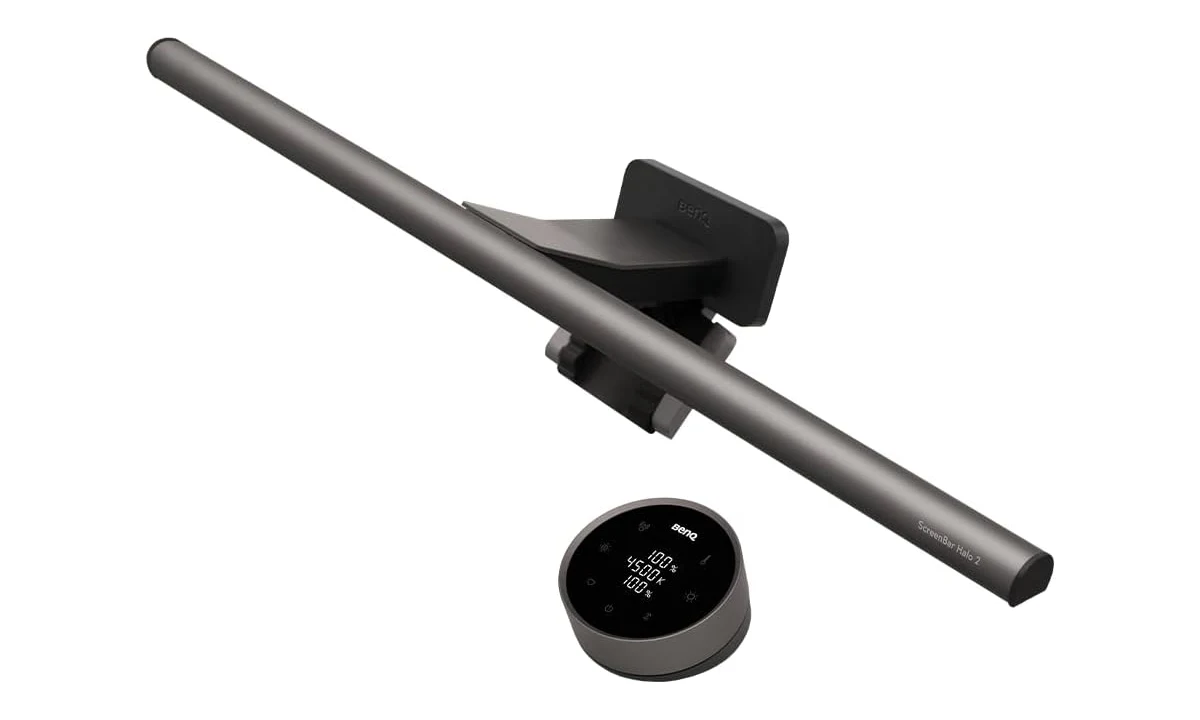
The BenQ ScreenBar Halo 2 is most convincing on a permanent monitor desk where a conventional lamp competes with notebooks, a keyboard and a mouse. It puts task lighting above that working area and adds a separate light behind the display. Its appeal is control over two different parts of the desk, rather than a reason to work in an otherwise completely dark room.
Our assessment combines BenQ’s current product and power information with AppleInsider’s original evaluation. We have not measured illumination or glare ourselves. The recommendation depends on your monitor, wall position and preferred lighting: the Halo 2 is worth considering when those arrangements suit a mounted light, but its shape and mounting requirements make a conventional adjustable lamp the better answer for some desks.
Begin with the surface you need to light
A monitor light bar is primarily a way to illuminate the working surface in front of a display. Think about the place where you write, read a document or find a keyboard control. If those activities happen beside rather than directly in front of your monitor, a lamp with an adjustable arm may direct light to them more naturally. Position matters more than the product category’s tidy appearance.
The rear light serves a different purpose: illuminating the area behind the monitor. Its effect depends on what is there. A wall close behind the desk offers a different surface from a window, a dark shelving unit or an open room. Before buying, look at the background your light would actually reach. A promotional photograph of a pale wall does not describe every home office.
Consider the existing room lighting too. If overhead lights already provide comfortable illumination and your desk has no shadowed work area, the additional hardware may solve little. If your screen is the only bright object in a dim space, changing the room’s general lighting is also an option. The Halo 2 should complement a deliberate setup rather than become an excuse to ignore the rest of the room.
Its strongest case is a desk where both forward task lighting and adjustable rear illumination would be used regularly. Someone who only wants a decorative glow behind the screen should compare a suitable bias-light arrangement. Someone who mainly needs to light their face for calls should compare a video light. Combining all three needs into one product expectation is likely to disappoint.
Monitor fit is the first purchase gate
The Halo 2 sits on the monitor rather than on a conventional weighted desk base. Check the display’s top edge, rear shape and the surrounding area before looking at colour settings. A thickness figure alone does not establish compatibility when the back has a large bulge, an unusual curve or a mounting obstacle. Use BenQ’s current fit guidance for the exact display.
Also inspect where the clamp would meet the bezel and whether it could interfere with an integrated camera, ambient-light sensor or ventilation. A screen with a thin-looking front can have a more complicated rear profile. Do not force the mount or assume that pressure is harmless because another buyer reports success on a different monitor. The fit needs to be appropriate on your equipment.
A separate webcam introduces another item competing for the top of the screen. Plan the arrangement before buying both products. It may be possible to place them appropriately, but the existence of a webcam mount and a light-bar clamp does not establish that they stack together. An alternative camera position or a different lighting format can be simpler than improvising a mounting arrangement.
Multiple displays deserve the same attention. A light attached to one monitor will not necessarily illuminate a wide desk evenly, especially when the screens sit at different angles. Identify the main working area and evaluate whether one bar can serve it. The aim is a useful pool of light, not merely a symmetrical-looking row of equipment above the screens.
Front and rear controls are the useful premium feature
The Halo 2 allows brightness adjustment for its front and rear lighting, with colour-temperature adjustment across the advertised range. Separate control matters because the conditions behind the monitor and on the desk can change independently. You may want more task light for a printed page without making the wall brighter. A fixed linked setting would offer less flexibility in that situation.
BenQ lists a colour-temperature range of 2700K–6500K. The practical choice is how the light looks with your other lamps, room surfaces and preferences. A warmer-looking setting may feel appropriate in one evening arrangement while another task benefits from a different balance. The range does not establish that a particular setting improves health, concentration or sleep for every user.
AppleInsider’s reviewer particularly valued the wireless controller and its visible settings. That is a useful observation about everyday adjustment: a control you can reach without touching the display may make it easier to change the lighting during work. We do not treat the reviewer’s favourable glare experience as a universal result. Screen finish, geometry and surrounding reflective objects still matter.
Think about where the controller will live. A light bar frees the space occupied by a lamp base, but the control dial still needs an accessible spot. If it sits behind a pile of papers, the convenience is diminished. Put frequently adjusted equipment within ordinary reach and leave a clear place for it, rather than designing a desk that only looks tidy when nothing is being used.
Automatic behavior should support your routine
Ambient adjustment and presence sensing can reduce the amount of manual switching and dimming. Their usefulness depends on the desk’s surroundings and whether you like the resulting behavior. A workspace beside a changing window, for example, presents different conditions from a consistently lit interior room. Automatic adjustment is an option to assess, rather than proof that you will never want to change a setting.
Try the automatic behavior during a representative working session. Move between typing, reading and stepping away, and see whether the lighting follows your expectations. If it does not, review the documented settings before deciding that the whole product is unsuitable. A feature can be technically functional yet inconvenient for a particular routine; that is a legitimate reason to prefer manual operation.
Keep the sensors unobstructed according to the manufacturer’s installation instructions. Accessories and decorative objects placed around the monitor can change what a sensor encounters. Avoid surrounding an automatic light with clutter and then expecting it to behave exactly as it did on a clear demonstration desk. The physical installation and the automatic features are parts of the same system.
If several people share the desk, agree on a simple default. Constantly changing both lights and the room lamps can make it hard to understand why the next session looks different. A familiar starting point makes experimentation easier. The benefit of flexible controls is choosing a useful arrangement, not maintaining the largest possible collection of lighting combinations.
USB-C power needs deliberate checking
BenQ specifies a 5V input, up to 3A current and a maximum power consumption of 15W. A USB-C-shaped socket does not by itself establish that an available monitor or computer port provides the required power. Follow the documented supply arrangement and check the regional package. Do not assume that any spare connection behind the screen is suitable merely because the cable fits.
This distinction matters if the attraction is eliminating visible cables. A monitor’s USB connection may have a different intended role or power capability, while a computer port may change behavior when the computer sleeps. Plan where the power actually comes from and how the lead reaches it. A clean installation is one with a suitable supply and sensible routing, rather than simply the fewest visible connections.
Keep the cable away from moving monitor-arm joints and leave enough freedom for normal display adjustments. A light fixed to a screen moves with that screen, so cable routing should accommodate the movement. Otherwise, changing the monitor height can pull on the light or its connection. This is easy to miss when testing the fit with the monitor in only one position.
The wireless controller does not mean the lamp itself is battery-powered. Treat the light as a powered desk accessory requiring the documented connection. If portability between rooms is your main goal, a more self-contained lamp may be easier to manage. The Halo 2’s appeal lies in an integrated fixed workstation rather than quick relocation around the house.
Assess reflections with your real work materials
Glare is a property of the whole arrangement, not a promise that a particular lamp can settle alone. Assess the screen from your normal seating position and with the display at its ordinary angle. Then check glossy paper, a tablet, a keyboard and any other reflective surface you use. A lighting arrangement can look good on the desk while creating an inconvenient reflection elsewhere.
Printed documents are a useful practical check. Put a page where you normally read it, rather than directly under the brightest-looking part of the bar. If you must move every document to one narrow location, an articulated lamp may serve your working habits better. A lighting product should accommodate the task, rather than require you to redesign every task around its beam.
For colour-sensitive image work, separate comfortable desk illumination from a controlled colour-evaluation environment. Changing the apparent colour of surrounding light can influence how you perceive a display. This review does not certify the Halo 2 as a colour-proofing system. Follow the requirements of your actual editing or proofing process instead of assuming an adjustable lamp establishes reference conditions.
A video call is another separate test. Lighting a keyboard is not the same as providing flattering illumination on a face, and a brighter background can alter a webcam’s exposure decisions. If calls are central to your work, preview the camera after changing the desk lighting. The Litra Glow already covered on TopDataLLC addresses a different lighting position and purpose.
Compare the alternatives by what occupies the desk
A conventional desk lamp can direct light away from the monitor, serve an adjacent writing area and remain useful when the display is replaced. Its base or clamp needs space, and its arm may intrude into the working area. Compare those physical costs with the Halo 2’s monitor-fit dependency. Neither form is inherently better; the tradeoff is between independent placement and an integrated screen-mounted arrangement.
A simpler monitor bar can be appropriate if you only need front task lighting and seldom change settings. The Halo 2’s rear light and controller should earn their place through actual use. Paying for capabilities you leave disabled does not automatically make the workstation more comfortable. Compare current packages and support terms without assuming that every BenQ bar shares the same controls or mounting system.
A separate rear light may be preferable when the wall effect is the main goal, particularly across several screens. That leaves you free to choose task lighting independently. It also adds another component and control arrangement. Decide whether integration simplifies your actual routine or whether separate tools better match the different locations you need to illuminate.
Verdict
Choose the ScreenBar Halo 2 when you have confirmed the monitor fit, can provide the correct power and want both adjustable desk lighting and a rear glow. Its most persuasive features are the separation of those lighting roles and a controller that makes changes accessible. It is a substantial desk accessory whose value depends on the installation, rather than a universal upgrade for every screen.
Skip it when the monitor is unsuitable, the working surface is elsewhere or a conventional lamp already solves the problem. Evaluate the result with your documents, reflective surfaces and camera, and keep medical promises out of the decision. For the right permanent desk, the Halo 2 offers a coherent way to manage light without using a conventional lamp base in the working area.