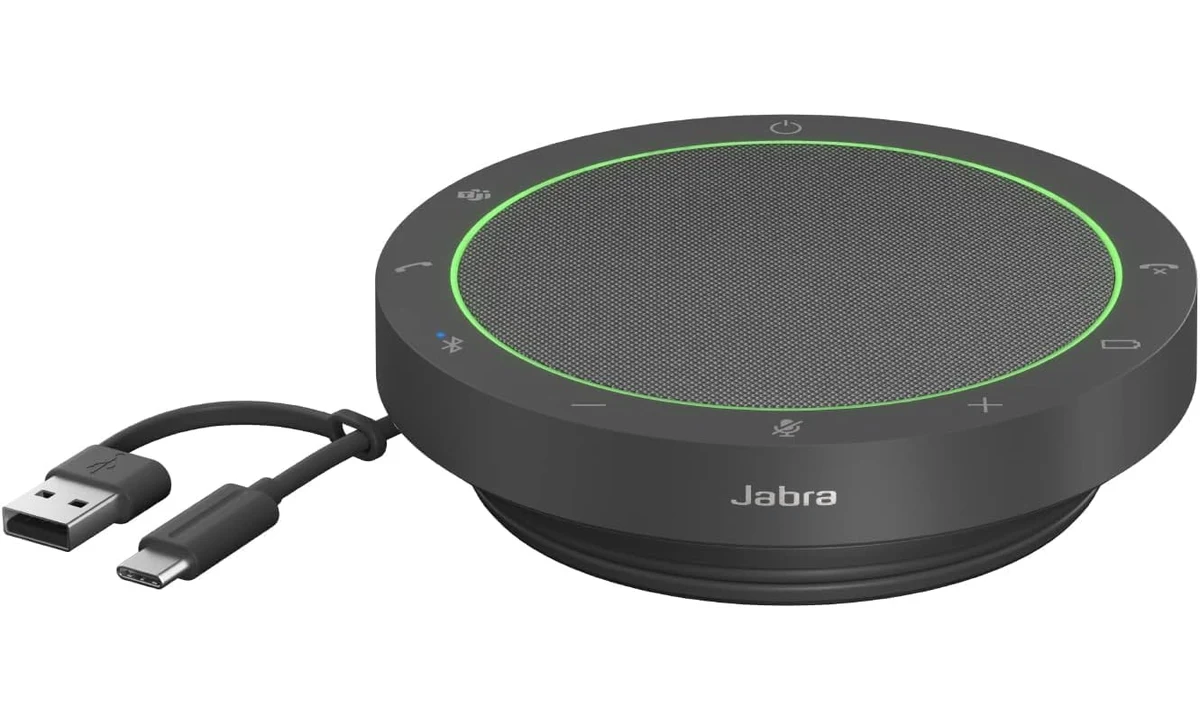
The Jabra Speak2 55 is useful when you want to take calls without wearing a headset, or when a small group needs to join around one computer. Its main advantage is combining a speaker, microphones and call controls in a portable unit. The purchase makes less sense where meeting audio must stay private, where the room is very noisy or where each participant needs an individual microphone.
This review covers the Dark Grey Microsoft Teams version, model 2755-109, rather than the separate UC configuration or a listing described as a newer edition. We use Jabra’s technical sheet and quick-start material alongside Systems Contractor News’ original evaluation. We have not measured microphone pickup, battery endurance or echo cancellation ourselves, so our recommendation is tied to the documented connection arrangement and the room where you intend to use it.
Decide whether the room can hear your meeting
A speakerphone deliberately plays the other participants into the room. That is convenient for a private home office and problematic for a shared space containing people who should not hear the conversation. Before comparing microphone counts, decide whether listening aloud is appropriate. A headset solves a different problem by keeping incoming audio close to the listener rather than making the call accessible to everyone nearby.
The microphones also need to hear the room. A unit designed to capture several people cannot behave exactly like a close-positioned headset microphone that follows one mouth. Background conversation, room reflections and the distance between participants all matter. If your main problem is working beside other people’s calls, a speakerphone may be the wrong category even when its processing features sound impressive.
A small table is a more natural role than a long meeting room. Think about where the device can sit relative to everyone, whether laptops obstruct it and whether quieter speakers are farther away. Avoid treating a manufacturer pickup figure as permission to place participants anywhere inside an imaginary circle. The quality of a conversation depends on the complete arrangement, not just whether a voice is faintly detectable.
For one person in a quiet office, avoiding headset wear can be a meaningful benefit. You can move naturally within a sensible working area while keeping physical call controls on the desk. But check whether your calls include confidential discussions and whether anyone else enters the room. Convenience should be assessed alongside the listening environment, rather than discovered after a sensitive conversation has begun.
USB is the straightforward computer route
Jabra documents an integrated USB-C cable with a USB-A adapter. That provides a practical connection to different computer ports without requiring a separate detachable lead for normal operation. The cable wraps around the unit for transport. Confirm the exact model and connector arrangement in the supplied package, especially because some older review descriptions reverse the names of the cable and adapter.
For computer meetings, USB is the documented certified route. Jabra’s technical sheet identifies Bluetooth for smartphone and tablet use and states that meeting-platform certification applies to USB connections. That distinction matters if you are buying it specifically for a work application. Do not assume that any Bluetooth connection to a computer offers the same controls or supported behavior as the USB arrangement.
Bluetooth is useful for phone calls and compatible mobile workflows, but it introduces pairing and connection priorities. If you intend to leave a computer attached while also connecting a phone, learn what happens when another call arrives. A device with several ways to connect can become confusing when the audio source changes unexpectedly. Test the exact combination before relying on it for an important meeting.
A certified speakerphone does not provide a meeting account, unlock organizational features or override a work computer’s policies. The application still needs to select it as the appropriate microphone and speaker. Make that selection deliberately and check it after docking, restarting or switching devices. A familiar illuminated ring does not establish that the meeting software is using the hardware you expect.
Full duplex describes conversation, not magic isolation
The Speak2 55 supports full-duplex audio, with echo cancellation and outgoing voice-level normalization. The useful idea is helping participants speak and listen naturally rather than taking turns because one direction cuts out. Those features deserve attention, but their presence does not establish that every room will sound natural or that overlapping speech will always remain clear.
Jabra specifies four microphones and a 50mm speaker. More microphones can support processing and coverage, but microphone count alone is not a useful ranking of every speakerphone. Placement, room acoustics and the processing approach remain important. A smaller group positioned sensibly can be a more suitable task than expecting additional microphones to compensate for a poor room arrangement.
Voice-level normalization is intended to reduce differences between outgoing voices. It is not a reason to put one person close to the speakerphone and another at the far end of a reflective room. People still need to speak at a reasonable level and sit within an appropriate arrangement. Automatic processing works best when it is supporting a sensible setup rather than being asked to rescue an avoidable problem.
If you need to evaluate performance, ask a remote participant to describe the result while different people speak from their actual seats. Test interruptions and ordinary background activity rather than a single sentence spoken directly above the unit. That is a practical suitability check, not a scientific benchmark. It tells you more about your intended room than repeating a catalogue claim without trying the environment.
Physical controls help when their state is understood
The illuminated ring and call controls make the device more directly usable than a generic speaker and separate microphone combination. Systems Contractor News’ reviewer appreciated the indicators and straightforward operation. Visible mute and call information can reduce the need to search an application window, especially when the meeting occupies one screen and your working documents occupy another.
However, the exact control behavior depends on the application, connection and version. Verify that mute, answer and end-call actions do what you expect in the software you use. A hardware button and an application button can appear to serve the same purpose while behaving differently under a particular integration. Establish the relationship during an ordinary test call rather than assuming perfect synchronization.
The Microsoft Teams version has platform-specific controls, while the UC version provides a different arrangement. Buy the configuration that matches the intended use, not simply the first listing with Speak2 55 in the title. The visual difference may be small, but a control you expect to invoke a work feature can be the reason the exact version matters.
Keep the speakerphone within comfortable reach if physical mute is important. Placing it centrally for a group and placing it conveniently for one person can be competing goals. Discuss who will operate the controls and how everyone will know the microphone state. A portable device is easier to share when its role and controls are clear to the whole table.
Battery use and the fixed cable are ownership choices
Jabra’s advertised talk time is up to twelve hours under its specified conditions. We have not independently measured that maximum, and music playback, volume, charging behavior and use can change the practical routine. Treat the figure as a manufacturer limit rather than an assurance that every working day finishes with charge remaining. Check the battery indicator before a session away from the normal desk connection.
USB operation and charging can simplify a permanent workstation, while the battery enables compatible mobile calling away from it. Decide which role matters most. Someone using it mainly beside a desktop may care little about maximum wireless endurance, while someone carrying it between rooms needs a charging habit that does not depend on remembering only when a call is about to start.
The integrated cable reduces the chance of leaving a separate connection lead behind. The corresponding limitation is that it is not as casually replaceable as an ordinary detachable cable. Avoid twisting or trapping it when packing the device. A fixed lead is not automatically a flaw, but it is a reason to consider the transport and replacement arrangements before describing the product as maintenance-free.
Jabra lists a body diameter of 120mm, a height of 33mm and a weight of 280g. That is portable, but it still occupies desk and bag space. Include the pouch and any other meeting accessories when judging the complete kit. A speakerphone may replace a headset in one role while still leaving you needing a headset for confidential calls elsewhere.
What the independent review adds
Mark Pescatore’s Systems Contractor News evaluation used the Microsoft Teams model for computer meetings and mobile calls. He valued the integrated cable, practical controls and call experience, while treating music as a secondary role. Those are useful original observations, but they do not demonstrate how the speakerphone behaves in every room or with every computer’s Bluetooth implementation.
The review’s cable labels differ from Jabra’s technical sheet, which describes USB-C with a USB-A adapter. We follow the manufacturer for the physical specification. This is a small example of why combining sources requires checking differences rather than merging every statement into a longer feature list. A review can be useful evidence without becoming the authority on every detail of the package.
We do not assign the reviewer’s colleague feedback to your own background noise. An office with a quiet keyboard and soft furnishings presents a different test from a hard meeting room beside a busy corridor. If the call environment is difficult, room treatment, closer microphones or another equipment category may matter more than moving between similarly sized portable speakerphones.
Speakerphone, headset or separate audio equipment
A headset remains the better direction when you need incoming privacy, frequently take calls in shared spaces or want the microphone to stay close as you move. Its wear comfort and connection arrangement need their own assessment. The Speak2 55 is an alternative for a suitable room, not evidence that headsets have become unnecessary for every kind of work.
A separate microphone and speakers can suit a fixed desk that also records voice or plays music. However, meeting echo behavior and application setup become parts of that combination. The Wave Neo and Samson Q2U already covered on TopDataLLC address different voice-capture workflows. Buying a recording microphone does not automatically create the same integrated call controls as a dedicated speakerphone.
The Creative Pebble V3 and JBL Flip 6 reviews concern music-speaker choices with different priorities. Do not select the Jabra mainly for an assumed high-fidelity listening upgrade because it contains a speaker. Likewise, a good music speaker is not automatically a suitable conference microphone. Start with whether the central job is shared conversation, private listening, voice recording or music playback.
Before the first important call
Connect the device by the intended route, select it in the application and make a test call. Check mute behavior, volume and what happens when a paired phone receives a call. If the workplace allows Jabra’s management software, review the appropriate current update process. Avoid making a firmware change immediately before a meeting without time to confirm the result afterward.
For shared use, return the device to a known state after meetings and keep its cable wrapped sensibly during transport. A short note describing the intended connection can be useful where several people borrow the speakerphone. Most practical problems are easier to diagnose when everyone knows which computer, application and connection arrangement the device is supposed to serve.
Verdict
The Speak2 55 is a reasonable choice for a quiet personal office or a small shared meeting arrangement where listening aloud is appropriate. Its USB connection, full-duplex design and accessible controls form a coherent calling tool. Choose the exact Teams or UC variant deliberately and assess the real room rather than treating microphone processing as an exemption from sensible placement.
Choose a headset when privacy or background noise is the bigger problem, and another category when music or voice production dominates the task. The Jabra earns its place by simplifying a particular call routine. It is less useful when purchased as a general audio upgrade without deciding who needs to hear the meeting and how the computer will connect.