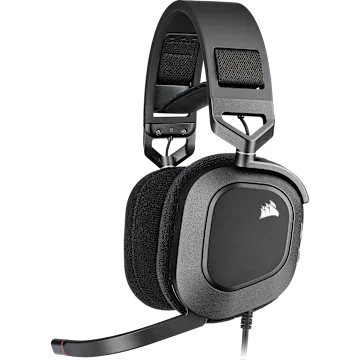
The Corsair HS80 RGB USB Wired Gaming Headset in Carbon, model CA-9011237-NA, is built for a computer desk rather than a mixed-device setup. Its appeal is concentrated in USB audio, a capable boom microphone, Dolby surround processing and Corsair’s iCUE software. The trade-off is equally clear: there is no alternate wireless or analog connection to broaden its role.
The exact model and buying decision
This review concerns the Carbon HS80 RGB USB, SKU CA-9011237-NA. It is not the HS80 RGB Wireless and not the HS80 MAX. Those similarly named headsets should not be treated as interchangeable when connection options matter. Corsair’s current product listing identifies this model as wired, with PC and Mac compatibility.
Corsair lists USB as the headset interface, and Tom’s Hardware reports USB-A connectivity. The cable is the only connection option according to that independent review. For a desktop or laptop with a suitable USB port, that keeps the basic connection uncomplicated; for a phone, tablet or console, it makes compatibility the first question rather than a detail to solve later.
Corsair lists a 1.8 m cable. Tom’s Hardware lists a 71-inch cord and describes it as non-removable. Those specifications point to a cable long enough for many desk arrangements, but the fixed lead also makes routing important. A damaged cable is not simply replaced with a standard detachable headset cable.
The sensible buyer profile is therefore specific: someone who expects the headset to stay with a compatible computer and values voice communication and software tuning. It is a weaker fit for a household where several people change devices, or where a single headset must move between a computer, console and handheld.
Audio hardware and listening modes
Corsair specifies 50 mm neodymium headphone drivers and a headphone frequency response of 20 Hz to 40 kHz. It also lists 24-bit/96 kHz audio through USB and Dolby Audio 7.1 surround. These are manufacturer specifications describing the hardware and supported modes, not a prediction that every recording or game will sound identical to every listener.
There is a specification conflict worth preserving. Corsair’s current technical listing gives headphone impedance as 32 kΩ at 1 kHz, while Tom’s Hardware’s table gives 32 ohms at 1 kHz. Because the records disagree, the manufacturer’s current listing is the appropriate reference for the exact model, but the discrepancy means this figure should not be presented as independently settled.
Tom’s Hardware reports that the headset supports stereo audio as well as Dolby surround. The same review says surround is included and toggled through iCUE, rather than requiring a separate purchase. That gives the owner a straightforward choice between unprocessed stereo and software-controlled surround, with the preferred mode likely to depend on the content.
In its independent evaluation, Tom’s Hardware reported clear positional audio cues with Dolby surround enabled during Halo Infinite. It also reported that the selected configuration kept gunfire and explosions from overwhelming other game sounds. Those are findings from that reviewer’s system and settings, so they are more useful as evidence of potential than as a promise of identical results in every game.
The independent review also reported good results from movies and television with Dolby surround active. For music, it described detailed playback from high-definition FLAC material using the headset’s 24-bit/96 kHz support. The broader point is that this is not limited to competitive gaming, although surround processing remains a preference rather than an automatic upgrade for every recording.
Microphone and controls
The microphone is one of the model’s strongest reasons to stay with a USB headset. Corsair lists it as omni-directional, with a frequency response of 100 Hz to 10 kHz and sensitivity of -40 dB plus or minus 3 dB. Corsair also identifies the HS80 RGB USB as Discord Certified, separating the product’s stated certification from any individual call experience.
Tom’s Hardware reported superb microphone clarity. Its reviewer said the microphone captured the reviewer’s voice clearly while picking up only the loudest environmental sounds. That finding supports the headset for multiplayer chat and voice calls, although room acoustics, microphone position and the software used by the call can still change the result.
The microphone is non-removable according to Corsair’s specification. Corsair describes a flip-up mute function and a built-in LED mute indicator, while Tom’s Hardware reports that the microphone automatically mutes when swung upward. The gesture is convenient for quick privacy, but the fixed boom is less suitable for someone who wants a clean headphone-only profile.
The left earcup houses the microphone, mute button and volume dial, according to Tom’s Hardware. Corsair describes the controls as on-ear volume and mute controls. That arrangement keeps the common adjustments within reach during a game or call, without requiring the wearer to find a keyboard shortcut or open the operating-system mixer.
The mute button is also programmable through iCUE. Tom’s Hardware reports that it can be reassigned to play and pause or other actions, including functions associated with the optional Voicemod add-on. This is useful flexibility, but it depends on Corsair’s software. Without customization, the button’s main job remains muting the microphone.
Fit, comfort and construction
Corsair describes plush memory-foam ear pads covered with breathable cloth and an adjustable floating headband. Tom’s Hardware independently reported that the cloth-covered memory-foam earcups were comfortable and relatively cool during long gaming sessions. That is encouraging evidence for extended desk use, though comfort still depends on ear shape, glasses, hair and preferred clamping pressure.
The unusual part of the fit is the suspension band. Tom’s Hardware says the top band uses stretchable material adjusted with hook-and-loop fastening instead of a conventional sliding headband. The reviewer found that getting the size right could take multiple attempts. This is the main setup inconvenience and a more meaningful buying consideration than the lighting effect.
The same adjustment can be awkward in a shared environment. Tom’s Hardware reports that if another person changes the band, the fitting process must be repeated. That makes the HS80 RGB USB more logical as a personal headset than as equipment for a family computer, office hot desk or shared gaming station.
Tom’s Hardware reports that the earcups hinge and rotate up to 90 degrees. That can help the cups settle into a more conforming position and makes the headset easier to transport. It does not turn the model into a compact travel headset, because the cord remains attached and the destination still needs a compatible USB host.
Tom’s Hardware describes sturdy construction using thick plastic and machined aluminum. Its specification table lists the headset at 373 g and 0.8 lb. That is a meaningful amount of headset to wear for anyone sensitive to weight, so the independent comfort report should be read as useful evidence rather than a universal comfort conclusion.
The earcups also have a practical limitation in noisy or shared spaces. Tom’s Hardware reports that they do not isolate external sounds especially well and do not fully prevent other people from hearing the audio. The review specifically says they may not suit an open office. Buyers should treat the cloth comfort advantage and the limited isolation as two sides of the same design choice.
iCUE, RGB and setup
Corsair iCUE is central to the HS80 RGB USB’s feature set. Corsair lists pre-tuned audio profiles, custom equalizer settings, sidetone control and customizable RGB lighting. Tom’s Hardware likewise says iCUE is used for surround, RGB and equalizer adjustments. Anyone who prefers a headset that exposes every important function through hardware should regard this software dependency as a limitation.
Tom’s Hardware reports five EQ presets and the ability to create custom presets. Its named options include Pure Direct, Clear Chat, FPS Competition, Movie Theater and Bass Boost. The reviewer found Pure Direct preferable for music with surround disabled, while the other presets worked more effectively with surround active. These are useful starting points, not settings that every listener must adopt.
Corsair lists sidetone control in iCUE. That feature can help a wearer monitor their own voice, but the supplied records do not establish a sidetone range, latency figure or particular monitoring quality. The responsible conclusion is simply that the control exists; its quality should not be inferred from the feature list.
The RGB treatment is restrained. Tom’s Hardware reports that the illuminated elements are Corsair logos on the earcups and a red microphone indicator ring. The review also reports that iCUE can synchronize effects with multiple Corsair devices. This suits a coordinated Corsair desk, but buyers wanting prominent lighting across the headset should not expect the entire exterior to glow.
The basic setup is simple on a compatible computer: connect the USB cable, select the headset for audio and microphone use, then install iCUE if surround, equalization, RGB or sidetone adjustments are wanted. That sequence follows the listed interface and software functions; it does not require pretending that the headset has controls or connection modes absent from the specifications.
Platform compatibility
Corsair lists PC and Mac compatibility. Tom’s Hardware says Macs may require a docking station or USB-A to USB-C adapter, and says the macOS version of iCUE supports the headset. The model therefore makes the most sense when the computer already has a practical USB connection or the owner accepts the need for an adapter or dock.
The PS5 situation is limited. Tom’s Hardware reports that the headset produced audio on a PS5, but that the volume dial and mute function did not work with the console. The reviewer also says a long USB extension cable would likely be needed to reach the console. This is possible audio use, not a complete console experience with every headset control available.
Tom’s Hardware says Xbox and Switch are not options for this headset. The review also identifies the lack of wireless and analog support as a problem for people who use consoles and tablets. That is the product’s defining boundary: its computer feature set is substantial, but it cannot compensate for a connection plan built around several incompatible devices.
Corsair lists wireless range as not applicable and says the headset is not battery-powered. There is no alternate wireless mode for moments when a cable is inconvenient. If a phone, handheld or living-room setup is part of the routine, that missing flexibility should outweigh enthusiasm for EQ profiles or lighting.
Ownership and alternatives
The fixed cable and fixed microphone keep the design focused but reduce replaceability. Corsair’s package contents list includes the HS80 RGB USB and a warranty card. The manufacturer material also includes general headset documentation and firmware-update guidance, but it does not establish a routine firmware schedule specific to this wired model.
Corsair’s supplied replacement guidance discusses ear-pad removal and installation for the HS80 RGB Wireless. It does not establish that the same parts or procedure apply to CA-9011237-NA. Owners should confirm compatibility before buying replacement pads rather than assuming that every HS80 accessory fits every variant.
The HS80 RGB Wireless is the closest alternative when the general HS80 design appeals but PS5 use matters. Tom’s Hardware specifically points to that model because its dongle is more practical with the console. That comparison establishes a connectivity advantage, not identical performance or identical behavior across every platform.
The Corsair HS65 Surround is more relevant when Xbox, Switch or another device requiring a physical audio connection is part of the plan. Tom’s Hardware describes that alternative as supporting USB and analog plugs and as sacrificing little in style or audio quality. Those are the supported comparison points; they should not be treated as specifications of the HS80 RGB USB.
Tom’s Hardware also names the Asus ROG Delta S as an alternative with similarly excellent audio clarity, more connectivity options and flashier RGB lighting. That category is more relevant when device flexibility and conspicuous lighting matter more than staying within Corsair’s iCUE ecosystem. The supplied source does not establish further Asus specifications, so the comparison should remain narrow.
Verdict
Choose the Corsair HS80 RGB USB if it will remain connected to one PC or Mac, if microphone communication matters, and if iCUE controls are welcome. Tom’s Hardware’s microphone findings, comfortable cloth-covered memory-foam earcups, clear positional audio and sturdy construction give the model a convincing dedicated-computer role.
Choose something else if wireless use, analog connectivity, Xbox or Switch support, or frequent sharing between users belongs in the plan. The suspension-band fitting can be fussy, the microphone and cable are fixed, and the reported PS5 arrangement does not preserve the headset’s volume and mute controls.
The conditional verdict is straightforward: this is a focused computer headset, not a flexible household headset. Its strengths are concentrated in USB audio, voice communication, software tuning and a personal desk setup. If those are your requirements, its limitations are easy to avoid. If your devices or users change often, begin with a model built around broader connection options.