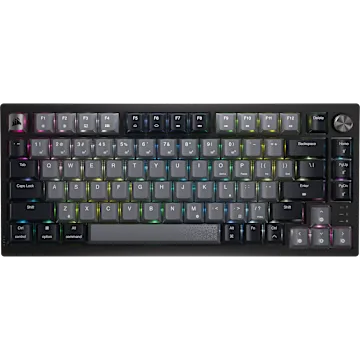
What this exact keyboard is
The Corsair K65 PLUS WIRELESS reviewed here is the Black/Gray model with Corsair MLX Red linear switches and a North American US QWERTY layout. That identity matters because the switch feel, key arrangement and available controls determine whether this is a sensible shared work-and-gaming keyboard or an expensive customization project.
Corsair classifies the K65 Plus as a 75% keyboard. The format keeps separate arrow and utility keys while reducing the width associated with larger layouts. It is therefore aimed at someone who wants more room for mouse movement without moving to a compact design that hides most navigation behind a function layer.
The missing number pad is the first buying question. A 75% board can be practical for documents, browsers and games, but it does not reproduce the dedicated numeric block found on a full-size keyboard. If frequent data entry is central to your work, compactness may create more friction than it removes.
The board’s appeal is consequently specific rather than universal. It combines a smaller layout, wireless operation, a rotary dial and a mechanical platform that can be modified later. Those priorities make more sense for a shared desk than a purchase based only on RGB lighting or gaming branding.
Layout and desk fit
The separate arrow keys are one of the clearest reasons to choose this size. They remain distinct instead of being compressed into an unusually small cluster. That should make routine navigation less dependent on function-layer combinations, although the board still requires an adjustment period for anyone moving from a full-size layout.
PC Gamer’s independent review identifies a less familiar arrangement detail: Delete sits above Backspace, while Home, Page Up and Page Down occupy a column on the right. This is not necessarily a problem, but it can matter during rushed editing because the positions differ from the layout many full-size users expect.
The independent specification table lists zero macro keys. That keeps the physical design straightforward, but it also means the K65 Plus is not a substitute for a keyboard with a bank of dedicated, programmable macro buttons. Its extra control is concentrated in the function layer, rotary dial and software assignments.
The rotary dial is the most distinctive physical control. Corsair says iCUE can assign it to RGB brightness, zoom, scrolling and other functions. PC Gamer’s review narrows that practical choice to volume, page scrolling, brightness and zoom, and reports that the dial’s click action cannot be changed.
That makes the dial useful for quick adjustments without turning it into a complete media-control cluster. A shared desk may benefit from one reachable volume or brightness control. Someone expecting separate play, pause, track and mute buttons should treat the dial as a convenience rather than a full media deck.
Corsair lists adjustable height. That gives the owner some ability to match the board to an existing desk and wrist position. The supplied evidence does not establish one ideal angle or a universal comfort result, so the useful conclusion is simply that the keyboard offers height adjustment.
Switch choice and customization
This exact configuration ships with Corsair MLX Red linear switches. Corsair specifies a 45 g actuation force, a 1.9 mm actuation point and 4.0 mm total travel. Those measurements help narrow the choice, but they cannot determine whether a smooth, non-tactile key will feel natural during every work session.
Corsair lists a 70 million keystroke lifespan for the MLX Red switch and identifies it as pre-lubed. The manufacturer also describes the acoustic profile as quiet. Those are product and switch descriptions, not a prediction that every desk, room or typing style will produce the same sound.
The largest limitation is the stock switch selection. PC Gamer reports that the base model offers no alternative to Corsair’s linear red switches. Buyers who specifically want a tactile bump or clicky feedback therefore need to accept the supplied linear feel or budget for a switch change.
The hot-swappable PCB changes the longer-term calculation. Corsair says owners can swap in their own switches, while PC Gamer reports that standard switches fit the board’s north-facing five-pin slots. Replacement compatibility should still be checked against the particular parts rather than inferred from the hot-swap label alone.
For a linear-switch buyer, the included MLX Reds make the keyboard ready to configure without an immediate parts purchase. For a tactile-switch buyer, the relevant cost includes a compatible replacement set and the time required to change it. Hot-swap flexibility creates an upgrade path; it does not remove the initial mismatch.
Keycaps, lighting and sound
Corsair specifies PBT dye-sublimated keycaps and describes them as fade-resistant. PC Gamer adds an important qualification: the lettering does not shine through. The per-key RGB can illuminate the board, but the legends themselves are not designed to glow through the keycap material.
That distinction matters in a dim shared room. Shine-through legends can make key identification easier without relying on ambient light. The K65 Plus is better understood as having configurable decorative illumination than as having strongly backlit lettering.
Corsair says the keyboard has two layers of integrated sound dampening intended to reduce internal pings and echoes. PC Gamer’s reviewer independently described the keyboard as quiet after considering its silicone and foam lining. Perceived sound can still vary with the desk surface, room and typing force.
The board uses a top-mount plate. Corsair says that design provides a consistent typing feel and airy acoustics. Those are construction and tuning descriptions rather than a universal statement about sound preference. Buyers seeking a very deep or heavily muted presentation should not assume the construction settles that question.
Corsair specifies PCB-mounted screw-in stabilizers and says they reduce vibration while keeping long keys secure. That is relevant to the spacebar and other long keys. It is a design advantage on paper, not a complete prediction of how every stabilized key will sound in a particular room.
Per-key RGB is customizable in iCUE. Corsair says the software can customize each key’s lighting, create lighting effects, assign macros and create single-key shortcuts. The board therefore supports more than a fixed collection of preset colors, provided the owner is willing to configure it through Corsair’s software.
Wireless and wired connections
The K65 Plus offers three connection methods: 2.4 GHz wireless, Bluetooth and USB wired. That combination suits a desktop, work laptop and wired fallback. Corsair lists a USB wireless receiver and a USB charging/data cable among the package contents.
Corsair describes its 2.4 GHz connection as an ultra-fast wireless option for gaming. The manufacturer also lists a 1,000 Hz keyboard report rate and full-key rollover. Those specifications describe connection and key-registration features; they do not independently determine performance on every computer or wireless environment.
Bluetooth is the more convenient option when moving between devices. Corsair says the keyboard can switch between multiple Bluetooth devices, and PC Gamer reports support for up to three Bluetooth devices. That is useful for a desk shared between a desktop and portable computers, although switching still depends on the devices’ configuration.
Battery life is one of the strongest catalogue specifications. Corsair rates the rechargeable lithium-ion battery for up to 266 hours with the LEDs off. That condition is important: the figure should not be treated as the expected runtime for continuous RGB use.
PC Gamer reports that the lighting switches off when the battery warning appears and remains off until the keyboard is connected. That behavior prioritizes continued keyboard operation over illumination. It matters if RGB is part of the desk setup rather than an occasional visual effect.
USB wired mode provides a direct connection and the charging path. It is useful during a low-battery period, setup or wireless troubleshooting. The included receiver means the supplied package supports 2.4 GHz operation without requiring a separate receiver purchase.
Software and device compatibility
Corsair iCUE is central to the deeper configuration options. The manufacturer says it supports lighting customization, macros, single-key shortcuts and rotary-dial reassignment. Those controls are useful when one keyboard serves different games and work applications, but software access is part of the ownership experience.
Corsair lists four onboard profiles. That gives the keyboard stored configuration capacity rather than making every setting dependent on an open desktop application. The supplied evidence does not establish which settings are retained in every profile, so onboard storage should not be treated as proof that every iCUE feature works identically without the software.
PC Gamer’s reviewer described iCUE as easy to understand and reported approximately 2% CPU usage in that review context. That is an independent observation, not a specification for every computer or software version. The broader buying point is balanced: iCUE adds control, but it is another application to install and maintain.
The manufacturer says the keyboard is compatible with Mac computers and iPads, and the product uses a North American layout here. PC Gamer also notes a Mac/Windows connectivity switch. That makes mixed-device ownership more practical when the board moves between a Windows gaming system and a Mac-based work setup.
Ownership details
The package includes the 75% wireless mechanical keyboard, USB wireless receiver, USB charging/data cable, warranty card and a 2-in-1 key switch/keycap puller. The puller supports later keycap or switch work, but an included tool cannot make an unsuitable layout or switch feel appropriate.
PC Gamer lists the reviewed keyboard at 942 g, without specifying the weighing conditions. Treat that as the independent review’s published figure rather than a verified cable-free measurement. For anyone carrying a keyboard between desks, the practical point is that a compact layout saves space but does not automatically make a board exceptionally light. A protective case and enough room for the receiver and cable remain sensible parts of a portable setup.
The PBT keycaps and hot-swap PCB provide a sensible maintenance path. Owners can remove keycaps with the included tool and replace compatible switches later. That does not make customization necessary, and it does not eliminate the need to work carefully around stabilizers and switch sockets.
Corsair lists a 2-year warranty. That is a manufacturer specification rather than an assessment of long-term reliability. The supplied sources do not provide enough detail to summarize the warranty’s conditions, exclusions or claim process responsibly.
Alternatives and verdict
A full-size keyboard remains the more direct category for anyone who regularly enters long numeric sequences or depends on a dedicated number pad. The K65 Plus instead prioritizes a smaller footprint and separate arrows. This is a workflow decision before it is a gaming decision: compactness helps only when the removed keys are not central to the workday.
PC Gamer compares the K65 Plus with the Keychron K2 and reports that the Keychron base model offers various switch options. The Corsair response is a 75% layout with a programmable dial, hot-swappable switches and the iCUE ecosystem. Choose between them according to whether stock switch choice or Corsair’s controls and software matter more; the supplied evidence does not support a broader specification comparison.
PC Gamer also compares the K65 Plus with the Asus ROG Azoth, reporting that the Asus has more dedicated media controls and a display in that comparison. The K65 Plus is therefore the more focused category choice for someone who wants a dial and compact layout without prioritizing a larger control surface. Buyers who specifically want a display should investigate that alternative instead.
The Corsair K65 PLUS WIRELESS is a conditional fit for a buyer who wants separate arrow keys, wireless flexibility, a rotary dial and a customizable mechanical platform. Its strongest case is a shared desk where compactness, Bluetooth and quieter-oriented construction matter more than a number pad, shine-through legends or a complete media-control bank.
Choose this exact MLX Red US configuration when light linear switches already suit your typing and the 75% layout matches your work. Choose another configuration or category when tactile feedback, illuminated legends, frequent numeric entry or dedicated macros matters more than the K65 Plus’s battery design, connection options and hot-swap foundation.