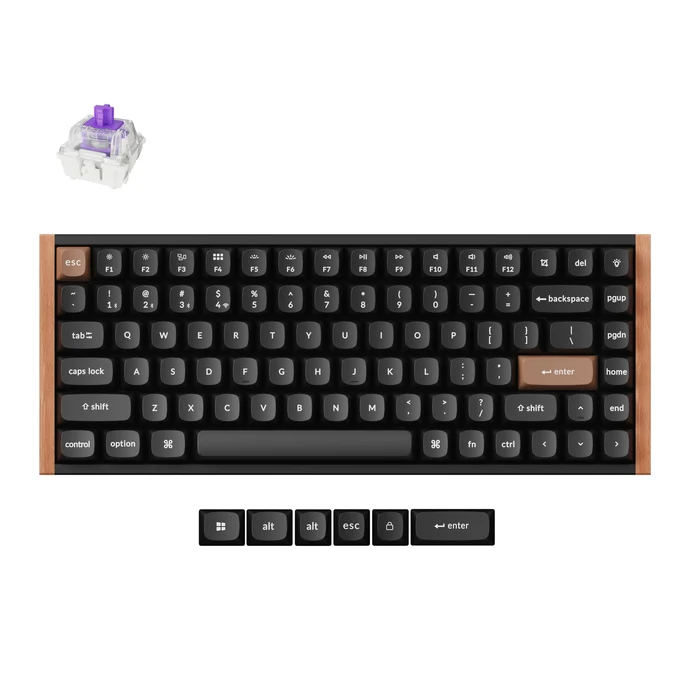
The Keychron K2 HE Special Edition is a compact wireless keyboard for buyers who want magnetic-switch control without settling for a generic gaming design. This review covers the exact black rosewood ANSI configuration with Gateron Double-Rail Magnetic Nebula Switch Version 1, SKU K2H-F1. The central buying question is whether that particular switch ecosystem fits your gaming, typing and upgrade plans.
Exact model and layout
The product page identifies this configuration as the Special Edition in black with Gateron Double-Rail Magnetic Nebula Switch Version 1. The K2 HE name covers multiple versions, layouts and switch options, so selecting a visually similar Version 2 or an ISO model would mean choosing a different configuration.
This is a 75% ANSI keyboard. That layout retains a function row, arrow keys and a compact navigation area while using less horizontal space than a full-size board. It is a practical middle ground for a gaming or general desk, although buyers whose regular work depends on a dedicated number pad should look at a larger layout instead.
The Special Edition combines aluminum and wood in its body, with dark wood accents on the black version. Keychron specifies OSA-profile, double-shot PBT keycaps that are not shine-through. The result is more distinctive than a plain plastic gaming board, but the taller keycap shape and limited legend lighting are part of the fit decision.
PC Gamer’s independent review praised the rosewood appearance and described the construction as solid and rigid. Its reviewer also described the OSA keycaps as comfortable and rounded. Those are independent impressions rather than manufacturer measurements, but they explain why this model appeals to buyers who care about the keyboard’s physical character as much as its feature list.
Magnetic switch behavior
The defining hardware is the Gateron Double-Rail Magnetic Nebula Version 1 switch. Magnetic switches detect key position through a sensor rather than relying on a conventional fixed contact point. That makes software-defined actuation possible: the keyboard can be configured to respond nearer the top of the press or farther down the travel.
Keychron specifies adjustable actuation from 0.2 mm to 3.8 mm, with 0.1 mm sensitivity. Those are the available settings, not a promise that every setting will suit every person or game. A shallow setting can make a frequently used key respond sooner, while a deeper setting can make an easily brushed key require more deliberate movement.
The board also supports Rapid Trigger. Keychron describes this as activation and reset based on travel distance rather than fixed points. That can be useful to players who want repeated movement inputs to react to small changes in key position, but it does not automatically make every player faster. Configuration, technique and tolerance for accidental input still matter.
Dynamic Keystrokes provide another layer by allowing up to four actions on one key according to press depth. This is more specialized than ordinary remapping. It could suit a game command that needs separate light-press and deep-press behavior, but it also adds setup complexity for anyone who only wants conventional key input.
Keychron also lists Last Key Priority and Snap Click. The manufacturer says both features are disabled by default and can be enabled in the Launcher web app. That default matters because the keyboard should not be assumed to behave like a competitive preset immediately after connection.
Analog Mode is included in the listed magnetic features. Keychron describes it as variable input that translates press depth into different speeds or intensities instead of the usual on-or-off signal. That makes the board relevant to racing and sports games, although game support should be checked before making this feature the main reason to buy.
The Version 1 restriction
Version 1 is the most important purchasing constraint. Keychron states that the Gateron Double-Rail Magnetic Nebula Version 1 supports only Gateron Double-Rail Magnetic Switches. It separately identifies Version 2 as the model compatible with Keychron Ultra-Fast Lime Magnetic Switches.
Keychron also says that other magnetic switches, including Gateron Magnetic Jade and KS-20, are not supported. This makes “hot-swappable” a narrower promise than it is on a typical mechanical keyboard. The board permits compatible magnetic switch changes, but it does not offer a broad switch-shopping ecosystem.
PC Gamer reached the same practical conclusion independently, describing the choice of replacement switches as very small and noting that not all Gateron Hall effect models are compatible. For the K2H-F1 buyer, Version 1 makes sense only when the available Gateron Double-Rail ecosystem is acceptable for the expected ownership period.
That distinction is more important than the label “magnetic” on the product page. Version 2 is not a simple future upgrade for this exact purchase; it is a different switch configuration. Buyers who already know they want to experiment with several magnetic switch designs should treat the Version 1 limitation as a deciding factor.
Wireless and wired use
Keychron specifies 2.4 GHz wireless, Bluetooth and wired Type-C connectivity. The manufacturer lists a 1000 Hz polling rate for wired and 2.4 GHz modes, while Bluetooth is listed at 125 Hz. That gives the board a performance-oriented desktop route and a convenience-oriented multi-device route.
Bluetooth can connect to up to three devices, according to Keychron. That suits a desk shared by a computer, tablet and phone, provided the user is comfortable switching among saved connections. The 2.4 GHz receiver is the more natural choice when response consistency is the priority, while Bluetooth is the more useful option for flexible everyday pairing.
PC Gamer reported that Bluetooth and the bundled 2.4 GHz receiver worked on both Windows and macOS. That independent finding supports the practical appeal of the connection design, but it should not be treated as evidence that every wireless environment will behave identically. Interference, receiver placement and the surrounding desk can affect wireless equipment.
Keychron says the Launcher web app should be opened in a current Chrome, Opera or Edge browser, with the keyboard connected in wired mode. This is an important setup limitation. Wireless convenience does not extend to every configuration task, so the USB cable should remain accessible when changing remaps, macros or magnetic settings.
Software and system fit
The keyboard uses QMK firmware and Keychron’s Launcher web app for remapping and macros. Keychron lists compatibility with macOS, Windows and Linux, and the product includes Mac and Windows keycaps. A system toggle and separate layouts are intended to make switching between macOS and Windows more practical.
The two-layout approach is useful for a household or desk that moves between Apple and Windows computers. It reduces the need to remember a different modifier arrangement whenever the host changes. Linux support is listed too, but the browser-based configuration requirements deserve attention because the documented workflow requires a supported browser and a wired connection.
The Special Edition has north-facing RGB lighting. Keychron says Launcher can control hue, saturation, brightness and effect speed. Because the Special Edition keycaps are non-shine-through, buyers should not expect the same legend illumination produced by a shine-through gaming set. Here, RGB is more about atmosphere and surrounding visibility than maximum legend projection.
PC Gamer described the lighting effects as somewhat basic, while describing the web configurator as easy to use for actuation changes, remapping and macros. That is a useful distinction: the software’s main value is control over the keyboard, not an especially elaborate lighting system.
Size, battery and physical setup
Keychron lists the Special Edition dimensions as 320.5 mm by 126.7 mm. It lists a front height of 30.1 mm including the keycap and a back height of 40.7 mm including the keycap. The footprint is compact across the desk, but the rear height and OSA profile may make a palm rest worthwhile for some typing positions.
The product page lists the Special Edition weight as 965 g. That is substantial for a 75% board and should appeal to buyers who want a keyboard that stays planted rather than one that is easy to carry. PC Gamer independently reported a measured weight of 966 g, close to Keychron’s specification.
Keychron lists three feet angles: 5 degrees, 9.34 degrees and 12.43 degrees. Multiple positions allow the slope to be adjusted, but they do not eliminate the need to consider wrist posture, keycap height and desk height together. The useful setting is the one that keeps the hands relaxed during the actual routine.
The battery is a 4000 mAh rechargeable lithium-polymer unit. Keychron specifies up to 110 hours of working time and notes that laboratory results can vary with actual use. PC Gamer reported up to 72 hours with vivid backlighting enabled and 240 hours with the lighting off, illustrating why runtime should be treated as usage-dependent rather than as one universal figure.
Build and maintenance
Keychron lists an aluminum plate, tray-mount construction and an ABS plastic bottom case. The product page also describes EVA foam, EPDM foam, PET film and a silicone acoustic pad inside the keyboard. These components indicate an effort to control resonance and soften the typing character, but they cannot predict the exact sound in every room or with every keypress.
Keychron describes the switches as pre-lubricated, and PC Gamer associated them with a smooth, stable feel and a pleasant sound profile. Those are independent reviewer observations, not laboratory measurements. The ownership trade-off is clear: magnetic sensing avoids conventional switch contacts, while replacement options remain bounded by the Version 1 compatibility list.
The included keycaps are double-shot PBT, and Keychron specifies the Special Edition’s OSA profile as non-shine-through. PBT is a sensible material for frequent handling, but replacement keycaps still require attention to profile, stem compatibility and legend orientation. A keycap change can also alter the perceived height and appearance of the board.
Who should buy it?
Choose the K2H-F1 if you want a distinctive 75% ANSI keyboard with rosewood accents, wireless flexibility and per-key magnetic adjustment. It is especially relevant to a player who will configure actuation or Rapid Trigger, or to a mixed-workflow user who wants one board for gaming, typing and several Bluetooth devices.
The fit is weaker for buyers who want a full-size layout, a number pad, shine-through legends or a broad range of third-party magnetic switches. It is also a less obvious choice for someone who dislikes browser-based configuration or has no interest in magnetic features. Paying for adjustable behavior makes less sense when fixed-actuation typing is the entire requirement.
Alternatives and verdict
The standard Keychron K2 is the category alternative for someone who wants the general 75% concept without making Hall effect behavior central to the purchase. PC Gamer specifically presented the standard K2 as a sensible choice for buyers who do not need the speed-oriented magnetic feature set. That is a comparison of product direction, not a claim about specifications not provided here.
A broader magnetic-keyboard category may suit buyers who prioritize a larger compatible switch ecosystem or a different layout. The K2 HE Special Edition instead concentrates its appeal in wood-accented construction, wireless connectivity and configurable key response. The buyer must accept the Version 1 switch boundary in exchange for that focused feature set.
My conditional verdict is straightforward: buy the Keychron K2 HE Special Edition K2H-F1 when the black rosewood ANSI design and magnetic controls are central to the decision, and when the Version 1 Gateron ecosystem is acceptable. Skip it for a number pad, broad switch experimentation or simple office typing. Its value lies in combining those specific strengths, not in making every feature necessary for every buyer.