What this light is for
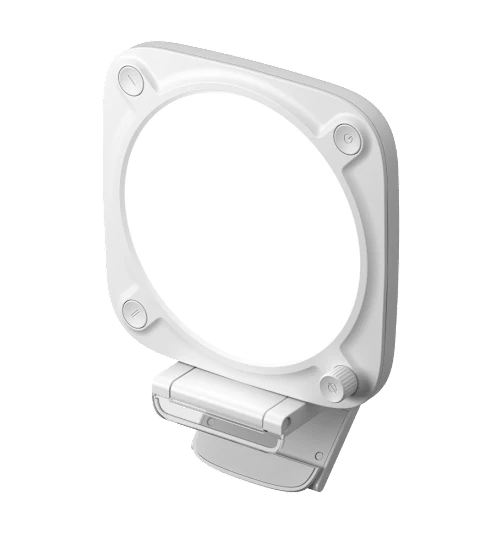
The Elgato Key Light Neo is a compact LED panel designed to put light in front of your face for video meetings, streaming and recorded content. This review covers the white light with its monitor mount. Elgato’s official quick-start guide identifies the hardware model as 20LAJ9901, matching the US retail model, while its product page lists shop SKU 10LAJ9901.
The buying decision is less about whether a desk can use more light and more about how much control you need. Elgato describes the Neo as a compact LED panel that mounts on a monitor or desk, while PC Gamer’s independent review describes soft, even illumination across different scenarios. Those two findings point to a product intended for a dedicated position near the camera rather than general room lighting.
That makes the Neo most interesting for a desk that serves several jobs. It can occupy a monitor-mounted position for calls and then move to another compatible mounting position for recording. If your need is simply to make a dark face visible once or twice a week, a simpler light may be sufficient. The Neo’s value is its combination of mounting, power choices and adjustment rather than its basic ability to produce illumination.
Design and mounting
The included monitor mount is the central reason to choose this particular package. Elgato lists a monitor mount with a 1/4-inch thread in the box, and PC Gamer reports that the bottom connection is a standard 1/4-20 UNC screw mount. That connection also allows use with compatible stands, although stand compatibility depends on the stand’s thread and physical clearance.
PC Gamer describes the supplied mount as a folding monitor stand with a transparent front lip. That design should suit a conventional monitor-top arrangement, but the supplied evidence does not establish compatibility with every bezel shape, curved display or laptop screen. Buyers should treat the mount as a physical fit question, not as a universal monitor accessory.
The panel itself measures 1.49 inches deep by 5.9 inches wide by 5.9 inches high, equivalent to 38 millimeters deep by 150 millimeters wide by 150 millimeters high. Its listed weight is 246 grams. Those dimensions make it substantially more compact than a large photographic panel, but the light still needs room for its mount, cable and usable angle.
Cable routing is part of the setup decision. Elgato includes a USB-C-to-USB-A cable measuring 100 centimeters, equivalent to 39.4 inches, plus a USB-A-to-USB-A extension measuring 150 centimeters, equivalent to 59.1 inches. PC Gamer specifically noted that the attached cable is short and found the braided extension useful. A desk with a distant power source should benefit from planning the route before attaching the mount.
Power and brightness
The Neo’s output changes with its power source. Elgato lists 400 lumens from USB-A at 4.5 watts, 700 lumens from USB-C at 7.5 watts and 1,000 lumens from a 3-amp power supply at a maximum of 12 watts. These are separate operating levels, not a single brightness figure that applies to every USB connection.
The manufacturer also lists maximum power consumption of 15 watts. That figure is different from the 12-watt supply level associated with the 1,000-lumen specification, so it should not be read as another brightness mode. The practical point is straightforward: the port or adapter matters if you expect the highest listed output.
PC Gamer’s review similarly reports 400 to 700 lumens over USB and 1,000 lumens with 12-watt power. The reviewer described the light as very bright for its size and considered the full output excessive for a monitor-mounted light at close range. That independent observation is useful because maximum output is not automatically the most comfortable setting for a nearby face light.
For ordinary webcam calls, the 400-lumen USB-A level may be the simplest starting point, while the higher modes create more headroom for distance, diffusion or indirect bouncing. Those are practical interpretations of the listed power levels, not promises about how a particular room, camera or complexion will appear. Wall color, screen position and ambient lighting will change the result.
Color and controls
Elgato lists a color range of 2,900 kelvins to 7,000 kelvins. The low end is warmer and the high end is cooler, giving the light room to match different household bulbs, office lighting or a deliberately cooler image. Matching the room can look more natural than placing a very cool light beside warm ceiling lamps.
The front controls make the Neo usable without software. PC Gamer reports that three buttons and a dial control power, brightness and temperature. That matters when the light is attached to a monitor and the computer is busy, because basic adjustment does not require opening another application.
Software adds a different kind of convenience. Elgato says Control Center is an optional free download, and its technical listing supports USB or Wi-Fi connectivity. PC Gamer reports that brightness and tone can be adjusted through the Control app over USB, or through the app after the light is connected to Wi-Fi.
The Wi-Fi option is useful when the light is positioned away from the computer or when repeated adjustments are part of a recording routine. Elgato lists both 2.4-gigahertz and 5-gigahertz Wi-Fi. Wi-Fi control also introduces network setup, so a buyer who wants a purely local accessory can use the onboard controls and compatible USB power instead.
PC Gamer additionally reports control through Home Assistant and integration with Elgato Stream Deck devices. Those are independent review findings, not features I am treating as personally verified here. They make the Neo more appealing inside an existing Elgato or smart-home setup, but they should not be the reason to buy it if the only requirement is a manual light.
Setup and compatibility
The manufacturer lists onboard control as requiring a USB port or an external USB power supply with a minimum of 3 amps. It also lists Windows 10 64-bit or later, Android 6.0 or later, macOS Monterey 12 or later, iPadOS 12 and iOS 13 or later for Wi-Fi mode. The operating-system requirements apply to the optional software path, not to the physical act of powering the lamp.
Elgato includes a USB adapter, the USB cables, the monitor mount with 1/4-inch thread and a USB extension. The official page also says the box includes Elgato Control Center software access and lifetime firmware updates. The included accessories make this a more complete monitor-light package than a panel that arrives without a mount or extension.
The quick-start process should be treated as a fit check rather than a complicated installation project. Confirm that the monitor’s top edge can accept the supplied mount, leave a sensible path for the USB cable and position the panel so it illuminates the face rather than pointing directly into the eyes. Elgato directs owners to scan the QR code on the box for the user manual.
A dock can be convenient, but the supplied material does not establish that every dock will deliver every brightness level. The supported figures make the limitation clear: USB-A at 4.5 watts corresponds to 400 lumens, USB-C at 7.5 watts corresponds to 700 lumens and a 3-amp supply at 12 watts corresponds to 1,000 lumens. Check the dock’s actual power rating before assuming it will reach the top mode.
What independent findings add
PC Gamer described the Neo as delivering soft, even illumination across different scenarios. The review also found that the light could be set up in many locations and offered several control options. Those are independent observations from that publication’s reviewer, not measurements or impressions collected for this article.
The reviewer found the standard mount connection, extension cable and compact form useful when changing positions. PC Gamer also reported using the light with a separate tripod and a bounce surface. That example supports the Neo’s flexibility, but it does not mean every tripod or bounce arrangement will be equally stable or suitable for a particular desk.
The same review identifies cheaper lights as a limitation. That is not a specification dispute; it is a category-level purchasing point. A low-cost ring light or basic panel may be adequate when the light will stay in one location and only needs a simple on-and-off workflow.
The Neo earns its extra complexity when the lighting position changes, when manual and app controls are both useful, or when a buyer already uses Elgato control hardware. The monitor mount, standard thread and included extension are more meaningful here than the branding alone. Buyers who will never move the light may not benefit from those options.
Limitations to plan around
The Neo is compact, but compact does not mean invisible on a small monitor. The panel occupies a 150-by-150-millimeter face, equivalent to 5.9 by 5.9 inches, and its mount adds positioning considerations. A narrow laptop display, thick webcam arrangement or crowded monitor shelf may leave less room than the product photos suggest.
The highest output also requires more deliberate power planning. A basic USB connection can operate the light, but the manufacturer’s 400-lumen USB-A figure is lower than the 700-lumen USB-C figure and the 1,000-lumen 12-watt figure. If maximum brightness is important, selecting an underpowered port will undermine the reason for choosing this model.
The panel is not a substitute for complete room lighting. It can improve the light falling on the face, but it cannot independently control background brightness, reflections or shadows elsewhere in the room. A camera’s exposure and white balance still affect the finished image, and a bright panel may need to be aimed or dimmed rather than run at full output.
Check the color and package contents before ordering. Elgato sells mount-included and no-mount configurations, as well as black and white options. The official quick-start guide confirms the Key Light Neo hardware model 20LAJ9901; the shop’s 10LAJ9901 identifier is presented separately as its SKU. The linked US listing and the white monitor-mount configuration are the subject here, rather than an interchangeable claim about every Neo bundle.
Maintenance and ownership
Ownership should be relatively simple because the source material identifies the product as an LED panel rather than a lamp with a replaceable bulb. The practical maintenance tasks are cable management, keeping the front surface free of dust and periodically checking firmware if using Elgato Control Center. Elgato states that firmware updates are provided for the lifetime of the product.
Wi-Fi control is optional, so the Neo does not require a networked workflow for basic operation. That reduces dependence on software for a buyer who prefers physical controls. Conversely, remote control, Stream Deck integration or smart-home routines make more sense only when the light remains connected and positioned consistently.
The included 100-centimeter, equivalent to 39.4-inch, cable and 150-centimeter, equivalent to 59.1-inch, extension give the setup more routing flexibility than a short attached lead alone. Still, the cable path should avoid pulling on the monitor mount or creating a snag point. The supplied evidence does not establish weather resistance or suitability for outdoor installation, so this should be treated as an indoor desk light.
Verdict
Choose the Elgato Key Light Neo with Monitor Mount if you want a compact face light that can live on a monitor, run from several USB power levels, adjust from physical controls and optionally join an Elgato or Wi-Fi workflow. Its strongest case is a flexible desk used for meetings, streaming and recording rather than a single fixed task.
Choose a simpler light instead if your budget is the priority, you only need occasional basic illumination and you do not need a monitor mount, standard-thread flexibility or software control. The Neo’s specifications are useful, but its cost-benefit depends on whether those control and placement options will be used.
Before buying, verify the exact white monitor-mount variant, inspect the monitor’s physical fit, check the available USB power and decide whether 400 lumens is enough for your position. If those conditions line up, the Neo is a sensible compact lighting platform. If they do not, its extra brightness and controls will not compensate for an unsuitable mount or underpowered connection.