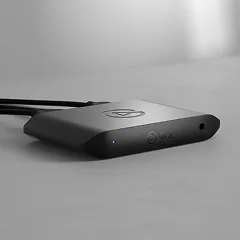
What this review covers
The Elgato Game Capture 4K S is an external capture card for routing console or PC video through a computer for recording or streaming. The important buying question is not simply whether a capture card says “4K.” It is whether the source, display, computer, USB connection and software support the same mode. Passthrough and capture are separate capabilities, and that distinction determines whether this card suits your setup.
This review covers the black Elgato Game Capture 4K S. The independent US retail-identity record lists model 20GBR9901 and manufacturer part number 10GBR9901 for the same product; Elgato’s own shop uses SKU 10GBR9901. These are different catalogue identifiers associated with the reviewed 4K S, rather than evidence of two separate hardware revisions.
Elgato positions the 4K S around 4K60 capture and high-frame-rate passthrough. Its technical specification lists passthrough up to 2160p60, 1440p120 and 1080p240. It lists capture at 2160p60, 1440p60 and 1080p120 in the core specification. In practical terms, the card can send a faster signal to a display than the computer necessarily records, so the desired play mode and recording mode should be chosen separately.
The enclosure measures 112 × 72 × 18 mm, equivalent to 4.4 × 2.8 × 0.7 inches. Elgato lists its weight as 90 g, equivalent to 3.2 oz. That is a compact external format for a console desk or laptop bag. The cables still need space to bend, however, and a small body does not remove the need for a sensible HDMI and USB layout.
Passthrough is not capture
Passthrough is the video sent onward to a television or monitor. Capture is the video delivered to the computer. Elgato lists HDMI 2.0 lag-free passthrough and maximum passthrough formats of 2160p60, 1440p120 and 1080p240. PC Gamer independently described the passthrough as smooth and reported nearly no latency in its comparison work; that is an independent finding, not a measurement made for this article.
Elgato’s own page is inconsistent about high-frame-rate recording. Its detailed capture table lists 1080p120 and 1440p60, while its marketing text says up to 1080p240 passthrough and capture, and other comparison material lists additional modes. These are conflicting manufacturer statements, not a verified universal recording ceiling. The capability consistently documented across the supplied evidence, and used for the recommendation here, is 4K60 capture.
That distinction matters if high-frame-rate recording is the main reason for buying. Do not order solely for 1080p240 or 1440p120 capture without confirming the exact supported mode with Elgato for the intended platform and firmware. A consistently documented 4K60 workflow has a clearer evidence base. Passthrough can still keep gameplay responsive on the connected display, but the display signal and the file recorded by the computer remain separate requirements.
Variable refresh rate support is listed for passthrough. VRR signals can pass through the device to a supported display, where they may help reduce tearing and stutter. This does not establish that every console, game, monitor and capture setting will operate with VRR simultaneously. The source device and display still determine whether the mode is available.
Elgato also lists ALLM passthrough support. Auto low-latency mode signals can pass through to engage game mode on a compatible display. That is a signal-path compatibility feature, not a promise that every television or monitor will switch modes. Display settings and the rest of the HDMI chain remain relevant.
4K and HDR choices
The central attraction is 4K capture at up to 60 frames per second. Elgato’s technical specification lists 2160p60 capture, and its product material describes 4K60 content creation. PC Gamer independently reported good recording quality and compared footage from Nintendo Switch 2 and PlayStation 5. Those findings support the card’s intended role, but they are not a new benchmark conducted for this review.
HDR needs more careful reading. Elgato lists HDR10 passthrough up to 2160p60, while HDR10 capture is listed up to 1080p60 on Windows. A 4K HDR signal can therefore reach a compatible display without establishing that the computer records it as 4K HDR. For a 4K HDR archive, this is a central limitation rather than a minor setting.
The manufacturer also states that HDR cannot be captured at every resolution and frame-rate combination. The card supports HDR in defined modes, not as a universal overlay on every listed format. Console creators should check the exact resolution, frame rate and operating system before assuming that their preferred HDR output will be preserved in the recording.
Elgato lists on-device HDR-to-SDR conversion for non-HDR workflows. That can make an HDR source more manageable for software or displays expecting SDR, but conversion changes the workflow rather than making an SDR recording equivalent to an HDR recording. Elgato’s support material separately discusses tone mapping in Elgato Studio, so OBS users should confirm how their selected software handles the incoming signal.
Connections and system requirements
The video connections are HDMI 2.0 input and HDMI 2.0 output. Elgato specifies the input as unencrypted HDMI. The output carries passthrough to the display, while the computer receives the capture feed over USB. This is a conventional console-to-card-to-screen arrangement, but the display and recording computer must be connected at the same time for the full workflow.
The box includes a USB-C-to-USB-C cable measuring 150 cm, equivalent to 59 inches. It also includes an HDMI 2.0 cable measuring 150 cm, equivalent to 59 inches. Those lengths suit a nearby computer and display, but a recording computer across a desk may need a different cable arrangement. Cable reach is a practical installation issue, not an extra capture mode.
Elgato’s comparison material identifies the computer interface as USB 3.2 Gen 1 at 5 Gbps. The technical specification also describes the computer connection as USB 3.0 Type-C. A USB-C plug shape alone does not prove the required data capability, so a hub or dock should be checked for its actual USB data path before becoming part of the setup.
For Windows, Elgato lists Windows 11 or later, an Intel Core i5 processor from the 8th generation or later or an AMD Ryzen processor, and an NVIDIA GeForce RTX 10-series GPU or equivalent. These are platform requirements, not a measure of how much headroom a particular computer will have for 4K recording, overlays, encoding and simultaneous streaming.
For Apple hardware, Elgato lists macOS 14.2 or later. It lists iPadOS 18 with USB-C for iPad use. Elgato lists Apple M1 or better for the Apple processor and GPU requirements. That gives the 4K S a wider platform range than a Windows-only device, although the tablet still needs a suitable software and connection workflow.
Elgato lists Elgato Studio, OBS and Discord among compatible applications. The product page also describes USB-C and UVC compatibility. PC Gamer independently reported that Elgato software can display or record the signal and that the card can send it to OBS Studio. The sensible conclusion is broad application support, not identical controls or recording options in every application.
Setup, software and audio
Elgato’s official quick-start guide gives a specific PlayStation 5 requirement: disable HDCP before capture, or the 4K S will show a black screen instead of gameplay. On PS5, the guide directs users to Settings, System, HDMI, then Enable HDCP, and says to turn it off. Check this setting before blaming the cable, USB port or recording application. This setup instruction concerns gameplay capture, not a promise that protected streaming-video services can be recorded.
The same guide separates the cable connections: use the supplied USB cable between the card and computer, connect the console or source to HDMI IN, and connect HDMI OUT to the display. Confirm those labels before opening the capture software. A picture on the display and a usable recording in the computer are different checks, so verify both before starting a long session.
The basic connection order is straightforward: connect the source to HDMI input, connect the display to HDMI output and connect USB-C to the recording computer. Elgato supplies one USB-C-to-USB-C cable and one HDMI 2.0 cable. A complete working setup still needs the source device, the display when passthrough is wanted and recording or streaming software.
PC Gamer described the 4K S as easy to set up and reported connecting a console in a few minutes. That is an independent setup observation. Elgato provides setup guides for Nintendo Switch 2, PlayStation 5 and PlayStation 5 Pro, making those platforms the clearest documented starting points for buyers who want a supported console workflow.
Elgato Studio is the dedicated software option, while OBS is the more configurable choice for scenes, sources and streaming layouts. Elgato says Studio can preview and record gameplay on Windows and macOS. PC Gamer characterized the software as intuitive but somewhat barebones. That distinction matters: simple recording and a complex production workflow are different software requirements even when they use the same capture device.
The 4K S includes a 3.5 mm stereo line-in for use with Elgato Chat Link Pro. Elgato says Chat Link Pro captures voice and game audio from PS5, Xbox and Switch in one cable. The 4K S specification identifies the port as a line-in, so buyers should not treat it as a complete microphone, monitoring or party-chat solution without checking the rest of their audio chain.
Audio is a more significant trade-off for surround-focused setups. PC Gamer’s independent specifications summary lists 2.0 audio output, and its review specifically criticizes the lack of 5.1 audio. The card is therefore a more natural fit for stereo streaming and recording than for a system built around multichannel audio.
Meaningful alternatives
The nearest alternative category is another external 4K capture card. PC Gamer compared the 4K S with AVerMedia’s Live Gamer Ultra S GC553Pro and concluded that the AVerMedia option offered more for less in that review context. The same review identified Elgato’s software and port arrangement as possible reasons to choose the 4K S. The supplied sources do not establish every specification of the AVerMedia model, so the comparison should remain category-level rather than a full specification table.
Within Elgato’s range, the 4K X is the more relevant step-up category for users who need higher frame-rate capability. PC Gamer states that the 4K X uses HDMI 2.1 and offers higher frame rates for passthrough and recording than the 4K S. The manufacturer’s comparison material also distinguishes the products by HDMI version and supported modes. Buyers should consult the current technical details before treating that distinction as a complete feature comparison.
The Elgato Game Capture Neo is the lower-cost category to consider when 1080p capture is sufficient. PC Gamer’s reviewer preferred paying more for the 4K S rather than choosing the Neo at a lower price, citing 4K capture and higher-frame-rate passthrough. That is an independent value judgment rather than a current price recommendation. The right choice depends on the resolution you actually intend to record.
Built-in console recording is another legitimate alternative for casual clips. PC Gamer notes that PlayStation, Xbox, Switch and Windows PCs have built-in recording tools, and says built-in software can be adequate for some users with a sufficiently strong computer. An external card becomes more useful when the workflow needs a computer-based stream, webcam, scene transitions, long recordings or a separate console-to-production path.
Fit checklist and limitations
Choose the 4K S if you need an external console workflow with 4K60 capture, 4K60 HDR10 passthrough, high-refresh 1080p passthrough and support for Windows, Mac or a compatible iPad. It is especially coherent when the computer handles overlays or streaming while the television or monitor receives the passthrough signal directly.
Be cautious if 4K HDR recording is the main requirement. The manufacturer limits HDR10 capture to 1080p60 on Windows, and HDR is unavailable at some resolution and frame-rate combinations. A different class of device may be more appropriate if the system also requires HDMI 2.1 bandwidth, 5.1 audio or high-frame-rate 4K recording.
Before purchase, check the console’s output mode, the display’s input mode, the computer’s USB data capability and the software’s HDR behavior. Then check whether the target mode refers to capture or passthrough. That process is more useful than shopping by the 4K label alone, because the fastest advertised formats are not all computer recording formats.
Verdict
The Elgato 4K S is a defined mid-range external capture card rather than an all-purpose high-end replacement. Its strengths are 4K60 capture, 4K60 HDR10 passthrough, high-refresh 1080p passthrough, VRR support, broad operating-system coverage and a compact 112 × 72 × 18 mm enclosure weighing 90 g. Its limitations are HDMI 2.0, Windows-only HDR capture up to 1080p60, mode-dependent HDR support, USB requirements and stereo-oriented audio.
The conditional verdict is straightforward: buy the 4K S when the priority is 4K60 console recording with high-refresh passthrough and a manageable external USB workflow, particularly for PS5, Xbox or Switch capture into a computer. Choose another class of device when 4K HDR recording, HDMI 2.1 bandwidth, 5.1 audio or a fully specified high-frame-rate 4K path matters more. Confirm the identifier, then match the exact source and capture mode to Elgato’s current table.