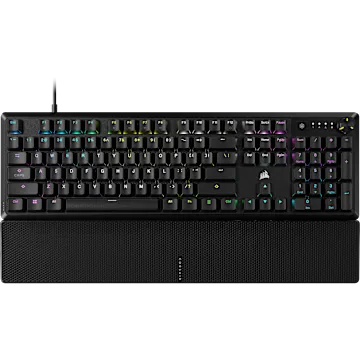
What this exact keyboard is
The Corsair K70 CORE RGB in this review is the black North American model CH-910981E-NA, supplied with a palm rest. That model identification matters because the K70 CORE name appears across related configurations. The practical choice is whether you want a full-size wired mechanical keyboard with linear switches, per-key lighting and a control dial, or whether a smaller or simpler board would suit your desk better.
Corsair lists a full-size layout with a 104-key matrix. That makes the keyboard relevant to buyers who regularly use a number pad for spreadsheets, data entry or applications with dedicated numeric controls. The trade-off is physical: a full-size keyboard takes more room than a tenkeyless or compact model, so its extra keys need to earn their place on the desk.
The switch specification is Corsair MLX Red linear mechanical switches. Corsair describes the MLX Red v2 switches as pre-lubricated and intended to provide smooth, responsive keystrokes. Linear switches do not provide the tactile bump some typists prefer, so this is primarily a matter of feel. The product is a defined switch choice rather than a keyboard selected for experimenting with several switch types.
Tom’s Hardware independently described the switches as exceptionally smooth for a stock mainstream gaming keyboard and reported a 45-gram actuation force. That is the reviewer’s finding, not a Corsair specification. It offers useful context for shoppers who prefer lighter linear keys, but it cannot determine whether that feel will suit every typing style.
Sound and construction
Corsair specifies two layers of sound-dampening foam inside the keyboard. The intended effect is softer keystroke sound, not silence. Switches, keycaps, bottom-out force and the desk surface still affect what people nearby hear, so the foam should be understood as part of the acoustic design rather than a promise of quiet operation.
Tom’s Hardware reported proper sound dampening and no case ping in its review. The independent result supports the idea that the K70 CORE’s internal treatment addresses hollow or metallic case noise. It remains a review observation rather than a laboratory loudness measurement, and room acoustics will change the result.
The keyboard uses double-shot ABS keycaps with shine-through legends, according to Tom’s Hardware. Corsair also describes the keycaps as double-shot ABS. That construction suits the per-key RGB system because the legends allow light through, while ABS remains a different material choice from textured PBT. Buyers who specifically want the feel or wear characteristics of PBT should account for that distinction.
Corsair lists an aluminum top plate. That is a structural component, not evidence of a particular flex measurement or a long-term durability result. It gives the keyboard a more substantial construction specification than a board described only by its plastic case, but the supplied records do not establish how it compares with every competing aluminum-framed design.
Dial, lighting and controls
The multi-function rotary dial is the K70 CORE’s most distinctive control. Corsair says it can adjust volume, zoom and scrolling, among other functions. The manufacturer also lists media and volume controls, making the dial relevant to both game sessions and ordinary desktop work where frequent audio or navigation adjustments are inconvenient through software menus.
Tom’s Hardware adds an important limitation: the dial is not fully programmable and instead uses five presets that can be toggled on or off. That makes it a collection of supported shortcuts rather than an unrestricted rotary macro controller. If your buying decision depends on assigning arbitrary commands to the dial, this model is the wrong category of control.
Horizontal scrolling is a meaningful use case for spreadsheets, timelines and wide documents. Tom’s Hardware specifically valued that function while working in Microsoft Excel. That is an independent workflow observation, not a universal statement about every application, but it shows why the dial may appeal to office users as well as gamers.
Corsair supports per-key RGB backlighting through iCUE. Per-key control allows different lighting choices across the keyboard, while the shine-through legends make the lighting visible. RGB does not improve typing by itself, but it can provide distinct work and gaming layouts for buyers who want software-controlled visual customization.
iCUE and stored profiles
The K70 CORE is an iCUE-enabled product. Corsair says iCUE can configure per-key RGB backlighting, program macros and remap keys. This gives the fixed physical layout more software flexibility, provided the connected computer can run the required application and the buyer is willing to configure it.
Corsair lists onboard memory with support for up to five profiles. That is useful for storing different lighting or control arrangements, but onboard storage should not be confused with every setting automatically transferring between computers. The precise behavior matters to buyers who move between a work machine and a gaming system.
Tom’s Hardware reported that onboard profiles and software-based profiles must be programmed separately. The reviewer also described iCUE as unusually convoluted. That combination makes configuration a genuine ownership consideration: the software adds capability, but it may take more organization than a keyboard managed entirely through simple hardware shortcuts.
Corsair lists a 1,000 Hz report rate and full-key rollover with NKRO. The report rate describes the keyboard’s reporting specification, while rollover concerns recognition of simultaneous key presses. Neither figure establishes a particular game result, and neither changes the more basic question of whether you prefer linear switches and a full-size layout.
Corsair also describes FlashTap, which can prioritize the first, last or neither input when opposing movement keys are pressed. The feature is disabled by default and requires the latest firmware through iCUE. It is therefore an optional firmware-dependent behavior, not the ordinary operating mode that every buyer will encounter immediately.
Wired connection and desk fit
Corsair lists wired USB Type-A connectivity. The specified compatibility includes a PC or Mac with a USB 3.0 or USB 3.1 Type-A port, Windows 10, or macOS 10.15 or later. Corsair also lists an internet connection for downloading iCUE. Buyers should check the computer and operating system before planning around the software features.
The cable is the main physical compromise. Tom’s Hardware identifies it as a 6-foot fixed rubber USB-C cable and specifically notes that it is non-detachable. A fixed lead is less convenient than a detachable connection for transport, replacement or a custom cable setup. Cable condition consequently becomes part of the keyboard’s longer-term ownership calculation.
Corsair’s technical listing calls the cable material tangle-free rubber, while Tom’s Hardware raises concerns about future durability because the cable is fixed. Those points are compatible: a cable can resist tangling while still being difficult to replace if it is damaged. Plan its route before placing the board, particularly when the computer is not close to the desk edge.
Corsair lists the keyboard weight as 0.934 kilograms, equivalent to 934 grams. Tom’s Hardware reports the same 934-gram weight. That is a substantial full-size board specification, although the supplied records do not provide a measured sliding or flex test. The weight is helpful for a mostly permanent desk but less attractive if the keyboard will move frequently.
Tom’s Hardware lists dimensions of 17.64 inches long, 6.02 inches wide and 1.39 inches high, equivalent to 448 millimeters long, 153 millimeters wide and 35.4 millimeters high. Those dimensions make the desk decision concrete. Measure the keyboard area alongside the mouse space rather than assuming a standard desk will leave comfortable room.
Palm rest and setup
The included palm rest attaches magnetically and is detachable. Corsair describes it as soft-touch and intended to provide a place for the hands. That gives the package a convenient starting accessory, while the detachable design lets buyers remove it if their desk height or preferred wrist position works better without it.
Comfort is less certain than inclusion. Tom’s Hardware described the wrist rest as its only real issue with the board and characterized the texture as similar to a football. That is an independent comfort finding, so the palm rest should be treated as an option rather than a reason to assume the accessory will suit everyone.
The package contents listed by Corsair include the K70 RGB CORE mechanical keyboard, magnetic palm rest, safety leaflet and warranty card. The supplied records do not establish that alternate keycaps or a switch-pulling tool are included. Buyers planning a custom-keyboard-style setup should therefore avoid assuming those extras are in the box.
Corsair lists adjustable height. That provides some control over the keyboard angle, but it does not solve every desk-height or wrist-position issue. The feet, palm rest, chair and desktop need to work together; changing only the keyboard angle may not produce a comfortable arrangement.
Limits and ownership
The fixed cable is the clearest limitation for a modular desk. If the keyboard will travel between computers, move regularly or use replaceable cables as part of maintenance, a detachable connection elsewhere may be more valuable than this model’s included controls. The K70 CORE is more naturally suited to a permanent or semi-permanent workstation.
The second limitation is the combination of a full-size layout and a defined linear switch type. Buyers receive the 104-key arrangement and MLX Red switches described by Corsair, rather than choosing a compact form factor or a tactile switch during configuration. That clarity is helpful, but it narrows the initial fit for shoppers who are undecided about layout or key feel.
The third limitation is software overhead. iCUE provides lighting, remapping, macros and profile functions, but the independent review’s separate-profile finding means setup may require care. If the priority is simple plug-in typing with no lighting or remapping, much of the K70 CORE’s feature set may go unused.
The palm rest is another variable. Its magnetic attachment and inclusion are useful for buyers who like supported hands, but the independent comfort criticism weakens the case for choosing this variant solely for the accessory. The keyboard can still be considered on its layout, switches and controls if the palm rest is removed or replaced.
For ordinary ownership, keep dust and spills away from the switches, clean the keycaps with care, and avoid pulling or sharply bending the fixed lead. Corsair lists a two-year keyboard warranty. That support period is relevant when comparing this model, but it does not turn a fixed cable into a replaceable one.
Alternatives and verdict
A tenkeyless keyboard is the logical category alternative if you rarely use a number pad and want more mouse room. A compact keyboard goes further when portability or desk space dominates. Either category gives up some of the K70 CORE’s full-size key coverage, so begin with the keys used every day rather than with RGB or gaming branding.
A keyboard with a different switch platform is the better category for shoppers who want to explore tactile, clicky or otherwise varied key feel. A quieter non-mechanical keyboard is another sensible direction for shared spaces, though it also gives up the mechanical switch character and the K70 CORE’s dial-centered controls. These are category comparisons, not specification claims about a named rival.
Choose the Corsair K70 CORE RGB CH-910981E-NA when a permanent desk benefits from a full-size layout, linear switches, per-key RGB, a multifunction dial, onboard profiles and an included detachable magnetic palm rest. Its strongest case is a work-and-play setup where the number pad and scrolling controls will be used often enough to justify the larger footprint.
Look elsewhere when a detachable cable, different switch feel, compact dimensions, simpler software or a more comfortable palm rest is central to the purchase. The K70 CORE is a specific combination of coverage and control rather than a universal mechanical-keyboard choice. That specificity is its strength when the fit is right, and its limitation when those features will not be used.