What this keypad is for
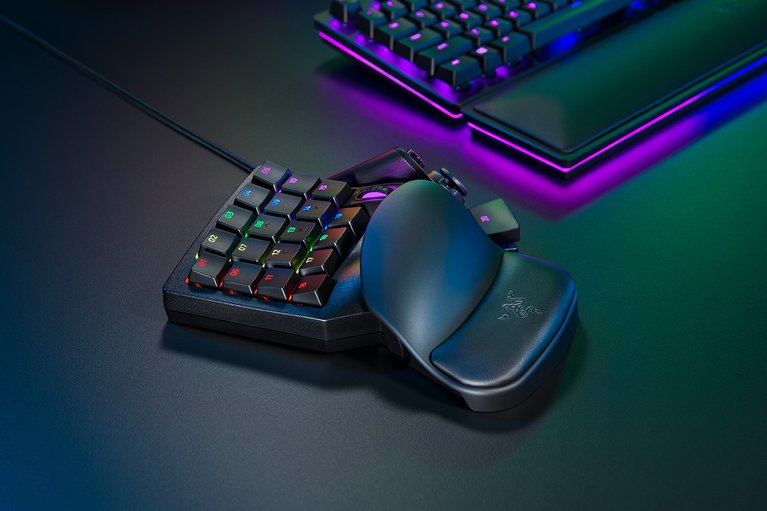
The Razer Tartarus Pro is a separate left-hand gaming keypad for players who want something between a conventional keyboard and a controller. The exact product here is the Classic Black, US model RZ07-03110100-R3U1. Its reason for existing is specific: move core game commands onto a smaller dedicated surface while leaving the right hand available for a mouse.
That sounds like a straightforward space-saving upgrade, but the buying decision is not simply whether the keypad has more features than a keyboard. It is whether analog input, profile-based remapping, and a compact command area solve a problem you actually have. If your current keyboard already gives you comfortable access to movement and shortcuts, the Tartarus Pro asks you to learn a new layout before its unusual controls become useful.
Razer’s current product page identifies this model as an Analog Optical Switch Keypad and lists Razer Analog Optical Switches, Dual-Function Keys, and adjustable actuation among its features. Those are manufacturer specifications, not a promise that every game will use them well. The practical value depends on software support, your preferred control scheme, and how many commands you need close to the left hand.
The defining controls
The analog optical keys are the central distinction. Tom’s Guide describes them as pressure-sensitive switches rather than simple pressed-or-unpressed keys. A partial press can produce one degree of input while a deeper press can produce another, which is conceptually closer to a controller trigger or stick than to an ordinary keyboard switch.
That difference matters most when an action benefits from graduated input. A movement command could distinguish walking from running, while another game might use pressure for a more cautious or forceful action. The keypad therefore has a plausible role in games where keyboard movement feels too binary but a full controller is not the desired tool.
The same feature can also be more interesting on paper than in a particular game. Analog input only helps when the game accepts a meaningful range of input or when you deliberately map the key behavior to useful actions. For ordinary commands that are simply on or off, the optical mechanism does not automatically create a better result than a familiar keyboard key.
The second important feature is dual-function programming. Tom’s Guide reports that Synapse can bind two functions to each key, with a lighter press activating one function and a full press activating another. Razer’s product page separately lists Dual-Function Keys, so this is one of the better-supported reasons to consider this exact model.
Adjustable actuation gives that dual-function idea more control. Tom’s Guide says each function’s actuation point can be customized according to how hard you want to press. That creates room to make a first command easier to reach and reserve the deeper press for a deliberate secondary command, although a complicated arrangement may take practice to remember.
Layout and reach
The physical arrangement is compact, but compact does not mean universally comfortable. Tom’s Guide describes four rows of numbered buttons, with 19 numbered buttons altogether, plus a scroll wheel, profile button, analog control, thumb button, hard palm rest, and soft wrist rest. This is a command surface rather than a miniature replacement for every keyboard function.
The layout’s strength is concentration. A player can keep the most important movement, ability, and utility commands near one hand instead of reaching across a full keyboard. That can make a deliberately reduced control scheme feel less cluttered, especially when the mouse remains responsible for aiming or camera movement.
The trade-off is reach. Tom’s Guide found the middle two rows easier to access from the intended hand position, while the top row required stretching and the bottom row required contracting the hand. That finding is particularly relevant because the keypad’s appeal depends on quick access; a dense layout is less helpful if the commands you need sit outside your natural reach.
The palm-rest design also affects how freely you can reposition. Tom’s Guide describes the palm rest as inflexible and says moving the hand around created friction. This does not make the form unusable, but it means the shaped chassis favors a particular hand position rather than behaving like a flat keyboard where you can shift your fingers without much resistance.
The analog control is not a conventional thumbstick. Tom’s Guide characterizes it as closer to a directional pad with a circular nub, with four directional clicks available. Razer’s official excerpt establishes the analog optical switch system, but the independent description is the useful evidence for understanding how the thumb control differs from a full controller stick.
That distinction shapes compatibility with your habits. If you expect a controller-like thumbstick with smooth movement in every direction, this keypad’s control may feel like a compromise. If you mainly want a compact directional option or prefer movement on the numbered keys, its limitations may matter less.
Programming and setup
Setup is centered on Razer Synapse. Tom’s Guide reports that the software can reprogram buttons, customize RGB lighting, and create profiles linked to individual games. That makes the keypad adaptable, but it also makes initial setup part of the ownership experience rather than an optional finishing step.
The profile approach is useful when games assign different priorities to movement, abilities, menus, and communication. A single universal arrangement is unlikely to suit every title, so separating profiles by game can reduce compromises. The practical question is whether you enjoy tuning controls or would rather connect a keyboard and begin playing immediately.
Dual-function keys increase both capacity and complexity. A single physical key can carry two actions, but you must remember which pressure level triggers which command. That can be efficient for a small set of carefully chosen actions; it can also make mistakes more likely when several keys have different thresholds and the game is demanding quick responses.
Tom’s Guide specifically notes that the software becomes important for each new game. That observation is more useful than simply calling Synapse powerful. The Tartarus Pro is not a universal layout that removes configuration work. Its advantage grows when you are willing to map commands intentionally, test the logic inside the game, and revise profiles when the first arrangement feels awkward.
A sensible setup starts with the commands you already use most. Put movement and a few high-priority actions in the easiest central positions, then reserve less frequent commands for the outer keys. Treat the analog and dual-function features as targeted tools rather than assigning every possible action immediately. A smaller, memorable profile is more useful than a crowded one.
Where it makes sense
The strongest documented fit is MMO play. In Tom’s Guide’s assessment, the keypad worked well as a companion for Final Fantasy XIV because movement, combat controls, and a row of numbered ability buttons covered much of the moment-to-moment action. That is an independent reviewer’s finding about a particular game, not a universal result for every MMO.
The MMO case is persuasive because a player may want mouse control, movement, and ability access without keeping the entire keyboard under the left hand. The keypad can narrow attention to those commands. It does not remove the need for other input, however: Tom’s Guide still needed a full keyboard for in-game messages and numerous menus.
A smaller command set can also suit some action games. Tom’s Guide reported a positive experience with Overwatch after remapping several buttons and described the minimalist interface as a good addition. Again, that is a reviewer’s game-specific assessment, but it supports a useful rule: the keypad is more promising when a title needs a limited group of left-hand commands.
The benefits become less convincing as command count and variety rise. Tom’s Guide found games needing more than about 10 commands became unwieldy. The important limitation is not simply the number printed on the product description; it is the mental and physical cost of remembering where each command lives while also managing the mouse.
The keypad is a weaker fit for real-time strategy games. Tom’s Guide directly describes the Tartarus Pro as a poor accessory for that genre, while judging a keyboard superior for RTS and MOBA titles. Those games often reward broad access to many commands, so reducing the surface can work against the reason to use a full keyboard.
Third-person action and adventure games present a different alternative. Tom’s Guide says a controller remained the preferred input for those titles. That comparison exposes the Tartarus Pro’s central compromise: it offers some controller-like behavior without reproducing the complete controller layout or the same kind of thumb control.
Limitations worth accepting
Retraining is unavoidable for anyone moving from a familiar keyboard. Tom’s Guide notes that the Tartarus has an ergonomic shape but requires learning its layout as intimately as a keyboard. The product may reduce physical reach across the desk while increasing the short-term memory burden inside the game.
The default movement arrangement may not suit every hand position. Tom’s Guide says the 8, 12, 13, and 14 configuration will not work for everyone because players may prefer resting on different rows. That is a practical reason to expect remapping rather than assuming the factory arrangement will be comfortable.
Thumb workload is another constraint. Tom’s Guide reports that the thumb is assigned to both the analog control and the thumb button by default, making it nearly impossible to use the top row and analog control simultaneously. This limits the apparent number of controls available at one instant, even though the keypad offers many physical inputs.
The Tartarus Pro also does not replace a full keyboard for ordinary text and menu-heavy use. Tom’s Guide still required a full keyboard for messages and menus in Final Fantasy XIV. Buyers should therefore plan for a two-input setup: keypad and mouse for selected gameplay, with the keyboard still nearby for typing and broader navigation.
Comfort is not a settled advantage. Tom’s Guide called the keys comfortable in isolation but reported stretching and found a regular keyboard with a wrist rest more comfortable in its comparison. That does not invalidate the shaped design, but it does make hand size, resting posture, and preferred reach more important than the feature list suggests.
Ownership and alternatives
Maintenance is mostly a software and layout task rather than a feature chase. Keep profiles understandable, document unusual dual-function bindings, and revisit assignments when a game changes its controls. The more custom behavior you add, the more valuable a simple naming scheme becomes when switching between profiles.
A conventional gaming keyboard is the sensible alternative when you want broad command access, familiar muscle memory, or frequent typing. Tom’s Guide concluded that many players may get more value from a good full-size keyboard, particularly when the keypad’s benefits are mild and the learning curve is unwelcome.
A controller is the better category comparison when smooth thumb-led movement and a complete controller layout matter more than mouse aiming. Tom’s Guide found that controller input remained preferable for third-person action and adventure games. The Tartarus Pro makes more sense when you specifically want mouse-plus-keypad control rather than a general replacement for a controller.
The right comparison is not “more keys versus fewer keys.” It is a choice among three workflows: familiar keyboard access, controller-style thumb input, or a deliberately compact left-hand surface paired with a mouse. The Tartarus Pro earns consideration only when the third workflow matches the games you play and the way you want to divide commands.
Verdict
Buy the Razer Tartarus Pro Classic Black if you already understand why a gaming keypad would help: perhaps you play MMO combat with a mouse, want pressure-sensitive movement, or value two actions on one key and are prepared to build profiles. Its analog optical switches, adjustable actuation, and dual-function programming are meaningful differentiators.
Skip it if you are hoping for an effortless universal upgrade. The reach issues, hand-position choices, retraining, thumb-control compromise, and continued need for a full keyboard are substantial. For a broad library, a conventional keyboard or controller may fit more games with less configuration.
My conditional verdict is therefore narrow: the Tartarus Pro is a specialized control surface, not an automatic desk essential. It earns its space when its analog and profile features address a repeatable problem in a compatible game. If that problem is hypothetical, keep the keyboard or controller you already understand and avoid adding another layout to memorize.