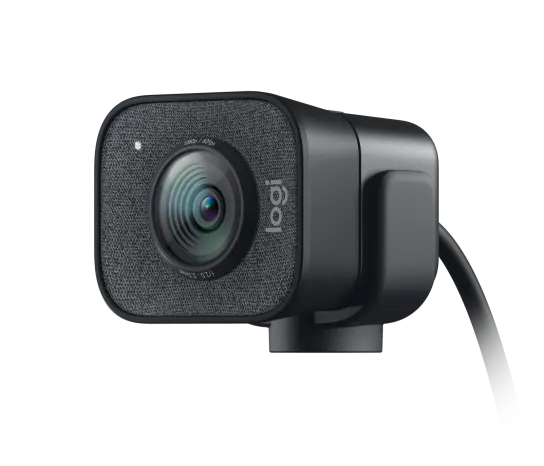
What this exact StreamCam is for
The Logitech StreamCam 960-001286 is a Full HD webcam for streaming, recording and video calls where smooth motion matters more than 4K capture. Its appeal is unusually specific: direct USB-C connectivity, 1080p at 60 frames per second, autofocus and a mount that supports portrait or landscape orientation.
That combination makes it a more considered purchase than a basic plug-in webcam. The important question is not simply whether it can produce a clear picture. It is whether your computer has the right port, whether the fixed cable reaches your setup, and whether your preferred software exposes the controls you want.
The model identity matters here. Logitech identifies the Graphite version as StreamCam with SKU and MPN 960-001286. Marketplace listings can combine colors, regions and bundles, so check the model number and included accessories before treating another StreamCam listing as identical.
This is a camera for a defined kind of desk. It makes the most sense when a creator wants a compact monitor-mounted device, needs vertical as well as horizontal framing, and prefers automatic focus and exposure over a fully manual video workflow. Someone choosing mainly for a privacy cover, replaceable cable or 4K output is solving a different problem.
Video specifications that matter
Logitech specifies a maximum video resolution of 1080p at 60 frames per second in MJPEG. The supported resolution list includes 1920 by 1080. This establishes the camera’s position clearly: it is built around fluid Full HD output, not a 4K image intended for aggressive cropping.
The manufacturer lists 60, 30, 24, 20, 15, 10, 7.5 and 5 frames per second as supported frame rates. It also lists YUY2 and NV12 among the camera formats, while the 60-frame-per-second maximum is specifically identified as MJPEG. That distinction matters when an application selects its own capture format instead of following a Logitech preset.
A creator who records fast hand movement, demonstrations or energetic talking-head material has a reason to prefer the 60-frame-per-second mode. For ordinary calls, 30 frames per second may be adequate, so the headline mode should not be treated as a requirement for every use. The more useful buying question is whether the host connection can preserve it when it matters.
Logitech specifies a direct USB 3.1 Gen 1 Type-C connection. The supplied cable is a USB-C 3.1 cable, so the high-frame-rate feature is tied to more than having a USB-shaped connector available. The computer and connection path need to support the intended data workflow.
Laptop Mag reported that connecting through an adapter to a USB Type-A 2.0 or USB Type-A 3.0 port capped the frame rate at 30 frames per second. That is an independent finding from the review, not a universal statement about every adapter. It is still an important planning warning: if 60 frames per second is central to your setup, direct USB-C is the safer starting point.
A USB-A-only computer is therefore not automatically disqualified, but it makes the purchase less straightforward. An adapter may provide physical connectivity while changing the available frame-rate result. Buyers should verify the host port and application behavior before assuming that an adapted connection preserves the headline specification.
Lens, focus and framing
The StreamCam uses what Logitech calls a premium Full HD glass lens. The listed aperture is f/2.0, and the listed focal length is 3.7 millimeters. Those are manufacturer specifications; they do not by themselves establish a particular image result in every room or lighting arrangement.
The diagonal field of view is 78 degrees. That should suit a face-and-shoulders presentation or a modest desk scene without being designed primarily for showing a whole room. Placement still controls how much background enters the frame, so the field-of-view figure is a positioning guide rather than a substitute for arranging the desk.
Logitech specifies autofocus from 10 centimeters to infinity. Its technical specification also mentions face-based autofocus with Logitech Capture. The practical reading is that the camera has a broad focusing range, while the named face-based behavior is associated specifically with Logitech’s software.
That focus range is useful for a creator who alternates between speaking to the camera and holding an object closer to the lens. It does not mean every application will expose identical focus controls. If a workflow depends on locking focus, changing focus behavior or prioritizing a face, the chosen software should be checked before purchase.
Logitech also describes smart auto-framing that adjusts the framing to keep the subject centered while moving left or right. This is a software-assisted framing function, not evidence of a motorized pan mechanism. It may be useful for a presenter who shifts position, but buyers should check how their chosen application handles or overrides it.
The manufacturer describes intelligent exposure that adjusts aperture and ISO speed in real time. That points to an automatic exposure system intended to respond to changing light, but the supplied documentation does not establish a laboratory low-light threshold or promise a particular result in a dark room.
Mounting and physical fit
Portrait mounting is one of the StreamCam’s more meaningful differentiators. Laptop Mag reported that the camera can be adjusted for portrait or landscape use and described side bumps that slide into the mount in either orientation. That makes vertical content a physical mounting choice rather than merely a crop applied after capture.
This orientation is particularly relevant to vertical livestreams, short-form video and demonstrations where the subject is taller than it is wide. It is less important for a permanently horizontal video-call station. The feature adds flexibility, but it does not remove the need to position the camera at a useful height and distance.
Laptop Mag also reported that the mount latched securely to the reviewer’s MacBook Pro and BenQ XL2420TE monitor. That observation applies to those specific devices, not to every laptop lid or display. It supports the basic design while leaving unusually thick, curved or crowded screens something the buyer must assess locally.
The manufacturer lists a tripod mount in its in-box information. However, Laptop Mag’s review distinguishes the base model from StreamCam Plus and says the tripod comes with the Plus rather than the base model. Because the supplied records conflict, do not assume a tripod adapter is included with this exact package without checking the retailer’s contents list.
Without its mount, Logitech lists the camera at 66 millimeters by 58 millimeters by 48 millimeters and 150 grams. Those compact body dimensions suit a crowded monitor bezel or a small streaming desk, although the mounted footprint is the more useful figure when planning the actual installation.
With the monitor mount, Logitech lists dimensions of 85 millimeters by 58 millimeters by 48 millimeters and a weight of 222 grams. The mount therefore changes both the physical envelope and the mass. A narrow laptop lid, shallow display edge or lightweight arm should be assessed using the mounted figures rather than the camera body alone.
The cable is fixed and 1.5 meters long, or 4.92 feet. Laptop Mag described it as a 5-foot inline cable that cannot be removed. That combination makes cable routing part of the initial setup: this is not a webcam for routinely switching between a short lead and a longer one.
A fixed lead is less troublesome when the computer sits directly beside or beneath the display. It becomes more consequential when the computer is on the opposite side of a desk, inside a cabinet or connected through a monitor hub. Before buying, trace the route from the camera position to the actual host port rather than relying on the camera’s compact body size.
Audio and privacy
The built-in audio system uses dual omnidirectional microphones with a noise-reduction filter, according to Logitech. The manufacturer lists stereo or dual-mono channel operation. Those features make the camera a self-contained option for calls and basic streams, but the specification does not describe how the microphones will sound in a reflective or noisy room.
Laptop Mag called the built-in microphone serviceable but not great and suggested that musicians may want a mixer and microphone setup. That is the useful dividing line. Casual calls can benefit from an integrated camera, while music, voice-focused broadcasts and deliberate narration may justify separate audio equipment.
A separate microphone also changes the setup decision. It can improve control over voice placement and recording levels, but it adds another device, cable and software input to manage. The StreamCam’s integrated microphones are therefore convenient rather than a reason to avoid dedicated audio when sound is central to the content.
A white LED is listed as the live indicator. The supplied sources do not describe a physical privacy shutter or cover, and Laptop Mag specifically listed the absence of a privacy cover as a reason to avoid the camera. A software mute or application setting is not the same as placing a physical barrier over the lens.
That omission matters most when the webcam remains attached to a shared or unattended computer. If a physical lens block is part of your routine, the StreamCam’s autofocus and 60-frame-per-second capability may not outweigh the convenience of a competing design with an integrated cover.
Software and setup choices
Logitech identifies Capture software as the route to controls that automate focus, exposure and other functions. Laptop Mag described Capture as approachable, with settings for recording, volume, aspect ratio and pixel quality. The review also reported five frame-rate settings from 24 to 60 frames per second.
Capture is not the only workflow. Laptop Mag reported that the StreamCam is designed to work with OBS, Twitch and XSplit. That gives a buyer room to use a familiar broadcast application rather than making Logitech’s software the center of the production setup.
The trade-off is convenience versus depth. Laptop Mag said Capture was less robust than OBS or XSplit, while describing its presets as accessible to new streamers. Capture therefore makes sense as a starting point for a simple scene, whereas a creator already managing complex sources and layouts may prefer a broader broadcast tool.
The autofocus and exposure features should be considered alongside that software choice. Logitech’s face-based autofocus reference names Capture specifically, and third-party applications may expose different controls. If a particular autofocus mode, manual adjustment or frame-rate choice is essential, confirm that the chosen application supports it before building the workflow around it.
Limitations and alternatives
The lack of 4K is a defined limitation, not a hidden specification. Laptop Mag described the camera as 1080p and said that resolution was sufficient for streaming, while Logitech specifies Full HD at 60 frames per second. Choose this model for smooth Full HD delivery, not for producing a 4K master image or making large crops later.
USB-C is the other hard constraint. Logitech specifies direct USB 3.1 Gen 1 Type-C connectivity, and Laptop Mag described the camera as limited to USB Type-C devices unless a dongle is used. The independent report linked an adapted USB-A path with a 30-frame-per-second ceiling, so a dongle should not be treated as an automatic substitute for the intended connection.
The fixed 1.5-meter cable can also complicate a distant computer-and-monitor arrangement. Its reach may suit a normal desk, but a computer positioned far from the screen could require a different layout. Since the cable cannot be removed according to Laptop Mag, replacing it with a longer or shorter lead is not an ownership option.
A conventional USB-A webcam category may suit a computer without a suitable USB-C port. That avoids making the connector the center of the setup, although the supplied sources do not establish specifications for a particular competing USB-A model. Compare current connection, resolution and frame-rate documentation rather than assuming category-level equivalence.
The Razer Kiyo is the named alternative in Laptop Mag’s conclusion. The reviewer suggested it when USB-C availability or the StreamCam’s cost was a problem, but the supplied passages do not provide a complete Kiyo specification set. It is safer to consider Kiyo a possible port-and-budget alternative here, not to assign it unverified features.
For audio-led content, a webcam paired with a separate microphone is another sensible arrangement. Laptop Mag’s musician-focused observation supports that workflow, while Logitech’s dual-microphone specification explains why the StreamCam can still cover basic voice capture. The choice is between a simpler desk and more deliberate control of recorded sound.
Ownership and verdict
Maintenance is straightforward in the available documentation: keep the lens area clear, avoid putting unnecessary strain on the fixed cable, and recheck capture settings after operating-system or software changes. Logitech lists a 1-year limited hardware warranty; warranty handling and regional terms should be confirmed for the purchase location.
The most important setup check happens before installation. Confirm that the Graphite 960-001286 listing matches the desired package, identify the computer’s actual USB-C path, measure the cable route, and decide whether a physical privacy cover is essential. Those checks address the product’s practical limits more effectively than image-quality marketing alone.
Buy the Logitech StreamCam 960-001286 when you have a suitable direct USB-C connection, want 1080p at 60 frames per second, and value autofocus plus portrait-or-landscape mounting. Its compact body, integrated microphones and accessible software make it a coherent starter streaming setup.
Choose something else when a replaceable cable, physical privacy cover, USB-A-first compatibility or 4K capture is non-negotiable. The StreamCam’s strengths depend on the host computer and mounting plan. For the right USB-C desk, it is a focused Full HD creator webcam; for the wrong port layout, its headline frame rate is much harder to use.