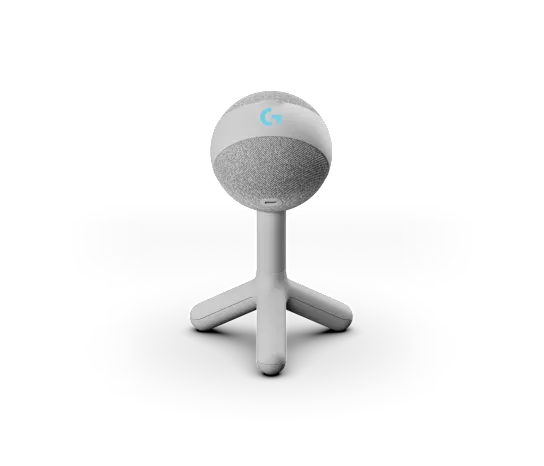
The Logitech G Yeti Orb USB condenser microphone, White, US model 988-000556, addresses a straightforward desk-audio problem: improving one person’s voice without assembling an XLR interface, external preamp and several separate controls. Its appeal is the simple USB connection, included stand and uncomplicated single-pattern design. Its limitations are equally important. The stand is not height-adjustable, the microphone has no physical controls, and the supplied specifications do not identify a headphone-monitoring connection.
What this exact model is
This review covers the white Yeti Orb with model number and SKU 988-000556. Logitech’s catalogue identifies that white variant separately from the black model, so buyers should match the model number rather than rely only on photographs or the product name. The product is a desktop USB condenser microphone intended for one speaker, with a cardioid pickup pattern and side-address orientation.
The manufacturer identifies the capsule type as condenser and the polar pattern as cardioid. Tom’s Hardware independently describes the microphone as a side-address condenser with one unidirectional cardioid pattern. That combination suits a speaker who can put the microphone in front of them and aim its front toward their voice. It is not a multi-pattern room microphone.
Logitech specifies a 24-bit / 48 kHz recording format and a 70 Hz–20 kHz frequency response. Tom’s Hardware lists the same format and range in its independent specification table. These are the product’s stated signal and frequency specifications, not a prediction that every voice, application or room will produce the same result.
A cardioid pattern can help a single speaker organize the setup, but it should not be confused with active noise cancellation. Directional pickup does not eliminate keyboard impacts, fans, reflections or nearby conversation. Tom’s Hardware’s independent evaluation found that background noise was not handled especially well without software intervention, making placement more important than the gaming branding suggests.
Connection and compatibility
Logitech lists compatibility with a Mac or Windows system that has an available USB 1.1 port or higher. The included cable is USB-C to USB-A, and the manufacturer identifies it as a 2 m cable. A computer with only USB-C ports may therefore require a suitable adapter or another compatible cable; the box specification does not describe a USB-C-to-USB-C lead.
The direct connection is the Yeti Orb’s clearest setup advantage. Tom’s Hardware described the microphone as easy to use out of the box, and its independent review reported usable voice capture without software installed. That makes the basic path relatively simple: connect the cable, select the microphone in the operating system or application, and position it toward the speaker.
The optional software changes the ownership decision. Logitech says internet access is needed for the optional software download. The relevant application is Logitech G HUB, which provides access to the Yeti Orb and other Logitech G products in one desktop window. Buyers who want only basic voice capture can avoid adding that software at first.
G HUB is more than a lighting utility. Tom’s Hardware reports that the microphone’s Blue VO!CE tools include a three-band equalizer, high-pass filter, noise reduction, noise gate, compressor, de-esser and de-popper. Presets provide a simpler starting point for people who do not want to tune each processing stage manually.
That software path also exposes a hardware limitation. Tom’s Hardware reports that the Yeti Orb has no on-mic controls or ports other than its USB-C connection for power and connectivity. The supplied evidence therefore does not identify a physical mute button, gain dial or headphone-monitoring port. If immediate mute access or direct listening is central to the desk, the Orb is a poor fit unless those functions are handled by the computer, application or separate equipment.
Placement and stand fit
Logitech lists the product dimensions as 7.72 in (196 mm), 4.53 in (115 mm) and 4.53 in (115 mm). The manufacturer lists its weight as 8.11 oz (230 g). The manufacturer does not identify these as capsule-only measurements; use the listed product dimensions for desk planning. Those figures describe a noticeable desktop object rather than a small clip-on microphone, so the available space in front of the keyboard and monitor matters.
The microphone includes a removable desktop stand. Logitech also specifies that the product can use any ¼-inch-20 threaded mount. That gives the buyer a future route to a boom arm or another compatible support, although no alternative mount is included in the supplied package.
Tom’s Hardware describes the included support as a tripod desktop stand with a base that rotates 360 degrees. Rotation helps aim the microphone across a desk, but it does not change the stand’s height. The same independent review reports that the stand is not adjustable apart from rotating, while its mounting points allow angle changes.
Tom’s Hardware measured the total microphone-and-stand height at 7.75 in (196.85 mm). Logitech’s listed product dimensions use a different presentation, so the independent height is best treated as practical placement guidance rather than a replacement for the manufacturer’s dimensions. Either way, the fixed-height design deserves attention before purchase.
The independent reviewer reported that the microphone sounded better when positioned closer, with a preferred distance of around 4–5 in (101.6–127 mm). At 12 in (304.8 mm), the reviewer found that pickup began to drop noticeably beyond that distance. These observations make the included stand’s short, fixed position more consequential on a deep desk.
At about 1.5–2 ft (457.2–609.6 mm), Tom’s Hardware reported that the pickup was much quieter and the voice sounded thin and echo-prone. That is an independent review finding, not a manufacturer specification. It is especially relevant if the microphone must sit behind a keyboard, beside a monitor or at the far edge of a large desk.
The practical fit checklist is therefore simple. The Orb works more naturally when it can sit directly in front of the speaker, close enough for a clear voice, without blocking the keyboard or screen. If the desk forces a greater distance, budget for a compatible ¼-inch-20 support and plan the cable route before assuming the included stand will be sufficient.
The microphone is side-address, so the speaker should aim the face of the ball toward their voice rather than speak into its top. Tom’s Hardware reports that the stand’s mounting points allow upright positioning or a backward tilt of 45 degrees. That helps adjust direction, but it does not add height or provide another pickup pattern.
Sound and room expectations
Tom’s Hardware’s independent review describes vocals as full and relatively warm. It also reports that the microphone kept popping plosives and hissing sibilants to a minimum without software installed. Those are useful observations for calls, game chat and casual streaming, but they are listening findings from that reviewer rather than guarantees of a particular result in every room.
The same review found good voice pickup when the microphone was about 1 ft (304.8 mm) from the reviewer’s mouth, positioned on a desk in front of a keyboard. It found that moving closer improved the sound. The sensible takeaway is to treat the Orb as a near-field voice microphone, not as a device intended to capture a speaker across the room.
Logitech says the condenser capsule is optimized for voice and reduces noises such as keypresses. Tom’s Hardware reached a more qualified conclusion, reporting that background noise remained a weakness without software intervention. The manufacturer’s keypress-reduction language should therefore be read as a design aim, not as evidence that every keyboard or room will be quiet in the recording.
Blue VO!CE can provide noise reduction and gating options, but processing is not a substitute for placement. A microphone farther from the speaker receives more room sound along with the voice, and stronger processing can alter the natural character of speech. Positioning the capsule close and reducing the loudest nearby noise should come before extensive software adjustment.
The specified frequency response begins at 70 Hz. That does not by itself determine whether speech will sound good; Tom’s Hardware’s independent evaluation found the Yeti Orb suitable for ordinary voice use. Buyers should prioritize distance, room acoustics and control needs over treating the response range as a complete sound-quality verdict.
Lighting and everyday ownership
The Yeti Orb includes RGB with LIGHTSYNC. Logitech says its built-in RGB logo and status light support custom lighting effects. Tom’s Hardware reports that G HUB can assign different colors for idle and recording states, so the lighting can serve both appearance and a basic activity indication.
The recording indicator has a specific limitation. Tom’s Hardware reports that the color does not change when the microphone is muted because the recording state indicates use rather than mute status. The RGB therefore should not be treated as a dedicated mute confirmation, particularly since the microphone has no physical mute control.
The removable stand makes later repositioning possible. Logitech supports any ¼-inch-20 threaded mount, which is useful if a boom arm becomes preferable after the desk arrangement changes. For travel, however, Tom’s Hardware notes that the tripod stand does not fold up, even though the microphone itself is described as relatively compact and lightweight.
The package includes the Yeti Orb microphone, removable desktop stand, 2 m USB-C to USB-A cable, user documentation and a Streamlabs Ultra redeem code. The included code is an accessory offer rather than a core microphone capability. The more important ownership question is whether the buyer can keep the capsule close and stable after the initial setup.
Logitech lists a 2-year limited hardware warranty. No special maintenance routine is identified in the supplied evidence. In practical terms, the useful ongoing task is consistent positioning: moving the microphone behind the keyboard or farther across the desk can change both voice level and the amount of room sound captured.
Who should buy it
The Yeti Orb is a sensible candidate for a first standalone USB microphone when one person needs clearer computer voice audio and wants to avoid an XLR setup. A Windows or Mac user with a compatible USB port can start with the included stand and cable. Someone already using Logitech G HUB may also value keeping lighting and voice-processing settings in one application.
It is less suitable for a buyer who expects to mute or adjust gain at the microphone. It is also a weak fit for a desk where the capsule must remain far from the speaker, because the independent review found quieter, thinner and more echo-prone sound at approximately 1.5–2 ft (457.2–609.6 mm). A separate adjustable support may become necessary.
The Orb is not the obvious choice for several people sharing one microphone. Logitech lists one cardioid pattern, and Tom’s Hardware likewise describes one unidirectional cardioid pattern. A single front-facing speaker is the natural arrangement; group recording calls for a different microphone strategy or multiple microphones.
It is also not a complete answer for a loud desk simply because it is marketed for gaming. The independent review found background-noise limits without software, while Logitech’s product language focuses on voice optimization and keypress reduction. The best fit is a reasonably controlled room, close speaking distance and willingness to use G HUB when software processing is useful.
Alternatives and final verdict
The meaningful alternative may be a different microphone category rather than a more expensive version of the same design. A headset microphone keeps the capsule close to the speaker and can reduce the desktop placement problem. A USB microphone with physical mute and gain controls reduces software dependence. An XLR microphone with an interface expands equipment choices but adds hardware, cabling and setup decisions.
Tom’s Hardware specifically contrasts the Yeti Orb with the HyperX QuadCast S, describing that alternative as having four polar patterns, a shock mount and an on-mic mute button. Those cited features make the QuadCast S the more versatile direction for buyers who need pattern selection or immediate controls. The Yeti Orb is the simpler direction for a basic one-speaker USB arrangement.
Choose the Logitech G Yeti Orb White 988-000556 if a USB condenser microphone with a removable stand, cardioid operation and optional G HUB processing matches the desk. It is particularly appropriate when the microphone can sit close to one speaker and the buyer values a straightforward starting point more than physical controls.
Choose something else if direct mute access, headphone monitoring, adjustable stand height, stronger physical isolation or multi-pattern recording is central to the workflow. Those are not minor preferences here: the lack of physical controls and the fixed stand affect how the microphone is positioned and operated every day.
The final buying decision is therefore about friction and placement rather than a single sound-quality label. The manufacturer’s 24-bit / 48 kHz format, cardioid pattern, included stand and USB-C-to-USB-A cable establish a clear basic package. Tom’s Hardware’s independent placement and noise findings explain the conditions around that package.
For the stated buyer problem, the Yeti Orb is a focused entry-level USB microphone for one-person desktop speech. Its strongest case is uncomplicated setup and respectable out-of-box voice performance according to the independent review. Its boundaries are equally clear: keep it close, account for the fixed stand, expect software to handle advanced processing, and do not buy it expecting a built-in headphone-monitoring or physical-control workflow.