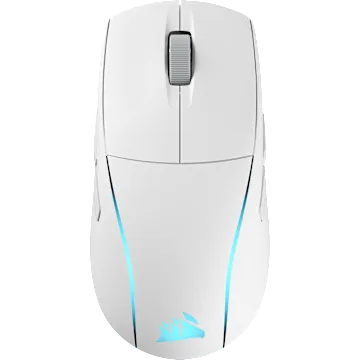
Corsair M75 Wireless: the short version
The Corsair M75 WIRELESS Lightweight RGB Gaming Mouse in White, model CH-931D011-NA, addresses a problem many gaming mice overlook: giving left- and right-handed players comparable physical controls. Its shell is ambidextrous, and its magnetic side controls can be rearranged so the functioning buttons sit where the active thumb needs them.
That makes the M75 more than a symmetrical outline with duplicated buttons. It is a configurable wireless mouse for a left-handed player, a right-handed player, or a shared desk. The qualification is important: changing hands involves moving physical pieces and changing a software setting, not simply pressing a hand-selection button.
The central trade-off is clear. Corsair lists an 89 g weight, so this is not an ultralight mouse despite its lightweight branding. You also need to decide whether the side-button arrangement, wheel behavior and wireless findings matter more to you than the lower mass offered by some right-handed alternatives.
A genuinely ambidextrous configuration
Corsair describes the M75 Wireless as having an ambidextrous shape for right- and left-handed players. PC Gamer independently called it genuinely ambidextrous, which is meaningful because many supposedly ambidextrous mice offer only a broadly symmetrical shell while leaving the useful controls on one side.
The more distinctive feature is the swappable magnetic side-button system. Corsair says the pieces can be set up as raised, assignable buttons or smooth, non-clickable covers. That gives each hand a functioning control side while allowing the opposite side to be blanked rather than left vulnerable to accidental presses.
The arrangement is not an instant hand-switching control. PC Gamer reports that moving to left-handed use requires removing the magnetic side buttons and the blank covers, then replacing them with inverted pieces included in the box. The reviewer then selected left-hand mode in Corsair’s iCUE software.
That makes the M75 better suited to a permanent configuration or an occasional hand change than to switching several times during a workday. A left-handed player can complete the setup once and leave it in place. Someone alternating hands frequently should regard the removable parts as part of the setup routine.
PC Gamer also found the side buttons low profile and reported that a thumb did not always press them properly during fast play. That is an independent handling observation rather than a manufacturer specification, but it affects the feature that most clearly separates this mouse from ordinary symmetrical designs.
Weight, shape and glide
Corsair lists the M75 Wireless at 89 g. That is not an especially heavy gaming-mouse figure, but it is not an ultralight figure either. PC Gamer reached a similar practical conclusion, describing 89 g as neither especially heavy nor especially light.
Weight does not tell the whole story during broad sweeps. PC Gamer said the M75 could feel somewhat cumbersome beside mice in that reviewer’s comparison and attributed part of the impression to mass distribution inside the chassis. That is a subjective independent assessment, not a published balance measurement.
Corsair equips the mouse with 100% PTFE feet and says they are intended to glide across nearly any surface. The material specification identifies the foot material, but it does not predict the exact feel on every desk finish or mouse pad.
PC Gamer reported that the feet felt somewhat narrow and that the M75 did not glide as effortlessly as the Razer DeathAdder V3 Pro. This is a comparative independent finding, not a universal ranking. It matters most to players who make frequent low-pressure arm movements and prefer minimal resistance.
The shape is therefore the stronger reason to consider this model. A lighter right-handed mouse may feel preferable if movement speed is the only priority, but it cannot solve the same left-handed control problem. The M75 earns consideration by making hand choice part of the physical design.
Sensor and primary buttons
The M75 uses Corsair’s MARKSMAN optical sensor. Corsair lists a maximum resolution of 26,000 DPI, maximum tracking speed of 650 IPS and maximum acceleration of 50 g. Those are upper-limit specifications, not settings that every player needs to use.
The practical question is whether tracking remains consistent at your chosen sensitivity. PC Gamer reported that the M75 tracked very accurately in that reviewer’s examination. That supports the sensor’s basic tracking credentials without turning the maximum figures into a promise of better aim.
Corsair lists a 1,000 Hz polling rate. That figure describes the manufacturer’s stated report rate. A larger polling number on another mouse is not automatically more useful if it does not improve the experience on your computer, display and preferred games.
The primary buttons use Corsair Quickstrike technology and optical switches. Corsair describes the design as having no gap between the primary buttons and the optical switches. That explains the intended input arrangement, while the supplied sources do not establish whether every player will prefer its click feel.
PC Gamer lists five buttons in total. This is consequently a relatively simple gaming control layout rather than an MMO mouse with a large side keypad. Its assignable controls are better suited to a small group of useful commands than to replacing a bank of keyboard shortcuts.
The independent review’s hardware assessment was measured: the core components were described as functional but not outstanding. That is a useful way to place the M75. Its sensor and main switches provide a capable baseline, while its unusual value comes from the hand-neutral body and modular side controls.
Wireless connections and battery
The M75 supports 2.4GHz SLIPSTREAM wireless and Bluetooth. Corsair lists battery life of up to 105 hours through 2.4GHz SLIPSTREAM and up to 210 hours through Bluetooth, with RGB lighting off.
Those connection modes serve different purposes. The 2.4GHz receiver is the more appropriate choice for fast-paced gaming, while Bluetooth offers the longer stated runtime and can be convenient with compatible devices. Corsair also lists a control that switches between wireless mode, Bluetooth and power-off mode.
The wireless receiver can be stored in a compartment under the mouse. That helps when moving the mouse between a desktop, laptop or shared setup. It does not provide storage for every spare side piece, so the removable buttons and covers still need a separate safe place.
PC Gamer described the battery life as decent and reported 105 hours over 2.4GHz with RGB disabled, rising to 210 hours over Bluetooth. The reviewer also said Corsair’s figures appeared accurate during that review. Battery duration remains dependent on connection mode, lighting and usage conditions.
The independent wireless findings deserve more attention than a low-latency headline. PC Gamer reported accurate tracking but a connection that was less flawless than Razer’s HyperSpeed technology in that comparison. The reviewer observed some long update intervals during testing.
PC Gamer said those spikes were usually not noticeable, while also reporting a few Counter-Strike 2 occasions when the screen and mouse did not feel fully synchronized. The reviewer acknowledged that the cause was difficult to establish. This is not evidence of universal failure, but it matters to buyers who prioritize highly consistent wireless timing.
Software, lighting and compatibility
Corsair’s iCUE software handles DPI presets, key assignments, RGB lighting and surface calibration. It also provides the software setting needed for the left-hand mode described by PC Gamer. The M75 is consequently a better fit for buyers willing to manage configuration in software than for those seeking a completely software-free setup.
The RGB lighting is programmable through iCUE. PC Gamer reports lighting in the logo, side strips and rear edge of the base, with those areas independently configurable. That reviewer described the lighting as subtle even at full brightness, so the M75 is not primarily a brightly illuminated desk centerpiece.
Corsair lists compatibility with a PC or Mac that has a USB 2.0 Type-A port. The supported operating systems are Windows 10, Windows 11 and macOS 10.15 or later. Corsair also states that an internet connection is needed to download iCUE software.
The USB Type-A requirement is worth checking before purchase. A laptop equipped only with USB-C ports may need a suitable adapter or dock for the receiver. Bluetooth can reduce dependence on the receiver with a compatible computer, but the manufacturer’s listed computer compatibility still specifies USB 2.0 Type-A.
Corsair lists one onboard memory profile. That is enough for a basic saved configuration, but it is a limitation for someone who wants numerous game-specific profiles available without opening iCUE.
Setup and ownership
Initial setup means choosing a connection, installing iCUE if customization is needed, and deciding which side should carry functioning buttons. A right-handed buyer can use the default arrangement. A left-handed buyer should plan for the physical button and cover swap before relying on the mouse.
The magnetic pieces make the side-control layout changeable rather than permanently fixed. The trade-off is that removed buttons and covers are small parts that need a safe storage place. The supplied information identifies storage for the USB receiver, not a dedicated compartment for every spare side piece.
Charging is an ordinary part of ownership because the M75 uses a rechargeable battery. Corsair’s stated figures are up to 105 hours through 2.4GHz and up to 210 hours through Bluetooth, with RGB off. Lighting and connection choices can shorten the interval between charges.
The available sources support basic ownership guidance but not a detailed repair plan. Keeping the sensor and feet clear, protecting the removable side pieces and storing the receiver with the mouse are sensible precautions. The supplied records do not provide a cleaning procedure, replacement-foot schedule or battery replacement instructions.
Alternatives and trade-offs
The closest alternative category is a conventional right-handed wireless performance mouse. That category may provide a more sculpted palm fit or lower weight, but it does not address left-handed control in the same way. Compare the M75 on hand flexibility first, not only on sensor ceilings.
PC Gamer compared the M75 with the Razer DeathAdder V3 Pro and described that alternative as lighter and faster in its assessment while noting that it is for right-handers only. The choice is conditional: the Razer is more compelling when low mass and right-handed ergonomics lead, while the Corsair is more relevant when either-hand use is essential.
Corsair’s M75 Air Wireless is another useful comparison. PC Gamer states that the RGB-free Air version weighs a lower listed weight and describes it as cheaper in that review. Prices change, and the supplied material does not establish whether its control arrangement provides the same ambidextrous functionality.
A simpler symmetrical mouse can make more sense if you do not need side buttons. The M75 can replace unused positions with smooth, non-clickable covers, but that configurability also adds setup decisions. There is little reason to pay for a feature you will never use unless the shape or connection options independently fit your needs.
Verdict
Buy the white Corsair M75 WIRELESS, model CH-931D011-NA, when genuine left- and right-handed configuration is the deciding requirement, an 89 g body is acceptable, and you want both 2.4GHz wireless and Bluetooth. Its swappable magnetic controls solve a real compatibility problem that many gaming mice leave unresolved.
Choose something else if the lowest possible weight, a faster-feeling wheel or the most consistent wireless timing matters more than hand flexibility. The M75’s low-profile side buttons, resistant wheel and independent wireless findings are not trivial details for a highly competitive player.
The conditional verdict is favorable for left-handed players and shared desks, but narrower for everyone else. This is not the universal performance winner implied by the lightweight label. It is a practical, feature-rich choice when configurable hand placement matters more than ultralight movement.