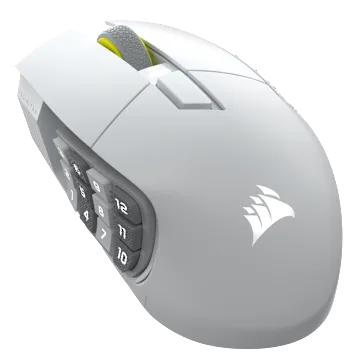
What this exact mouse is for
The Corsair SCIMITAR ELITE WIRELESS SE MMO Gaming Mouse is a specialist pointing device for buyers who want many commands under one thumb. This review covers the white US-retail variant, model CH-9314011-WW, rather than treating every Scimitar model as interchangeable.
Its central idea is straightforward: combine a conventional gaming mouse with a programmable 12-button side panel. Corsair lists 16 customizable buttons overall, making this a very different purchase from a minimal mouse with only a few extra inputs.
The practical buying question is not whether more buttons are useful in the abstract. It is whether your games, creative shortcuts, or streaming controls justify learning and carrying a larger mouse. The answer depends more on command density and hand fit than on the sensor’s headline resolution.
Corsair also positions the mouse within the Elgato Stream Deck ecosystem. Its product material says Stream Deck functions can be mapped directly from the Stream Deck app. That matters to streamers who want scene or media commands close to the hand already on the mouse.
The thumb grid and setup
The side panel is arranged as four buttons by three buttons. Corsair calls the mechanism a repositionable 12-button Key Slider and says it can be moved to suit different hand sizes. That adjustment is valuable because thumb reach is personal; a fixed grid can force awkward stretching or leave buttons too far forward.
Adjustment is not merely a software choice. PC Gamer reports that the panel slides back and forth and locks in place with a screw on the underside. Position the grid before building muscle memory, then secure it rather than repeatedly changing its location.
That setup effort is part of the product’s real cost. Sixteen inputs create opportunity, but each assignment needs a sensible home. An MMO layout may prioritize abilities and cooldowns, while a streaming layout may use the same thumb area for scenes, effects, or volume commands.
Corsair’s iCUE software handles remapping, macros, sensor calibration, and RGB customization. PC Gamer also reports configuring lighting, DPI settings, and key assignments in iCUE. The software is therefore central to the full control scheme rather than an incidental extra.
The mouse stores up to three custom profiles onboard, according to Corsair. PC Gamer reports that profiles can be assigned to different games and swapped between them. That makes a multi-game setup more practical, although it does not remove the need to remember which profile is active.
Streaming and desktop shortcuts
The Stream Deck integration is the strongest reason to choose this model over an ordinary MMO mouse. Corsair says the 12 side buttons can access more functions through Elgato Virtual Stream Deck, and its software description says Stream Deck functions can be mapped from the Stream Deck app.
PC Gamer independently describes the feature as the mouse’s real appeal and assesses the side panel as a Stream Deck-like control surface. Its examples include OBS actions such as launching OBS, starting or ending a stream, changing scenes, applying effects, and adjusting microphone or game volume.
Those findings describe a workflow advantage, not a promise that every application will behave identically. Compatibility still depends on the relevant software integration and on how assignments are configured. Buyers should check their intended streaming applications before treating the feature as a replacement for a separate control device.
For ordinary desktop work, the same inputs can hold keyboard functions, macros, text, and media controls. PC Gamer specifically reports those assignment options. That flexibility may suit repetitive editing or communication tasks, but 16 controls can be excessive if your routine consists mostly of pointing, scrolling, and occasional shortcuts.
The trade-off is learning time. PC Gamer reports that its reviewer needed muscle-memory training and found some configuration necessary for a macro. Separated buttons, differing textures, and the grid layout helped that reviewer identify buttons by touch, but those observations remain an independent review finding rather than a universal fit result.
Wireless and compatibility details
Corsair lists three operating choices: Slipstream wireless, Bluetooth, and power off. The mouse also has a USB receiver storage compartment under the shell. That combination suits a desk setup that uses the receiver at home but may occasionally move to another computer over Bluetooth.
The official specification lists 1,000Hz polling for the wireless and Bluetooth feature set. PC Gamer lists Corsair Slipstream 2.4GHz, Bluetooth, and USB Type-C connectivity, so the connection options are not limited to a permanently wired desktop arrangement.
Charging uses a USB Type-C port on the front, according to PC Gamer. The official page lists a 1.8m braided-fiber cable. That cable length is useful for planning a receiver-and-charging layout, though the supplied records do not establish whether the cable’s design suits every desk arrangement.
Battery figures require careful reading. Corsair states up to 150 hours through 2.4GHz with RGB off and up to 500 hours through Bluetooth with RGB off. These are manufacturer maximum-use figures, not a universal runtime, and RGB operation is specifically excluded from those conditions.
The sensor is Corsair’s MARKSMAN S optical sensor. The manufacturer lists a maximum resolution of 33,000 DPI, tracking speed of 750 IPS, and acceleration of 50G. Those are technical capabilities; they do not by themselves determine whether the mouse feels preferable for a particular game or sensitivity.
The optical switches are specified for up to 100 million clicks, and Corsair describes its Quickstrike design as having zero gap between the primary buttons. Those are manufacturer design and durability claims, not an independent longevity result. The supplied evidence does not establish how the switches will age in a particular use pattern.
Fit, weight and movement
Corsair’s technical card identifies the grip type as palm, while the manufacturer describes the shell as contoured to support a comfortable grip and reduce wrist strain. Comfort remains a personal fit question, especially when the side grid changes where the thumb rests.
Bulk is the main physical warning. PC Gamer calls the mouse bulky and reports a measured weight of 161g. The same review says the mouse arches into the hand, while its verdict lists greater weight than other mice as a drawback. The shape may feel accommodating without being light or nimble.
The supplied manufacturer specification instead lists weight as 0.114kg, equivalent to 114g. Because that conflicts materially with PC Gamer’s 161g measurement, this review does not present one weight as settled. Treat the discrepancy as a reason to verify the exact retail unit and specification before buying for a weight-sensitive setup.
The disagreement matters most for fast, low-inertia play. PC Gamer judged the mouse slower and heavier than mice aimed at esports use. That does not undermine its MMO purpose; it clarifies that the design spends physical mass and space on buttons, wireless hardware, and a palm-supporting shell.
The side grid also affects grip mechanics. A thumb has to hover over or contact 12 closely arranged controls instead of resting on an empty side. The adjustable slider can improve reach, but it cannot turn this into a compact mouse with only a few intentional thumb commands.
Corsair lists PTFE mouse feet and describes them as enabling ultra-low-friction movement. This specification may appeal to buyers who prefer a smooth glide, but the supplied evidence does not provide a controlled comparison against another mouse or mouse pad.
Gaming performance and limits
For MMO play, the appeal is command access rather than extreme flick speed. PC Gamer found the mouse responsive in a basic game-assignment scenario and described the optical switches as having a satisfying click. That is an independent reviewer’s experience, not a benchmark supplied by Corsair or a result from this article.
The mouse can also handle conventional keyboard functions and recorded macros through its button assignments. PC Gamer reports using a side button for a multi-key action after some configuration. This makes the model more versatile than a device limited to fixed MMO commands, but it also increases the number of decisions required during setup.
For competitive shooters, the case is narrower. PC Gamer says the mouse may not match lighter, more FPS-oriented esports mice and identifies its heavier, slower character as a reason not to buy if fast flicking is the priority. A lighter specialist category is the more sensible comparison for that buyer.
For an MMO player who regularly manages cooldowns, inventory actions, or many bindings, the grid directly addresses the problem. Corsair presents the 16 programmable buttons as a way to put powers, cooldowns, and attacks at hand. The benefit depends on actually using those assignments rather than leaving most buttons unused.
For a streamer, the decision includes the separate-control-device question. PC Gamer describes the mouse as effectively combining mouse and Stream Deck functions, while Corsair confirms native Stream Deck integration. If your desk already has a preferred dedicated control surface, the extra controls may be redundant rather than transformative.
Maintenance and ownership
Ownership is relatively software-dependent. Keep the receiver stored under the mouse when it is not in use, use the connection mode appropriate to the computer, and maintain profiles in iCUE. Corsair’s receiver-storage specification supports that transport routine, while the supplied records do not provide a cleaning schedule or replacement-parts information.
Battery planning is also part of ownership. The manufacturer’s 150-hour 2.4GHz figure and 500-hour Bluetooth figure both assume RGB off and are maximum claims. A buyer who wants constant lighting or uses the mouse heavily should regard those numbers as planning references, not as a fixed calendar.
The product carries a manufacturer-listed two-year warranty. That is a support term, not evidence that a particular unit will last for that period or that every failure scenario is covered. Check the applicable US warranty conditions before relying on it for a work or streaming setup.
The current evidence has meaningful limits. Corsair provides extensive specifications and setup features, while PC Gamer provides an independent evaluation of comfort, weight, responsiveness, configuration, and Stream Deck usefulness. There is no supplied controlled comparison of battery life, switch longevity, wireless range, or long-term maintenance burden.
Alternatives and verdict
The closest alternative category is a conventional MMO mouse with a programmable side grid but without this model’s documented Stream Deck emphasis. That route makes sense when game bindings matter but streaming controls do not. The Scimitar’s differentiator is the combination of the grid and Elgato integration, not merely the existence of side buttons.
A lightweight esports mouse is the better category for buyers who prioritize rapid flicks and minimal mass. PC Gamer’s finding that this mouse is heavier and slower than esports-oriented options supports that category-level distinction. The supplied sources do not support a specific competing model’s feature list, so a named alternative would add unsupported detail.
Choose the white CH-9314011-WW if you want a palm-shaped MMO mouse, can accommodate its bulk, and will invest time in configuring profiles and learning a dense thumb layout. It is especially compelling when Stream Deck actions, macros, or many game commands need to remain under one hand.
Choose something simpler if you need only a few extra bindings, dislike software configuration, or value fast, light movement above command capacity. The adjustable slider addresses thumb placement, but it does not remove the weight conflict in the available evidence or the fundamental size of the design.
My conditional verdict is favorable for MMO players and streamers who will use the controls. The Corsair Scimitar Elite Wireless SE is a feature-dense command mouse whose strongest case is workflow consolidation. It is a poor fit when the real priority is a small, light, flick-oriented pointer or when most of its programmable surface would remain unused.