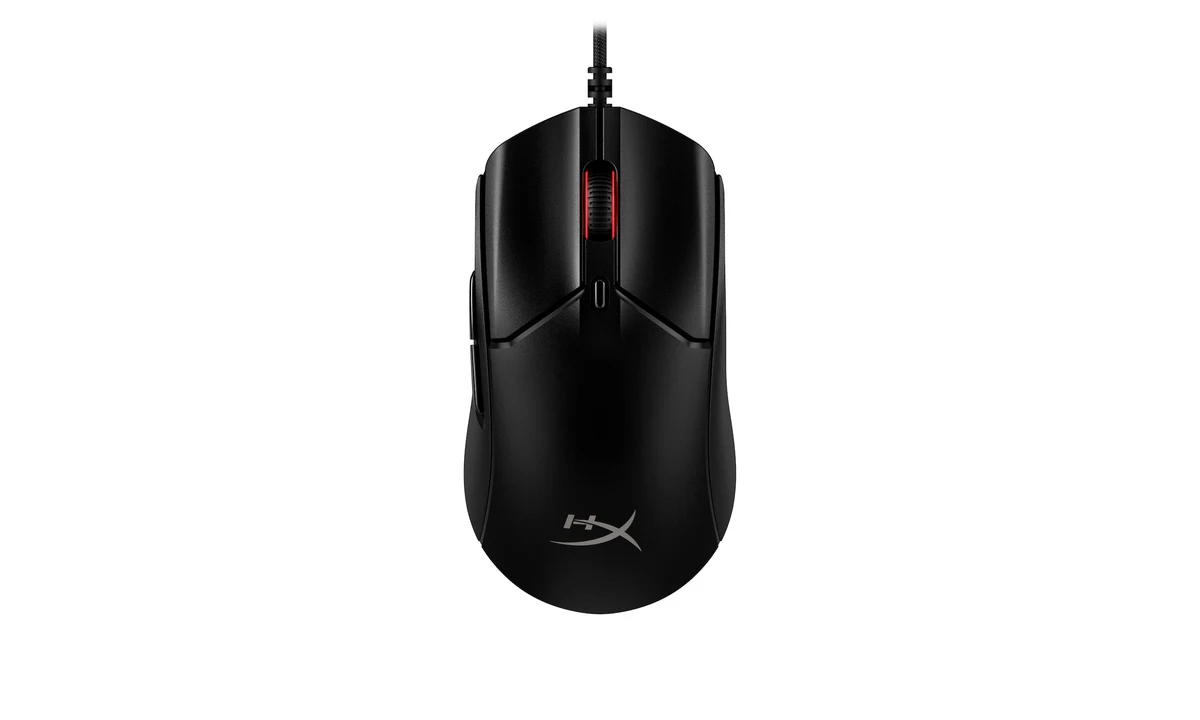
The wired HyperX Pulsefire Haste 2 is for someone who wants a light, uncomplicated gaming mouse and is comfortable keeping a cable on the desk. Its solid upper shell, limited button arrangement and high polling-rate option put the emphasis on ordinary aiming and clicking rather than a large collection of game-specific controls. The black model considered here is the wired version, not the Haste 2 Wireless.
Its appeal depends on more than low weight. Hand fit, main-button resistance, cable routing and the amount of configuration you need can change the answer. An impressive sensor specification does not compensate for a shape you keep readjusting or a click that feels wrong during repeated use. Start with those physical questions before treating its highest reporting setting as the main reason to buy.
The exact model and hardware
HyperX lists the wired Haste 2 at 53 grams, excluding the cable. The manufacturer describes a solid upper shell and a symmetrical shape. That is a meaningful distinction from the original Pulsefire Haste's visible honeycomb design, but the Haste 2 still has its own underside construction and should not be described as a completely sealed object.
The apparently symmetrical outline also needs qualification. The thumb buttons sit on the left side, so the control arrangement is intended primarily for right-handed use. Shape symmetry is not the same as mirrored controls. A left-handed buyer should check the actual button access rather than relying on an ambidextrous-looking product photograph or a broad retailer category.
HyperX specifies six programmable buttons, a 26K sensor and a wired connection. The sensor's maximum resolution is 26,000 DPI. That ceiling is a capability specification, not a recommended sensitivity setting and not evidence that a user will aim more accurately. Most of the useful work is choosing a comfortable sensitivity and maintaining a setup that feels predictable.
The wireless product is a separate purchase with different connection and power considerations. Do not transfer its battery claims or Bluetooth support to the wired Haste 2. Equally, do not assume a review of the wireless version establishes every detail of the wired cable experience. The distinction matters even when the products share a name, color and broad shape.
Weight is useful when the shape works
A light mouse can be easier to lift and reposition, particularly when your movements regularly approach the edge of the available surface. That is a practical reason to consider the Haste 2. It is not a promise that a lighter product automatically produces better results. The hand still needs a secure, repeatable way to guide and lift it.
Tom's Hardware describes the Haste 2 as having relatively straight sides and a low hump, and found it more naturally aligned with fingertip or claw-style use than a strongly rounded ergonomic body. That is useful review context, not a universal hand-size rule. Examine where your palm normally rests and how much contact you want from the rear of the mouse.
The same review notes that the surface can become slippery and discusses fitting the supplied grip tape. HyperX includes pre-cut grips and spare low-friction skates. Those accessories offer ways to adjust contact or maintain the gliding surfaces, but neither should be treated as proof that the underlying shape will fit every hand equally well.
When evaluating fit, consider movements as well as a stationary grip. Reaching the thumb buttons, lifting the mouse and pressing the wheel can expose awkward contact points that are not obvious when the mouse first sits under your hand. A suitable shape should allow those ordinary actions without repeatedly shifting your grip to recover control.
The cable is part of the experience
The Haste 2 uses HyperX's HyperFlex 2 cable. It is a wired mouse with an attached cable, so the cable is part of the product rather than an optional charging lead. Tom's Hardware particularly liked its flexibility and low resistance during use. That finding helps explain the wired model's appeal for buyers who want to avoid charging a mouse.
Cable routing still deserves attention. Leave enough free movement between the connection point and the mouse so the cable does not catch at the back of a monitor or drag across a rough desk edge. A flexible cable cannot eliminate a poorly arranged workstation. Try to judge the mouse with the cable positioned as it will be during normal play.
The attached design also affects ownership. If you strongly prefer being able to exchange a cable without opening a device, that is a separate reason to compare another mouse. Do not assume that a convenient wired connection necessarily brings the same repair or replacement options as a detachable cable. Check the manufacturer's support arrangements for an actual fault.
For a laptop that moves frequently, consider how the mouse and cable will be packed together. Avoid building a carrying routine around tight bends at the point where the cable enters the body. A small accessory pouch can keep the cable from tangling with charging equipment, but it also becomes another item in the travel setup to keep organized.
What the polling-rate option means
HyperX advertises polling up to 8,000Hz and notes that the default setting is 1,000Hz. The higher option can be selected through the documented controls or NGENUITY. These are reporting settings, not a guarantee of a visible improvement in every game. The rest of the computer, the display and the particular application's behavior all belong in the practical evaluation.
A sensible approach is to establish a comfortable baseline before changing the reporting rate. Keep the sensitivity, game settings and connection consistent while checking whether the higher setting creates any useful difference for your work or play. Changing several things together makes it much harder to understand why the mouse feels different or whether a problem has appeared.
The highest setting should remain an option, rather than an obligation attached to the purchase. If a game or system behaves more consistently at the default rate, using that rate is a reasonable outcome. Buying a configurable mouse is useful because settings can match the system; it does not require running every specification at its maximum value.
Tom's Hardware considered the higher polling option potentially excessive for many users. That aligns with the broader buying point: fit and a dependable click are more immediate than a headline number. The Haste 2 remains interesting as a lightweight wired mouse even for a buyer who does not intend to use its most demanding reporting option.
Buttons and click feel
The main switches are mechanical, and HyperX rates them for up to 100 million clicks. That is a manufacturer endurance rating, not a forecast of an individual mouse's working life. It cannot establish how the switch will feel under your finger or how a particular unit will behave after a long period of use.
Tom's Hardware found the main clicks firm and the secondary controls different in feel, with the reviewer needing time to adjust to the main-button force. That is a decision-changing observation for someone who prefers very light clicks. It should prompt a fit and feel check rather than be converted into a universal defect or a claim that all samples behave identically.
Think about the kinds of input you repeat. Holding a button, making deliberate single clicks and repeatedly clicking during a fast sequence place different demands on the hand. A switch that feels satisfyingly positive in one situation may feel less agreeable in another. That is why the mouse's low overall mass should not be used as shorthand for effortless operation of every control.
The small control set also defines the mouse's role. It suits buyers who want the main controls and a modest amount of remapping without an extensive side keypad. If your games or applications depend on many mouse-accessible commands, investigate a control layout designed for that need. A clean shape cannot replace buttons that your workflow actually requires.
The top-mounted sensitivity button is another detail to understand before remapping controls. Changing DPI alters pointer sensitivity; it does not select another stored application profile. If you tend to press that button unintentionally, consider its assignment during setup. A clear separation between sensitivity adjustment and ordinary game commands can make the limited control set less confusing in the middle of play.
Software and onboard settings
NGENUITY provides customization for buttons, sensitivity and lighting. The Haste 2 stores one onboard profile, according to HyperX. This allows a saved arrangement to travel with the mouse, but it is a narrower capability than a collection of independently selectable onboard configurations. Decide how often you actually switch between substantially different control schemes.
For a single gaming setup, one well-chosen arrangement may be all that is needed. For several computers or applications, repeatedly changing the saved configuration can become inconvenient. Compare the actual behavior you need when the configuration software is closed or unavailable. Do not assume that any mouse advertised as programmable provides the same profile management or software-free switching.
On a managed computer, confirm whether NGENUITY can be installed before buying around its customization. HyperX lists several host platforms for the mouse, but a device being recognized by a system does not mean the full configuration application is available there. Treat basic input compatibility and access to all customization controls as separate checks.
Keep an understandable record of your useful settings. That can make a fresh installation, replacement computer or configuration reset less disruptive. The goal is not to keep changing settings indefinitely, but to reach a stable arrangement whose purpose you understand. Additional adjustment is valuable when it solves a specific problem, not merely because the software offers it.
Alternatives and ownership checks
A wireless mouse is the obvious alternative when a cable is the main annoyance in your present setup. Compare its exact shape, weight, receiver requirements and charging routine rather than assuming the related wireless model is equivalent in every other respect. A simpler wired arrangement can be preferable for one desk, while cable-free movement may matter more in another.
A more strongly contoured mouse belongs on the shortlist if you want substantial palm support. The Haste 2's relatively restrained shape is a different proposition from a pronounced right-handed body. Compare where the hump and side support meet your hand. A familiar shape that remains comfortable during your ordinary tasks may be more valuable than a lighter specification.
HyperX lists a two-year warranty on the product page. Check the applicable regional terms and the selected retailer, and retain the product identity with the receipt. Also verify the wired version and black finish in the actual listing. Similar names and photographs make it easy to compare a different Haste generation or connection type by mistake.
Verdict
Choose the wired HyperX Pulsefire Haste 2 if a light, relatively simple right-handed control arrangement suits your grip and you want to avoid a battery routine. Its flexible cable, included grips and spare skates are useful parts of that proposition. The high polling option is a feature to evaluate after the physical fit works, rather than a substitute for it.
Choose another mouse if you need very light main-button force, several onboard profiles, extensive thumb controls or a shape with more palm support. The Haste 2 is a focused tool with identifiable compromises. It becomes a worthwhile purchase when those compromises match your desk and habits, not merely when its weight and maximum sensor figures beat another line in a comparison chart.