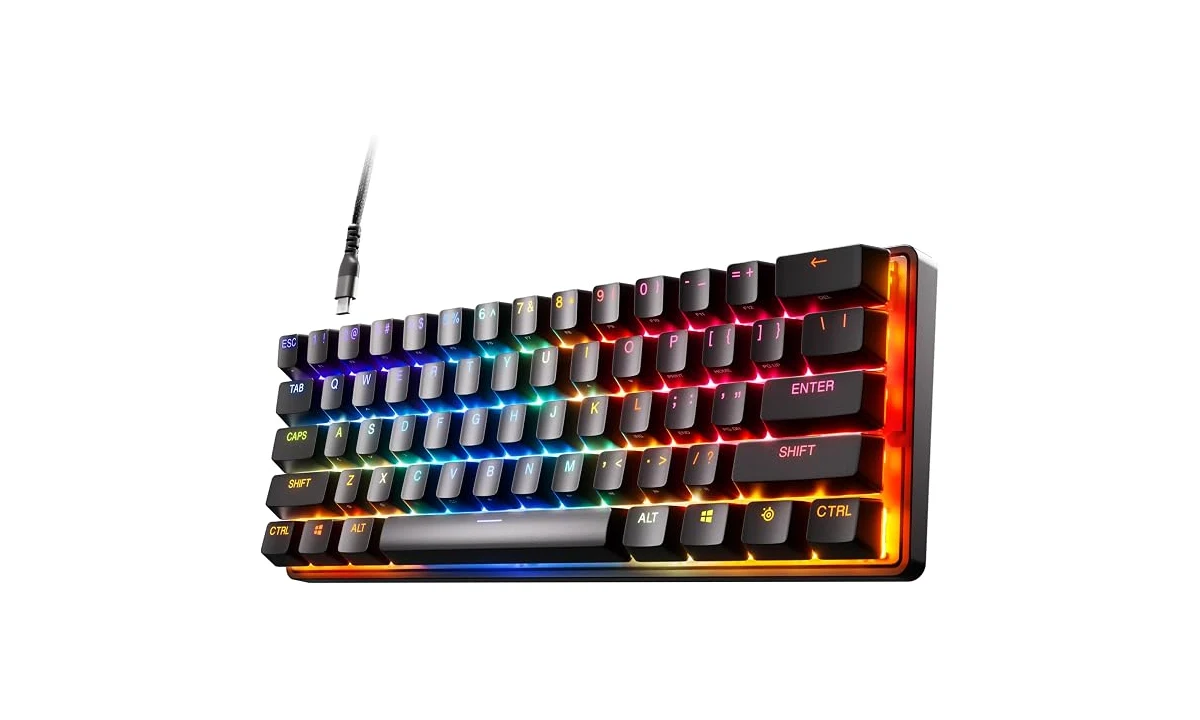
The original wired SteelSeries Apex Pro Mini is a compact keyboard for buyers who actively want adjustable magnetic switches and are prepared to use a small layout. Its appeal is the ability to change when a key registers, including different behavior at different press depths. Its compromise is that a smaller board asks more of the person using it, especially outside a game.
This review concerns the black wired OmniPoint 2.0 model sold under the original Apex Pro Mini listing. It does not transfer the specifications of the later Apex Pro Mini Gen 3 or the wireless version onto this product. Before ordering, check the selected generation, connection and physical layout. Similar product names are a poor substitute for matching the actual keyboard in the offer.
What the compact layout changes
The Apex Pro Mini uses a 60% layout. Tom's Guide describes the tested layout as having 61 keys, with no separate function row, navigation cluster or dedicated arrow-key group. The smaller footprint can leave more room for mouse movement, but the missing dedicated keys do not disappear from your work. Their functions must be reached through combinations or another arrangement.
That is a worthwhile trade for someone who mainly plays with a familiar cluster of keys and wants a cleaner mouse area. It is less obviously helpful for repeated spreadsheet navigation, coding shortcuts or document work. List the commands you use outside games before deciding that fewer physical keys are simply an improvement. A compact layout is a workflow choice, not a free reduction in size.
A short practice exercise can expose the difference. Consider moving around a document, changing a function-key setting and entering punctuation while keeping the normal hand position. If the required combinations are already familiar, the Mini may fit naturally. If they interrupt your concentration, a slightly larger board with dedicated controls may make the same desk more usable.
Tom's Guide praised the compact build and gaming customization while finding it less convincing as a combined productivity keyboard. That is a useful distinction because the most attractive product photographs tend to show the reduced footprint rather than the daily navigation routine. Evaluate both before making a compact gaming board your only keyboard.
Magnetic switches and actuation
The original model uses OmniPoint 2.0 magnetic switches. Instead of treating a key's activation point as one fixed characteristic, the system allows that point to be adjusted. SteelSeries's firmware announcement describes a range from 0.1 to 4.0 millimeters for OmniPoint 2.0 after its update. Check the installed firmware and current instructions before comparing a stored unit with older launch specifications.
A shallow setting can make a key register with relatively little downward travel. A deeper setting asks for a more deliberate press. Neither setting is universally best. The useful choice depends on how firmly you rest your fingers, what accidental input would cost you and whether the same keyboard is being used for a game, chat window or long writing session.
Adjustment should solve an identified problem. If ordinary typing produces unwanted characters because your fingers brush keys, a very shallow setting may be the wrong choice for that profile. If a gaming control requires too much deliberate travel for your preference, explore an appropriate change. Turning every key to the minimum simply because the keyboard allows it is not a meaningful setup strategy.
The travel range also should not be converted into a promised competitive result. A switch can register earlier in its press without changing the player's awareness, decision-making or the rest of the computer's response. Assess the feature as a way to tailor input behavior. Claims that it will make every player faster go beyond what a specification can establish.
Rapid Trigger is a separate behavior
SteelSeries added Rapid Trigger through an OmniPoint 2.0 firmware update. The feature changes how key release and reactivation are handled, rather than merely choosing the initial actuation point. That distinction is important: setting a shallow first activation and enabling a different reset behavior address different parts of a repeated key press.
Try to understand each feature before combining them. Start with a familiar actuation arrangement, then assess whether Rapid Trigger changes the control behavior in a useful way. If an input becomes harder to predict, return to a simpler setup and isolate the cause. The goal is a keyboard that responds as you intend, not a collection of enabled options whose effects are difficult to distinguish.
For organized play, check the current rules of the game and competition before using advanced bindings or automation-related features. The existence of a configuration option does not establish that every competitive setting permits it. This is particularly relevant when several kinds of remapping and input behavior are discussed together in marketing, even though they are not the same feature.
Tom's Guide regarded Rapid Trigger as one of the board's strengths for its intended gaming role. That is an independent assessment, not a guarantee that everyone will prefer it. If you cannot identify a situation where altered reset behavior is useful, the presence of the feature alone may not justify choosing this board over a simpler compact keyboard.
Dual actions need a clear purpose
The keyboard also supports assigning different actions at different depths of a key press. This can be useful when related actions naturally belong on one control, but it requires learning where the intended behavior changes. The feature is not simply equivalent to gaining another dedicated physical key that can be pressed independently without thinking about travel.
Before creating a dual-action binding, decide whether an unintended deeper press would be disruptive. A combination that looks efficient during setup may be harder to control when you are tense or moving quickly. Practice in an appropriate non-critical setting and keep a straightforward way to return to the familiar configuration. A specialized binding should earn its place through predictable use.
Some buyers will use adjustable actuation extensively and leave dual actions untouched. That is a valid choice. Features do not need to be used equally to make a keyboard suitable, but they should not be counted as benefits in a purchase comparison when you already know they will remain unused. Compare the features that match your habits, not every possibility in the software.
Keeping ordinary typing separate from an experimental gaming profile can make the transition less confusing. Clear profile names and a known default are useful when moving between tasks. The point is not to create a profile for every application automatically, but to prevent a highly specialized setting from unexpectedly following you into a document or a message.
Software and onboard use
SteelSeries GG provides configuration for the Apex Pro Mini, and the board offers onboard profile storage. Tom's Guide identifies support for up to five profiles. This is helpful when you want a small number of deliberately different arrangements, but it creates a responsibility to understand which one is active and what its settings are intended to do.
Check the current operating-system and installation requirements before buying around the software. On a managed work or school computer, confirm that the configuration application is allowed. A wired connection does not by itself establish access to all customization tools. The ability to type and the ability to change every magnetic-switch setting are different parts of the ownership experience.
Firmware version deserves attention because the product gained meaningful functions after launch. An older review may describe the board before the later actuation range and Rapid Trigger update. Read current manufacturer guidance alongside the original evaluation rather than treating every difference as a hardware change. Equally, do not assume an unrelated later generation uses the same switches and internal design.
Once the useful settings are established, keep a simple record of them. That makes moving to another computer or recovering from a reset less disruptive. A well-understood configuration can remain useful without frequent alteration. Constantly importing settings from other players is unlikely to help if those settings address a different grip, key pressure or game than your own.
Build, cable and lighting
The independent review describes an aluminum top over a plastic base and double-shot PBT keycaps. These details help explain the board's substantial feel without implying that every part is metal. They also distinguish the original black product from limited editions whose marketing may describe different materials. Do not transfer a special edition's construction to the standard model.
The wired connection uses USB-C at the keyboard. Plan the cable route before placing the board at an angle for gaming, particularly if the available mouse area is the reason for buying a compact layout. A small board can still create a crowded arrangement when its cable crosses the mouse path or forces the keyboard away from the preferred position.
Tom's Guide noted limitations in the lighting presentation alongside its praise for the build. If illuminated legends are important to you, examine both the main and secondary functions under realistic room lighting. Marketing images often emphasize the color effects. In daily use, being able to identify a less familiar alternate function can matter more than the overall brightness of the surrounding glow.
The physical layout also needs to match the retailer offer. Check the actual key shapes and punctuation arrangement, not just a language label in a product title. A review of the core switch system can be relevant across layouts, but the keys your hands reach are part of the purchase. This is especially important when a marketplace offer is imported.
Alternatives and buying priorities
A larger compact or tenkeyless keyboard is the more useful alternative when arrow keys and navigation are central to your work. It may occupy more surface area while reducing the number of combinations you need to remember. Compare the space gained by the Mini with the frequency of the controls you give up, rather than treating the smallest footprint as the automatic winner.
A conventional mechanical keyboard is worth considering when you already like a stable actuation feel and do not intend to use magnetic-switch adjustments. That can simplify configuration and make the purchase less dependent on specialized software. The Apex Pro Mini's additional capability is meaningful when it changes an input behavior you care about; otherwise, it may remain an unused part of the feature list.
The later Gen 3 and wireless Apex Pro Mini products should be compared as separate options. Check their own official switch, connection and package information rather than assuming a retailer's family grouping makes them interchangeable. A current-looking photograph or a recommendation for another generation does not change which product an individual ASIN identifies.
Verdict
Choose the original wired Apex Pro Mini if you deliberately want a small layout, understand why adjustable actuation or Rapid Trigger would help, and are willing to maintain clear profiles. Its strengths form a coherent gaming-focused package when those requirements align. Confirm the original OmniPoint 2.0 model and review the current firmware instructions before deciding how to configure it.
Choose a larger or simpler keyboard if navigation-heavy work dominates your day, if you prefer fixed switch behavior, or if software access is restricted. The Mini's most important trade-off is the combination of a small physical layout and extensive configurable behavior. It is rewarding when that combination suits your routine, and unnecessarily complicated when you mainly want a keyboard that stays out of the way.