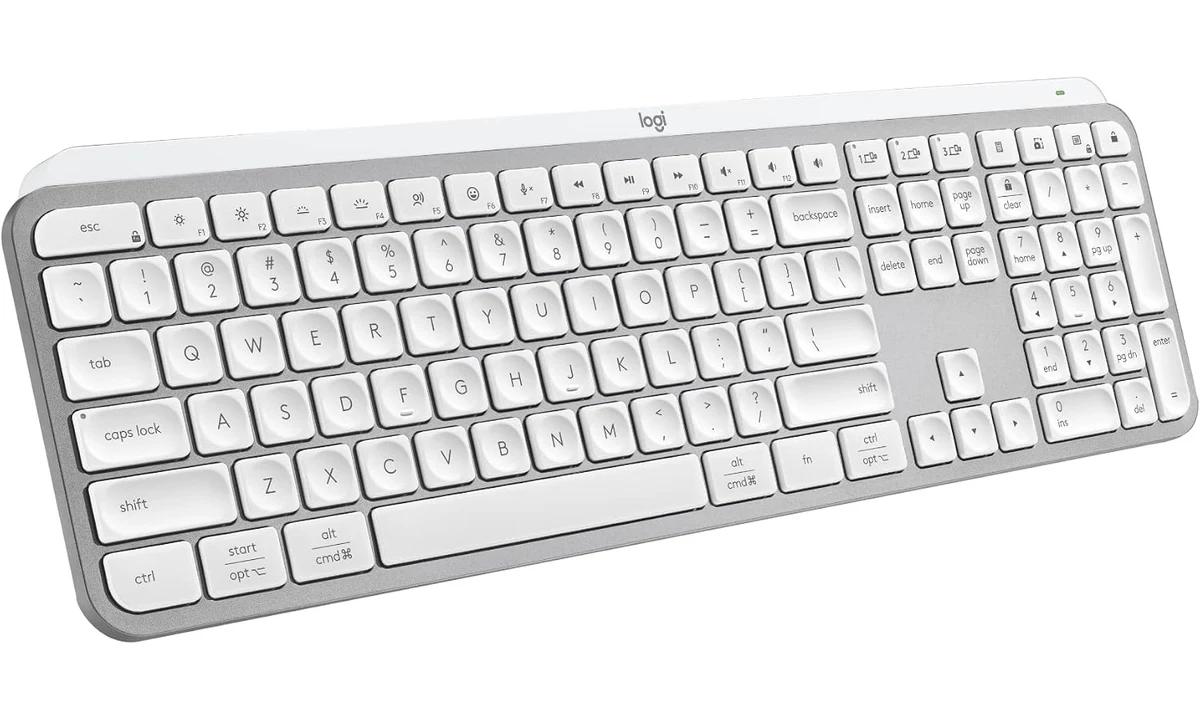
The Logitech MX Keys S is for a desk where typing comfort, a number pad and quiet operation matter more than a small travel footprint or mechanical-switch customization. It is a full-size wireless keyboard with low-profile scissor keys. The strongest reason to buy it is that this physical typing arrangement suits your work; backlighting and device switching are useful supporting features, rather than substitutes for liking the keys themselves.
This review concerns the Pale Grey multi-OS retail version with a US layout, rather than the separate For Mac, Mini or mouse-combo packages. We use Logitech’s product information and specifications alongside RTINGS’ original evaluation. We have not measured the keyboard ourselves. Our recommendation is conditional on desk fit, software support and a preference for short-travel office keys over taller mechanical alternatives.
Decide whether the number pad earns its space
A full-size keyboard is useful when numerical entry forms a substantial part of the day. If you regularly work through figures, the separate number pad can make sense as a permanent part of the layout. If you mostly write documents and only occasionally type a number, it may occupy space that would be more useful for bringing the mouse closer to your working position.
Logitech lists a width of 430.20mm and a weight of 810g. Those figures reinforce its role as a stationary desk keyboard. Measure the available area with the mouse, notebook and other equipment in place. A keyboard can fit between the edges of a desk while still making the overall arrangement crowded. Evaluate where your hands will work, not simply whether the product fits on the surface.
The number pad is fixed to the main keyboard. You cannot move it aside when doing pointer-heavy work, as you could with a separate keypad. That is an acceptable tradeoff if it is used constantly. It is less attractive when you alternate between long mouse sessions and occasional data entry, particularly on a narrow desk where every extra control competes for reach.
The MX Keys Mini is an alternative within the same broad product family, but it is a different layout and package. Do not assume that all full-size features, accessories or regional versions carry across unchanged. Compare the keys you use most often, including navigation and function controls, before choosing a smaller model simply because its photograph looks neater beside a laptop.
Scissor keys suit a particular typing preference
The MX Keys S uses low-profile scissor keys with dished keycaps. That differs from the taller switch-and-keycap arrangement found on many mechanical keyboards. Someone accustomed to laptop-style travel may find the transition relatively familiar, while someone who enjoys a deeper mechanical stroke may prefer another design. This is a preference worth assessing through ordinary writing, not a specification that establishes one universally superior typing experience.
RTINGS found the keyboard well built, with satisfying, very quiet typing in its office assessment. Those observations are useful evidence, but they do not establish silence in every room or a perfect feel for every hand. The desk surface and the way you type also contribute to the sound. If noise matters during calls, assess the complete desk and microphone arrangement.
The typing angle is not a collection of adjustable mechanical-keyboard positions. Before buying, consider how your chair, desk and existing wrist support work together. A low profile can reduce the need for a tall rest for some users, but it does not provide an individual ergonomic assessment. Avoid interpreting a comfortable-looking product shape as a promise to resolve an existing physical problem.
This is not the right purchase for someone who wants to swap switches, tune stabilizers or build a highly personalized mechanical board. The Keychron V6 Max already covered on TopDataLLC addresses a different ownership preference. Choose between them according to the interaction you want and the maintenance you enjoy, rather than assuming a premium office keyboard must offer the same customization as a mechanical enthusiast model.
Three device slots, with two wireless routes
The MX Keys S supports Bluetooth Low Energy and Logi Bolt, with three saved device slots. That is useful when the same desk serves a work computer, personal computer or compatible mobile device. Assign the slots consistently so switching becomes predictable. Saved connections reduce repeated pairing; they do not move applications or give access to a locked computer.
Logi Bolt is different from Logitech’s older Unifying system. An existing Unifying receiver from another keyboard is not automatically compatible. Check the exact devices before planning to consolidate them onto one receiver. The MX Keys S and the original MX Keys can look closely related, so the generation and receiver family deserve more attention than the broad MX name.
Bluetooth avoids occupying a receiver port, while the supplied receiver arrangement can be convenient for a fixed computer. Which route is better depends on your machine’s available connections and policies. A laptop with limited USB-A access may need an appropriate adapter for the receiver or may be simpler to use over Bluetooth. Include that arrangement when deciding how many extra pieces the keyboard adds.
Some independent summary bullets describe a different number of connections. We follow Logitech’s documented three-slot arrangement rather than turning that discrepancy into an extra feature. Likewise, do not confuse saved pairing slots with several computers receiving the same keystrokes simultaneously. The useful behavior is selecting the intended active device, which should be tested with the equipment you actually own.
USB-C charging does not create a wired keyboard
The USB-C connection supplies charging power. Keyboard data remains wireless, so attaching the charging lead does not turn the MX Keys S into a wired USB keyboard. This matters on computers where wireless input is restricted, during some setup tasks or when you specifically need a cable-only fallback. A socket on the back of the keyboard is not evidence of that fallback.
You can plan charging around your desk routine, but do not assume a particular interval will apply to every user. Backlighting, usage and settings affect battery requirements. A keyboard used brightly lit throughout long working days has a different demand from one with lighting disabled. The practical question is whether occasional charging fits your habits and whether a suitable lead remains accessible.
A rechargeable design removes the need to keep disposable replacement batteries in a drawer, but it introduces a different maintenance dependency. If you travel with the keyboard or move it between desks, remember the appropriate charging arrangement. For a permanent workstation, route the lead so charging does not require dismantling the desk every time the battery runs low.
If a machine must accept input under tightly controlled conditions, verify that requirement before buying. Do not assume Bluetooth pairing or a receiver will work in every pre-login or recovery situation. A basic wired keyboard can be a better tool for those specific tasks. The MX Keys S is best evaluated as a wireless office keyboard rather than an all-purpose technical service device.
Backlighting is useful when it behaves as you expect
The white backlighting responds to hand proximity and ambient conditions, with additional adjustment through supported software. Its practical benefit is finding keys when the room is dim. It is not a reason to leave the rest of the workstation poorly lit, and someone who touch-types consistently in a bright office may value it less than someone frequently locating unfamiliar shortcuts in the evening.
Test the lighting with your normal desk lamps and monitor brightness. A pale keyboard and reflective surfaces can look different under changing illumination. The goal is legible legends, not simply maximum brightness. If automatic changes are distracting, review the available controls and decide whether a stable configuration is possible within the software permitted on your computer.
The visual effect is a restrained office arrangement rather than a programmable multicolour display. Buyers who want game-specific lighting patterns or elaborate per-key effects should compare a keyboard built for that purpose. Conversely, those effects are unnecessary for someone who wants a readable number pad and clear function labels during ordinary work. Match the lighting to a practical need.
Remember the battery tradeoff when setting duration and brightness. A preference for always-available illumination can mean more frequent charging than a minimal-light routine. There is no need to optimize every setting immediately. Start with a readable arrangement, see whether the automatic behavior suits you, then adjust one aspect at a time so you understand its effect.
Options+ adds features, subject to the computer
Logi Options+ supports extra customization and Smart Actions on compatible Windows and macOS systems. These can be useful when you repeatedly perform the same sequence of tasks. However, basic keyboard compatibility on another platform does not imply access to all those features. A computer recognizing keystrokes is only the first level of support.
A managed work computer may prevent installation or limit what companion software can do. Confirm the policy before treating advanced actions as decisive. If you cannot install the application, evaluate whether the ordinary keys, device switching and available default controls already justify the purchase. A feature that exists on a personal laptop may still be unavailable in the workplace where you intend to use it.
Start customization with commands you understand. Automating a sequence does not remove assumptions about which application has focus, whether a file is open or whether a dialog is waiting. Keep sensitive information out of text macros and avoid putting an irreversible action behind a casually pressed key. A shortcut should make a reliable routine easier to reach, rather than hide a fragile sequence.
The function row also deserves attention. Media or system actions and traditional function keys have different roles in office applications. Establish the behavior you prefer using the documented controls, then keep it consistent. Someone relying on frequent function-key commands may value this setup step more than someone who mainly wants quick access to volume and playback.
Match the regional version and package
The selected retail link is for the Pale Grey multi-OS keyboard. Verify the layout at checkout rather than assuming every similarly named listing is a US board. Regional legends, key shapes and packaging can differ, and marketplaces sometimes mix closely related variants on one page. A familiar product name is not enough when you depend on a particular punctuation or shortcut layout.
The For Mac version is a distinct package and should not be treated as identical to the dual-labeled multi-OS selection. Mouse combos and palm-rest bundles are also different purchases. Check what is included rather than assigning accessories from one photograph to another listing. If you already own a suitable mouse, an unnecessary combo can obscure the actual cost of replacing only the keyboard.
Colour is secondary to these functional distinctions. A matching desk aesthetic is pleasant, but the wrong layout or receiver arrangement will be noticed every day. Put the correct version first, then assess whether the finish suits the workspace. This avoids paying for a visually consistent set of devices that do not operate the way your routine requires.
Verdict
The MX Keys S is a sensible choice for a stationary office desk where a number pad, quiet scissor keys and several wireless connections are useful. Its strongest combination is a familiar low-profile typing approach with clear device switching and adjustable illumination. The full-size shape should be an intentional choice, particularly if it changes where the mouse can sit.
Choose a smaller board for a constrained desk, a mechanical alternative for switch customization or a wired model when cable-only input is essential. Confirm the regional layout and software permissions, and remember that charging does not provide wired data. For the right user, the MX Keys S offers a coherent daily typing tool without requiring the ownership habits of a mechanical keyboard enthusiast.