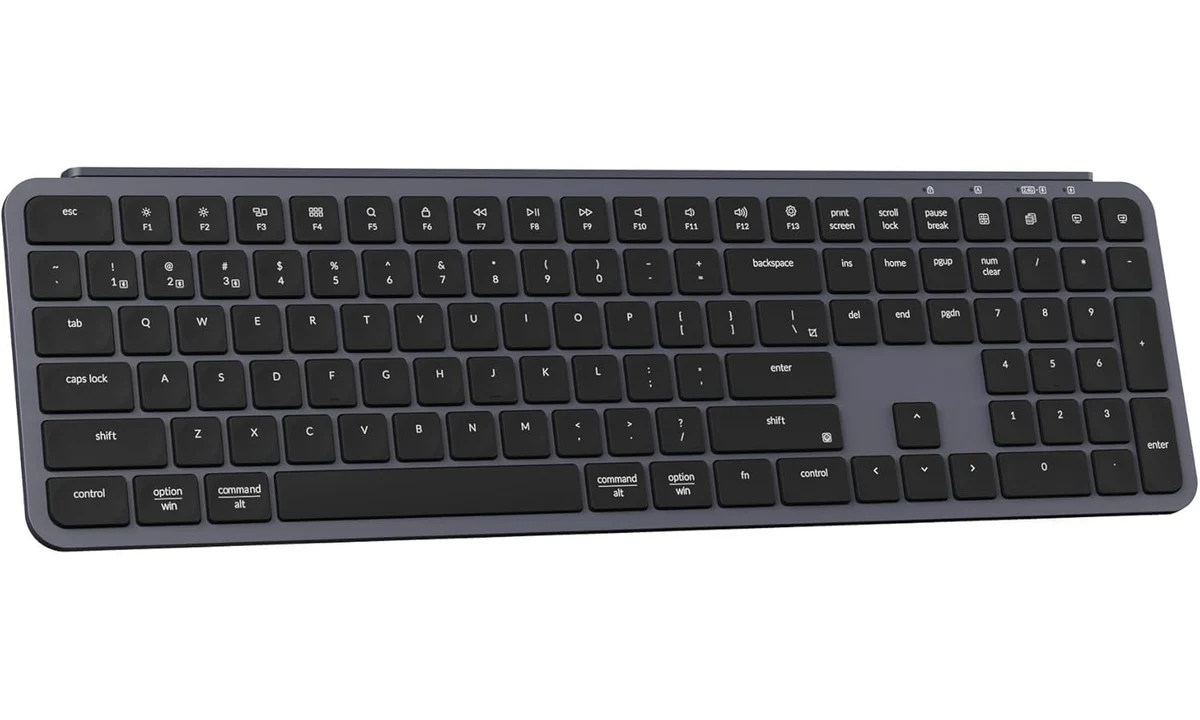
The Keychron B6 Pro makes a clear trade: you get a full-size, low-profile keyboard with several connection options, while giving up backlighting and a more substantial-feeling enclosure. That can be a sensible exchange on a bright office desk. It is less convincing if illuminated legends, adjustable typing height or enthusiast-style switch customization are the reasons you are replacing your present keyboard.
This assessment covers the Space Gray ANSI B6 Pro, model B6P-K1. Keychron’s current specifications and user manual establish the hardware and controls; RTINGS’ original B1/B6 evaluation supplies independent typing context. The compact B1 is a different layout. We have not measured this keyboard ourselves, and our recommendation concerns the B6’s documented features and likely fit within a working desk.
What you gain by keeping the number pad
The B6 Pro has a full-size layout with a separate number pad and navigation area. That makes sense for someone entering figures repeatedly, moving through spreadsheets or using applications that depend on the traditional arrangement of navigation keys. You do not need to learn a compressed layout simply to get a thin wireless board. The number pad is useful hardware when numerical entry is a daily activity rather than an occasional possibility.
That convenience occupies permanent space. Keychron specifies a width of 429mm and depth of 130mm. Before ordering, mark out that rectangle with your mouse and usual notebook beside it. A keyboard can fit comfortably on an empty desk and become awkward once a pointing device needs room. The number pad cannot be detached when you switch from entering figures to editing a document or manipulating a large image.
If your desk is narrow, compare a compact keyboard and, if necessary, a separate keypad. That arrangement lets the numerical controls move when they are not needed. It introduces another item to store or connect, so it is not automatically simpler. The B6 Pro is strongest when its full-width arrangement remains useful throughout the day, rather than when you are hoping that thinness will compensate for a layout that is too wide.
The US ANSI version also deserves a deliberate choice. Check the photographed Enter key, punctuation and legends against the layout you use. Keychron offers separate regional configurations, and their familiar names do not make them interchangeable. A good typing feel cannot make an unfamiliar physical punctuation layout disappear, particularly if you frequently switch between a work keyboard and a laptop with another arrangement.
Scissor keys are the point, not a compromise to apologize for
The B6 Pro uses scissor keys rather than the taller mechanical switches associated with many Keychron products. A laptop user may prefer that shorter, flatter interaction for everyday writing. Someone buying specifically for replaceable switches, a deep key stroke or acoustic tuning should look at a different category. The existing V6 Max guide on TopDataLLC covers a mechanical alternative with a different ownership experience.
RTINGS found very quiet typing and good typing quality in its B1/B6 family evaluation, while criticizing the inexpensive-feeling materials. Those findings help explain the proposition: the B6 can be useful as an office input tool without offering the feel of a heavier premium keyboard. Its ABS body and keycaps are documented construction choices. They do not prove a future failure rate, but they should temper expectations created by attractive product photographs.
Sound remains dependent on how you type and the surface beneath the board. A quiet office assessment is not a promise of silence through a sensitive microphone. If calls are part of your routine, consider where the microphone sits relative to the keyboard. That is a more practical response to typing noise than assuming every low-profile keyboard will be inaudible in every recording arrangement.
The fixed typing angle also matters. You cannot treat this as a board with several adjustable feet positions. Evaluate it alongside your desk height, chair and preferred wrist support. A slim shape may suit you, but comfort is personal and the product is not a treatment for an existing physical problem. If possible, compare the basic scissor-key feel before making customization features the main reason to buy.
Three connection modes have different jobs
Bluetooth, a wireless receiver and USB-C wired data give the B6 Pro three useful ways to join a desk. Bluetooth is convenient for compatible tablets and computers when you want to keep a port free. The receiver suits a computer where a dedicated wireless connection is preferable. A cable provides a direct data route, which is a meaningful distinction from keyboards whose USB socket only charges the battery.
The keyboard stores three Bluetooth pairings. Those are saved destinations you select between, rather than three computers receiving the same typing at once. Give each slot a consistent role, especially if a work machine and personal machine share the desk. Switching hardware does not move a document, transfer a password manager session or make an application on another computer ready to receive input.
Keychron’s manual uses a physical mode switch to distinguish the connection routes. That switch is worth learning before troubleshooting a pairing problem. A cable plugged in while the keyboard remains set for another mode is not the same arrangement as intentionally selecting wired operation. Begin with the documented connection process and confirm ordinary typing before adding remapped keys or switching between several devices.
Wired capability can be a useful fallback, but do not assume every adapter, dock or restricted computer permits the same operation. Use a suitable data cable and an appropriate host connection. If your workplace has particular input-device rules, check them. The useful buying advantage is having a documented cable option, rather than a universal assurance that every pre-login, recovery or managed-computer scenario has been tested.
Remapping is useful only when you edit the right layer
Keychron Launcher supports browser-based key remapping, with ZMK firmware underpinning the keyboard’s customization. The manual specifies a wired connection for Launcher and supported current browsers such as Chrome, Edge and Opera. Being able to type over Bluetooth does not establish that you can configure the keyboard through that same wireless connection. Plan a cable session if remapping is part of the attraction.
The manual distinguishes Mac and Windows layers. The physical operating-system switch determines which arrangement is active, so changing a different layer can leave you wondering why your new shortcut has no effect. Start by confirming the switch and the layer you intend to edit. Change one non-critical key, test it in the target application and keep a record before creating an elaborate alternative layout.
A useful remap addresses a recurring action: reaching an awkward navigation command, putting a common shortcut somewhere accessible or adapting the function row to an application. Avoid building complexity just because it is available. A keyboard shared by several people becomes harder to use when labels and behavior diverge without explanation. An ordinary default with a small number of understandable changes can be more valuable than a densely customized layout.
The manual’s broad Launcher description mentions capabilities that also belong to other keyboard designs. Do not interpret that generic software language as evidence that a scissor keyboard has adjustable magnetic actuation or becomes a specialized gaming controller. The actual B6 hardware remains the purchase. Current support guidance should resolve a software question rather than features being inferred from a general list of what a configuration platform can do.
Check function keys against the applications you use
The function row can serve media and system actions or the traditional function-key commands used by office software. Keychron documents a shortcut for changing that behavior. This is worth checking if your work depends on spreadsheet editing, presentation controls or an application with established function-key shortcuts. Choose a consistent default rather than rediscovering which layer is active during a meeting or while entering a long sequence of figures.
The operating-system switch also affects the expected modifier arrangement. A keyboard that works with both Mac and Windows still needs to be in the appropriate mode for the computer receiving input. If you alternate between systems, test ordinary editing shortcuts as well as letters and numbers. A pairing can be successful while a familiar command behaves differently because the layout mode has not changed with your device selection.
For a shared desk, keep the default behavior understandable to the next user. Remapping an essential navigation key can be convenient for one application and confusing elsewhere. Record the change and retain a straightforward route back to the original layout. This is a practical advantage of configurable hardware only when the resulting keyboard remains easy to operate in the programs that earn its place on the desk.
No backlight should be an intentional decision
There is no backlight on the B6 Pro. This is easy to accept if you touch-type in a consistently lit room and rarely need to find an unfamiliar symbol. It is a more noticeable omission if you work in changing light, use occasional shortcuts or share a room where bright general lighting is unwelcome. The question is whether the legends remain readable during the hours you actually work.
A desk lamp can make an unlit keyboard perfectly practical, while also lighting paper and other tools. That lamp occupies its own place and may create reflections, so include the whole desk arrangement in the comparison. Buying a keyboard that requires an inconvenient lighting change simply to save money can be less satisfying than choosing one that fits the existing room. Neither approach is inherently more professional.
The Logitech MX Keys S already reviewed on TopDataLLC offers a useful comparison for someone prioritizing white backlighting and a different typing construction. It also has its own full-size footprint and connection limitations. Compare the features you would use daily rather than assuming the more expensive category is automatically the better buy. For someone who does not need lighting, the B6’s wired data option may matter more.
Battery expectations and moving the board
Keychron advertises long battery endurance under its test conditions. We have not reproduced that claim, so it should not become a promise about how many months your own routine will last. Treat charging as an occasional maintenance task and keep a suitable lead accessible. The keyboard can operate while charging, which helps avoid a battery warning becoming a reason to abandon the desk in the middle of work.
At a specified 623g, the B6 Pro is easier to move than many substantial mechanical keyboards, but it is still a full-width object. Check bag dimensions if you plan to carry it between workplaces. A thin board that does not fit your bag safely is not a travel solution. Protect its keys and controls appropriately, and keep the receiver with the equipment that actually needs it.
A shared office also benefits from a simple connection plan. Decide whether the keyboard normally stays with one receiver-equipped computer or moves between saved Bluetooth destinations. If every session begins by changing switches and discovering which machine is receiving input, the wireless flexibility has become unnecessary friction. A known default makes the extra connection modes useful when needed, rather than an everyday guessing exercise.
Who should choose it
Choose the B6 Pro when a number pad, quiet scissor keys and several connection routes are the core requirements. It fits a bright office desk where practical typing matters more than a substantial enclosure or illuminated legends. Confirm the ANSI layout and whether your computer permits the configuration process. The board’s strength is combining an ordinary full-size arrangement with useful flexibility, without requiring mechanical-keyboard ownership habits.
Choose a smaller layout when pointer space matters more than numerical entry, a backlit model for regular dim-room use or a mechanical board when switches and construction are the main interest. The B6 Pro does not need to be the most elaborate keyboard to be a good purchase. It needs to match the particular layout, key feel and connection routine you will repeat every working day.