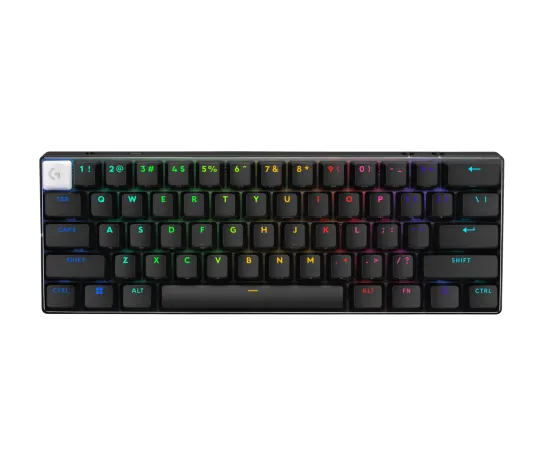
The Logitech G PRO X 60 LIGHTSPEED is a compact gaming keyboard built around a difficult compromise: it saves desk space by removing keys, then asks software and muscle memory to restore much of what disappeared. The exact product here is the black English-US QWERTY linear-optical model 920-012164, not the tactile version or another color SKU.
The real buying decision
This keyboard is for the buyer who values a smaller footprint and broad mouse movement more than immediate access to every conventional keyboard control. Logitech calls it a 60 percent design, and that description is important: the physical layout is intentionally reduced rather than merely shortened around a familiar full keyboard.
Tom’s Hardware identifies the practical omissions clearly: there are no dedicated arrow keys, no function row, and no dedicated navigation or editing buttons. Those are not minor cosmetic changes. They affect browsing, writing, spreadsheet work, shortcuts and any game that uses more than the central letter and number keys.
The sensible question is therefore not whether the PRO X 60 can technically perform those commands. It can use secondary functions and custom layers. The question is whether you are willing to learn where those commands live and configure them to suit your hands.
A compact board can be worthwhile for a low-sensitivity mouse setup, where the mouse needs more lateral room. That advantage is conditional rather than universal. If your desk already has enough space, or your work depends on visible navigation keys, the smaller layout may exchange physical clutter for repeated finger combinations.
Exact model and physical design
Logitech’s catalogue identifies 920-012164 as the black English-US QWERTY variant. That model number matters because the PRO X 60 family also includes other switch and color combinations. A listing that says only “PRO X 60” may not describe the linear US version covered here.
The manufacturer lists dimensions of 11.42 inches (290 millimeters) in length, 4.06 inches (103 millimeters) in width and 1.54 inches (39 millimeters) in height. Those dimensions make the board genuinely small from front to back, which is the measurement most relevant when a keyboard crowds the mouse side of a desk.
Tom’s Hardware records a weight of 1.36 pounds (616 grams). Its review attributes the substantial feel to a metal switch plate and describes the plastic lower case as showing no flex or creak during its examination. That is an independent physical observation, separate from Logitech’s dimensional specification.
The result is a compact keyboard that is not especially focused on minimum travel weight. That distinction matters for commuters and tournament travelers. It occupies little desk area, but buyers should not assume that small dimensions mean an exceptionally light board.
The physical controls are more generous than the 60 percent label suggests. Logitech lists a game-mode switcher, volume roller and media controls. Tom’s Hardware places the volume wheel on the left and the game-mode switch on the right, giving common adjustments dedicated physical controls without restoring a larger key layout.
The detachable cable measures 6 feet (1.8 meters), according to Logitech. It handles charging and data, so the keyboard can operate through a cable when a receiver is inconvenient. The supplied information does not establish charging time or describe every behavior available while the battery is charging.
Linear optical switches
The 920-012164 uses Logitech GX Optical Linear switches. Tom’s Hardware says the GX Optical range is available in linear and tactile versions, so the switch experience discussed here should not be carried over to the tactile PRO X 60 without checking that variant separately.
The linear switch has a 50-gram actuation force and a 1.8-millimeter actuation point, according to Tom’s Hardware. Those are characteristics of the supplied switch design rather than adjustable settings. They may appeal to someone seeking a quick linear action, but they do not turn the keyboard into a tunable actuation platform.
The independent review specifically reports that the PRO X 60 lacks adjustable actuation and Rapid Trigger. That limitation separates it from magnetic Hall Effect keyboards built around changing actuation behavior. Optical sensing should not be treated as evidence of every feature associated with newer switch technologies.
Tom’s Hardware reports a rating of 50 million presses for the switches. That is a manufacturer-rated durability figure discussed by the reviewer, not a prediction of the usable life of an individual keyboard. Dust, spills, software support and normal wear remain separate ownership variables.
The keycaps are doubleshot PBT plastic, and Tom’s Hardware records a thickness of 1.2 millimeters. The reviewer describes the surface as slightly textured and says the material should resist the oily sheen often associated with some gaming keycaps. That makes the keycap material a practical strength, though texture and profile remain personal preferences.
There is a specific lighting compromise. Tom’s Hardware reports that the side legends for secondary functions are not backlit. The main legends can be illuminated, but the information needed to find alternate commands may be difficult to read in a dark room until the layer becomes familiar.
Missing keys and KEYCONTROL
The missing dedicated keys are the central limitation. A conventional keyboard lets you reach an arrow or function key by location. The PRO X 60 instead uses secondary functions, which can be efficient after practice but are less immediately legible during the transition from a larger layout.
Logitech presents KEYCONTROL as a system for controlling every key through multiple customizable layers in G HUB. That gives the board a way to recover many commands without physically adding keys. It also makes the keyboard more dependent on configuration than a larger board with dedicated controls.
Tom’s Hardware reports that KEYCONTROL can assign up to five separate commands to every key. The review describes triggers including pressing, releasing, holding and using Shift, Ctrl or Alt as modifiers. This supports more elaborate layouts than simply placing an arrow key behind a single Fn combination.
The alternate-layer trigger does not have to remain on the physical Fn key. Tom’s Hardware reports that a freely selected G-Shift key can be assigned to another Logitech G peripheral, such as a mouse. A compatible thumb button could therefore activate the second layer while the hand remains positioned for movement.
That arrangement is particularly useful for people who dislike the traditional right-side Fn position. A buyer could assign arrows, navigation controls and function-row commands to a layout activated by a more comfortable key or mouse control. The opportunity is meaningful, but the work of choosing and learning the layout belongs to the owner.
The setup burden should not be understated. Tom’s Hardware lists mapping keys as involving many clicks and reports that G HUB still has some bugs. Those are independent review findings rather than a prediction that every owner will encounter the same software behavior, but they qualify the appeal of deep customization.
Wireless connections and battery
The keyboard supports 2.4GHz LIGHTSPEED, Bluetooth and USB wired connection, according to Logitech. That gives the board a receiver-based gaming path, a Bluetooth option and a cabled option. Tom’s Hardware reports that Bluetooth can pair the keyboard with up to three devices.
Logitech lists wireless range as up to 32.81 feet (10 meters), while warning that the result may vary with user and computing conditions. This is useful for planning a nearby desk or living-room arrangement, but it should not be read as an identical distance through every wall, piece of furniture or wireless environment.
The manufacturer lists a 1-millisecond report rate. That figure suits the keyboard’s gaming positioning, but it also defines a limitation for buyers comparing it with products advertised around higher polling rates. The supplied records do not establish a separate report-rate advantage for one connection mode.
Battery life is listed as up to 65 hours for the rechargeable battery. Tom’s Hardware notes that Logitech does not specify whether this figure applies over Bluetooth or LIGHTSPEED, or whether particular lighting conditions are required. Treat the number as an upper planning figure, not a fixed charging schedule.
The included USB-A to USB-C cable supports charging and data. The sources do not specify charging time, battery-indicator behavior or low-battery behavior. Those omissions are worth checking in current G HUB documentation if precise charge planning matters to your setup.
Software and setup
Advanced features require Logitech G HUB, according to Logitech. The manufacturer lists a PC with Windows 10, Windows 11 or later as the system requirement and lists internet access for Logitech G HUB software. That makes a Windows computer with internet access the clearest supported route for initial configuration.
The keyboard still has connection options outside the software workflow, including LIGHTSPEED, Bluetooth and USB wired operation. Logitech also lists onboard lighting profiles. However, the main reason to choose this model over a simpler compact board—KEYCONTROL—depends on spending time in the software.
A sensible configuration would start with the commands you use most often rather than attempting to redesign every key immediately. Arrow keys, editing controls and the function row are logical first targets. After those are comfortable, game-specific commands can occupy additional layers without disrupting everyday typing.
Tom’s Hardware reports that G HUB can create profiles for installed games and switch to a game profile when a game launches. That can reduce repeated manual changes across applications, but it also creates a responsibility to keep track of the arrangements. A written map or saved configuration is useful when several layers are involved.
Included accessories and travel
Logitech lists the PRO X 60 Gaming Keyboard in the box. It also lists a USB LIGHTSPEED wireless adapter, a USB-A to USB-C charging and data cable, a Logitech G keycap, a carrying case and user documentation. These accessories address receiver storage, wired charging, transport and a small visual customization option.
The supplied list does not establish that a wrist rest, replacement switch set or alternate keycap set is included. Buyers wanting those items should budget for them separately rather than treating the carrying case as evidence of a larger customization bundle.
Tom’s Hardware reports a built-in compartment for storing the LIGHTSPEED wireless dongle. That is a useful travel detail because a small receiver can easily become separated from a keyboard. The compartment works alongside the included carrying case, although the manufacturer’s in-box list remains the authority for included accessories.
Alternatives and fit
A 75 percent or tenkeyless keyboard is the more sensible category if visible arrow keys, a function row and straightforward navigation matter more than maximum mouse space. A larger layout reduces layer dependence. The supplied sources do not provide a complete specification set for a particular alternative, so a model-by-model feature winner cannot be established here.
Tom’s Hardware names the SteelSeries Apex Pro Mini, Razer Huntsman Mini and Corsair K70 Pro Mini Wireless alongside the PRO X 60 as miniature programmable gaming keyboards. The source establishes them as relevant category comparisons, not their current prices, complete specifications or superiority in any particular feature.
Choose the PRO X 60 when a compact footprint, wireless flexibility, linear optical switches and extensive remapping matter together. Choose a larger keyboard when you frequently use navigation controls, dislike software setup or want every common command visible without a layer.
Verdict
The Logitech G PRO X 60 LIGHTSPEED is a focused compact keyboard, not a conventional keyboard with unnecessary keys trimmed away. Its physical controls and three connection methods make the format more practical, while KEYCONTROL can restore many missing commands through carefully planned layers.
The conditional verdict is straightforward. The black US 920-012164 makes sense for a PC gamer willing to configure G HUB and learn a layered layout in exchange for more desk room. It makes less sense for a buyer who wants immediate dedicated navigation, adjustable actuation or a configuration-free typing experience.