What this exact model is
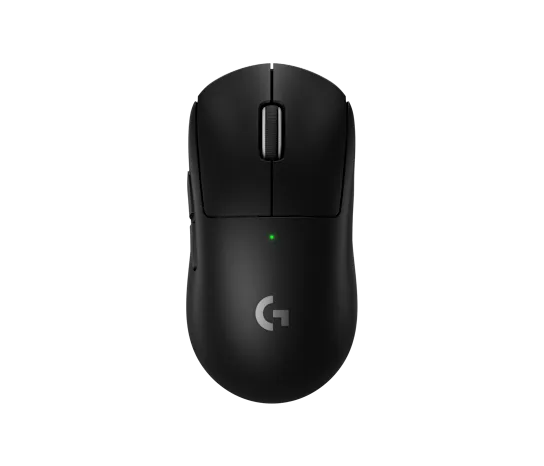
This review covers the black US Logitech G PRO X SUPERLIGHT 2, model 910-006628. Logitech identifies the black version separately from the white and magenta variants, so the stock number matters when comparing listings. This is a focused wireless gaming mouse built around a light shell, a limited control layout and a receiver-based connection rather than a long list of office features.
The buying decision is mainly about shape and controls. You are choosing an established outline, two left-side thumb buttons and a low-weight design before choosing among the sensor settings. The mouse makes sense if five buttons are enough, the left-side arrangement suits your hand and Bluetooth is unimportant. It makes less sense if you need many shortcuts or frequent sensitivity changes.
Shape and hand fit
Logitech lists the mouse at 4.92 inches (125 millimeters) long, 2.5 inches (63.5 millimeters) wide and 1.57 inches (40 millimeters) high. The listed weight is 2.12 ounces (60 grams). Those measurements are useful screening references before purchase: compare them with a mouse that already fits instead of treating low weight as evidence of universal comfort.
Tom’s Hardware’s original review described the Superlight 2 as identical in size and shape to the original G Pro X Superlight. The independent review called it a streamlined, pseudo-ambidextrous five-button mouse. Its outline is visually symmetrical, but the two thumb buttons are on the left side, so it should not be mistaken for a fully interchangeable left- and right-hand control arrangement.
The side profile pinches in slightly and has a subtle ridge for grip, according to Tom’s Hardware. That review found the body workable for palm, claw and fingertip grips. Those are independent reviewer findings, not a promise that every hand will fit. The practical lesson is to compare the listed dimensions and hump with your preferred contact points before relying on the Superlight reputation.
The shell has a smooth matte finish. Tom’s Hardware said it did an acceptable job resisting fingerprints, while also noting that sweaty hands could make the surface slippery. Logitech includes optional grip tape in the box. That provides a supplied way to add friction, but it does not change the underlying shape or solve a mismatch in hand size.
Controls and click feel
Tom’s Hardware lists five programmable buttons and describes the layout as two main buttons, a clickable wheel and two left-side thumb buttons. That is a sensible arrangement for a focused shooter or ordinary pointing, but it leaves less room for application commands than a productivity or MMO-oriented mouse.
There is no dedicated DPI switch. Tom’s Hardware identified that omission as a drawback and reported that one existing button can be reassigned to DPI control. That workaround creates a sensitivity button, but it also gives up the button’s previous function. If you change sensitivity often, this is a physical-layout limitation rather than a setting hidden somewhere in software.
The independent review reported five preset DPI levels: 800 DPI, 1200 DPI, 1600 DPI, 2400 DPI and 3200 DPI, with 800 DPI as the default. These settings are starting points, not a reason on their own to choose the mouse. The important question is whether your games or applications require rapid sensitivity changes during use.
Logitech specifies LIGHTFORCE Hybrid Switches and rates them for 70 million clicks. The manufacturer describes the technology as combining optical switching with the power characteristics of a mechanical switch. Tom’s Hardware reported a somewhat heavier click than the reviewer expected from contemporary gaming mice. Buyers who prefer a very light click should treat that independent observation as relevant preference information.
The Superlight 2 includes onboard memory. Logitech says advanced features require G HUB, while Tom’s Hardware reported that up to five profiles could be saved directly to the mouse. That combination supports configured use on more than one compatible computer, but it does not remove the need for software during setup. Remapping and profile behavior are part of ownership rather than optional extras.
Current sensor and polling figures
The supplied sources describe an important change over time. Tom’s Hardware reviewed the mouse around its September 2023 release and reported a HERO 2 sensor with a maximum sensitivity of 32,000 DPI, a maximum speed of 500 IPS and acceleration above 40 G. It also reported polling rates up to 2,000 Hz. Those figures describe the product at that review point and should not be silently merged with newer manufacturer information.
Logitech’s dedicated support specification for the G PRO X SUPERLIGHT 2 lists resolution from 100 DPI to 44,000 DPI, maximum acceleration above 88 G and maximum speed above 888 IPS. These are the current support-sheet figures. The independent review’s 500 IPS and above 40 G figures belong to its earlier review context. A buyer comparing old tables should note the date and source rather than treating all figures as simultaneous defaults.
The retail product page still contains an older 100 DPI to 32,000 DPI tracking table alongside marketing text for 44,000 DPI. The dedicated model support sheet independently confirms the higher current range and is the specification used here. This distinction avoids quietly combining the 2023 review, a stale retail table and current support information into one apparently timeless result.
Logitech currently lists a maximum report rate of 8,000 Hz, with advanced features requiring G HUB. That is different from the 2,000 Hz maximum reported by Tom’s Hardware in its original review. The distinction is central to this model: an older review can accurately describe an earlier firmware and software state without defining the current manufacturer-listed ceiling.
These headline figures matter most when comparing configuration options, not when deciding whether the shape fits. A high DPI number does not automatically improve control, and a high report rate may place more demand on the host system. Logitech’s published figures establish available specifications; they do not establish that every game, computer or player benefits equally from selecting the maximum.
The current Logitech page describes independent X-axis and Y-axis adjustment, adjustable lift-off tolerance and sensitivity synchronization with another mouse through G HUB. These are useful calibration controls for matching an existing setup. They refine cursor behavior, however; they do not add physical buttons or alter the shell’s dimensions. Fit and layout remain the first decisions.
Wireless connection and charging
The mouse uses Logitech LIGHTSPEED wireless technology and includes a USB LIGHTSPEED adapter. Tom’s Hardware described the connection as low-latency 2.4 GHz wireless and reported that the mouse does not have Bluetooth. This is a natural arrangement for a fixed gaming desk, but it is less convenient for someone who wants to move between computers without carrying or moving a receiver.
The current manufacturer contents list includes a USB A to C charging/data cable and an adapter extension. Tom’s Hardware described its review cable as 6.2 feet (1.9 meters) long and found it reasonably flexible, although the reviewer reported too much drag for comfortable wired play. That cable assessment belongs to the original independent review and should not be mistaken for a new test of a current retail package.
Logitech rates battery life at 95 hours and notes that battery life may vary with user and computing conditions. Tom’s Hardware added configuration context to that rating: the reviewer associated 95 hours with power saving and 1,000 Hz polling, and reported lower estimates when power saving was disabled or polling was increased to 2,000 Hz. Runtime should therefore be treated as settings-dependent.
Charging uses USB-C, which Tom’s Hardware identified as an improvement over the original Superlight’s Micro-USB port. The mouse can also operate through its charging/data cable. The independent review found cable drag undesirable for play, so wired use is best understood as a charging or fallback option. The intended experience remains wireless through the supplied receiver.
The underside uses no-additive PTFE feet according to Logitech. The box also includes an optional aperture door with a PTFE foot. Tom’s Hardware described an alternate PTFE-covered puck and discussed compatibility with Logitech Powerplay wireless charging mouse pads. The supplied records support those underside options, but they do not provide a replacement-foot lifespan or maintenance timetable.
Setup and compatibility
Logitech lists a PC with Windows 10 or later and a USB 2.0 port as the system requirement. It also lists internet access for Logitech G HUB software. That is a clear starting point for a Windows gaming computer with an available USB port, but it is not a universal operating-system claim. Buyers using another platform should verify software and feature support before purchasing.
The physical setup is simple: connect the LIGHTSPEED adapter, charge through USB-C when needed and use G HUB for advanced settings. Logitech includes the adapter extension, optional grip tape, the alternate aperture door with PTFE foot and user documentation. The receiver still needs a suitable location on the desk, particularly if you want the extension to position it near the mouse.
G HUB is central to customization. Logitech requires it for advanced features, and the current product page places sensor calibration options there. Tom’s Hardware found the software unnecessarily convoluted, especially for button mapping. That is an independent software assessment, but it identifies a genuine ownership trade-off: a mouse with restrained hardware controls can still require patience during configuration.
Strengths and limitations
The strongest case for the black 910-006628 is focused control. Its listed weight is 2.12 ounces (60 grams), its outline follows the established Superlight shape and its two thumb buttons avoid the crowded side panels found on feature-heavy gaming mice. The current manufacturer page also lists an 8,000 Hz maximum report rate, although that figure should be separated from the older 2,000 Hz review result.
The shape is the second major reason to consider it. Tom’s Hardware found the outline suitable for multiple grip types, and Logitech’s dimensions make comparison with an existing mouse relatively easy. Use those numbers as a screening tool rather than a comfort promise. The pseudo-ambidextrous outline is also a poor match if you need left-side and right-side controls to be interchangeable.
The main weakness is the control layout. Five buttons and no dedicated DPI switch are reasonable for a focused shooter, but restrictive for MMO commands, editing shortcuts or frequent sensitivity changes. Remapping can change what an existing button does; it cannot create another input. Onboard profiles add flexibility after setup, but they do not alter the physical control count.
The next weakness is connection flexibility. LIGHTSPEED wireless is suitable for a desk where a receiver is acceptable, but the lack of Bluetooth matters when moving between a gaming PC, laptop and tablet. The receiver is another small accessory to carry and protect. That trade-off is minor for a permanent station and more noticeable in a mobile multi-device setup.
Specification interpretation still needs care. The dedicated Logitech support sheet gives the current range as 100 DPI to 44,000 DPI and the report-rate ceiling as 8,000 Hz. Tom’s Hardware reported lower figures around the original release, and an older tracking table remains on the retail page. Check current firmware and G HUB settings before comparing a configured mouse with an older review.
Alternatives and buying decision
The closest alternative category is another lightweight wireless FPS mouse with a similarly restrained button count. That is the useful comparison if the Superlight shape appeals but its software or missing DPI switch does not. Compare physical fit first, then receiver behavior, battery claims, click preference and whether the competing mouse provides a dedicated sensitivity control.
A multi-button gaming mouse is a better category for MMO commands, creative applications or productivity workflows built around shortcuts. Tom’s Hardware identified the Razer Naga V2 Pro as the reviewer’s daily driver because the reviewer needed double-digit buttons. That is an individual use case, not a universal verdict, but it illustrates the difference between a command-heavy mouse and the Superlight 2.
A Bluetooth-capable mouse is the better category for people who regularly switch between computers without moving a receiver. The supplied evidence supports LIGHTSPEED wireless and no Bluetooth for this mouse, so it should not be purchased on the assumption that it behaves like a multi-device office mouse. For a fixed gaming desk, the receiver requirement is much less consequential.
The original G Pro X Superlight remains the relevant upgrade question. Tom’s Hardware judged the Superlight 2 very similar in shape and said an upgrade from the original was probably not worthwhile, while identifying USB-C, sensor changes, higher polling and hybrid switches as the newer model’s upgrades at the time of review. That dated conclusion should be separated from Logitech’s current figures and from the needs of a first-time buyer.
Verdict
Buy the black Logitech G PRO X SUPERLIGHT 2 910-006628 if you want a light wireless mouse with a familiar shape, two left-side thumb buttons and little interest in Bluetooth or frequent DPI switching. Its current manufacturer specifications show a changed sensor and polling story compared with the September 2023 review, but its practical identity remains the restrained layout and receiver-based setup.
Choose another category if Bluetooth, a physical DPI switch, extensive buttons or minimal setup work matters more than low weight. Existing Superlight owners should identify a specific reason to change, such as USB-C or the newer manufacturer-listed capabilities, rather than expecting a new shape. For a first purchase, this is a focused competitive mouse, not a universal choice for every desk role.