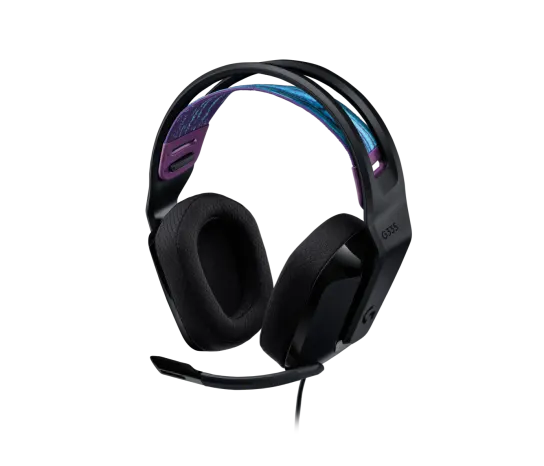
The Logitech G335 Black, US model 981-000977, is an uncomplicated wired headset built around a 3.5 mm analog connection. Its appeal is straightforward: a light frame, a suspension-style headband, console compatibility and no battery to charge. The harder question is whether its comfort and appearance compensate for the independent review’s criticisms of sound, microphone performance and construction.
This review is specifically about the Black 981-000977 variant. Logitech’s catalogue identifies that SKU as the Black model, while the independent review discussed a different color of the same G335 hardware family. That review’s observations are useful for the design and performance discussion, but its photographs should not be treated as photographs of this Black SKU.
What the G335 is designed to do
The G335 is an analog headset rather than a wireless model. Logitech lists a 3.5 mm audio jack as the requirement, and describes compatibility with PCs, Xbox, PlayStation, Nintendo Switch, Nintendo Switch 2 and mobile devices with a compatible 3.5 mm audio jack. That makes the headset flexible across devices, provided the host actually offers the needed analog port.
There is no wireless receiver, charging routine or software-dependent setup in the manufacturer’s listed connection method. You connect the headset’s analog cable to the device and use the physical controls. That simplicity suits a desk where the headset moves between a console controller, laptop and phone, but it also means the computer’s audio hardware and jack arrangement matter more.
For a desktop PC with separate headphone and microphone sockets, Logitech lists a PC splitter for separate mic and headphone jacks. TechRadar likewise reports that desktop users need the included audio/mic splitter for both audio and microphone use. A computer with one combined headset jack is the easier match; a two-jack desktop needs the additional adapter in the signal path.
The practical buying decision is therefore not simply “wired versus wireless.” It is whether your usual device has a compatible 3.5 mm headset connection and whether you are comfortable with analog controls and a splitter when required. If your desk is built around USB audio accessories, the G335’s plug-and-play approach is less convenient than it first appears.
Fit, weight and physical design
Logitech lists the G335 at 240 grams and 8.47 ounces. The manufacturer positions that weight as a smaller, lighter alternative to the G733 LIGHTSPEED wireless headset. TechRadar’s independent review also describes the 240-gram frame as lightweight and comfortable, so low mass is one of the better-supported reasons to consider this model.
The headset uses a suspension headband with an adjustable strap. Logitech says the design distributes weight and relieves pressure points, while its fit guidance says the elastic headband can be adjusted and the ear cups slide up and down. Those are useful adjustment points for an adult desk user, although they do not remove the need to check how the band and cups sit on your particular head.
The ear cups are described by Logitech as soft, breathable memory foam with sports mesh material. The manufacturer says they surround the ear and fit snugly. TechRadar’s independent assessment also calls the ear cups breathable and the headset comfortable during gaming sessions, making the G335’s physical comfort a more credible strength than its performance claims.
The light construction has a trade-off. TechRadar says the plastic feel can seem easily broken and later characterizes the build as flimsy. That is an independent finding, not a Logitech specification, but it is central to the buying decision. A headset that spends most of its time on a desk may suit this construction; frequent packing and rough handling make the criticism more consequential.
Logitech labels the product dimensions as height 3.11 inches (79 millimeters), width 7.09 inches (180 millimeters) and depth 7.44 inches (189 millimeters). These are the manufacturer’s catalogue labels. For storage, compare the whole headset’s outline and its headband adjustment with the available space rather than assuming the light frame will fold into a compact travel package.
Audio quality and microphone expectations
The manufacturer lists 40 mm drivers, a 20 Hz–20 kHz headphone frequency response, 36 ohms impedance and 87.5 dB SPL/mW sensitivity. These are specifications, not a prediction that every source will sound identical. They describe the electrical and stated frequency characteristics, while the independent review supplies the more important practical caution about how the headset sounded in use.
TechRadar found that the 40 mm neodymium drivers lacked clarity, richness and volume during its gaming evaluation. It also described the overall audio as lacking the punch and clarity of rival headsets. That is a materially different conclusion from Logitech’s promotional description of crisp, clear sound, so buyers should give the independent assessment more weight when sound quality is the priority.
The same review compared the G335 with the HyperX Cloud Core 7.1 and Corsair HS50, reporting that the Logitech’s audio and microphone quality did not hold up well against those similarly priced competitors. The meaningful lesson is not that every alternative will suit every listener; it is that the G335 is a style-and-comfort choice rather than an obvious performance-first purchase.
TechRadar also reported a flat result with music, including weaker drum-roll and bass-guitar presence in one listening example, and said the headset struggled with bass-heavy music. That finding matters for ordinary desk audio as well as games. If your headset is expected to cover music listening, dialogue and games with equal importance, the G335’s limitations become harder to overlook.
The review further states that the G335 lacks surround-sound support. Logitech’s supplied specification excerpt lists analog stereo-oriented headset specifications but does not establish a software surround mode. Buyers seeking positional processing should therefore treat the G335 as a simple analog headset, not as a model selected for a surround feature.
Microphone and controls
Logitech lists a cardioid, unidirectional microphone with a 100 Hz–10 kHz microphone frequency response. Those are the manufacturer’s microphone specifications. TechRadar’s independent review adds the less flattering practical finding: the microphone lacked clarity unless it was positioned almost directly near the user’s lips.
That placement criticism changes the setup advice. The microphone should be brought close enough to the mouth for the pickup pattern to work as intended, rather than left far to the side because the boom is visible. The source does not establish a precise recommended distance, so there is no responsible numeric placement rule to add here.
The microphone mutes by lifting the boom. Logitech describes that action as an instant mute, while TechRadar found that flipping the microphone up may not be as good as having a dedicated button. This is convenient when you want a quick physical gesture, but less convenient if you prefer a tactile switch that stays separate from the microphone’s position.
The only listed on-headset audio control is a volume roller on the ear cup. TechRadar notes the absence of a microphone on/off switch, which explains the reliance on the flip-up mute action. The arrangement is easy to understand, but it offers fewer independent controls than a headset with a dedicated mute button or a USB control box.
Setup and everyday ownership
Initial setup should be short on a compatible device: connect the 3.5 mm plug, select the headset if the operating system presents an audio choice, and position the microphone. Logitech describes the G335 as plug-and-play. The important exception is a PC with separate audio and microphone jacks, where the listed Y-splitter is part of the required connection path.
The analog design also limits what can be claimed about software features. TechRadar reports that the headset does not support Logitech’s software suite. That makes the physical volume roller and flip-up mute more important, because there is no supported software workflow in the supplied evidence for remapping or managing the headset.
Logitech says the elastic straps are reversible and washable. It also presents replacement straps and microphone covers as appearance accessories. Those details give the headset some maintenance and personalization potential, but they do not address the independent review’s concern that the lightweight build can feel flimsy.
Cleaning should be approached as light routine care rather than a repair plan. The manufacturer specifically identifies the straps as washable, but the supplied material does not provide a full cleaning procedure for the ear cups, boom or cable. Avoid treating the washable strap statement as permission to wash the complete headset.
The official page lists a two-year limited hardware warranty. That is useful ownership information, but it does not change the product’s physical limitations or establish how a particular failure will be handled. Keep the model and purchase records if warranty support matters to your decision.
Check the connection before blaming the headset
The included splitter makes a useful troubleshooting distinction. If you can hear the computer but a call cannot hear you, first identify whether the host uses a combined headset socket or separate headphone and microphone sockets. A plug sitting in a headphone-only socket does not establish a microphone path. Use the supplied splitter where the computer needs separate connections, then select the intended input and output in the application. This is setup guidance based on the documented analog arrangement, rather than a claim that an adapter improves sound quality.
Next, lower the microphone boom before checking the call input and confirm that the ear-cup volume roller has not been turned down. A short recording or the application’s input indicator can separate a muted or unselected microphone from the clarity limitations reported by TechRadar. Reposition the boom before concluding that the pickup is unusable. These checks do not create software features or surround processing; they simply help establish whether the basic connection and physical controls are working as intended.
Alternatives and who should choose them
The HyperX Cloud Core 7.1 and Corsair HS50 are the most relevant named alternatives in the supplied independent review. TechRadar specifically compares their audio and microphone performance favorably against the G335. That does not establish every detail of either alternative, but it does make them sensible models to investigate if performance is more important than the Logitech’s design.
TechRadar also names the Turtle Beach Recon 500 as a comparison for a more coherent game mix and the wired SteelSeries Arctis 3 as a model with surround-sound support. Those references are useful category signposts, not complete specifications for those products. Check the exact current variant and connection arrangement before treating either as a direct replacement.
Choose the G335 when a light, colorful, analog headset fits your desk habits and your device already has the appropriate 3.5 mm connection. Its adjustable strap, sliding ear cups, physical volume control and flip-up mute form a simple ownership model. The choice makes the most sense when comfort and appearance outrank advanced controls or high-fidelity listening.
Look elsewhere when your priority is competitive audio quality, a clearer microphone away from the mouth, a sturdier-feeling build or software and surround features. The independent review’s criticisms are concentrated exactly in those areas. A different headset category may be a better answer than trying to compensate for the G335 with settings.
Verdict
The Logitech G335 Black 981-000977 is a coherent choice for an adult desk user who wants a light wired headset for compatible consoles, computers or mobile devices and accepts analog simplicity. The manufacturer’s specifications support its connection, fit adjustments, microphone type and physical measurements; the independent review supports the more cautious view of its sound, microphone clarity and build.
My conditional verdict is simple: buy the G335 for its light fit and straightforward 3.5 mm flexibility if those are the deciding requirements, especially when your device has one combined headset jack. Do not choose it as a performance-first headset, and do not overlook the PC splitter requirement or the independent warnings about audio, microphone placement and flimsy-feeling construction.