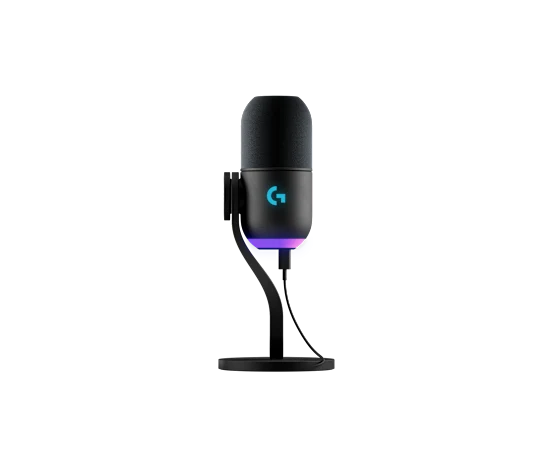
The Logitech G Yeti GX is a desktop USB microphone aimed at speech-heavy gaming and streaming setups. This review covers the Black US model 988-000567, not another Yeti variant with a different capsule, pickup arrangement or control layout. The central buying question is straightforward: do you want a focused, software-expandable microphone with a supplied stand, or do you need direct headphone monitoring and broader recording flexibility?
What this exact model is
Logitech identifies the Black version as YETI GX - Black with SKU 988-000567 and MPN 988-000567. That identification matters when listings combine the Yeti GX with other Yeti products or show the white version. The white GX uses SKU 988-000574, so color and model details are worth checking before ordering.
The manufacturer describes this product as a USB microphone with a custom dynamic capsule. A dynamic design is relevant to a desktop speech setup because this is not the same product category as a condenser microphone simply because both use USB. The GX’s published pickup pattern is supercardioid, which is the current manufacturer specification to use when positioning it.
One independent review uses the shorter term cardioid when describing the microphone. That wording conflicts with Logitech’s current specification, which says supercardioid, so I would not treat the two terms as interchangeable. For buying and setup decisions, the manufacturer’s supercardioid listing is the more specific current reference; the independent account remains useful for its observations about handling and sound.
Pickup and speech placement
A supercardioid pattern makes placement more deliberate than simply putting the microphone anywhere on a desk. The speaking side needs to face the user, while unwanted sound should be kept away from the microphone’s less sensitive directions. Logitech presents the capsule as intended to reject noise and key clicks, but that is a manufacturer design claim rather than a result I can independently verify here.
TechRadar’s independent review reported that the capsule picked up anything from a whisper to normal speech and singing during its evaluation. That finding suggests useful sensitivity for ordinary voice work, but it is not a laboratory measurement and should not be treated as a universal result for every room, voice or distance.
The same reviewer reported that keyboard and mouse sounds were rarely picked up during game use, even though those devices were only a few inches away. That is a meaningful reason to consider the GX for a gaming desk, particularly when the microphone cannot be isolated from every input device.
There is a trade-off in that focused pickup. TechRadar also reported that moderate shouting or screaming could peak aggressively even after reducing the gain dial and recording volume. Animated speakers should therefore leave headroom and keep the microphone position consistent rather than assuming the software features remove every clipping risk.
Close positioning can introduce other speech artifacts. The independent review reported that popping words and tongue clicks could appear when the reviewer was close to the microphone, although this was not a persistent issue in that evaluation. A sensible setup should leave enough distance for natural speech and use consistent gain rather than chasing maximum loudness.
Controls and software
The physical control set is intentionally narrow. TechRadar describes a gain dial and a mute button as the available controls. That simplicity can suit calls and streams where quick level changes and muting matter more than a large mixer, but it gives you fewer on-microphone adjustments than a model built around multiple channels or monitoring controls.
The mute state has a visual cue. TechRadar reported that a red light appears when the microphone is muted. The reviewer also reported that the light can appear when audio starts spiking during recording or streaming. These are practical status signals, though they do not replace checking levels in the application that records or broadcasts your audio.
The manufacturer lists dual-zone RGB with LIGHTSYNC. Logitech says the two RGB zones can be customized through LIGHTSYNC, while TechRadar identifies a light strap on the bottom and a lit Logitech G emblem. RGB is therefore a real feature of this model, but it is decorative rather than a reason to expect better speech capture.
G HUB is the main software layer for the GX. Logitech says G HUB can control the Yeti GX and other Logitech G equipment from one desktop window. The company also lists Blue VO!CE filters and effects, including a clipping-protection feature, plus Smart Audio Lock functions that include an analog limiter and a downward expander.
Those processing tools change the buying decision for users who want software shaping without immediately building an XLR chain. They also make the GX more dependent on a computer-based workflow if you want the full advertised control set. Logitech lists internet access for optional software download, so the software should be regarded as an enhancement rather than the basic USB connection requirement.
The monitoring limitation
The largest functional drawback is the absence of headphone monitoring. TechRadar lists “No monitoring” among its reasons to avoid the microphone. That means the GX is a poor fit if you specifically need to hear your voice directly from the microphone while speaking, or if you want a microphone-side headphone control as part of the desk workflow.
This limitation is more important than the RGB question. A streamer who already monitors through an audio interface, headset mixer or application may not need microphone-side monitoring. Someone replacing a headset microphone and expecting a self-contained USB audio station should treat the missing feature as a deciding constraint, not a minor omission.
The GX still has a mute button and gain dial, so the lack of monitoring does not mean the microphone has no convenient controls. It means those controls do not provide a direct check of the voice signal in headphones. You will need to use the computer or another audio device for that part of the workflow.
Stand, mounting and desk fit
The supplied removable desktop stand is part of the Black US package. Logitech also lists an adapter for 5/8-inch and 3/8-inch boom arms and microphone stands. That gives the GX two practical installation paths: start on the desk, or move it to a compatible arm using the included adapter.
The stand is not just a box-checking accessory. TechRadar described it as well built and said the microphone can be angled upward or away from the user. Its independent review also calls the footprint small, which supports the case for a crowded gaming desk, although the precise amount of usable space depends on the stand position and surrounding equipment.
The microphone measures 6.69 inches (170 millimeters) in height. Its width is 3.94 inches (100 millimeters), and its depth is 3.94 inches (100 millimeters). These are manufacturer dimensions and should be compared with the free space beneath a monitor, beside a keyboard and around any boom-arm base.
The listed weight is 21.73 ounces (616 grams). That is the manufacturer’s product weight, not a claim about the load rating of any particular third-party boom arm. If you mount the GX away from its supplied stand, check the arm’s own capacity and the adapter fit rather than assuming every arm will balance it.
The included cable is 2 meters (6.56 feet) long, using USB-C at the microphone and USB-A at the computer end. Logitech lists the connector as USB-C to USB-A. The length can help with a desktop tower placed below or beside the desk, but it does not make the microphone compatible with every USB-C host because the supplied computer-side connector is USB-A.
Compatibility and setup
Logitech lists a Windows or Mac system with an available USB 1.1 port or higher as the system requirement. That is the manufacturer’s stated baseline. The computer must also have the appropriate physical connection or an adapter, since this package’s cable terminates in USB-A on the host side.
The GX is intended to operate as a USB microphone, and TechRadar reported that its review unit was detected immediately on a Windows computer without new drivers or manual settings changes. That is an independent setup observation, not a promise that every operating-system configuration will behave identically.
The practical setup sequence is therefore uncomplicated: place the microphone on its stand or attach it to a compatible arm, connect the supplied cable, select the GX as the input, and position the speaking side correctly. G HUB is optional according to Logitech’s system requirements, so basic USB use should not be confused with installing the company’s optional software.
The package includes the removable desktop stand, the boom-arm and stand adapter, the 2-meter (6.56-foot) USB-C-to-USB-A cable and user documentation. Logitech also lists a Streamlabs Ultra redeem code in the box. Availability or redemption conditions for that code are not established by the supplied specification, so it should not drive the purchase decision.
Audio expectations
Logitech lists a sample rate of 24-bit / 96-kilohertz. The manufacturer also lists a microphone and performance frequency response of 60 hertz to 18.5 kilohertz. Those are published specifications, not a prediction that every voice, room or software chain will reproduce the full range in the same way.
TechRadar’s reviewer described the GX as having a pleasing flat sound profile and considered it suitable for game streaming. The same review says the sound quality was solid but not at the level of a larger, more expensive Rode X XDM-100. That comparison is an independent listening judgment, not a measurement supplied by Logitech.
The more useful conclusion is that the GX is aimed at convenient speech capture rather than maximum recording flexibility. Its dynamic capsule, supercardioid specification, physical gain control and software processing form a coherent streaming setup. They do not turn it into an XLR system, and they do not solve the separate need for direct headphone monitoring.
Alternatives and fit
A less RGB-focused USB microphone can make more sense if lighting is irrelevant to your desk. TechRadar specifically says a Yeti Nano can be found for less and argues that the GX adds little beyond lighting and a newer visual design. That is the independent reviewer’s comparison; the supplied sources do not establish the Nano’s current specifications, so the decision should be based on verified listing details.
An XLR microphone is the more relevant category alternative for someone prioritizing a dedicated audio interface, hardware monitoring or a more expandable recording chain. TechRadar says the GX does not reach the same quality level as a dedicated XLR microphone setup. An XLR alternative also requires planning the rest of that system, so it is not automatically the simpler choice for a single-computer desk.
The GX is a narrower recommendation than its RGB presentation might suggest. It suits a Windows or Mac desktop user who wants a compact microphone, a supplied stand or boom-arm option, focused pickup and quick physical mute and gain controls. It is less suitable for a buyer whose first requirement is hearing their own voice through headphones at the microphone.
Verdict
Choose the Logitech G Yeti GX Black US 988-000567 when the priority is straightforward desktop speech for gaming, streaming or calls, especially if a compact stand, RGB integration and G HUB processing fit the setup. Its manufacturer specifications establish the dynamic capsule, supercardioid pickup, USB connection and included mounting options, while TechRadar’s independent findings support the case for simple setup and useful rejection of nearby gaming sounds.
Skip it when direct headphone monitoring is essential, when you want the broader control and expansion of an XLR system, or when RGB and the newer visual design add no value. The GX’s appeal is its focused compromise: convenient USB speech capture with limited physical controls. That compromise makes sense for a tidy gaming desk, but only after the monitoring limitation and microphone placement requirements are accepted.