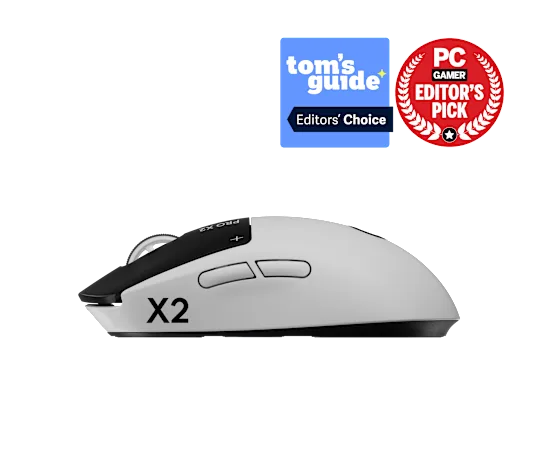
The buying decision
The Logitech G PRO X2 SUPERSTRIKE is aimed at a narrow but important competitive-gaming problem: making repeated mouse clicks register with less travel and less reset delay. Its Haptic Inductive Trigger System, or HITS, replaces traditional mouse switches in the two main buttons with inductive sensing and haptic feedback. That is the reason to consider this mouse, not simply its high DPI figure or wireless connection.
The exact product here is the black-and-white Lunar Eclipse version, identified by Logitech as SKU 910-007700 and MPN 910-007700. The core decision is whether adjustable actuation and rapid trigger matter more to you than the lighter weight, simpler software, or lower purchase cost available from other gaming mice. If your games depend on rapid tapping, the unusual click system is relevant. If they depend mainly on continuous tracking, its advantage is less compelling.
Logitech says HITS can reduce click latency by up to 30 milliseconds. That is a manufacturer claim about the click system, not a promise that every player will shoot 30 milliseconds sooner in a match. PC Gamer’s review makes the more useful distinction: click latency is only one part of aiming, alongside recognizing an opponent, moving the crosshair, making the shot decision, and controlling the aim.
That distinction keeps the SUPERSTRIKE in perspective. It changes the physical response of the buttons, but cannot replace game knowledge or practice. Its feature has a plausible use case when repeated inputs limit your control, rather than being a shortcut to winning. A player who mostly holds a button while tracking a target has a different requirement from someone repeatedly tapping it.
HITS and the click controls
The left and right buttons have ten selectable actuation points. Logitech describes these as adjustments to the travel distance required for a click to register. In practical terms, a lower setting should suit a player who wants a light, short press, while a higher setting can provide more deliberate separation between resting a finger and sending an input.
There are also five rapid-trigger reset points. Rapid trigger changes when a button becomes ready for another click as you begin lifting it, rather than waiting for a conventional return point. That makes the feature more relevant to repeated taps, burst firing, quick ability inputs, and high-frequency clicking than to a long, held mouse button.
The haptic response has six intensity levels. The haptic motor supplies tactile feedback when the press reaches its actuation or reset point, so the click does not have to feel like a silent or ambiguous switch. You can tune the sensation separately from the actuation behavior, which matters if a very strong vibration becomes distracting.
This arrangement is more flexible than a normal mouse’s fixed click. It also adds a setup decision that ordinary mice avoid. A very light actuation setting may feel immediate, but it leaves less margin for resting a finger on the button. A higher setting can be a better compromise for users who produce accidental inputs. The useful setting is therefore personal rather than automatically the lowest one.
PC Gamer independently describes HITS as inductive sensing paired with haptic feedback. That description helps explain how the buttons work; it does not independently verify every manufacturer latency claim. Keep the mechanism, the reviewer’s experience and the advertised maximum benefit separate when judging whether the feature solves your own input problem.
Shape, size and fit
Logitech gives three catalogue dimensions of 125 millimeters, 63.5 millimeters and 40 millimeters, labelled Height, Width and Depth respectively. Those are the manufacturer’s axis labels; use the complete dimensions when comparing its footprint rather than treating the first label as upright height. It weighs 61 grams. Those figures place it in the lightweight gaming-mouse group, but not at the extreme low end of the category. PC Gamer specifically identifies weight as a possible point of contention rather than treating it as an uncomplicated strength.
The shell follows Logitech’s familiar Pro-style symmetrical design and is right-handed in its control arrangement. PC Gamer describes the shape as a Superlight-style shell that suits claw, relaxed-claw, and palm grips, while cautioning that pure fingertip users may find better options elsewhere. Shape remains the first fit question because click technology cannot compensate for an uncomfortable hand position.
The thumb controls sit on the left side, so the mouse is not a neutral ambidextrous model despite its symmetrical outline. Logitech lists five buttons. That is a focused competitive layout rather than a button-heavy productivity or MMO design; buyers needing a large bank of shortcuts should choose their control layout before comparing sensor ceilings.
The surface texture and grip are also part of the fit decision. PC Gamer describes the finish as slightly chalky and says users with dry hands may find it slippery. Logitech includes optional grip tape, which gives the owner a way to add friction instead of accepting the surface as supplied. Grip tape can help, but it changes the hand feel and may require eventual replacement.
The supplied feet use UHMWPE, and the manufacturer includes a POWERPLAY aperture door with a UHMWPE foot. PC Gamer found UHMWPE slower than PTFE on cloth pads but more suitable for glass pads and potentially longer-lasting. That makes the pad pairing meaningful: users seeking the fastest glide on cloth may prefer different feet, while glass-pad users may be more comfortable with the included material.
Wireless connection and tracking
The box includes a LIGHTSPEED wireless receiver, a USB-A-to-USB-C charging and data cable, and a receiver extension adapter. The extension adapter is useful when the computer is under a desk or farther from the mouse than a direct rear-port connection would be ideal. The supplied receiver is the primary wireless route described by Logitech for this model.
Plan around the documented LIGHTSPEED receiver or wired USB connection. Logitech supplies the receiver and charging/data cable, and its compatibility requirements specify Windows or macOS with an available USB 2.0 or higher port. Bluetooth is not established by the manufacturer evidence used here. If a receiver-free Bluetooth connection is essential, choose a mouse whose current manufacturer specifications explicitly document that mode.
Logitech rates the mouse for up to 8,000 hertz over LIGHTSPEED and 1,000 hertz in wired mode. An 8,000-hertz report rate means a nominal 0.125-millisecond interval between reports, while 1,000 hertz corresponds to a 1-millisecond interval. The higher setting can reduce the interval between movement reports, but it also increases the demands placed on the computer and game setup.
The HERO 2 sensor is specified for 100 to 44,000 DPI, up to 88 G of acceleration, and a maximum speed listed as 888 inches per second. Logitech notes that the acceleration and speed figures were tested on its G640 gaming mouse pad. Those are ceiling specifications, not recommended everyday settings; most players will choose a much lower DPI and adjust sensitivity in the game.
The manufacturer also specifies zero smoothing, acceleration, or filtering for tracking. That is relevant to competitive users who want the sensor’s movement behavior to remain predictable. It does not make an unsuitable sensitivity, poor pad surface, or poor grip disappear, and it should not be confused with the separate latency behavior of the main clicks.
Battery, software and setup
Logitech rates battery life at 90 hours under constant-motion conditions and states that battery life varies with use conditions. PC Gamer reports about 90 hours at 1,000-hertz polling in its review context. The rating is therefore useful as a planning figure, but high polling, frequent clicks, haptic intensity, and other settings can change how often charging is needed.
Setup requires connecting the receiver or cable, then using Logitech G HUB for the advanced features. Logitech explicitly says advanced features require G HUB software, and lists Windows or macOS with an available USB 2.0 or higher port as compatible requirements. Internet access is optional for the listed requirements, but it is needed if you want to download the software.
G HUB is where the important choices live: actuation, reset behavior, haptic intensity, DPI, report rate, button assignments, and game profiles. The broad customization is a strength when you enjoy tuning hardware to specific games. It is also part of the ownership cost in time, because the mouse is not simply a plug-in-and-forget device if you want its signature features.
Do not buy this mouse on the assumption that advanced HITS settings will persist without G HUB. PC Gamer reports that its selected actuation, haptic and rapid-trigger settings did not remain active after it closed the software and restarted the computer. Logitech also says advanced features require G HUB. The current sources do not verify persistence of those particular settings on another computer. This is a practical limitation for a tournament computer, managed work machine or shared system where you cannot keep the software running. Ordinary profile storage is not sufficient evidence that the signature click configuration travels with the mouse.
For sensitivity changes, decide how often you actually switch settings during play. A single carefully chosen DPI setting can be simpler than maintaining a large collection of stages. If your game needs different aiming speeds, start with the game’s own sensitivity controls and check the available G HUB assignments before making that requirement part of a purchase.
Ownership and maintenance
The included box contents are practical rather than decorative: the receiver, cable, extension adapter, POWERPLAY aperture door with UHMWPE foot, optional grip tape, cleaning cloth, and documentation. The POWERPLAY door matters mainly to owners of Logitech’s compatible charging ecosystem; the mouse can otherwise be charged through its cable. Logitech also provides a two-year limited hardware warranty.
Maintenance is straightforward but not entirely consequence-free. Keep the sensor opening and feet free of dust, use the supplied cleaning cloth for the exterior, and expect grip tape to become a consumable if it is handled heavily. Replacing feet is possible, but changing from the supplied UHMWPE material to aftermarket PTFE feet is an additional choice rather than part of the standard package.
The haptic system adds another variable to battery management. Logitech’s 90-hour figure is tied to constant motion and variable use conditions, while PC Gamer notes that lower haptic intensity may help battery life. The sensible ownership routine is to select a comfortable haptic level, monitor charge in G HUB, and keep the cable accessible rather than assuming the published number will describe every session.
Alternatives and trade-offs
The obvious alternative is a conventional lightweight wireless gaming mouse with a shape you already know fits. That option gives up HITS, adjustable actuation, and rapid-trigger reset behavior, but it can be the better purchase for tracking-heavy games, casual play, or users who dislike software-dependent configuration. PC Gamer specifically says games involving sustained tracking and fewer repeated clicks may gain less from the SUPERSTRIKE’s central feature.
A lighter mouse is another legitimate alternative. PC Gamer compares the SUPERSTRIKE’s 59-to-61-gram range, depending on the puck configuration, with a 36-gram Corsair Sabre V2 Pro. The lighter category may feel preferable for very low-sensitivity aiming, but losing 20 or more grams is not automatically worth more than gaining adjustable click behavior. That is a preference and game-pattern decision, not a universal performance ranking.
A conventional lightweight wireless mouse is the more direct alternative if you like this general shape but do not need adjustable click actuation. Compare the way your current mouse fits your hand and the commands you repeatedly use. Replacing a familiar model solely for a larger DPI ceiling is difficult to justify when your actual sensitivity already sits comfortably within its range.
A simpler wired mouse is another useful category alternative for a fixed desk. It removes charging and receiver management from the decision, while giving up the freedom of a wireless connection. The sensible comparison is the total routine you want to maintain, including configuration software and cable placement, rather than treating a premium input system as necessary for every game.
Verdict
Buy the Logitech G PRO X2 SUPERSTRIKE if you specifically want adjustable main-button actuation, rapid-trigger reset behavior, and tunable haptic feedback in a familiar 61-gram wireless shape. It is most persuasive for competitive FPS, RTS, and click-intensive MOBA play where repeated taps are central to the interaction.
Choose something else if you use a pure fingertip grip, require a truly neutral left-handed layout, want the lightest possible mouse, or prefer settings that live independently of desktop software. It is also difficult to justify for casual games or tracking-heavy play when a conventional wireless mouse already satisfies your shape and sensitivity requirements.
The SUPERSTRIKE’s value is concentrated in its buttons. Its sensor, polling rate, battery rating, included receiver, and shell make it a serious modern gaming mouse, but those features are not unique reasons to buy this exact model. The purchase makes sense when the click system is the feature you will actively tune and use, not when you are merely shopping for a high-DPI wireless mouse.
My conditional verdict is therefore favorable for click-focused competitive players and cautious for everyone else. HITS is a meaningful change to mouse input, while the 61-gram weight, software dependency concerns, unverified persistence of advanced settings, and premium positioning are real trade-offs. Decide by grip and game first; choose the SUPERSTRIKE only if its adjustable clicks solve a problem your current mouse actually gives you.