The buying decision
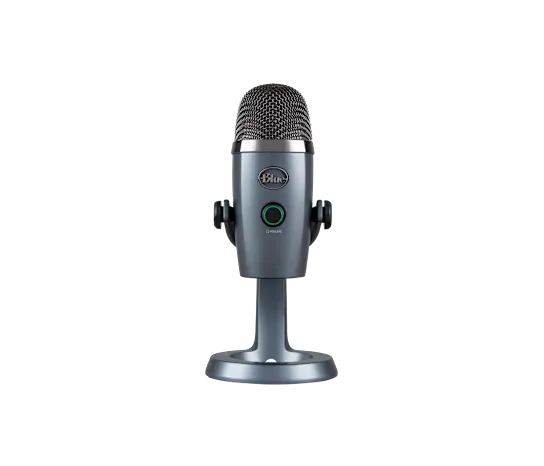
The Logitech G Yeti Nano in Shadow Grey, US model 988-000088, is a compact USB condenser microphone for calls, streaming and spoken recording. Its proposition is simple: a desktop stand, two pickup patterns, headphone connectivity and software support in one contained setup. The more useful question is whether that simplicity suits your room and workflow better than a newer microphone with more physical controls.
This is a sensible upgrade category for someone moving from a headset microphone or a laptop’s built-in microphone. It is less obviously suited to a buyer who needs stereo recording, a front-facing gain dial or several ways to manage a changing group conversation. The Yeti Nano covers the solo-speaker and shared-room basics, but its small control set makes the choice more specific than the word compact suggests.
The exact variant matters here. Logitech identifies the Shadow Grey version as SKU and model number 988-000088. The review source uses the older Blue Yeti Nano name, while Logitech’s current catalogue places the product under Logitech G. Those names describe the same model family in the supplied records, not the larger Yeti or another Logitech G microphone.
What comes with the microphone
Logitech lists two proprietary 14-millimeter condenser capsules. It also lists cardioid and omnidirectional polar patterns. Those are the central hardware specifications: the Nano offers a focused solo mode and an all-around mode, rather than a larger collection of stereo or front-and-rear patterns.
With its stand attached, the microphone measures 4.29 inches (10.9 centimeters) long, 3.78 inches (9.6 centimeters) wide and 8.31 inches (21.1 centimeters) high. The corrected height is the measurement most likely to affect a laptop or monitor setup. “Compact” does not mean it will disappear beneath every display.
The microphone with stand weighs 1.39 pounds (0.63 kilograms). Tom’s Guide independently described the microphone and stand as weighty metal with a matte finish, and described the build as sturdy. That combination points to a desk-oriented object rather than a lightweight microphone intended to travel constantly.
The stated package includes the Yeti Nano with its desktop stand, a USB cable and user documentation. The basic setup therefore includes the support needed to place the microphone on a desk. Buyers do not need to add an arm simply to begin positioning it, although an arm may be preferable if desk space is tight.
The stand allows angle adjustment, according to Logitech. The manufacturer also says the stand can be removed so the microphone can be mounted to a desktop boom arm such as Compass. That creates two practical installation routes: a contained desktop arrangement or a closer, more adjustable arm position. The supplied evidence does not establish compatibility with every third-party arm.
Pickup patterns and room fit
Cardioid is the logical first choice for one speaker. Logitech describes it as capturing sound sources directly in front of the microphone. Tom’s Guide independently described the setting as suitable for gaming and streaming while minimizing ambient noise. That is directional pickup, not a substitute for sensible placement in a reflective or noisy room.
Omnidirectional mode makes the opposite trade-off. Logitech says it picks up sound equally from all around the microphone and presents it for a multiplayer board-game session, a discussion with guests or a roundtable. It is useful when several people need coverage, but it is not the mode to choose when the priority is separating one voice from a busy room.
The two-pattern design makes the solo-versus-group choice easy to understand. It also establishes the Nano’s main limitation. Tom’s Guide listed the two directional patterns among its reasons to avoid the microphone, while reporting that the JLab Talk adds bidirectional and stereo modes. If those extra arrangements matter, the Nano’s simpler pattern set may feel restrictive.
The pattern selector is on the rear. Tom’s Guide reported that the rear button switches between cardioid and omnidirectional, and noted that the selector is less visible than the JLab Talk’s front-mounted switch. This matters most for someone who regularly moves between solo calls and group sessions. If the microphone stays aimed at one speaker, the rear position is less consequential.
Room acoustics remain more important than the pattern names alone. Tom’s Guide reported crisp, clear speech with depth and detail in cardioid mode when the reviewer was close to the microphone, even in a home with poor acoustics. That independent result supports close placement as a sensible starting point, but it cannot predict every room, voice or desk arrangement.
Controls, monitoring and software
The independent review identifies a 3.5-millimeter aux output on the underside for wired headphones. That gives a speaker a way to listen through the microphone rather than relying only on computer playback. It is useful for monitoring the voice path and noticing an unsuitable level or distracting room sound before recording or joining a call.
Tom’s Guide reported that the front volume dial controls the headphone output and acts as a quick mute button when pressed. This is a convenient call control, but it is not the same as a microphone gain dial. The physical dial changes what the user hears; it does not provide the dedicated input-level adjustment some competing microphones offer.
The lack of a physical gain dial is the clearest everyday weakness. Tom’s Guide specifically wished the Nano could control gain from the microphone itself and listed limited controls as a reason to avoid it. A speaker who frequently changes distance, delivery volume or application level may need to reach for software instead of turning an input knob.
Logitech says the Nano can be connected directly to a computer or laptop with the included USB cable and requires no drivers. The manufacturer’s system-requirements excerpt identifies Windows and also identifies Mac, macOS and USB support. That supports ordinary computer setup, but the supplied records do not establish compatibility with phones, tablets, consoles or every USB hub.
The current manufacturer page says Blue VO!CE vocal effects require downloading and installing free G HUB software. Logitech describes processing tools including EQ, noise reduction, de-essing, voice modulation and audio samples. These are optional software features; they do not remove the need to position the microphone appropriately or manage a difficult room.
Tom’s Guide’s older review describes Blue Sherpa for Windows and macOS as adding gain control, pattern switching, volume adjustment and muting, along with EQ and filters. Because the current Logitech page names G HUB instead, the safest buying interpretation is that software features and utility names can vary by version. Do not treat the older Blue Sherpa description as a complete statement of the current application.
The independent review also found that microphone position and gain level mattered more than fine filter adjustments, and that most presets were difficult to distinguish. That does not make the software irrelevant. It makes software most useful when it addresses a specific level or tone problem, rather than serving as the main reason to choose the microphone.
Setup and fit
Start with the microphone facing the speaker and use cardioid for a single voice. The manufacturer’s description places the intended source directly in front of the microphone, and Tom’s Guide tied its favourable cardioid finding to a close speaking position. Distance is therefore a major setup variable, not a minor finishing detail.
The adjustable stand is a good fit when the microphone can sit near the front or side of the desk without blocking the display. At 8.31 inches (21.1 centimeters) high with its stand, the Nano deserves a clearance check beneath a monitor or in front of a laptop. The width is 3.78 inches (9.6 centimeters), so the footprint also needs to share space with a keyboard, mouse and display base.
A boom arm changes both placement and the purchase. Logitech supports removing the stand for an arm such as Compass, but the source does not confirm universal third-party attachment compatibility. Check the arm’s mounting hardware and supported load before assuming that any convenient desktop arm will fit.
The 1.39-pound (0.63-kilogram) stand-and-microphone weight is relevant to shelves, narrow desks and frequent storage. Its mass suits a permanent desktop arrangement better than a setup that is packed away after every call. That is a practical fit trade-off, not a claim that heavier construction automatically produces better recordings.
For a call, the useful baseline is cardioid, forward placement and wired headphones connected to the microphone. For a small discussion, omnidirectional mode is the relevant alternative. The two modes are easy to understand, but neither removes the effect of speaker distance, reflective surfaces or nearby equipment.
What the numbers tell you
Logitech lists a microphone frequency response of 20 hertz to 20 kilohertz. That is the manufacturer’s stated response range, not a prediction of how every voice will sound. It also does not establish that the Nano will outperform newer USB microphones in a particular recording setup.
The manufacturer lists sensitivity as 4.5 millivolts per pascal at 1 kilohertz. It lists maximum sound pressure level as 120 decibels at 0.5 percent total harmonic distortion at 1 kilohertz. These specifications help describe the documented electrical and acoustic design, but they do not settle questions about plosives, room reflections or vocal character.
Logitech lists power required or consumed as 5 volts and 150 milliamps. It also lists microphone impedance as greater than 16 ohms. These are product specifications for the USB microphone rather than a recommendation to buy a separate power adapter.
The headphone amplifier is specified with a frequency response of 15 hertz to 22 kilohertz. Its listed output is 58 milliwatts per channel at a 16-ohm load. Those figures describe the monitoring path, not the microphone capsule’s recording response, and they do not by themselves determine whether a particular pair of headphones will be comfortable or suitable.
Alternatives and ownership
The JLab Talk is the most meaningful alternative in the supplied independent comparison. Tom’s Guide reported slightly better sound from the Talk in that comparison, along with a front-visible selector and bidirectional and stereo recording modes. Choose that category of alternative when broader pattern choice and front controls matter more than matching the Nano’s particular desk arrangement.
The Rode NT-USB Mini is a narrower comparison. Tom’s Guide reported that it records only in cardioid, while the Nano also offers omnidirectional pickup. That makes the Nano the more relevant option for a buyer who specifically needs a simple all-around group mode, without proving that it is superior in every aspect of sound or construction.
The Blue Snowball is a more basic reference point. Tom’s Guide reported that the Nano was more robustly built and that the Snowball picked up more reverb in the reviewer’s home. Those are independent observations from one review environment, but they support viewing the Nano as a more serious desktop step up from a basic microphone.
The Elgato Wave:3 is relevant as a software-oriented category alternative. Tom’s Guide compared the Nano’s app-assisted workflow with the Wave:3, but the supplied passages do not provide enough current Wave:3 specifications for a complete feature comparison. Consider that type of newer USB microphone if current software controls matter more than the Nano’s established two-pattern arrangement.
Ownership details are straightforward in the supplied records. Logitech lists a two-year limited hardware warranty, and the package includes the cable and documentation. The sources do not specify a capsule-cleaning procedure, replacement-cable policy or long-term parts availability, so those details deserve confirmation if serviceability is central to the purchase.
Verdict
Choose the Logitech G Yeti Nano Shadow Grey 988-000088 when you want a compact desktop USB condenser microphone for solo calls, gaming, streaming or spoken recording, and you value a stand, headphone output, mute control and a choice between cardioid and omnidirectional pickup. The independent review supports its clear close-range cardioid performance and sturdy desktop character.
Choose another model when a physical gain dial is central to the workflow, when stereo or bidirectional recording is required, or when the microphone must work from a greater distance in a difficult room. The JLab Talk comparison is especially relevant for broader pattern choice and front-accessible controls. The Nano’s strongest case is straightforward desktop audio, not an extensive modern control set.