The buying decision
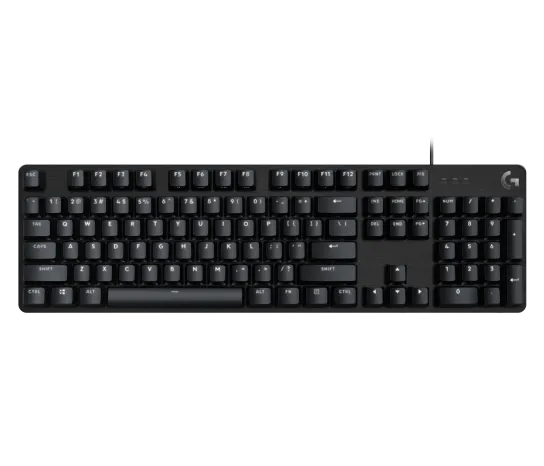
The Logitech G413 SE full-size mechanical keyboard, Black, US 920-010433, is a narrowly specified product. It gives an ordinary desk user a conventional number pad, mechanical switches, white per-key lighting and a restrained black appearance. It does not try to be a customizable command center. The important decision is therefore not whether it has enough headline features, but whether you can live with its fixed design and the particular feel of its switches.
This review concerns the full-size Black US variant identified by Logitech as “G413 SE - Black - English US (QWERTY)” with stock-keeping unit and model number 920-010433. That identification matters because the G413 family also includes the original G413 and the smaller G413 TKL SE. Those are not interchangeable shopping results. Check the layout and model number before buying if the number pad or US arrangement is part of the plan.
Logitech’s own catalogue describes this keyboard as full-size, while Tom’s Guide lists its size as 17.1 by 5.0 by 1.4 inches. The manufacturer’s more precise dimensions are 17.13 inches (435 millimeters) wide, 5 inches (127 millimeters) deep and 1.43 inches (36.3 millimeters) high. Those dimensions describe a relatively tightly packed full-size board rather than a wide model with large decorative borders.
What the manufacturer specifies
The switch type is tactile. Logitech lists an actuation distance of 0.07 inches (1.9 millimeters), an actuation force of 1.76 ounces (50 grams) and total travel of 0.16 inches (4 millimeters). These are useful reference points, but they do not fully predict how the keys will feel. A force figure is not the same thing as a description of smoothness, bump shape, sound or fatigue over a long working session.
The keyboard uses a USB connection and requires a USB 2.0 port according to Logitech’s requirements section. Its PC cable is 5.91 feet (1.8 meters) long. That is a straightforward fit for a desktop tower on or beside a desk, but cable routing still deserves a quick check if the computer is unusually far away or mounted on the opposite side of a workstation.
The listed platform compatibility is Windows and macOS X. That is the manufacturer’s stated compatibility information, not a promise that every shortcut behaves identically across both operating systems. For ordinary typing, the physical US QWERTY layout is the more important practical detail; for operating-system-specific shortcuts, consult the documentation for the computer being connected.
Logitech lists a weight of 27.51 ounces (780 grams). The top case is described as black brushed 5052 low-carbon aluminum alloy. That gives the specification sheet a more substantial construction story than a plain plastic shell, although the material description alone cannot establish how stable the board will feel on every desk surface.
The keycaps are PBT, according to Logitech’s product description. Logitech also presents PBT as resistant to heat and wear. That is a manufacturer durability position rather than an independent lifespan measurement, so it is best read as a material advantage, not a timetable for when the legends or surfaces will change.
Lighting and key rollover
Backlighting is present, and Logitech specifies white per-key lighting. The company positions the lighting as a clarity aid rather than a multicolor effects system. For an adult desk used for evening work or occasional games, a single white palette can be easier to live with than bright color effects, particularly when the keyboard sits in a shared room.
The independent review from Tom’s Guide says the white lighting is more pleasant than the red lighting on earlier G413 models. That is an aesthetic assessment, not a measurement. It also reports that brightness can be adjusted with a keyboard shortcut and that the lighting can be turned off. Those controls are useful, but they do not turn the board into a software-configurable lighting platform.
Logitech specifies six-key rollover with an anti-ghosting gaming matrix. The manufacturer says this is intended to allow multiple keys to be pressed simultaneously without missed keystrokes. That is a relevant specification for games that use several movement and modifier inputs, though six-key rollover should not be confused with unlimited rollover.
The rollover claim is also narrower than a general promise about every application or every unusual key combination. It tells you what Logitech has specified for the matrix. It does not answer questions about the feel of the switches, the quality of the stabilizers or whether the board offers a dedicated game mode.
The feel problem
The central reservation comes from Tom’s Guide’s independent review. That reviewer identifies the switches as Long Hua tactile switches and describes them as stiff and uncomfortable, with a tactile response that is difficult to gauge. This is the most important counterweight to the manufacturer’s neutral “tactile” specification. Tactile is a category; it is not automatically a recommendation for comfortable typing.
Tom’s Guide also says the switches cannot be depressed with a light touch and do not feel terribly different from linear switches in practice, while being much louder. That is an independent reviewer’s characterization, not a Logitech specification. It gives prospective buyers a practical warning: the presence of a tactile bump on the product sheet does not ensure the crisp or refined feedback associated with more familiar tactile switch designs.
The same review records a Typing.com result of 111 words per minute at 97 percent accuracy for the G413 SE and compares it with 116 words per minute at 98 percent accuracy on the reviewer’s usual Logitech G915. Those numbers belong to that reviewer’s short evaluation and should not be treated as a prediction of an ordinary adult user’s speed. The review itself notes the different familiarity periods.
The useful conclusion is not that the G413 SE is incapable of typing. Tom’s Guide calls the switches not terrible for typing, while still emphasizing that they feel stiff and unpleasant. That distinction matters for a mixed-use desk: acceptable input recognition and tolerable daily comfort are separate questions.
What is absent
The G413 SE’s clean layout is also a stripped-down one. Tom’s Guide reports no extra macro keys, no discrete media keys and no dedicated lighting or game-mode keys. The function row supplies secondary functions, including brightness, media controls and calculator access, but those shortcuts require the Fn key.
Tom’s Guide further reports that the keyboard cannot reprogram keys, cannot set up macros and cannot make the function keys default to media controls. It also reports no compatibility with Logitech G Hub. These are independent review findings, and they are especially important because the Logitech G brand can lead shoppers to expect the broader software controls available on other products.
The supplied records do not establish G Hub support for this exact model, so this review does not assume it. The safer buying interpretation is that the 920-010433 should be treated as a fixed-function keyboard unless current manufacturer documentation for that exact model says otherwise. Do not buy it expecting software remapping or macro creation on the strength of the brand name alone.
There is no wrist rest included in the product information supplied here, and Tom’s Guide specifically notes its absence. The reviewer also reports that the keyboard’s angle was uncomfortable without a wrist rest. That is an individual fit finding rather than a universal ergonomic conclusion, but it makes desk height and wrist position part of the purchase decision.
A full-size board already occupies the main typing area and number-pad space. The official width of 17.13 inches (435 millimeters) is manageable for many desks, but users who keep a mouse close to the keyboard should measure the available lateral room. The compact border helps; it does not remove the number pad’s footprint.
Setup and compatibility
Setup is intentionally simple on the evidence available: connect the PC cable to a USB 2.0 port and use the physical keyboard. Logitech lists Windows and macOS X as compatible platforms. There is no supplied evidence for wireless operation, a detachable cable or an additional connection mode, so those should not be assumed when comparing it with modern multi-device keyboards.
The 5.91-foot (1.8-meter) cable gives a normal desktop installation some routing flexibility. Measure from the keyboard position to the computer’s intended USB port rather than relying on a generic desk layout. A tower on the floor may need a rear-port route; a compact setup with the computer beside the keyboard should have fewer cable-management constraints.
The US QWERTY identification is equally practical. Buyers replacing a different regional layout should verify the key arrangement in the catalogue image and listing details before ordering. The exact model identifier, Black color and US English designation are more reliable checks than a marketplace title that simply says “G413 SE.”
Original G413 and TKL SE
The original G413 is not the same board. Tom’s Guide describes that earlier model as using Romer-G tactile switches with red backlighting, while describing the G413 SE as using Long Hua tactile switches with white backlighting. The reviewer preferred the older model’s key feel. That is a direct comparison from the independent review, not a reason to assume every original G413 listing has the same condition or availability.
The G413 TKL SE is a different size category because TKL means tenkeyless. The supplied manufacturer material repeatedly uses TKL SE wording in its PBT-keycap passages, even though this product is identified as the full-size G413 SE. That mixed catalogue text is precisely why shoppers should not transfer every TKL listing detail to the 920-010433. For this review, the full-size designation and exact model number take priority.
Alternatives and ownership
If the number pad is essential but software control is not, the G413 SE’s fixed layout may still make sense. Its specified white per-key lighting, PBT keycaps, anti-ghosting matrix and metal top case give it a clear feature outline. The trade is that the strongest independent criticism concerns the very part touched most often: the switch feel.
If a smaller desk matters more than a number pad, compare the category of tenkeyless mechanical keyboards rather than assuming the G413 SE’s full-size footprint will fit comfortably beside a mouse. The supplied records support the existence of Logitech’s G413 TKL SE naming, but they do not provide enough current technical detail here to make specific performance or feature claims about that alternative.
Tom’s Guide names the HyperX Alloy Origins as an alternative the reviewer considers superior, and says that model offers a choice of three proprietary switches and full RGB functionality. Those are the independent reviewer’s claims about that alternative. The comparison is meaningful because it addresses the G413 SE’s two weak spots: switch choice and lighting flexibility, not merely brand preference.
For ownership, the most defensible maintenance plan is ordinary keyboard care: keep food and drink away, disconnect the USB cable before cleaning and follow the supplied documentation for cleaning guidance. The source records do not provide a keycap-removal procedure, replacement-switch information or repair instructions, so this review will not invent a maintenance schedule or claim a particular service life.
Logitech lists a two-year limited hardware warranty. That is the manufacturer’s stated warranty term, not a statement that every claim will be accepted regardless of circumstances. Retain the model information and purchase documentation, and read the applicable warranty conditions before relying on the coverage.
Verdict
Choose the Logitech G413 SE 920-010433 when the priorities are a full-size US layout, a number pad, a compact 17.13-inch (435-millimeter) width, white lighting and a simple USB desktop connection. It is most coherent for a buyer who values a restrained appearance and basic mechanical-keyboard functions more than remapping, macros or elaborate lighting.
Pass on it when switch comfort is the deciding factor, when dedicated media and game-mode controls matter, or when you expect Logitech G Hub customization. Tom’s Guide’s criticism of the Long Hua switches is too central to dismiss, especially for someone who types for hours. The conditional verdict is simple: buy for the fixed layout and modest feature set only if you are comfortable accepting the uncertain fit of the key feel.