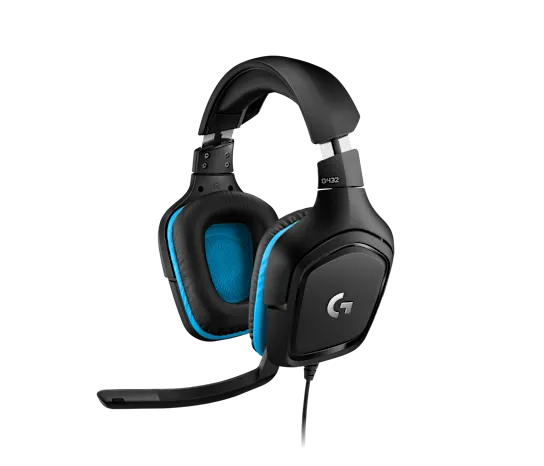
The buying decision
The Logitech G432 is a wired gaming headset for someone who wants one headset to cover a PC, console, Nintendo Switch, or mobile device without committing to a wireless receiver. Its important distinction is not simply that it has multiple cables. The 3.5 mm connection is the broadly compatible route, while the included USB hardware unlocks the headset’s software-controlled PC features.
That makes the exact variant worth checking before buying: this review concerns the black Logitech G432, US model 981-000769. Logitech’s catalogue identifies that color and SKU together. The practical question is whether you want a flexible analog headset that can also become a more configurable PC headset, rather than a headset whose surround processing follows it unchanged from one platform to another.
The G432 makes the most sense for a mixed-device household or a PC player who sometimes moves to a console. A single 3.5 mm headset is simpler if you never use a computer, and a wireless model is more appropriate if avoiding a cable is the priority. The G432’s appeal is the compromise: physical wired reliability, analog fallback, and optional PC processing.
Connections and platform fit
Logitech lists Windows 10, Windows 8.1, Windows 7, Mac, Nintendo Switch, PlayStation 4, Xbox One, tablets, and mobile devices among the system requirements. That is a compatibility list, not a promise that every platform receives identical audio controls. The connection method determines much of the experience.
For PCs, Macs, Nintendo Switch, and PlayStation 4, Logitech specifies a USB 2.0 port or higher for the USB route. Logitech separately specifies a 3.5 mm audio port for console or mobile devices. Tom’s Guide also describes the package as including a splitter for separate microphone and audio connections, along with a USB adapter, which is useful when a computer has separate analog jacks or when USB is preferable.
The USB connection is the meaningful upgrade over a basic analog headset on a Windows gaming computer. Logitech says DTS Headphone:X 2.0 is enabled on Windows PC through USB and Logitech G HUB software. That wording matters: plugging the headset into a console with an analog cable does not turn the console into a G HUB workstation.
The manufacturer’s “all platforms” description specifically says the G432 works with a PC, PlayStation 4, or docked Nintendo Switch through the included USB DAC, and that consoles or mobile devices can also use the 3.5 mm cable. Xbox One appears in the general system requirements, but the supplied documentation does not establish that its USB behavior matches the listed PC, PlayStation 4, or docked Switch route. Treat analog compatibility as the safer Xbox assumption.
Tom’s Guide’s independent review reaches a similar buying conclusion from a different direction. It found the headset’s USB connection particularly useful for gaming PC audio, while describing its 3.5 mm option as a convenient alternative. That makes the G432 more versatile than a headset built around one platform-specific digital connection, but not equally feature-rich everywhere.
What the USB features actually add
G HUB is optional software, but the surround and equalizer features are not universal hardware functions. Logitech says DTS Headphone:X 2.0 surround sound and EQ presets are available only for Windows OS and require G HUB gaming software. Logitech also says installing the optional software requires internet access.
The software requirement extends beyond installation convenience. Logitech lists G HUB as running on 64-bit Windows 7, Windows 8.1, Windows 10 or later, or the most recent version of macOS X. However, the supplied product passage specifically limits DTS Headphone:X 2.0 and EQ presets to Windows. A Mac can meet the software environment description without receiving every advertised audio feature.
Tom’s Guide reports that its reviewer could adjust sound profiles through G HUB over USB, including DTS 7.1 surround sound, equalization sliders, noise reduction, and other options. Those are independent review findings about the software experience, not a reason to assume the same controls appear through an analog console connection.
The review also found the stereo sound stronger and more immediate than the surround presentation, which it described as somewhat muddy and muted. That does not make surround useless for every listener or every game. It does mean the G432 should be purchased for its solid wired and stereo foundation first, with surround treated as an option to experiment with rather than the core reason to choose it.
This distinction is especially important for buyers who see “7.1” in a product name or listing. The G432’s advertised spatial processing is software-dependent on Windows. The headset remains usable through analog connections, but the supplied sources do not support presenting DTS processing as a universal console feature.
Audio and microphone
Logitech specifies 50 mm headphone drivers and a headphone frequency response of 20 Hz–20 kHz. Those figures describe the hardware specification range; they do not predict how every game, music track, or listener will perceive the tuning. They are useful for comparing the G432’s stated design with a narrower or differently configured headset, but not for assigning sound quality by themselves.
Tom’s Guide found the G432’s USB gaming audio rich and programmable in PC games including Destiny 2, World of Warcraft, and StarCraft: Remastered. The review noted a clear bass-and-treble balance and a close-feeling soundscape. These are independent listening findings, so they should be read as an evaluation rather than as another manufacturer specification.
The same review found the 3.5 mm connection less loud and less nuanced on a PC than the USB adapter, using the same game for comparison. That is the central trade-off in this model: analog gives broader device flexibility, while USB gives the PC a stronger route to the headset’s intended feature set.
On Nintendo Switch, Tom’s Guide found the audio came through well enough, with a reasonable balance among voice work, sound effects, and music. That finding supports the Switch as a practical analog or compatible wired use case, but it does not establish that the Switch receives the Windows-only EQ and DTS controls.
The boom microphone uses a cardioid, unidirectional pickup pattern according to Logitech. Logitech specifies a 6 mm boom microphone and a microphone frequency response of 100 Hz–20 kHz. The boom flips up to mute, a useful physical control when moving between active conversation and listening.
Tom’s Guide considered the microphone suitable for multiplayer communication but not a professional-grade recording microphone. That is a sensible boundary for the product. It is intended to carry teammate callouts, not replace a dedicated USB or XLR microphone for polished voice work.
Fit, controls and physical design
Logitech says the ear cups and headband use leatherette and describes the construction as lightweight. The manufacturer also says the ear cups rotate up to 90 degrees. That rotation helps with storage or setting the headset down, but it does not make the headset compact in the way a folding travel headset might be.
A volume wheel sits on an ear cup and Logitech says it can adjust volume on any platform. That physical control is more useful than a software-only slider when switching between consoles, phones, and computers. It also avoids making ordinary volume changes dependent on G HUB.
The manufacturer lists the headset dimensions as 6.77 in (172 mm), 3.22 in (81.7 mm), and 7.17 in (182 mm), with a weight of 9.88 oz (280 g). Because the supplied specification presents the three dimensions without naming their individual orientations, they are more useful as a size reference than as a precise desk-storage plan.
Tom’s Guide found the headset comfortable enough but reported that the leatherette ear cups could become hot after several hours. The reviewer also described the ear cups as somewhat loose. Those findings make head shape and movement important: a buyer who needs a very stable fit for frequent motion should be more cautious than someone who mainly plays while seated.
The independent review described the design as dated, with a plastic feel and an imprecisely notched headband. That criticism does not contradict Logitech’s comfort-oriented construction description; it addresses finish, adjustment feel, and perceived modernity rather than the presence of leatherette or rotating cups.
Tom’s Guide also described the headset as large and somewhat bulky, while noting that the microphone is fixed in place. The rotating ear cups provide some storage convenience, but the nonremovable boom and full headset shape remain part of the ownership experience.
Setup and daily ownership
Setup is straightforward if the intended route is decided first. For a Windows gaming PC, connect through USB, install G HUB if you want the supported surround and EQ features, and then configure the profile. For a console or mobile device, use the 3.5 mm route when the device exposes the appropriate audio connection.
The PC cable is listed by Logitech as 6.56 ft (2 m). That is enough reach for many desk setups, but buyers should still consider where the computer sits relative to the chair. A wired headset is only convenient when the cable can reach without crossing a walkway or pulling against the connector.
The 3.5 mm route also makes the headset easier to move between compatible devices without installing software. The trade-off is that analog output depends on the device’s audio hardware and controls. The independent PC comparison found lower loudness and less nuance through 3.5 mm than through USB, so “works without USB” should not be confused with “sounds identical without USB.”
Maintenance is mostly about preserving the cable, boom, ear-cup surfaces, and headband padding. The supplied sources do not provide replacement-pad instructions, cleaning procedures, or a parts schedule, so buyers should not assume a documented service path from this review. Logitech does list a 2-year limited hardware warranty.
Alternatives and trade-offs
The most direct alternative is another wired gaming headset with analog compatibility. That category may be preferable if console use matters more than PC software, because the buying decision then centers on fit, microphone quality, and cable handling rather than Windows-only processing. The G432 is more attractive when USB PC configuration is part of the plan.
Tom’s Guide specifically compared the G432 with the HyperX Cloud Alpha and SteelSeries Arctis 3. Its review characterized the Cloud Alpha as sounding somewhat better while remaining similarly functional, and described the Arctis 3 as comparable in sound quality and versatility. Those are the independent reviewer’s comparative findings, not current specifications or current price claims.
A simpler 3.5 mm headset can also be the better choice for someone who wants no software, no internet-dependent installation, and no distinction between PC and console feature sets. The G432’s extra USB path is valuable only when the buyer intends to use it. Otherwise, the additional adapter and software capability add choice without solving a real problem.
Wireless is the other obvious category alternative, but it changes the priorities rather than offering a direct feature match. The supplied sources do not establish wireless battery life, latency, receiver behavior, or charging details for any named model, so the relevant comparison is conceptual: choose wireless for cable freedom, and choose the G432 for wired simplicity and analog fallback.
Verdict
Choose the Logitech G432, black US 981-000769, if you want a wired headset that can move among compatible devices and you have a Windows PC where USB and G HUB are genuinely useful. Its strengths are the two connection paths, physical volume control, flip-to-mute boom, and a PC audio mode that an independent review found richer and more configurable.
Choose something else if you need a consistently firm fit, cool ear cushions for long sessions, a compact headset, a removable microphone, or equally rich controls on consoles and mobile devices. The G432’s feature story is strongest on Windows over USB; its analog compatibility is real, but it is the simpler fallback rather than the full software experience.
The conditional verdict is therefore clear: the G432 is a sensible bridge between PC and console audio when wired flexibility matters more than modern design or wireless convenience. It is less compelling as a pure console headset or as a microphone-first purchase. Buy it for the connection strategy, and treat DTS, EQ, and G HUB as Windows-specific additions rather than universal capabilities.