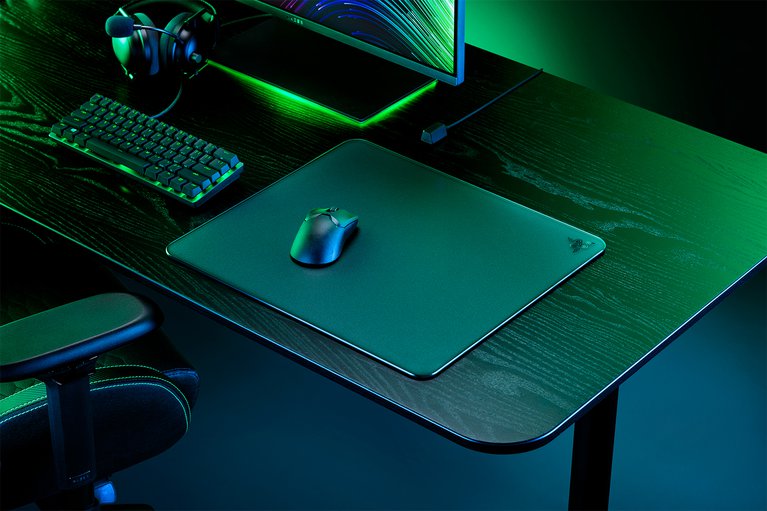
What the Razer Atlas is
The Razer Atlas is a rigid tempered-glass mouse mat for a desk setup that values a fast, consistent glide over easy storage. This review covers the black United States model RZ02-04890100-R3U1, not every Atlas listing or colorway. Razer’s product page identifies Black as the selected option and describes the surface as premium tempered glass with micro-etching. The buying decision is therefore less about whether a mouse mat is necessary and more about whether glass suits the way your desk is arranged.
Glass changes the role of a mouse mat. Instead of a flexible layer that can be shifted, rolled or fitted around awkward furniture, the Atlas is a solid surface that needs a defined home. That makes the product relevant to a permanent gaming desk, especially if a low-friction glide matters more than portability or a forgiving surface.
Tom’s Hardware provides the useful independent context. Its reviewer described the Atlas as a large piece of glass with optical-sensor-oriented micro-etching and an oleophobic coating. Those are observations from an independent review, while Razer’s page supplies the manufacturer’s product description. Keeping those categories separate matters because the surface treatment is a specification; whether its feel is worth the trade-off is a personal judgment.
Surface and glide
The Atlas’s main reason to exist is speed. Tom’s Hardware reported low static and dynamic friction on the surface. In practical terms, that should mean less initial force to start a mouse moving and less effort to continue a broad swipe. That favors quick repositioning and a light touch, but it does not automatically make every player more accurate. Control depends partly on how much resistance the player expects.
The mat is not simply a sheet of polished window glass. Its surface uses 2 micrometre micro-etched texturing that Tom’s Hardware described as optimized for optical sensors. The same passage says the texture is intended to avoid spin-outs and that the surface has a protective oleophobic coating. This explains the design goal: retain a slick glide while providing a dedicated tracking surface.
The texture is extremely fine rather than a coarse control layer. Buyers who prefer a fabric pad’s tactile drag should not expect the Atlas to reproduce that sensation in a harder material. The independent account instead characterizes the surface as smooth, matte and low-friction, which makes the Atlas a preference-led upgrade rather than an automatic performance improvement.
Tom’s Hardware reported accurate and reliable tracking across the mice included in its review. That is an independent finding from a selection of products, not evidence that every sensor and skate combination will behave identically. It does make the Atlas appear less dependent on one particular Razer mouse generation than a surface with a narrow compatibility profile.
Razer recommends using a recent mouse with its Focus Pro optical sensor for the best performance, according to the independent report. That recommendation is useful guidance, not a reason to replace a mouse that already tracks reliably on hard surfaces. The sensible purchase order is to examine the mouse you own first, then decide whether the Atlas’s glide addresses a real preference.
The more important compatibility question is underneath the mouse. Tom’s Hardware reports that Razer recommends PTFE or equivalent skates, and that mice with PTFE skates moved almost silently across the Atlas in its review. The skate material and condition may matter more to the buying decision than the sensor branding. Worn or damaged feet are a separate problem from the mat itself.
Glass mouse skates deserve particular attention. Tom’s Hardware warns that glass-on-glass contact will scratch the Atlas. Buyers using glass feet should therefore treat the mat as incompatible with that skate choice unless the manufacturer provides different, current guidance. This is a practical limitation that can outweigh the appeal of a fast surface.
Size and desk fit
The Atlas measures 17.72 inches (450 millimetres) long by 15.75 inches (400 millimetres) wide. It is a large rectangular mat rather than an extended surface designed to sit beneath both a keyboard and mouse. Those dimensions provide room for broad mouse movement, but they also create a fixed footprint. Measure the usable desk area, not just the advertised width of the tabletop.
The mat is 0.19 inches (5 millimetres) thick, including its anti-slip rubber backing. That construction gives the product a noticeable physical edge compared with a thin fabric mat. The sources do not establish that the Atlas includes a wrist rest or that its edge suits every hand position, so wrist comfort remains a fit question rather than a promised feature.
Razer’s placement guidance, reported by Tom’s Hardware, says to gently lay the entire mat on a fully level surface. It also says not to place the mat where its sides or edges protrude. These instructions are central to setup. The Atlas should be treated like a rigid panel that needs complete, even support rather than a flexible sheet that can bridge an irregular section of desk.
That requirement affects desks with lips, rails or raised sections. Tom’s Hardware described a setup where a desk lip prevented the mat from sitting level. The furniture is not universal, but the lesson is: do not plan to bridge a change in height, overlap an unsupported edge or let part of the glass hang beyond the desk.
The 4.41-pound (2-kilogram) approximate weight reinforces the permanent-desk character. Tom’s Hardware also reports that the Atlas cannot be folded or rolled. Moving it between rooms or packing it for another setup is consequently less convenient than moving a soft mat, even before accounting for the need to protect a rigid glass surface.
The footprint can feel more demanding than the dimensions alone suggest. A fabric mat can sometimes flex around a tight arrangement, while the Atlas needs a clear rectangle. Check clearance around monitor stands, keyboard feet, cable channels and the front edge before buying. A desk with enough nominal width may still be a poor fit if its usable, level area is interrupted.
Setup and daily fit
Setup is simple in concept: clear the desk, confirm that the support is level and place the whole mat without dragging it across rough debris. The product has no software setup. Tom’s Hardware reports no RGB lighting, no connection to Razer Synapse 3, and no cables or accessories. That keeps the mouse surface independent from peripheral-control applications.
The black finish is visually restrained. Razer’s page shows Black as the selected option and also presents White as an option. Tom’s Hardware reports that the Atlas comes in black and white colorways and that the Razer logo is black on both. On the black model, the logo should be less visually prominent than on the white version, according to that comparison.
The absence of RGB is useful for a quiet-looking workspace or for anyone who does not want another lighting ecosystem. It is a limitation for a setup built around illuminated accessories. The Atlas cannot add lighting effects, profiles or software-controlled accents because the product is an analog mouse surface rather than a connected peripheral.
The thickness may affect hand position even though the sources do not establish a universal comfort result. Compare the 0.19-inch (5-millimetre) edge with the keyboard and the way the heel of the hand rests during play. If the transition feels abrupt, a separate wrist support might be considered, but that would add another object to the desk and is not part of the Atlas.
The size is equally personal. Tom’s Hardware found the dimensions comparable to other large gaming mats but less forgiving because rigid glass cannot be squeezed into a slightly undersized space. For a compact desk, the important question is not whether a mouse can fit; it is whether the entire supported rectangle can remain clear.
Cleaning and care
Cleaning is one of the Atlas’s practical advantages. Tom’s Hardware reported that the oleophobic coating remained free of fingerprints and smudges during the reviewer’s observation period. That is an independent finding under one set of conditions, not a prediction for every type of residue or every period of ownership. A glass surface is nevertheless straightforward to inspect and wipe.
Razer’s cleaning guidance, as reported by Tom’s Hardware, permits a soft, possibly damp cloth and warns against soap or harsh cleaning agents. That narrow instruction should be the maintenance baseline. The Atlas should not be treated as a general-purpose desktop surface simply because it looks easy to wipe; the coating and micro-etched texture are part of the intended mouse experience.
The safety guidance also says not to place or drag heavy, sharp or rough items across the surface. It separately says not to place very hot or very cold items on the mat. These rules narrow the Atlas’s role to a dedicated mouse area. Keep tools, metal accessories, storage boxes and drinks elsewhere rather than using the glass as spare desk space.
Tom’s Hardware noted that Razer’s guidance includes unusual warnings about potential damage and placement. The useful buying interpretation is not to speculate about every warning, but to recognize that this is a material requiring deliberate handling. Owners should place it once, keep unsupported edges off the desk and avoid treating it like a coaster, cutting board or catch-all work surface.
Who should buy it
The Atlas suits a permanent gaming desk with enough level space for the complete footprint. It is especially relevant to someone who prefers very little glide resistance, wants a non-absorbent surface and uses a mouse with PTFE or equivalent skates. The lack of cables and software also suits buyers who want the mouse surface to remain separate from their peripheral-control setup.
It is less suitable for a shared or frequently rearranged desk. The approximate 4.41-pound (2-kilogram) weight, rigid construction and inability to fold or roll make relocation less convenient than with fabric. An uneven top, a protruding lip or insufficient depth is a more serious problem because the placement guidance calls for complete support on a level surface.
Control-focused players should think carefully before replacing fabric. Tom’s Hardware’s reviewer preferred textured soft mats for detailed pointer control and found the Atlas’s very low resistance less appealing with ultra-lightweight mice. That is not a universal verdict, but it identifies a meaningful pairing issue: a light mouse and a very fast surface may feel under-damped to someone who relies on resistance to settle small movements.
Alternatives and verdict
The closest alternative category is a large fabric gaming mat. It gives up the Atlas’s rigid glass surface and its particular glide, but it is easier to roll, move and accommodate on imperfect furniture. It also fits buyers who want more tactile resistance or a shared keyboard-and-mouse surface. Choose fabric when portability and forgiving placement matter more than a slick, fixed platform.
Tom’s Hardware identifies Pulsar’s Superglide and SkyPad’s Mousepad 3.0 as other glass mouse mats. They are relevant category comparisons, but the supplied evidence does not establish their dimensions, coatings, skate compatibility or cleaning requirements. Check those details directly before choosing either one; being another glass mat does not prove a better fit for this desk or mouse.
The Razer Atlas is a conditional recommendation, not a universal desk upgrade. Choose the black RZ02-04890100-R3U1 when you have a level, permanent desk, want very little glide resistance and are willing to protect the surface from unsuitable objects and glass skates. Choose fabric when you need portability, softer control or tolerance for imperfect furniture. The Atlas’s fast glide is the attraction, but its rigid footprint and care rules should decide the purchase first.