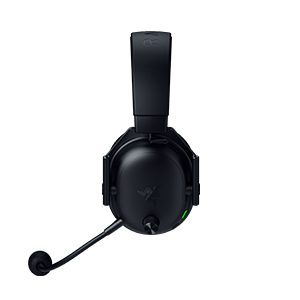
The Razer BlackShark V3 is a wireless gaming headset for PC users who want game audio, calls and music without a cable tether. This review covers the black US PC edition listed here, rather than the more expensive BlackShark V3 Pro. Its appeal rests on three connected ideas: fast 2.4 GHz audio, a relatively light design and enough controls to make the headset useful beyond gaming.
The buying decision is not simply whether the feature list is long enough. It is whether low wireless delay matters more to you than maximum battery endurance, whether a cable-looped receiver suits your desk, and whether the included boom microphone is sufficient for your calls. The V3 makes a focused trade: it prioritizes responsiveness, positional detail and flexible computer use over active noise cancellation and the longest possible runtime.
Razer identifies HyperSpeed Wireless Gen-2 latency as low as 10 ms. That is a manufacturer specification for the headset’s low-latency option, not a promise that every game, computer or wireless environment will feel identical. PC Gamer separately reports the standard HyperSpeed connection at around 25 ms, making the mode choice important rather than merely decorative.
PC Gamer’s independent review was strongly favorable about the V3’s audio, wireless connection and lightweight design. Those are that publication’s listening and comparison findings, not observations from this article. They are useful context because they address how the specifications translate into a competing headset, while Razer’s catalogue supplies the hardware and feature details.
What the exact model offers
Razer lists three connection options for the BlackShark V3: 2.4 GHz, Bluetooth and USB. The first is the obvious route for PC gaming, Bluetooth expands compatibility with suitable computers and mobile devices, and USB provides another connection path. That flexibility makes the headset more useful at a mixed desk than a model built around only one wireless receiver.
The headset can handle simultaneous 2.4 GHz and Bluetooth audio, according to Razer. In practical terms, that is aimed at someone who wants game audio from the PC while remaining connected to a phone or another Bluetooth source. Razer says a mobile call receives priority in simultaneous audio when the call arrives through Bluetooth.
The SmartSwitch button handles the main mode changes. Razer says one press cycles through EQ modes, while a double press switches between 2.4 GHz, Bluetooth and simultaneous mode. The configurable roller can control game/chat balance, microphone monitoring or footstep boosting, so several routine adjustments are available from the earcup instead of a software menu.
The power button also acts as a media control. Razer documents one tap for pause or play, two taps to skip the current song and three taps to return to the previous song. These controls matter more during general computer use than during a match, but they help the headset serve as an everyday listening device without requiring keyboard shortcuts.
A status light helps identify the active wireless state. Razer says green indicates 2.4 GHz HyperSpeed, blue indicates Bluetooth and white indicates simultaneous audio. That is a small feature, but it is useful when two devices are nearby and the connection is not obvious from the computer screen.
Audio and microphone
The BlackShark V3 uses 50 mm TriForce Titanium Gen-2 drivers. Razer describes the drivers as tuned for clarity and positional performance, with attention to footsteps and other game cues. That supports the headset’s competitive positioning, although it is a manufacturer description rather than an independent frequency-response measurement.
PC Gamer’s independent account is more helpful for the listening question. It reported that individual audio elements remained distinguishable when several sounds competed for attention. The publication also described clarity in busy game scenes and dense music passages, suggesting that the V3’s strength is separation and detail rather than simply emphasizing bass.
The included microphone is a detachable Razer HyperClear Super Wideband model with a 9.9 mm microphone size specified by Razer. Detachment is useful when the headset is stored, transported or paired with a separate desk microphone. It also prevents a permanently attached boom from getting in the way when the headset is being used only for listening.
Razer advises positioning the microphone with its symbol facing your mouth and keeping it 1 inch away. That gives calls and team chat a concrete starting position. It is not a claim that one placement will suit every voice, room or speaking style, so microphone expectations should remain practical rather than studio-oriented.
PC Gamer considered the microphone suitable for meetings and voice chats. The same review said its author would still use an affordable desk microphone for improved clarity in the office. The useful takeaway is that the boom is convenient for ordinary communication, while users focused on recording or highly polished voice work may still want a dedicated microphone.
Wireless speed and battery trade-offs
The low-latency mode is the feature most likely to shape ownership. PC Gamer reports the standard HyperSpeed connection at around 25 ms and the low-latency setting at 10 ms. Those are source-specific figures, but they explain why Razer presents a performance choice instead of one fixed wireless experience.
That faster mode has a meaningful cost. PC Gamer reports a little over 30 hours of battery life with low-latency mode enabled at 50% volume. This is not the runtime of every configuration, but it shows why the lowest-delay setting belongs in timing-sensitive sessions rather than being treated as the default for every call, song and game.
Razer lists 70 hours of play time for the headset. Razer also says that 15 minutes of charging provides 6 hours of play, while its support information says a full charge for the 70-hour play-time figure takes around 4 hours. These are manufacturer figures and useful planning points, but volume, connection mode and software features can affect actual runtime.
The practical routine is therefore straightforward. Use ordinary HyperSpeed when preserving battery matters more than minimizing delay, and select the low-latency setting when competitive timing justifies the shorter independently reported runtime. Buyers who want software to change modes automatically when a game opens may find this manual choice less convenient.
Comfort, fit and physical design
Razer lists the headset weight as 270 g. The company describes an ergonomic design with optimized clamping force, while PC Gamer independently characterized the V3 as lightweight and comfortable. Those sources establish that low weight is a major design priority, but they cannot predict how the clamp, headband and earcups will suit every head shape.
The ear cushions combine hybrid fabric and leatherette memory foam, according to Razer. The company describes the close-fitting earcups as intended to provide passive noise isolation. PC Gamer also reported an impressive level of passive isolation from the earcup seal, which supports the idea that the physical fit does useful work before software enters the picture.
Passive isolation is not active noise cancellation. PC Gamer specifically reports that the standard BlackShark V3 does not include active noise cancellation. If your computer is near voices or steady background sound, the seal may reduce some outside noise, but this model does not offer electronic cancellation as a feature.
Fit should come before the driver specification. A 270 g headset can still feel wrong if the cushions press against glasses or the seal is uncomfortable. Conversely, a close-fitting design may be useful in a shared room. The evidence supports the design intent and PC Gamer’s favorable observation, but personal fit remains something a specification sheet cannot settle.
Software and spatial audio
Razer provides Synapse support alongside a Razer Audio app. The manufacturer says the phone app can personalize EQ profiles and remap controls. Razer also says up to 9 EQ profiles can be saved directly on the headset, which suits users who move between games or want their preferred settings available without recreating them.
Five EQ presets are available out of the box: Default, Game, Movie, Music and Esports 1. Razer also identifies configurable reserve slots and game-specific profiles for Counter-Strike 2, Valorant, Fortnite, Apex Legends, Call of Duty and Halo Infinite. These are tuning options, not evidence that one preset will suit every player or every mix.
The headset supports THX Spatial Audio with 7.1.4 surround sound. Razer limits that feature to Windows 11 Version 23H2 or higher, so a PC buyer should check the operating-system requirement before treating spatial processing as a reason to purchase. The supplied evidence does not establish identical behavior across every connection, so this feature should be evaluated as part of a compatible Windows setup.
Software adds useful control but also adds setup overhead. Someone who wants only ordinary wireless audio, volume and mute may rarely need the app. Someone who wants per-game EQ, game/chat balance, microphone monitoring and spatial processing should consider configuration software part of ownership rather than an optional extra.
Receiver and desk compatibility
PC Gamer reports that the HyperSpeed receiver is not a discreet wireless USB connector. Instead, it uses a cable that loops around onto the desktop. This arrangement is manageable for a stationary desktop computer, but it is less tidy than a receiver that sits directly in a laptop port.
The receiver design matters most for people who move between rooms or work from a small laptop setup. A cable consumes additional desk space and needs somewhere to rest, even though positioning the receiver on a desktop can be practical. Bluetooth remains available, but switching to it changes the connection path and may change the latency experience.
For a fixed PC desk, the receiver trade-off is easier to accept. The cable can remain in place while the headset handles wireless listening and charging as needed. For a laptop user, the added cable is a more visible part of the daily workflow and should be weighed against the convenience of Bluetooth.
Alternatives and limitations
The HyperX Cloud Alpha Wireless is the clearest alternative if charging frequency is the deciding factor. PC Gamer lists 300 hours of uptime for that model compared with 70 hours for the BlackShark V3. The V3 counters with three connection options and a documented low-latency mode, so the meaningful comparison is endurance versus connection flexibility.
The BlackShark V3 Pro is the obvious in-brand alternative, but its higher position does not automatically make it the right purchase. PC Gamer identifies active noise cancellation as an addition on the Pro. Choose that model for those specific additions if they matter, rather than assuming the standard V3 is incomplete because a Pro version exists.
The Audeze Maxwell belongs in the comparison for buyers who place audio quality above weight and price. PC Gamer’s reviewer preferred the Maxwell for audio and described it as substantially more expensive. The supplied sources do not establish the Maxwell’s full compatibility or battery specifications, so the useful comparison here is one of priorities rather than a complete feature table.
The V3’s limitations are concrete. Its 70-hour manufacturer figure is not the same as the little-over-30-hour independent report for low-latency operation at 50% volume. It lacks active noise cancellation, its receiver needs a cable arrangement, and its detachable microphone may not replace a dedicated microphone for voice-focused work.
Verdict
Buy the Razer BlackShark V3 if you want a relatively light PC gaming headset with a detachable microphone, three connection options and an explicitly competitive low-latency setting. It is particularly well matched to players who value positional detail and want simultaneous PC and phone audio more than maximum battery endurance.
Choose another model if your first priority is charging as rarely as possible, a direct laptop receiver, active noise cancellation or a microphone aimed at dedicated voice production. The V3 is not a universal headset, but its compromises are understandable: it concentrates on wireless responsiveness, clear game audio, physical controls and flexible everyday connectivity.
For the exact black US PC edition covered here, the conditional verdict is favorable for competitive PC play and mixed desk use. Start with standard HyperSpeed for routine sessions, reserve the 10 ms mode for timing-sensitive play, position the microphone 1 inch from your mouth with its symbol facing you, and confirm that Windows 11 Version 23H2 or higher is available before buying primarily for spatial audio.